


Desertcart purchases this item on your behalf and handles shipping, customs, and support to OMAN.
🚀 Unlock desktop-grade GPU power on your laptop—wherever you go!
The TREBLEET Mini eGPU Enclosure is a compact, high-performance external GPU dock designed for laptops and NUCs with Thunderbolt 3/4 or USB4 ports. Featuring a certified JHL7440 controller, it delivers blazing 40Gbps data transfer speeds and supports versatile power supplies (DC, ATX, SFX) to accommodate a wide range of PCIe graphics cards. With dual Thunderbolt ports, it enables daisy chaining for expanded connectivity, while also functioning as a USB-A hub. Ideal for professionals seeking to supercharge their mobile workstations with desktop-class GPU power, this enclosure requires basic DIY setup knowledge and comes with a one-year warranty.
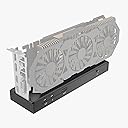


| ASIN | B0CZDSSVKK |
| Best Sellers Rank | #467 in Enclosures |
| Brand | TREBLEET |
| Color | Black |
| Compatible Devices | thunderbolt 3 laptop |
| Customer Reviews | 3.9 out of 5 stars 68 Reviews |
| Hardware Interface | Thunderbolt 3, Thunderbolt 4 |
| Input Voltage | 20 volts |
| Item Dimensions L x W x H | 9.45"L x 2.91"W x 1.1"H |
| Item Highlight | External GPU Dock Station, Compatible with NVIDIA/AMD PCIe, PD 85W Charging Support, Daisy Chain, DC/ATX/SFX Support |
| Item Weight | 280 g |
| Manufacturer | TREBLEET |
| Number of Items | 1 |
| Number of Ports | 2 |
| Product Dimensions | 9.45"L x 2.91"W x 1.1"H |
| Total USB Ports | 2 |
| Total Usb Ports | 2 |
| Warranty Description | One-year manufacturer's warranty |
| Wattage | 85 watts |
D**R
eGPU is not for the novice. Do your research on USB4 and TB3/4. This thing works and is stable!
Be sure your cables are within spec if you are not using the included one and that your laptop or TB3/4/USB4 device is eGPU ready. If this enclosure doesn't work at all it's something you're doing wrong. Reference egpu.io for help. The JHL7440 chipset is widely used in other similar eGPU products. If you happen to get a defective one I would at least attempt to get a replacement before rating 1 star. This is one of the nicest complete packages I've seen. I am using a USB4 dock in the passthrough TB port with no measurable performance impact. I'm getting the rated 32Gbps, and readings go over that limit often. (This is limited to device side not the enclosure.) The only issues I had was the screws; my unit came with all internal screws loose and some had fallen out and rattling inside the shell. You can easily tighten them yourself so this was a minor inconvenience. Just had to mention. In conclusion: The shell design can accommodate almost any size GPU. Keep in mind when using the passthrough TB to not use any display inputs with the passthrough TB (such as a HDMI port on hub; this causes iGPU/dGPU from laptop to render output, and not the eGPU which takes up bandwidth.) Connect all monitors if possible to the eGPU and disable the laptop display to get the best performance. Only keep laptop display enabled if your laptop allows you to assign the i/dGPU to the laptop display. Do not route any rendering to a display NOT directly connected to the eGPU. It will reduce performance by a bit. JHL7440 chipset is the highlight. Very fast and responsive. No crashes or BSOD. You will likely BSOD if you disconnect the cable without dismounting. Especially while playing a game. So I wouldn't recommend that. Overall, do your research and enjoy eGPU life! This is a good product.
C**L
Poor fit
Gets the job done, but leaves a lot to be desired. I installed an xtx 7900, and the card says over to one end because there's NOTHING securing it to the eGPU enclosure other than pressure between the pins. Now I have to design a custom bracket.
C**P
Works well
I bought this eGPU dock as an experiment to see what a thunderbolt 3 laptop could do with an external graphics card. Set up was easy, I used an old power supply, connected the motherboard and CPU connectors to the dock. I first tried an old 1080ti GPU. I used two VGA connectors from the power supply connected to the GPU. When I plugged the thunderbolt 3 cable in, and turned the dock on, it downloaded its own driver. I verified using the thunderbolt control panel on my laptop. I did not get a display at all, so I went and got the latest Nvidia driver installed. The monitor came to life. I next tried my current GPU in my desktop, a 3080ti. It was able to run a 3440x1440@180hz, and the new Dell U4025WQ at 5120x2160@120hz simultaneously. This was nice becuase my thunderbolt 3 ports could only run 5120x2160@30hz. Lastly I tried a 3050 low profile card with 2 DP 1.4a, and 2 hdmi 2.1 connectors. It was able to run 4 monitors. The hungriest setup I tried was 5120x2160@120hz, 3440x1440@180hz, 1920x1080@180hz all at the same time. It worked no problem. I did not try any demanding games or rendering with this though. This dock is great if you are like me and want desktop like monitor support from your laptop. The dock charges my laptop over the thunderbolt connection which is nice. I did not see that in the description anywhere so I assumed it wouldn’t. Hardware: Laptop: HP Elitebook 840 G7, i5-10210u GPUs that worked: 3080ti, 1080ti, 3050 low profile. (I had to remove a bit of metal from the dock shell with a dremel and drill to fit the low profile card, this is my only complaint). If this dock works for a long time it will be well worth the money.
Z**A
Okay option in a sea of over priced choices
Functionality seems decent for the most part, though it needs to be in a decently well ventilated area as they tend to run hot (this is common for these types of devices). The metal casing helps some in that regard, but the markup on these based on the internal components is pretty frustrating. Maybe that's to be expected for a sorta niche product, but I just can't justify paying a premium price for mediocre electronics, especially considering the cost of GPUs lately. I don't trust it to last and it reminds me of early PSUs that touted a bunch of features yet often resulted in fried components. Someone is making a pretty penny on them and I worry about the long term support
O**!
Dangling GPU...
Had to return this product. This enclosure can not hold the GPU without wobbling as it holds the GPU only at its slot. There are plenty of chances to snap the card's contacts when you try to plug the PCIE cables to GPU as there is nothing to hold it firm. Also, wobbly GPU is unstable when in use and may cause system crash which wouldn't be easily understandable.
J**E
Great product, easy to use
Great value, allows me to crunch numbers with my laptop using an external graphic card, I.e. NVIDIA. Super easy to use, must have Thunderbolt to work. I have this connected to a Dell laptop using a docking bay with Thunderbolt (WD19TB). I have an ATX power supply capable of driving the GPU. Applications like handbrake are much faster now. Also, can run CUDA based application. Seems very stable, design is such that the card is exposed. Compatible with system automatically. As for stability, take care to power down carefully, do not let the card be knocked out as it may damage the device - it is fragile. It would be good if it were in a box to protect the GPU card.
J**S
Is what it says it is
Came in one piece, plugged it all up, and it works with no issues. Works fine if you know how to use it, and if you need something like this, im assuming you know how to use it. Its a standard pcie x16 slot, so I would think other cards like storage or networking would works as well, though I havent tested.
J**L
It does work but It will chug vs using an Oculink EGPU setup
This is a good option for crypto miners that need the daisy chain option for mining with laptops or mini PCs and for light GPU aka 4070 or 7900 xt usage due to it only being TB4 capable speeds at 1080p gaming with dlss or fsr scaling. Most gamers would be better off buying a Minisfourm DEG1 having pci-e x4 4.0 speeds for a um890 or a Beelink egpu dock for a beelink AI mini Intel ultra 5 pc as it has x8 pci-e 4.0 speeds for a 4090 and 7900 xtx for a 4k 120hz 2024 lg oled g4 tv, 86 inch budget 120hz 4k lg tv, or samsung 8k 55 inch tv. Until TB5 egpu docks are made form this manufacturer or others I cannot recommend this for gaming as the lag and fps spikes can annoy alot of console gamers that are used to a 30-60 fps smooth framerate in games at 1440k or 4k.
U**D
Works perfectly fine; no issues with clearances on a massive RTX 4090
Not sure what some of the other reviews are going on about - literally the largest 3-slot card with a huge fan housing/shroud is completely clear of the slot on this device. Working perfectly fine under Linux and Windows (and of course Apple killed off any chances of having decent graphic card support when they lost the capabilities of Nvidia support a while back, and again with AMD when they shot themselves in their feet by failing to support any decent GPUs whatsoever under their M1/M2/etc devices). If this isn't working for you, and you didn't somehow get a defective item shipped to you (more likely damaged by the courier, who love to destroy things/ditch deliveries in bushes/etc), then you likely are lacking adequate Thunderbolt device support on your system. Pretty happy with the performance of this product; stable-diffusion works well, as well as Yuzu/other emulators at 4K@120hz, and gaming in general.
Z**C
Technically works, but lack of enclosure depth causes GPU to not seat properly.
As the headline suggests, while the product technically works, the enclosure is not deep enough to hold the GPU properly. It causes the GPU to tilt lengthwise, causing the GPU to not seat properly, lowering performance to unacceptably low levels (my Radeon 4600 performed worse than a GTX 1060 from limited testing, when it really, really shouldn't). Additionally, concerns over the rigidity (or lack thereof) have arisen. The slightest nudge causes the GPU to rock back and forth a bit in its seat. I have since removed the GPU over concerns of snapping at the area where the GPU was seated.
A**R
Awesome piece of Tech!!!
This little machine is great! Fired right up on the first try. I have been putting it through its passes too. The heart of my little coding command station :D PS- You should probably install Nvidia app and Nvidia drivers, or whatever brand you are using… Likely won’t boot without em ;)
H**H
Not all is cracked up to be
Didn't work disappointing
Trustpilot
4 days ago
2 months ago