

Desertcart purchases this item on your behalf and handles shipping, customs, and support to OMAN.
❄️ Stay cool, stay ahead — the ultimate fan controller for pros who demand peak performance.
The AC Infinity Controller 2 is a sleek, intelligent fan thermostat and speed controller designed to optimize cooling for up to six USB or AC Infinity fans. Featuring a precision thermal probe, digital LCD display, and six customizable fan speeds, it automatically adjusts airflow based on temperature changes to protect and enhance the performance of your AV cabinets, gaming consoles, or network equipment. With easy plug-and-play setup and quiet operation, it’s the essential upgrade for professionals who value equipment longevity and silent efficiency.
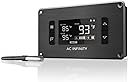


| ASIN | B00NG9TSG4 |
| Best Sellers Rank | #259 in Computer Case Fans |
| Brand | AC Infinity |
| Brand Name | AC Infinity |
| Color | Black |
| Customer Reviews | 4.7 out of 5 stars 936 Reviews |
| Display Type | LCD |
| Item Dimensions L x W x H | 5.2"L x 1.1"W x 3.1"H |
| Item Highlight | Auto Temperature Programming w/ Thermal Probe, LCD Display, 6 Fan Speed Control, for AIRPLATE, MULTIFAN in AV Cabinet Cooling |
| Item Weight | 6.4 ounces |
| Manufacturer | AC Infinity |
| Material | Plastic |
| Material Type | Plastic |
| Model | AI-ATC |
| Number of Items | 1 |
| Operating Temperature | 32 °F |
| Part Number | AI-ATC |
| Product Dimensions | 5.2"L x 1.1"W x 3.1"H |
| UPC | 854759004402 |
| Unit Count | 1 Count |
| Voltage | 5 volts |
M**H
Product has performed great
It does well to control the 6 fans I have running to cool my Xbox series x inside a small cabinet. I have 4 fans pushing air in the bottom of the cabinet and 2 fans running at the top. This keeps that cabinet under positive pressure and allows me to filter the intake so little to no dust enters the cabinet with my xbox. I also run the modem for my internet in this cabinet and the exhaust cools my router. I have smart settings adjusted so the fans kick on at 95 degrees F, and they run full blast at 105. This means the fans aren't on unless I have my Xbox running, and they don't ramp up until I am running a game that pushes the Xbox. For instance the fans never leave their lowest setting while I play my old school favorites, such as the original FFVII, and they begin pushing full capacity for new gen games. The temperature probe seems to be doing a great job hovering over the xbox's exhaust, and sends the right signals to allow my xbox to run full tilt, where I witness far less thermal throttling when pushing the xbox at peak settings. Placing the xbox in the cabinet with 4 fans below and 2 above has proven to be a significant upgrade to the xbox as it performs better than ever, and this controller is the heart of the whole system. Everything was simple to understand and this is a plug and play unit. As a bonus, the digital read out on top of my cabinet, serves to demonstrate I take my electronics, their functionality, and longevity seriously. I couldn't be happier with a basic order and a simple install that's made my xbox not only cool better, but allowed me to condition the air at the same time.
L**E
Excellent concept and nice aesthetics & quality
Initially I was looking for a quiet cooling fan for my NVR security system cabinet to replace the noisy fan that came with the cabinet, as I researched fans I came across this controller which was designed for quick and easy connections to their USB fans, the more I thought about it the more I liked & considered this concept. In the end I took a risk & decided to purchase a USB fan along with this controller. I was pleasantly surprised when I received them and opened the package, the quality looked very good, something you might find in high end cabinets. When installed I found the fan to be very quiet as advertised & I could no longer hear fan noise coming out of the cabinet. The controller itself allows you to automatically control the fans to regulate the temp but what I found and was surprised to see is that the actual temperature of the cabinet thanks to the sensor read-back on the controller was much higher than I had expected, this means that the original fan wasn't doing enough since my replacement was equal to the air flow of the original. What’s nice is that this concept of USB connections makes it very simple to add additional fans which in my case is a necessity, I just ordered a couple more fans to allow for more ventilation in my cabinet which will be an easy thing to add since I can plug them into the controller directly or at the fan where there is an expansion USB plug. The controller design and its read-back gives me the confidence that I am properly protecting my equipment.
S**N
Keeping things Cool & Quiet!
Well, let me begin by saying that I typically try buy things from companies that I have had good experience with in the past. This is another example that where I’ve acquired this AC Infinity controller to install in my A/V media component cabinet to improve ventilation. I recently installed a few expensive A/V components and a media sever (NAS) in my cabinet. With the new arrangement, I noticed my NAS was reporting temps in mid-50 degrees Celsius, which was warmer than I had hoped. I then decided to install AC Infinity Fan controller and fans in the cabinet hoping the results would yield improved air flow. It looks very professional and worked very well. but not as much as I would like. I purchased the fan controller and 4 dual intake/exhaust fans. Positioned the two dual exhaust fans near the bottom on each side of the A/V media cabinet and two dual intake fans near the top on each side of the cabinet. I installed the controller on the top of the cabinet on the right side. This setup worked perfectly. Have a look at the pictures for the installation as well as at the temperature monitoring results of the NAS, which runs throughout the day and night. I am very please with the look and the performance.
S**T
really “cool” cabinet fan system
This is a really “cool” cabinet fan system. We have a custom built-in entertainment cabinet in our family room. The top section has the flat screen LCD TV with the Wii equipment and the middle section has an audio system, TiVo, CD player and a VCR, (I know why a VCR). The new TiVo and the 25-year old audio system generate a fair amount of combined heat that I wanted to remove. I did a search on Amazon for cooling fans and looked at several options. Having a system that was temperature controlled and could adjust the speed of the fans was very attractive so I decided to focus on that solution and was very impressed with the features of the AC Infinity products. I ordered the AC Infinity AI-ATC, Fan Thermostat and Speed Controller, MULTIFAN S7, Quiet Dual 120mm USB Fan, and MULTIFAN S5, Quiet Dual 80mm USB Fan. Everything arrived in two days; the three items were well packed and arrived safely. Now I could actually see and test what I got and found they were even better than I had expected. The controller is a perfect size and flush mounts in my equipment cabinet. The temperature probe has a long enough wire to run it down and over to place on the audio amp and under the TiVo where the maximum heat is generated. The fans have large rubber grommets on each corner to stand on or mount with and no vibration is transmitted through. One set of fans are in the equipment section behind the equipment blowing air out through the equipment towards the open room. The second set is located in the TV section also blowing from inside through the TV towards the room. Running at full speed in a quiet room you can of course hear the mechanical fan and wind noise. However, when the audio is on, even at a comfortably low, watch the news level, the fan sound level drops below the audio program level and is no longer discernable. With the controller running in the “smart” mode the fan speed is reduced when the equipment temperature is within two-degrees (or four) of the desired set temperature. As they say on TV “Just set it and forget it”, the controller keeps the fans running as long as the equipment is generating heat above the set point. When the audio amp is turned off and the TiVo goes into stand-by the fans cool them down and then shut off. When I am able to locate my hole cutting drill I will add some ventilating holes in the top of the cabinet and between the sections in order to improve the circulation of fresh cooler air into the cabinet to improve the efficiency. I am so pleased with this cooling solution that I am ordering another setup for our weekend summer cottage up north at the lake. Again, there is an audio system but in addition there is a Magic Jack phone module and the cable modem / WiFi router generating heat. They are in a confined space that gets hot so I had placed a small fan in there to circulate the air. When we are there, I plug in the Magic Jack and turn on the fan. Now I will be able to automate the cooling. If you are looking for a great way to cool down your expensive equipment this is an inexpensive solution that I highly recommend.
M**W
Very durable and easy to use.
I love this fan and controller. I installed it on my TV stand to ventilate my modem and router. I've had it for 3 years and it's still going strong, it's very durable. It's super easy to install and set up. The fans are quiet and doesn't use much power at all. The only annoying thing, is when there is a power outage you have to redo your personalized settings.
H**D
Great Controller with Potential for More
Bright and very readable display. Button placement works well. Power supply and temperature probe cables seem to be more than adequate length. Currently being used to control 2 AC Infinity AI-MPF120A 120mm USB Fans connected in series on a single USB output port. Soon to be used with an additional USB fan of another brand. Only thing I've noticed is when using the AUTO mode that turns on fans at a certain set temperature threshold and turns off when a temperature 4° cooler is reached is that contrary to the operating instructions, the controller fan speed in the AUTO mode is full on. Even if fan speed is set at other speeds in ON mode, while in AUTO mode fan turns on at full speed. Second, in SMART mode the fan speed changes with every 2° degree increments approaching the set temperature.. for example, if set temperature is 77 then as temperature rises, @72 fan is off, @73 fan on at low speed, @75 fan on at medium speed, @77 (set temperature) fan on at full speed. So in SMART mode fan shuts off again @72. But, in AUTO mode, if set temperature is 77, @73 fan shuts off again after reaching 77. Just a slight difference in off temperatures. I also think the temperature probe may be 2 degrees high as compared with a laser thermometer. Lastly, the plastic template fits snuggly on the back. When tracing a line inside the template, you'll need to cut your cabinet very carefully on the line or you will find yourself having to slightly enlarge the cut out. And the very nice brushed aluminum finish front bezel is attached with small screws that protrudes slightly further than your templates cut out on both left/right sides where attached to the black plastic body. This becomes very apparent when carefully removing the template. If you want the controller and screw heads to fit into the cabinet, you may want to mark the template indicating the screw placements on template before removing the template. After making the correctly sized cut out and drilling 4 bezel mounting screw holes, you'll want to make additional small shallow notches for those screw heads on the side of the body. Suggestions for possible improvements: 1. Correct instruction manual to describe current operation regarding fan speed in AUTO mode, 2. have a way to raise or lower the temperature probe's base reading by a few degrees (no more than 5-10 +/- degrees should be needed) And, maybe another model controller could take advantage of having two output USB ports, by allowing each port to operate in different programming modes OFF, ON, AUTO, SMART. This could allow 1 USB port to drive a set of fans in a different speed or even off while the other USB port runs fans at variable speeds as SMART mode, or even allow ON mode at a different speed -- beside flexibility, this may allow greater compatibility with other USB Fans. Provided this could be offered at a price point between current model and purchasing 2 of same it may be worthwhile if that circuitry can fit within the same module you wouldn't need to retool most of the manufacturing.
W**S
Great Controller - Well worth the price!
I have bought other fans from AC Infinity and found the quality excellent and price point good. I have used them for example - cooling my receiver when powered on. I like the fact that they come with blade guards and ball bearings instead of sleeves. So I decided to buy the fan controller and 4 more 120mm fans for my network rack. I kind-of went back and forth on whether to buy the controller because the price seemed a little high just to control the fans but decided to give it a try. Boy am I glad I did. I have had it now for over a month and I love this little fan controller. Here is the key point why I love the controller. It turns the fans off and on at a temp set point. Instead of running the fans continuously at a particular speed, the controller spins up the fans only when the set point is reached. So the controller stops the fans when they are not needed. Therefore, with the fans stopped, the air is not continuously bringing in dust, lint, no-see-ums. By running the fans this way, the whole rack is cleaner but still cool. I attached the temp probe to the top of my GS1900-16 switch because that component runs the warmest. The controller's four degree variation buffer is also great because it prevents the fans from turning on and off too quickly. I set the temp point to 85 degrees (I live in Hawaii). The fans start at 85 and continues to run until the temp drops to about 81. They remain off until the temp rises back up to 85. I run the fans at medium speed so the temp changes are gradual. Without the fans, the temps would rise to over a hundred. The digital lighted readout is also nice so I can check the temp and know why the fans are running or not. If you are considering this controller - do it. I very glad I did. AC Infinity provides good quality products. They are an excellent source for fan needs. Thank You AC Infinity.
A**G
Near Perfection once in a while
This is a perfect well designed device. It does exactly what I needed it for and is very simple to install, configure and operate. Once in a while -- some good stuff comes along that I simply have to rave about. This is one of them. It's simply an elegant solution. I'm using it to monitor and cool when needed a CCTV power distribution box with 9 cameras at 12 volts. The box has a transformer that has a built in fan that goes on when the transformer itself reaches 80 degrees f. The problem with the box design is that the transformers fan simply circulates the hot air within the box and relies on gravity to vent the hot air. Not very effective especially with limited vent openings no where near the transformer fan. This unit, combined with 2 USB fans is perfect to force the hot air out and to keep the transformer and wires from over heating. To see what it's doing, I've extended the probe and the USB line to over 40 feet away (using cat 7 cable) which works perfectly without any performance or accuracy degradation. Now, I can see the unit at the place where the CCTV is being monitors and not have to go the CCTV system to see what's going on. The only recommendation I'd make is that it would be SOOOOO nice to have multiple probes within 1 unit. I could use another probe (and fan) for the CCTV DVR itself and, while I'm at it, for my adjacent audio equipment and refrigerator. Now -- that would be AWESOME to have 3 or 4 probes with 3 or 4 separate USB outlets to serve multiple purposes without having several of these units cluttering up the desk top. In summary -- NICE unit -- well designed from a looks, software, and operations / configuration perspective. Kudo's to the engineer and manufacturer!
J**E
Great!
Works perfect!
B**L
High quality value from AC Infinity
This is a very precise thermostat that adds to the complete set of blower options offered by AC Infinity. Very high quality built offered at a reasonable price. If you have a closed component rack, I highly recommend this brand of fan blowers for all your needs. I purchased their component style fans as well as some top or side mounted fans, all of which perform flawlesly. Noise levels are all dependent on the speed you use. I for one use them all at low speed and since they're thermostat controled, they will run a little more often but keep the noise to a level that won't protrude through the cabinet and into the room (during low level music passages for instance) If you found my review useful, please select yes below.
N**Y
almost great
almost great but one of the buttons for switching off the display has gone bad in a year
T**E
Excellent bit of kit
I use this to control 4 fans that keep the temperature down in a sideboard that houses my AV equipment. The sideboard is a mid-century G Plan thing that looks great but isn’t really suited to having a load of heat-producing boxes inside. I’d cut a sizeable hole in the back already but with the AV amp and an XBox running it soon got toasty in there. So I added a couple of 80mm fans... which helped, by it still got a little too hot. Next I added a couple of 120mm fans and this little controller. One of the bigger fans was cut into the rear of the sideboard and the other sits inside. Now the temperature perfectly controlled - the fans fire up when needed and the temp soon drops. The 120mm fans aren’t AC Infinity branded but work fine. The smaller fans are AC Infinity ones and noticeably better quality. Overall I’m very pleased with this - and the fans. A great bit of kit and a decent price. Top work!
A**R
Temp control unit
Excellent, running 6 small fans inside PC unit using this control. PC running most of the day for work and gaming.
Trustpilot
2 days ago
3 weeks ago