Buy anything from 5,000+ international stores. One checkout price. No surprise fees. Join 2M+ shoppers on Desertcart.
Desertcart purchases this item on your behalf and handles shipping, customs, and support to OMAN.
🖱️ Elevate your workflow with ergonomic precision and multi-device freedom!
The ProtoArc EM11 NL is a rechargeable wireless vertical mouse engineered for professionals seeking ergonomic comfort and versatile connectivity. It supports up to 3 devices simultaneously via Bluetooth 5.0 and 2.4GHz USB-A, features a natural vertical grip to reduce wrist strain, and offers adjustable DPI settings for precise control. With silent clicks and a robust 500mAh battery rechargeable via USB-C, it’s designed to enhance productivity and comfort across Windows, Mac, and Android platforms.


| ASIN | B0DCBW3B3T |
| Additional Features | Ergonomic Design, Multi-Device, Rechargeable, Vertical Design, Wireless |
| Antenna Location | Office |
| Are Batteries Included | Yes |
| Are Batteries Required | Yes |
| Best Sellers Rank | #12 in Computer Mice |
| Brand | ProtoArc |
| Built-In Media | 1 x 2.4G USB-A Receiver, 1 x ProtoArc Rechargeable Bluetooth Ergonomic Mouse, 1 x Type-C Charging Cable(The Type-C cable is for charging only), 1 x User Manual |
| Button Quantity | 6 |
| Color | Blue |
| Compatible Devices | Personal Computer, Tablet |
| Connectivity Technology | 2.4G USB-A Receiver, Bluetooth |
| Customer Reviews | 4.4 out of 5 stars 5,254 Reviews |
| Enclosure Material | Plastic |
| Hand Orientation | Right |
| Hardware Platform | Mac, PC, Windows |
| Item Dimensions L x W | 5.43"L x 2.72"W |
| Item Weight | 0.27 Kilograms |
| Manufacturer | ProtoArc |
| Mfr Part Number | EM11 NL |
| Minimum Required Operating System Version | Mac OS 10.12 Sierra, Windows 8 |
| Model Name | EM11 NL |
| Model Number | EM11 NL |
| Mouse Maximum Sensitivity | 2400 Dots per Inch |
| Movement Detection | Optical |
| Movement Detection Technology | Optical |
| Number of Batteries | 1 Nonstandard Battery batteries required. (included) |
| Number of Buttons | 6 |
| Operating System | Android 4.3 or higher, Mac OS X 10.12 or higher, Windows 8, Windows 10 or higher |
| Power Source | Battery Powered |
| Range | 8 Meters |
| Special Feature | Ergonomic Design, Multi-Device, Rechargeable, Vertical Design, Wireless |
| Style Name | Modern |
| Unit Count | 1.0 Count |
| Warranty Description | 2 Year |
J**D
The Most Comfortable Mouse I Have Ever Used
This is the most comfortable mouse I have ever used. It beats everything I have tried from Logitech - MX Master, MX Ergo, Trackball. If they added a side scroll wheel, it would be the perfect mouse.I am truly shocked at how comfortable it is to use. I have pretty bad carpal tunnel syndrome, and this mouse is a gamechanger for me. It glides smoothly on the desk. The buttons are plastic but have a quality feel. The support it offers at the base (it runs a bit under the back of your hand) is a unique touch. It has a soft-touch rubbery feel which feels great, but I do worry that it won't wear well, as I have had peripherals with similar surfaces get stained or, worse, become sticky to the touch. Right now, it feels nice. The scroll wheel is smooth. Setup was pretty easy - I used BT. The BT connection has been very stable and quick. It works great with my Win 11 laptop.
T**V
Surprisingly Comfortable and Versatile — Budget Ergonomics Done Right
This ProtoArc EM11 NL is one of those “low cost, high impact” upgrades—especially if you’re grinding long hours at a desk. It’s not flashy, but it quietly fixes one of the biggest problems in modern work: wrist fatigue. The vertical design is the star here. It puts your hand in a more natural handshake position, which genuinely reduces strain compared to a traditional flat mouse. The built-in wrist rest helps support your palm, making it easier to stay comfortable during long sessions.  Connectivity is another win. You can bounce between multiple devices (Bluetooth + USB) without constantly re-pairing, which is clutch if you’re running a laptop + desktop + tablet setup.  It just makes your workflow smoother. Performance is solid for everyday use. Adjustable DPI (1000/1600/2400) gives you enough control for productivity, browsing, and even light design work.  It’s not a precision gaming mouse—but that’s not what it’s built for. Battery life holds up well, and being rechargeable means no constant battery swaps—small thing, big quality-of-life upgrade. Now, keeping it real: • It’s a budget mouse, so the buttons feel a bit basic • Takes a few days to get used to if you’ve never used vertical mice • Might feel large if you’ve got smaller hands  But once you adjust, it’s hard to go back. Bottom line: If you want a cheap, effective way to improve ergonomics and reduce wrist strain, this is a no-brainer. It’s not luxury—but it’s practical, comfortable, and gets the job done without overcomplicating your setup.
Q**Y
Great device for the price!
I think I’ve had this mouse for at least a year at this point and can’t say I’ve ever experienced an issue. Connectivity is great and response. Quickly can switch between multiples PCs and the ergonomics of it are great compared to a standard mouse. I think it’s helped greatly with past wrist pain. The battery life is great. I try to remember to charge it maybe over night once a month if that. It’s never died on me. All in all a solid mouse at a great price compared to other similar mice.
Q**S
Best Bluetooth Handshake Mouse for the price - beware of Medium to larger hands though!
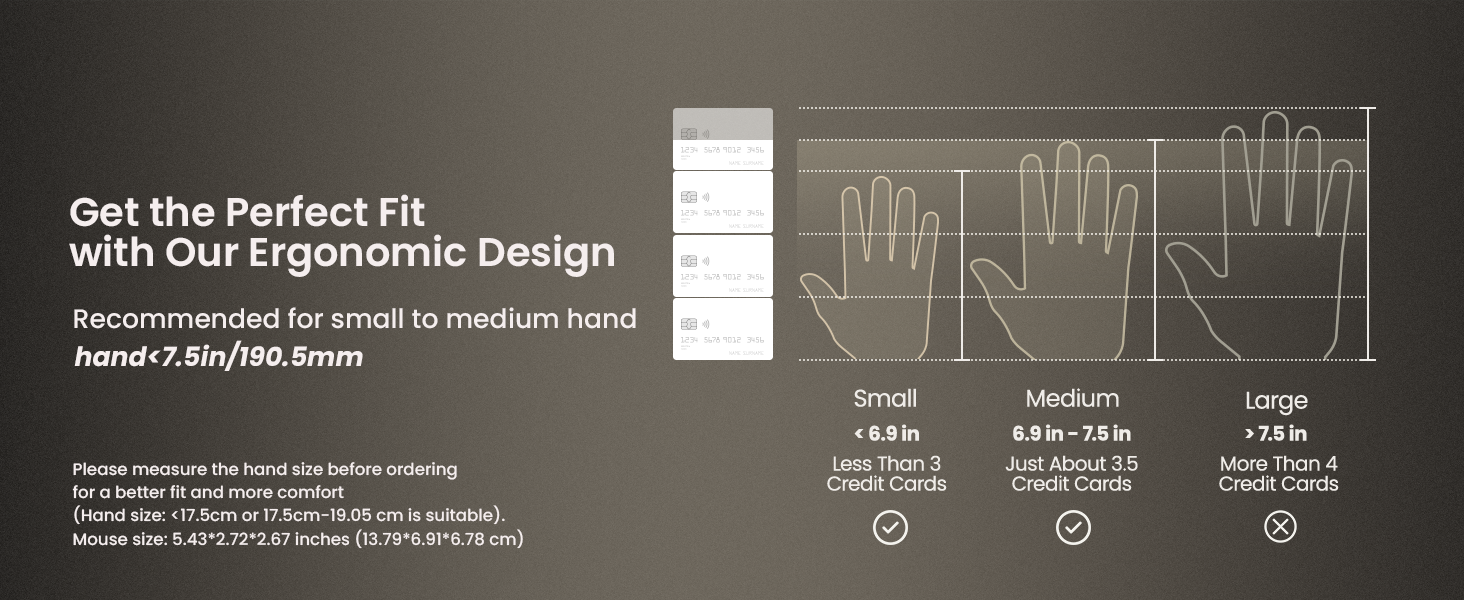
Purchased this as my Logitech MX Veritcal has been giving me issues with the click not working intermittently and I don't want to spend another $85+ on that brand to just have it die again. So enter the ProtoArc Ergonomic Mouse! I found this mouse to be comfortable, soft to the touch and I liked the pop of color on the buttons. The buttons are soft click which I find a bit weird since its quiet and not quite as decisive as I'm used to but it is very responsive. It charges easily and has the option for the USB Dongle which stows away underneath but bluetooth works great as well. It is compatible with Mac although i'd also recommend using the Mac Mouse Fix app to upgrade the functionality of the mouse and bring it more in line with Logitech's offerings. In the description it says not really suitable for large hands and I find this to be true. I would say my hands fall on even more of the Medium segment and this isn't as comfy as the logitech one. The left click button is beveled so it doesn't feel flat under your finger, making it feel like you're clicking on an edge which takes some time getting used to.(pictured for reference) Also the palm rest is sculpted and goes further back than the MX Vertical making it a bit weird for my palm to feel like its resting on it. (also included photo size comparison) I wish they made a supersized version of this and removed a bit of that extra plastic on the back so the edge of my hand could simply rest on my mousepad.
T**.
Unbeatable for the price
I had been looking at vertical mice for a while, and watched a video that popped up in my YT feed reviewing different mice, and this one was at the top of the list for many reasons. Purchased this mouse before the video ended. The mouse is comfortable in the hand, and angles my wrist at a more optimal neutral angle over normal mice. Much better navigating the desktop, and still good enough to game with depending on what you're playing. The buttons are very quite when clicking, which I like. Rechargeable USB-C wireless mouse for $25 is hard to beat. Especially when compared to other vertical mic. We shall see how it fairs over time, but first impressions are really good.
M**Y
vs Logitech
I have been very surprised by this mouse! I bought the ProtoArc in a pinch when the click buttons on my Logitech ergo mouse started malfunctioning, also thinking it could be a back up / travel mouse. Honestly, I’ve come to prefer the ProtoArc over the Logitech. The ProtoArc is a little wider, as such it fits my natural grip very well, I’ve had no issues utilizing it for hours at a time. I can’t use a “standard” mouse for more than 10 min before my hand starts cramping up. Tracking has been spot on, all the buttons and wheels have held up fine after several moths of use. The buttons have a nice feel, so I know when it has clicked, but without an obnoxiously loud click noise. The ProtoArc has also held up to the occasional fall off the desk 🙈 At 1st I didn’t think I’d ever use the dedicated USB wireless radio, but I’ve come to enjoy it, makes it very easy to connect with some of the locked down devices I use. Additionally I’ve been able to connect the Bluetooth with both my MAC and PC computers without issue. While the Logitech has more buttons and some software to configure the buttons, I can’t say I ever used them after setting it up, nor do I miss them. After the initial full charge on the mouse, I have yet to recharge it, that is with utilizing it Monday-Friday 8+ hours a day for work, and here and there after work and weekends. I was initially thinking it’d get maybe a week at a time, similar to other value mice, but I’m overly impressed that it’s conserving power so well! The only thing I wish it had was the ability to freewheel the scroll wheel, I can’t fault it, I think it’s been over a decade since I’ve seen a mouse with that option. Give the price of the ProtoArc vs the Logitech, I’ll be buying several more of the ProtoArc.
A**T
I tried ... I REALLY did !
Okay, let me start by saying that I have used Logitech Marble pointing devices, or something similar almost exclusively for the last 20 years, And I love them ! But LogiTech Marbles are getting scarce (and expensive) and I have had varying success with pretenders, so I thought I would give this a try. And while I have gotten used to it, I still DON'T like it. And I know that alot of that has to do with my prejudices & use case, so keep that in mind. First of all, I am not sure if this is a sensitivity issue, a communications one, or just the battery - but it is very jumpy. I used to have my old, corded pointer at a level BELOW my computer cuz that's where I had space. And it worked fine. But for some reason this CANNOT get a clear signal from there. So I rearranged things so it's on an even level now. It's better, but still iffy. So I tried charging it again. It improved, but started getting jumpy again. So I LEFT it plugged in (keep in mind it does not work corded, so I still have to use the dongle) and same problem. And I tried using both BT channels as well and it's no better. On top of all this. now my desktop is too crowded. Like I said, I usded a Masrble for 20 years and my desk was setup accordingly. I didn't NEED space for a traditional mouse. So I am relegating this as a spare pointer, and getting another Marble copycat. It just does not work for my day to day use ! NEW UPDATE: I wanted to be sure I shared something regarding this review. The Vendor (Proto Arc) reached out to me directly & offered me a full refund. They did not HAVE to do so, but I appreciate the offer ... even though I did NOT accept it. I do like Proto Arc products & I still use their version of the LogiTech marble in my work office. And while my situation did not make using this vertical mouse viable, it would probably be fine elsewhere. And as I said previously, I will keep this in my bag for when I needd a spare/emergency pointer. Still, it was very nice of them to offer me a refund. Thank You for that ! FINAL Update: Just thought I would tack this on in regards to my experience with this. My main complaint was that I was not getting a consistent wireless signal. And that was why I am NOT using this with my home PC. Now, it just so happens that I ordered a pair of Wireless Earbuds for my youngest, but she was not happy with how they fit her ears. So I decided I would try them out. I paired them with my Home PC .... and I had the same issue with the earbuds that I had with the Vertical Mouse. They failed to maintain a consistent connection via BlueTooth. So the issue is not with the Mouse OR the Earbuds ... it's with MY PC. and it's placement. So I will reiterate ... this is a good vertical mouse & a great value. It just doesn't work in my situation.
T**M
Say Goodbye to Wrist Pain – The Best Ergonomic Mouse I've Used! ⭐⭐⭐⭐⭐
The ProtoArc EM11 NL is a fantastic ergonomic mouse. The vertical design feels natural and has significantly improved comfort during long hours of work. The Bluetooth connectivity is reliable, the rechargeable battery lasts a long time, and switching between multiple devices is seamless. Smooth, responsive, and comfortable—this mouse has exceeded my expectations. Highly recommended!
E**O
El mejor mouse ergonomico con buen sensor para gaming o uso diario
Excelente mouse, probé varias marcas y modelos, pero este es el. Único ergonomico qué tiene un excelente agarre y rinde bien en videojuegos. Tiene buen sensor se nota.
J**N
Very good.
This thing is really award winning good. And very cheap pricewise. I couldnt find a single ergonomic mouse with this quality and price. Pros: usb c charging , connectivity with 3 devices and very good material feel on the hands and great holding angle for the palm. Longevity will be seen over time
J**R
Excelente
De gran calidad
A**E
Great Mouse. Perfect for Big Hands
This ProtoArc ergonomic vertical mouse is such a good buy. It has two connectivity modes (USB-A and Bluetooth) which work great out of the box with no need for any software installations. With the Bluetooth connection, you can connect up to two devices. While you cannot use them simultaneously, you can easily switch between them with the click of a button. Other features include: 1. Power: It is powered through USB-C, and you will find yourself recharging only about every three to six months depending on your use. It charges quickly. 2. Navigation: It has two side buttons for moving forward or back on a webpage, although there is no built-in native app to edit these buttons. Overall, it is great for your hand and recommended for people with big hands.
M**D
It is Algudz
Okay
Trustpilot
1 day ago
2 months ago