Buy anything from 5,000+ international stores. One checkout price. No surprise fees. Join 2M+ shoppers on Desertcart.
Desertcart purchases this item on your behalf and handles shipping, customs, and support to OMAN.
📡 Unlock wireless radio programming freedom—ditch cables, stay connected, and lead the comms pack!
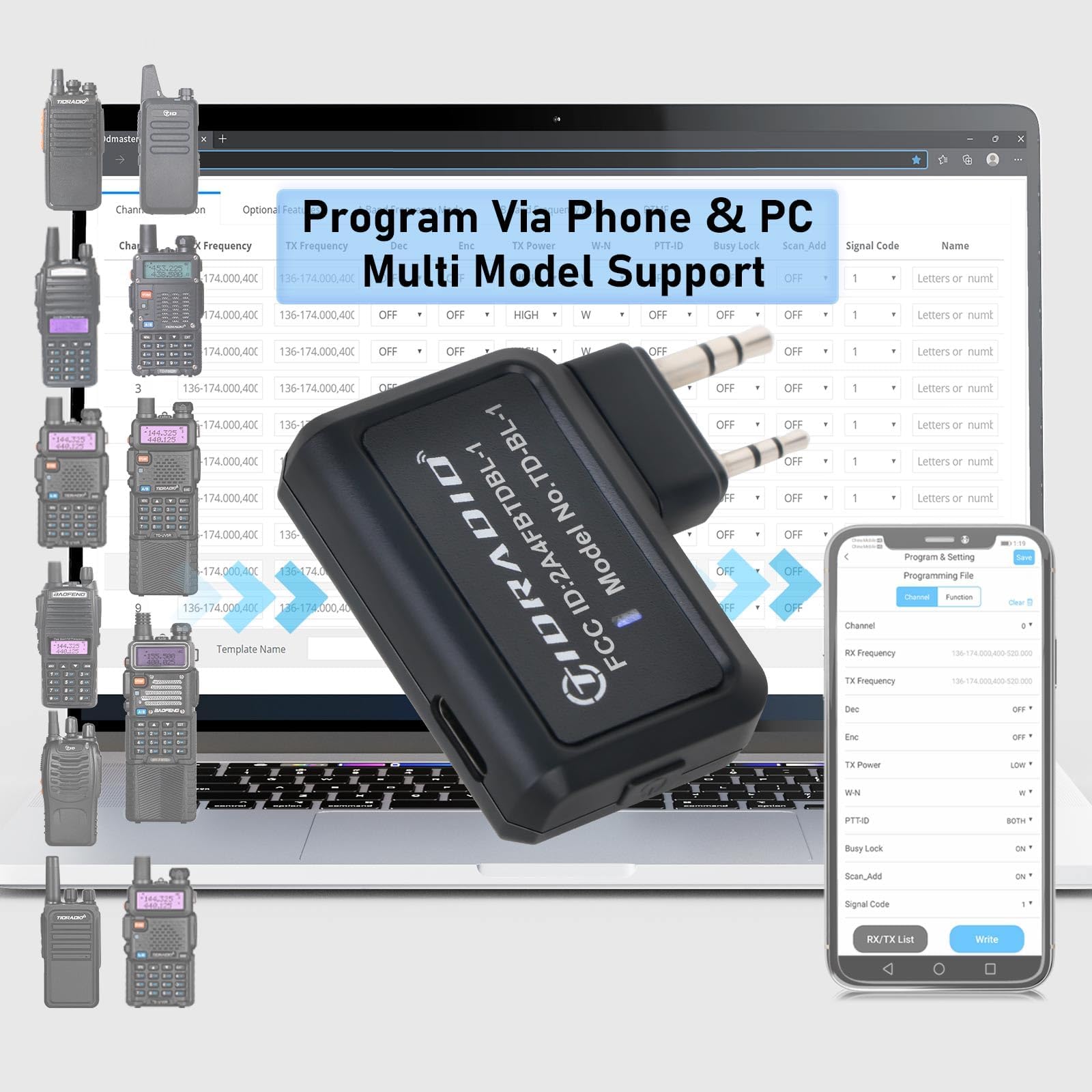
The TIDRADIO Ham Radio Wireless Programmer Adapter enables wireless programming of popular Baofeng and other walkie talkie models via Bluetooth. Compatible with PC (Windows/Mac) and mobile devices (iOS/Android) through the ODmaster Web and App, it supports 72 channels across 136-174 MHz and 400-470 MHz frequency bands. This adapter eliminates driver issues and cables, offers one-click local repeater import, and comes with a 365-day quality guarantee, making it an essential tool for professional and hobbyist radio users seeking streamlined, flexible programming.


| ASIN | B0D8J16ZX5 |
| Best Sellers Rank | 5,849 in Electronics & Photo ( See Top 100 in Electronics & Photo ) 38 in Portable FRS Two-Way Radios |
| Box Contents | 1 lithium polymer battery |
| Brand Name | TIDRADIO |
| Colour | Black |
| Compatible Devices | Personal Computer, Smartphone |
| Connectivity Protocol | Bluetooth |
| Country of Origin | China |
| Customer Reviews | 4.3 4.3 out of 5 stars (89) |
| Frequency Range | 136-174 MHz, 400-470 MHz |
| Manufacturer | TIDRADIO |
| Manufacturer Part Number | TD-BL-1 |
| Model Number | TD-BL-1 |
| Number of Batteries | 1 Lithium Polymer batteries required. (included) |
| Number of Channels | 72 |
| Product Features | Wireless, Work with PC (ODmaster Web), Work with Mobile Phone (ODmaster APP) |
| Product Warranty | 90 Days |
| Talking Range Maximum | 5 Mile |
| Tuner Type | AM, FM |
| Unit Count | 1.0 count |
| Voltage | 3.7 Volts (DC) |
| Water Resistance Level | Not Water Resistant |
V**R
Works well
Very good
D**E
Needs clearer instructions.
Instructions should state that radio must be tuned to a quiet channel and also that the squelch should be turned off/open before plugging into radio, otherwise it will not respond to chirp program. Tested fine with Tidradio TD-H3. I had to search for the driver for win 10 but device manager found it ok.
F**H
One giant leap for mankind
Haven’t bothered with programming radios in quite a while. And ever since having to search online for the right Chinese program back in the day, being able to access radios via your phone is a game changer. Worked in an instant right out of the box. One set Baofeng radios I have, weren’t listed. So I tried what I thought would be a good match and bam, I’m in. So don’t be alarmed if at first you don’t see your particular model. Best 20 quid I’ve spent in days 😁
A**L
work on all radios
Update: Manufacturers looking into product issues I have. Does work all. I have quanshang kv5-8 will read the radio too start LEAVE RADIO ON IMPORTANT then plug in. Start app connection bluetooth reader. Not like using lead where you turn off and on again. Review only works if your truthful about things. A lot don't like bad feedback but this might get a result for others with same issues 🤔 they are reading. I did get loss connection just restarted.
S**E
Baofeng bible
Mainly for America 🫤
R**K
100% works with boafeng radio. I have snaped screen shots of the boafeng list
Excellent product. Download ODMASTER app and simply plug the device into the radio. And click the on button. Open the ODMASTER app and click connect the device shows up instantly. 100% working on the boafeng uv-5rh.
K**K
Tidradio Bluetooth programmer
Connection was good first try linked but radio selected on app no connection selected different model worked Was use to using the pc version this one takes a little longer but the fact I can use my radio again is great please update more radios good product recommend
K**R
Change your radio setting with ease
Why did you choose this product over others?: This is a doddle to setup so that you can use your mobile phone to set your handheld radio up, it scans all the frequencies then let's you change them and let's you write back to the radio. Tried using a proper baofeng cable to connect to chirp on the computer but it wouldn't work, now I can alter my radio settings with ease
Trustpilot
3 weeks ago
3 weeks ago