Buy anything from 5,000+ international stores. One checkout price. No surprise fees. Join 2M+ shoppers on Desertcart.
Desertcart purchases this item on your behalf and handles shipping, customs, and support to OMAN.
💜 Pop your productivity with style and silent power!
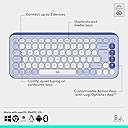
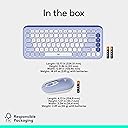
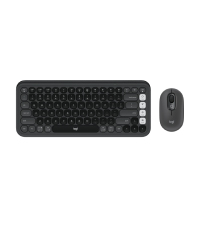
The Logitech POP ICON Combo is a Bluetooth keyboard and mouse set designed for professionals who value style, sustainability, and seamless multitasking. Featuring a compact, recycled plastic build, whisper-quiet keys, programmable shortcuts, and the ability to switch effortlessly between three devices, it offers up to 3 years of keyboard battery life and 2 years for the mouse. Perfect for millennial managers craving a chic, efficient, and eco-conscious workspace upgrade.


| ASIN | B0DB1ZHXP3 |
| Antenna Location | Office |
| Are Batteries Required | Yes |
| Best Sellers Rank | #77 in Computer Keyboard & Mouse Combos |
| Brand | Logitech |
| Built-In Media | Item |
| Color | Lilac |
| Compatible Devices | Laptop, Personal Computer, Smartphone, Tablet |
| Compatible Operating System Family | Android, Windows, iPadOS |
| Connectivity Technology | Bluetooth |
| Customer Reviews | 4.4 out of 5 stars 423 Reviews |
| EU Spare Part Availability Duration | 3 Years |
| Hand Orientation | Ambidextrous |
| Item Weight | 0.84 Kilograms |
| Keyboard Backlighting Color Support | Single Color |
| Keyboard Description | Membrane |
| Keyboard Layout | QWERTY |
| Manufacturer | Logitech |
| Mfr Part Number | 920-013043 |
| Minimum Required Operating System Version | Windows 10 |
| Model Number | 920-013043 |
| Movement Detection | Optical |
| Number of Batteries | 2 AAA batteries required. (included) |
| Operating System | Chrome OS, Linux, Windows 10, 11 or later, iPadOS 15 or later, iOS 15 or later, Android 12 or later, macOS 12 or later |
| Other Special Features of the Product | Lightweight, Portable, Programmable Keys |
| Power Source | Battery Powered |
| Special Feature | Lightweight, Portable, Programmable Keys |
| UPC | 097855199942 |
| Unit Count | 1.0 Count |
| Warranty Description | 1 Year Limited Hardware Warranty |
E**T
student gamechanger
getting this was such a major quality of life improvement. the keyboard is small and light enough that I can put it in my laptop case and take it with me, the bluetooth works well, I love the feel of the keys and mouse (mainly they’re so quiet!!). the price also was super reasonable for the quality
B**B
Great value!!
LOOOOOVEEEEE this set. Over the past 4 months of daily use, have had no issues. Works like a charm, even when connecting to other devices via Bluetooth. Portable, light, cute. Excellent set. Great value for the money. Thank you Logitech!
T**S
Quiet Keyboard
Nice and quiet, bought this because my other one was too loud and I write a lot of papers for school so it helps me concentrate. Mouse and keyboard was easy to pair up with my laptop.
M**A
Stylish, Comfortable, and Convenient – Great for Multi-Device Use
I recently got the Logitech POP ICON Combo in lilac, and I have to say, it’s a game-changer for my setup. The design is super sleek and cute, adding a pop of color to my desk without being too flashy. The keyboard is incredibly comfortable to type on—each key has just the right amount of responsiveness, and I can type for hours without any discomfort. The quiet clicks are a huge plus too, especially if you’re working in a shared space or prefer a more peaceful environment. One of my favorite features is the easy-switch functionality. I can seamlessly switch between up to three devices with just a tap of a button. Whether I’m working on my laptop, tablet, or phone, it’s so easy to hop between them without having to re-pair anything. It’s made working from multiple devices a lot more efficient, which is a huge win for me. The mouse is also super comfortable to use and the quiet clicks are a big plus here as well. It has a sleek, ergonomic design, which makes it feel natural in my hand during long sessions. Both the keyboard and mouse are Bluetooth-enabled, so I don’t have to worry about dealing with cords or clutter. Overall, the Logitech POP ICON Combo is stylish, functional, and makes multitasking across devices a breeze. The combination of quiet, comfortable typing and easy device switching has made it a perfect addition to my workspace. If you’re looking for a compact, aesthetically pleasing, and efficient setup, this is definitely worth considering.
A**7
Poor iPad support
I bought this keyboard and mouse combo to use a keyboard and mouse with my M2 iPad Pro 12.9” since the Combo Touch keyboard/case that I have used for less than a year is already falling apart and I have some notes. Pros: The keyboard is comfortable to type on Smooth and responsive Shortcut buttons on the top work pretty well more or less Mouse tracks pretty reasonably Cons: The function key does not work properly (even when using the manual override to put it into iOS/iPadOS or MacOS mode) which for a product that claims to work with iPadOS is not excusable. Any keyboard shortcuts that require the globe/function key will not work and that is a shame. You have to have a Mac or a Windows computer to map the custom shortcut buttons on the side and cannot do that from the iPad. At least give us an iPad app that can address these issues, maybe that might fix the function key issue as well.
J**E
Love this keyboard!!
If you’re unsure, go to your local Staples and they have a display model set up currently that you can try. I am obsessed with this new keyboard. I would have purchased it from Staples, but it was $70 there and $40 here. My only complaint is that the mouse is hideous and not ergonomic at all, but I don’t mind it. This was a great deal for the both of them and I will keep the mouse as a spare. The keyboard is compact, types like butter and is extremely ergonomic. The purple is so cute too! Highly recommend.
N**N
Good package
Cons I can think of: - Mouse: - Scroll wheel is too low. It should be higher. I keep reaching for it and it's not there; feels like it's in the middle of the mouse. Maybe my large hands, but small mice are also for big hands. Logi should make a POP 2 set with QoL improvements to the design. - The middle button (with the hollow circle icon) is way too deep in the center of the mouse to make me want to use it. It's a major inconvenience to use it and hurts my finger slightly. - The glide pads under the mouse are very thin and very far apart. It makes it painfully annoying to use on slightly rough surfaces like a plastic table. The sound and the feeling. - Keyboard - I keep getting confused which key is the Windows key. It doesn't have a special icon for that key. Logi should make some of the caps swappable or something. - No Android TV support. I've been trying to use it with my TV and besides the letter keys, the other keys do random things. Logi could at the very least give a native Android app (a version of Logi Options+) to remap keys. Pros: - So many times I've been surprised by how well the switching works. I currently only have one Logi Bolt receiver so I have to move it between computers, but sometimes I use the receiver and bluetooth on different computers and that switch is seamless. You just press a button and you're instantly paired with another computer and going about your business. - Impressive battery life. I've owned this for several months and the battery is still at 100%. I only use it occasionally though and not daily, nor on my main workstation PC. But the impression so far is that these barely use the battery and/or have smart power saving. - For $70, the build quality is great. I wouldn't drop these on anything but cushion, but the quality makes it feel like something industry grade from a corporate office; not like cheap gaming keyboards. The plastic on the mouse feels nice to touch and the keys are quieter than my laptop.
M**R
Love the Color, and the comfort of typing!
I was really looking forward to using this keyboard. For one, I like the design. Two, I really wanted something that could connect to my iPad Pro to help convert it to a “computer”. I enjoy typing on it, definitely more than the keys on my Chromebook. I love the color!! And I appreciate that it’s battery operated, and can be connected to up to 3 devices. It has a bit of a raise, nothing too major, but comfortable enough. If you type a lot a wrist cushion could still be helpful. You can switch effortlessly with the use of the f-keys. I would say it’s definitely worth what I paid, and I’m glad I chose this over alternatives.
B**S
Compact, functional, versatile and elegent
I shopped around for a while for a replacement keyboard and mouse that would be bluetooth enabled and allow me to connect to several (three) devices. At first I wanted a keyboard with a built-in touchpad that's also bluetooth enabled but apparently they don't make them anymore. Logitech had one years ago, but it's been discontinued. Anyways, this set was a bit pricey for my liking but honestly, after having used them for a while now, it's top quality stuff. They keyboard, while small, feels great. I don't miss any keys and the key press feels good. The mouse is oddly small for my hands but feels good to use. I don't review a lot of products but Logitech has a good pair of peripherals here. Highly recommended 5/5.
A**M
cute and comfortable
Great keyboard and mouse combo! The size is just right, compact but still comfortable to type on. The keys feel really smooth, and the mouse is almost silent. Bonus points for how cute it looks on my desk!
L**0
Comfortable and Stylish for Work
I got this Logitech POP ICON combo for work, and I’m really happy with it. The keyboard is comfortable to type on, and the mouse is smooth and responsive. Setup via Bluetooth was easy, and the design looks great on my desk. Perfect for daily use!
A**I
Excellent keyboard
I initially went to purchase another MX Keys keyboard. After some research I took the plunge to try this less expensive keyboard. While it is not 100% on par with much pricier MX Keys, it is pretty close in feel and in my opinion far better than any OEM keyboard I have ever tried.
D**I
logitech, you had ONE job.
don't get this if you don't have a backup input device. get the Pebble 2 combo. get a Keychron. get ANYTHING else, or spend the extra on a Bolt receiver (don't actually, you're wasting your money by doing that). i've had (or reviewed) a number of logitech keyboards over the years, and it's hard to be disappointed when you're expecting something terrible. this, like the Pebble 2 combo before it, is a rare, delightful exception. the actual experience of USING a keyboard and mouse set like this is 10/10. but come ON, logitech! you should know better than most of these simple, yet egregious oversights! most people dont have a spare keyboard or mouse lying around, nor a touch screen desktop, logitech! where else are you using a keyboard beyond a desktop or tablet?! most replace their keyboard and mouse only after they've failed! how are you supposed to pair these then!!? how do you expect your users to download your proprietary, closed-source app with telemetry on corporate managed devices, logitech!? WebUSB exists FOR A REASON. YOU PROBABLY USE IT. Keychron and Corsair now have WebUSB management systems for their keyboards. SO many other brands have a wired USB passthrough. you created a problem that MAKES YOU MONEY, logitech! needless to say, unboxing this will be miserable if you don't already have a working input method. onto the part you came for! how do these feel to actually USE? :D once you get the (un)pleasantries out of the way, these are a delight! the keyboard, while offering a switch quality even beyond the Pebble 2 (seriously, it's even impressive /for the price/), feels flimsy and wobbly in comparison. a small price to pay. there is NO usb passthrough. on a bluetooth only keyboard, that's a star off. but it's just so gosh darn CUTE!! i fell in love with the muted, matching colours. now onto what would be my other star off: where's my european layout, logitech!? all the product photos show the upside-down "L", like a chromebook! why can't i have my split shift and caps lock as meta? :( at least there's no "win" key. overall, this is the cutest, nicest feeling, portable, fun keyboard around. take notes, Keychron! next up, the mouse. my friends who have had this mouse, hated it. but i don't!! i love it! FINALLY, a mouse for my tiny dork hands! what's more, the soft touch switch and peg combo are BACK. if you've seen my Pebble 2 review, you know. a soft touch switch paired to flush pegs that gently mute the sound without turning this mouse into a squishy mess that disintegrates over time. Logitech isn't holding out on us anymore, and this is the part where you see what they're capable of when they actually try. In summation, the miserable unboxing experience, over-reliance on bluetooth (or you spending more money) and the proprietary, closed source app with telemetry (that probably installs itself without your knowledge or consent!) proved to be too much to ignore. don't buy this. PLEASE get something else. UPDATE 2025-09-24: pairing a second device seems to F2 seems to have deleted my old device. real smooth, Logitech.
Trustpilot
5 days ago
3 days ago