Buy anything from 5,000+ international stores. One checkout price. No surprise fees. Join 2M+ shoppers on Desertcart.
Desertcart purchases this item on your behalf and handles shipping, customs, and support to OMAN.
⌨️ Elevate your typing game with the ultimate coder’s keyboard—silent, smart, and seriously sleek.
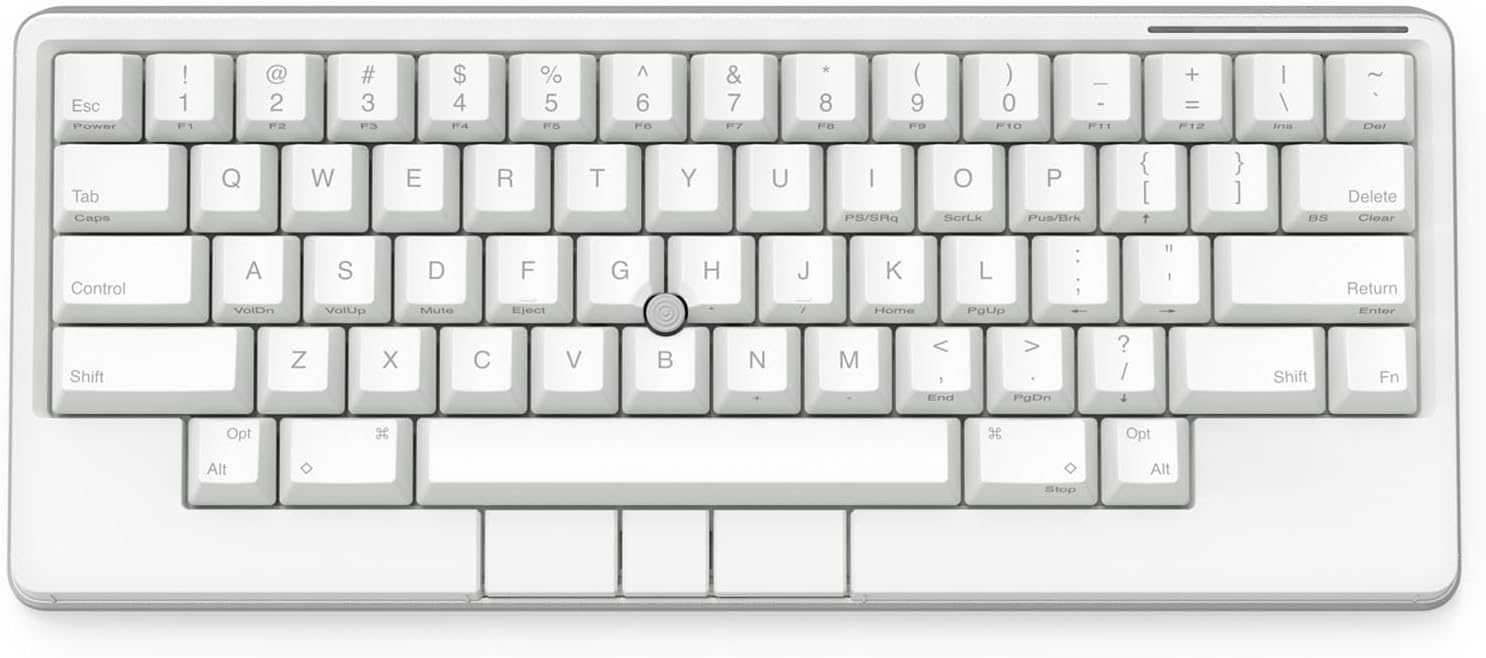
The Happy Hacking Keyboard Studio is a premium 60-key mechanical keyboard designed for professionals who demand precision and comfort. Featuring four customizable Gesture Pads, an integrated pointing stick with mouse buttons, and hot-swappable silent linear switches, it supports wired USB-C and Bluetooth multi-device connectivity. Its compact layout minimizes finger movement, while advanced customization options and durable build quality make it ideal for programmers, creatives, and multitaskers seeking a clutter-free, immersive typing experience.


| ASIN | B0DGR1JD36 |
| Additional Features | Portable |
| Antenna Location | Programming, Typing, Video & Photo Editing |
| Best Sellers Rank | #934 in Computer Keyboards |
| Brand | HHKB |
| Built-In Media | USB Cable |
| Button Quantity | 60 |
| Color | Snow |
| Compatible Devices | PC, Smartphone, Tablet |
| Compatible Operating System Family | Windows |
| Compatible Tablet Computer Models | AAUB P30 |
| Connectivity Technology | Bluetooth, USB-C |
| Customer Reviews | 3.9 out of 5 stars 35 Reviews |
| Enclosure Material | Plastic |
| Hand Orientation | Ambidextrous |
| Item Dimensions L x W x H | 12.1"L x 5.2"W x 1.6"H |
| Keyboard Description | Wireless, Programming, Coding, Gaming, Editing, Creating |
| Keyboard Layout | QWERTY |
| Manufacturer | PFU Limited |
| Mechanical Keyboard Switch Model | Cherry MX Red |
| Mfr Part Number | CG01000-310287 |
| Model Name | Studio |
| Model Number | CG01000-310287 |
| Number of Keys | 60 |
| Power Source | USB Power |
| Recommended Uses For Product | Programming, Typing, Video & Photo Editing |
| Special Feature | Portable |
| Style Name | Contemporary |
| Switch Type | Silent Linear |
| UPC | 097564310140 |
| Unit Count | 1.0 Count |
| Warranty Description | 2 Year Warranty |
G**N
Amazing keyboard
I own multiple mechanical keyboards and only used mechanical keyboards in the last ~10 years. This is definitely the BEST ONE and I am extremely happy with it. I have been using it with MacOS. PROS: - The build quality and overall feeling is amazing, with well-designed details and functionalities. It seems specifically designed for productivity. - The trackpoint (pointing stick) is extremely convenient. It's very similar to what you find on Thinkpads (and other business laptops). There is a small learning curve getting used to it, but then it becomes very natural, and it's great for quick mouse/click actions without moving the hands from the keyboard. It would be great to see more mechanical keyboards implementing it. Important: some early reviews complain about this specific aspect. However, there is a new firmware from April 2024 that largely improved pointing stick functionality, so REMEMBER TO UPDATED THE FIRMWARE after receiving the keyboard. - I really like the switches. I know that some people are not happy with this keyboard not having Topre switches. However, these are really good, and honestly I like that they are hot swappable (better longevity, more options for future changes) and that they have more options for different keycaps. - It's great to have options for wired or bluetooth connections. Additionally, it's great that it doesn't have an internal battery, as it improves longevity and avoids potential problems. - The software is great, a lot of options for customization. At the beginning, there were a few things in the keyboard I wanted to change, and I was able to do everything very easily through the integrated software and/or other OS options. I couldn't find major CONS. Maybe, just that the "gesture pads" (there are 4 of them) are not that useful, at least for my use cases, and I end up now using them. For scrolling, I like the pointing stick much better. It's also a bit too expensive, even though I can understand the price given the tech and innovations. Overall, 100% recommended.
A**R
I like the studio model more than the type s
I originally own a type-s, but it is with the studio that I decided to get the same model in a different color (for a change of mood, aesthetics for my desk). I do not travel with keyboards. The studio has a much sturdier build, and I especially like the elongated area for the three clicks in the studio model for resting (something that I think is missing for the type s). I have small hands and I like the tactile feel of the rims of the keyboard. The trackpoint and the gestures pads are curious features, could be useful and fun to use. Also i feel like the studio types more quietly than the type s. Took me a while, I now enjoy typing on the studio than the topre type s.
R**N
Low quality and poorly conceived
I expected more from the illustrious HHKB. This is my first product from them and will be my last. The mouse erratically jumps everywhere and the bluetooth disconnects every 5 seconds no matter what computer, nor distance from it. The switches are really really nice feeling but that doesn’t excuse the inability of the keyboard to perform basic functions. In addition the software is not up to par, especially for the price, and no, firmware updates did not address the issue. I usually do not write reviews, but this is clearly a half-baked product.
M**S
A Review on Productivity and Ergonomics, Not as a Keyboard Enthusiast
I have used an HHKB Professional 2 daily since 2017. I bought the Studio because it offers a pointer stick, which allows me to keep my hands close to the home row. It pairs perfectly with what I already consider a nearly perfect key layout. The gesture pad is a nice option; I currently only use it for page scrolling. You can also use the mouse middle function key to toggle the pointer stick as a page scroll. Why the Studio is for me: I experience wrist pain when using a traditional mouse. Over the years, I have tried or considered alternatives, including trackballs, vertical mice, touchpads, and RollerMouse devices, alongside my HHKB Pro 2. When I saw the Studio, it immediately made sense to pair a pointer stick with the HHKB layout. It’s excellent and has reduced my wrist pain. I use the pointer stick for precise mouse movements during long programming sessions, while still relying on a trackball (X-Keys L-Trac) for larger movements. Using both input methods helps break up repetitive strain from relying solely on one or the other. Yes, I would have preferred Topre switches, but the custom Kailh silent keys are very quiet and feel cushioned and comfortable—I have no complaints. It's also worth mentioning that the mouse switches are Gateron low profile and are also swappable along with the main Kailh box switches. I only gave the keyboard 4/5 stars because it does not use Topre switches. If a future version includes Topre switches, I will buy it immediately and almost certainly rate it 5/5.
M**L
Expensive but amazing keyboard
I’ve used HHKB keyboards in the past so the layout was familiar. The track button and left right and middle click buttons mean I can use it without a mouse and keep my hands in one place. I still have a trackpad for swipes and haven’t fully used the side Touch Bars. Over time I think I will fully utilize it. Great for traveling to the office.
B**N
Good keyboard with flaws
This was expensive and suited my needs (I wanted to have a mechanical keyboard with an integrated trackpoint or trackpack) and types very well with great key presses (despite the hate it gets from being non-TOPRE), but once or twice a day in normal typing whether on Linux or Windows becomes non-responsive and requires power off and power on again. It's a shame there's only one function key and one control key. I could use their keymap software, but this keyboard goes between several different machines, including Raspberry Pis, linux servers and a Windows machine. The location of the Control key is very desirable for those who use vim and the shell frequently and I love not having to bring an external standalone mouse along with me. I don't understand the purpose of a charcoal keyboard with black key text as there is not only no practical value (yes I touch type mostly anyway) but requires you to squint to use non-frequent function key combos.
S**H
Perfection
I have spent way to much money on mechanical keyboards over the years and I always come back to the HHKB, it's just a pleasure to use and I have had multiples that have lasted me years. I know they are expensive, but once you start to use them, they make sense. The new "Studio" edition is no exception, it's an amazing keyboard and I find myself using the scrolling feature a lot more than I expected. It's expensive but really worth it and good value on how well these last.
D**A
So nice I bought it twice
I have to admit: I purchased this keyboard twice. I've been looking for better ways to scroll because I hate scroll wheels, and the integrated trackpoint seemed like a good idea, but I just wasn't ready to adapt to something without visible arrow keys. That was my bad. It's not difficult at all to customize a function layer to have arrows, or in my case, I realized I don't use the right-side modifiers at all, so I remapped them to arrows on the top layer. For the Topre switch fans, the linear switches this bad boy comes with are REALLY good. Very similar feel to Topre that I actually prefer. I also tried the TEX Shura and the HKKB Studio is way better, the Shura feels like a toy compared to this keyboard, I really love it. I have clicky switches in it and they sound great, the keycap material is really nice feeling and the keycap profile is tightly contoured to create a nice slope of the keys from front to back. If you need to look to type, the white is probably a better option since the dark keycap legend is really hard to see. I don't need to look at my keys while typing so the dark version works for me. Can't say I'm hacking anything with it, but it does make me happy, and my scroll wheel finger is loving it the most because it gets to take a break from scroll wheel clicking detent torture. Thanks, HHKB!
P**L
Brand new?
Love the Keyboard, but it came with some scratches. Probably someone returned, thus it is not BRAND NEW. Disappointed.
Trustpilot
1 month ago
3 weeks ago