We remain fully operational. Our teams are working around the clock to ensure your deliveries continue safely.

قم بتنزيل التطبيق


معلومات عنا
حقوق الطبع والنشر © 2024 Desertcart Holdings Limited
قم بتنزيل التطبيق
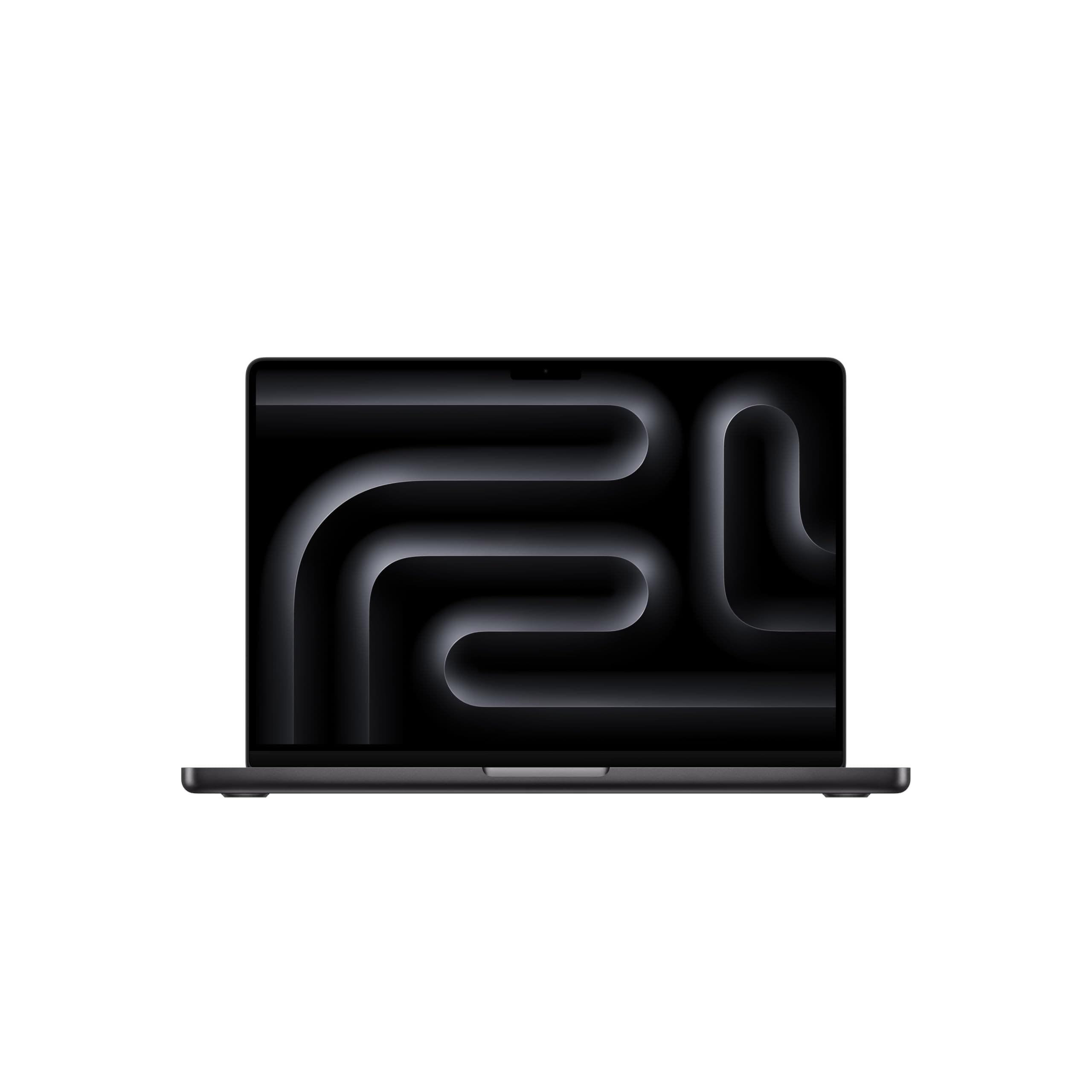

🚀 Power Meets Precision — Own the Future of Productivity
The Apple 2024 MacBook Pro with M4 chip redefines professional laptops by combining a 10-core CPU and GPU for lightning-fast performance, a stunning 14.2-inch Liquid Retina XDR display with up to 1600 nits brightness, and an impressive 24-hour battery life. Designed for Apple Intelligence, it offers seamless multitasking, enhanced privacy, and future-proof AI capabilities—all wrapped in a sleek Space Black chassis with 16GB unified memory and 512GB SSD storage for smooth, reliable workflows.


| Brand | Apple |
| CPU Model | Apple M4 |
| Color | Space Black |
| Graphics Card Description | Integrated |
| Hard Disk Size | 512 GB |
| Model Name | MacBook Pro |
| Operating System | Mac OS |
| Ram Memory Installed Size | 16 GB |
| Screen Size | 14.2 Inches |
| Special Feature | Backlit Keyboard, Fingerprint Reader |
N**K
My Journey with the Apple 2024 MacBook Pro M4: A True Game-Changer
My Journey with the Apple 2024 MacBook Pro M4: A True Game-Changer I still remember unboxing my Apple 2024 MacBook Pro with the M4 chip. The moment I lifted it out of the box, I felt the weight of quality and craftsmanship. It’s solid, sleek, and has that unmistakable premium Apple feel that immediately makes you excited to use it. Turning it on for the first time was like opening a window into the future. The startup was instant, and the Liquid Retina display immediately grabbed my attention. The colors, contrast, and clarity are breathtaking—every image feels alive and videos feel cinematic. I immediately tested the M4 chip’s power by opening multiple high-performance apps simultaneously: video editing, graphic design, and a few heavy browsers tabs. Not a single hiccup. The 10-core CPU and 10-core GPU handle everything with ease—it’s truly next-level performance. Battery life is astonishing. Even with a full day of intense work, video editing, streaming, and multitasking, I didn’t need to charge once. The efficiency of the M4 chip paired with macOS makes this laptop incredibly reliable for long workdays. Typing on the keyboard is a joy. Every key feels responsive and comfortable, even during long sessions. The backlit keys are perfect for late-night work, and I don’t feel fatigued after typing for hours. The trackpad is enormous and precise. Navigating between apps, using gestures, and editing media feels smooth and natural. It’s one of those features you don’t notice until you use a device without it. Portability is impressive for a MacBook Pro. Despite its power and size, it’s surprisingly light and easy to carry around. I can take it to cafés, coworking spaces, and meetings without feeling weighed down. I tested it for creative work on the first weekend. Editing 4K videos and complex graphics was effortless. The 10-core GPU makes rendering smooth and fast, which has completely transformed my workflow. The audio quality blew me away. I streamed music while working and noticed the clarity and depth of the sound. It’s immersive enough that I often don’t need headphones, which makes casual listening easy. The laptop remains whisper-quiet even under heavy loads. Unlike older devices that overheat or produce loud fan noise, this MacBook Pro stays cool and silent, which makes it comfortable to use anywhere. Integration with my iPhone and iPad is seamless. Copying files, continuing tasks, and syncing apps between devices is effortless. The ecosystem really shines when everything works together this smoothly. I’ve spent hours testing multitasking features like split view and Mission Control. The combination of the M4 chip and macOS makes juggling multiple projects effortless. I feel more organized and productive than ever. True Tone and the high brightness make it easy to work outdoors. I took it to a sunny café, and the screen remained perfectly readable without straining my eyes. It’s a small feature, but it makes a big difference in
M**N
⭐⭐⭐⭐⭐ Review: Apple 2024 MacBook Pro (M4, Space Black)
The 2024 MacBook Pro with the new M4 chip is an absolute powerhouse. Apple has once again raised the bar for performance, efficiency, and design. The 10-core CPU and 10-core GPU deliver lightning-fast speed, whether you’re running professional creative apps, coding, or multitasking with dozens of tabs and programs open. Everything feels smooth and instant. The 14.2-inch Liquid Retina XDR display is simply stunning—colors are vibrant, blacks are deep, and brightness is exceptional, making it perfect for editing photos, videos, or just enjoying movies. Apple’s attention to detail in display quality is unmatched. The build quality is premium, and the new Space Black finish looks sleek and professional while resisting fingerprints better than previous models. The laptop feels solid, yet remains impressively portable. Battery life is outstanding. Even with heavy workloads, it lasts through a full workday without needing a charge, which makes it ideal for professionals on the go. The combination of 16GB unified memory and a 512GB SSD ensures fast responsiveness and smooth workflow across demanding tasks. One of the most exciting features is that it’s built for Apple Intelligence—future-proofed to take full advantage of AI-powered tools and workflows that Apple continues to develop. Overall, this MacBook Pro is perfect for power users, creatives, and professionals who want uncompromising performance in a beautiful, portable design. It’s a significant leap forward and absolutely worth the investment.
B**A
⭐️⭐️⭐️⭐️☆ Powerful, Sleek, and Fast — But the Black Finish Needs Care
The MacBook Pro M4 14-inch is hands-down one of the fastest, smoothest laptops I’ve ever used. Everything from boot-up to heavy multitasking is incredibly quick and responsive. Apps launch instantly, video editing is seamless, and battery life is excellent — I can go a full day without needing to plug in. The screen is gorgeous, speakers are rich and clear, and the keyboard/trackpad combo is still the best in the game. It feels like a true professional machine in a compact body. ✅ What I Love: • Blazing fast performance with the new M4 chip • Beautiful 14” Liquid Retina XDR display • Long-lasting battery • Solid build quality — feels premium and sturdy • Quiet and cool under load ⚠️ Minor Concern: I went with the black (Space Black) finish, which looks amazing out of the box — but it picks up fingerprints and smudges easily. Even with clean hands, I find myself constantly wiping it down to keep it looking clean. It doesn’t affect performance at all, but something to be aware of if you’re picky about aesthetics. ⸻ 💬 Final Verdict: If you want a powerful, premium laptop for work, creativity, or everyday use, the MacBook Pro M4 14” is an absolute beast. Just be ready to give the black finish a little extra care — or consider using a case or skin if that kind of thing bothers you.
G**N
Good well made apple product.
This is a great laptop. Fast with good battery life. I prefer the card reader, and 3 C connectors. Charges phone well off the C connecter as well.
T**D
Huge upgrade from the M1 MacBook Air
Got this because I am doing a whole lot more of everything: editing pictures, writing music, rendering videos, recording audio, and studying. Appearance: The screen is SO MUCH better than the M1 13-inch, and that extra-inch difference makes a difference when I am split-screening windows. The ports are nice to have, especially the SD card slot. I always used to carry around 2 dongles or USB-C hubs with me. Now I don't have to (unless I have to somehow use a VGA port for presentations or USB-A to connect wired mouse/keyboard). Transition: If you have a Thunderbolt 3 or 4 cable, just connect that between your old MacBook to the new one and set the old one to Migration Assistant in Utilities. The process was so fast at about 1.7 GB/s, and I had 200GB out of the 256GB old storage. Storage: Having a 512GB base storage is so nice compared to juggling with 256GB the last 4 years. The M1 MacBook Air is/was an excellent budget laptop during grad school even with the base 256GB storage. However, I'd always struggle to offload and download files when I got more photography gigs, especially dealing with RAW files. I averaged 200GB on and off, so seeing that I am still less than half of the 512GB storage now is comforting. RAM: The 16GB of RAM flies through my workload with ease. No more "Swap Use" Memory from the former 8GB RAM I had, which is a plus. I throw all sorts of demanding tasks including Google Chrome, LightRoom, Ableton + Nexus, LogicPro, FruityLoops Studio, etc. Still under the 16GB usage. My thoughts: Typing this on the new M4 MacBook Pro, and it is noticeably a better experience for my productivity and day-to-day workloads. This isn't even the "M4 Pro" or the "M4 Max," and I am happy with it. Worth every penny. Overall, this is perfect for anyone who is a student, a creator, an artist, or anyone who just loves the efficiency and convenience of being in the macOS atmosphere. Worth.
K**R
Just buy it
Will never buy another computer again unless it is a MAC. Love the computer. Quick, Hefty Feel, long lasting battery. Always enjoy using it.
D**L
The Best Mac for Developers Yet
As a developer, performance, reliability, and efficiency are non-negotiable. After upgrading to the MacBook Pro with the M4 chip, I can confidently say: this is the best Mac you can get if you're a developer like me. The jump in speed is noticeable across the board. Whether I'm compiling large projects, running Docker containers, or juggling multiple VS Code windows with Chrome, Postman, and the terminal—everything feels faster and smoother. Thermal management is excellent, meaning I can work in silence without the fans kicking in or the machine heating up under pressure. Battery life is another huge win. I can go through a full workday on a single charge, even with my usual heavy dev workflow. If you're in the Apple ecosystem and you're serious about development—whether it's web, mobile, backend, or even AI/ML—the M4 MacBook Pro is an investment that pays off immediately in productivity and peace of mind.
A**R
Almost perfect, except of the price
My 16 inch 2019 MacBook i9 is always hot to the touch and it drains the battery in about 3 hours. Obviously something is wrong that I didn't want to hash out since Rosetta 2 is going to faze out in 2027. In case you are unaware, once OS X stops supporting Intel, you will not be able to update OS X on Macs with Intel processors. I went with a 14 inch M4 with 16GB or RAM and 512GB of storage. I also added AppleCare +. Which the laptop automatically added to the warranty with zero issues. I couldn't justify the extra money for a 16 inch. It would be nice if it had 1TB of storage since file sizes are always growing. The new M4 processor MacBook pros are excellent. Even the base model I went with is extremely quick. It loads apps such as the Adobe Creative Suite and Office programs which have been optimized for the silicon extremely quickly. The workflows through moderate video and picture editing are significantly faster than the previously mentioned MacBook and a newer Lenovo Thinkpad i7. It is surprisingly thicker, about 1/2 inch, than previous models. Its thickness reminds me of the 2012 unibody MacBook pros. Regarding weight, you have a high end laptop that is built for speed making it weigh about 4.5 pounds. I wouldn't consider it a boat anchor, but it is more to lug across an airport than more portable models. There is no problem putting it in any case designed for 15 inch laptops. I am a fan of the travel pro models. The premium elite is able to carry this laptop and a 15.6 inch Lenovo in separate compartments along with a power brick (they can use the same brick) and enough office supplies to assemble contracts. The display is sharp with good color reproduction. Like all MacBooks, it is built well. We don't like to drop laptops, but this one with everything solid state, has good survivability potential. I suspect it will have a few dents like all of my previously retired MacBooks when the time comes. It comes with a 65 watt charger. You can plug the larger 96 - 130 watt USB C chargers in it. It will not damage the laptop or significantly shorten the battery life. I am a fan of the return of the Mag Safe port. This really helps make sure that the dog or a clumsy family member doesn't trip over the charger cable and damage your port. It is also nice to have the return of HDMI so I don't have to remember an adapter if I am presenting. I have never been a fan of single type flash card readers. High end camera makers have moved from SD to CF Express cards. I would rather see a legacy USB port or another Thunderbolt 4 port instead of the SD reader. It is nice that Apple started braiding their cables. Living in the extremely dry Rocky Mountain West, the old vinyl cables always dried out, frayed, and looked tacky with electric tape until I retired them. The M4 sips the battery. Taking it to work, I usually consume about 10% battery life per hour. Depending on your software and usage, you could easily go all day without needing to plug this in. Unless I am rendering video, there is no significant performance decrease when the laptop is not plugged in. The magic in the M silicon chips reminds me of the leap from Pentium 4 to Core about 15 years ago. Time will tell, but it looks like Apple fixed the hacking vulnerabilities that plagued the earlier M series processors. Being able to go all day, there is no reason to seek or fight for an outlet while traveling with this laptop. I do have a few dislikes. First, the price. I know that you pay for high end computers, but it seems like Apple adds an additional 25% to the premium. Second, I couldn't care less about a similar experience between a laptop display and a phone or iPad display. The notch with the camera is stupid. It is especially annoying if you have older applications that don't move the menus around the notch. When I am editing photos or video, I find it really distracting. Third, I know that Apple will never admit their mistake, but printers, scanners, mice, jump drives, and almost every other device is still most likely USB 3. They really should have a legacy port. Carrying a dongle reduces the portability. Fourth, Rosetta 2 is slow. If your applications are ports from Intel, you will take a big performance hit. Fifth, the Thunderbolt 4 does not maintain true 10GbE speeds. I have a wired Cat 8e network with a Thunderbolt 4 external card. It is connected through a powered 10GbE router to a NAS that supports 3100 Mbps before I added NVMe cache. The bottleneck is the MacBook. I get faster, more stable transfer speeds with PC based laptops. This model runs a sine wave of transfer speeds ranging from about 250 Mbps to 800 Mbps with occasional surges above 10GbE speeds. Regardless, this is still much faster than 2.5GbE or Gigabit, but it is a bit of a letdown. Sixth, the finish fingerprints easily. I suggest going with the lighter color if it is available. Finally, make sure you get the processor, video, and storage you think you will need for the next few years. Laptops are difficult to upgrade, but Apple is the worst. Everything is attached to the logic board. You have to use multiple tools to even open the case. Most high end laptops allow you to change the storage with NVMe compatible drives, upgrade the RAM, and replace the battery. Do I recommend this laptop? Yes I have already recommended it to colleagues.
ترست بايلوت
منذ شهرين
منذ 3 أسابيع