We remain fully operational. Our teams are working around the clock to ensure your deliveries continue safely.

قم بتنزيل التطبيق


معلومات عنا
حقوق الطبع والنشر © 2024 Desertcart Holdings Limited
قم بتنزيل التطبيق

💼 Elevate your home server game with style and power — the JONSBO N5 means business.
The JONSBO N5 NAS PC Case is a premium, solid wood veneer chassis designed for professionals needing massive storage and GPU support. It features 12 hot-swap HDD bays plus 4 SSD slots, supports up to 4 GPUs, and offers extensive cooling options with 3 built-in fans and AIO compatibility. Compatible with ITX to E-ATX motherboards and equipped with 8 PCI slots, it balances high performance, expandability, and elegant design for home servers or enterprise setups.


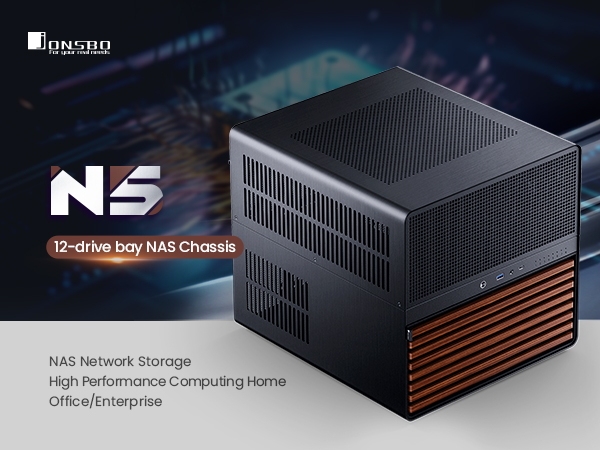


| ASIN | B0DG2N3PBB |
| Antenna Location | Business |
| Best Sellers Rank | #119 in Computer Cases |
| Brand | Jonsbo |
| Case Type | Full Tower |
| Color | Black |
| Compatible Devices | Motherboards (ITX/M-ATX/ATX/E-ATX), GPUs (up to 4), HDDs (up to 12), SSDs (up to 4), Cooling systems (up to 240mm/280mm AIO) |
| Cooling Method | Air, Water |
| Customer Reviews | 4.7 out of 5 stars 88 Reviews |
| Enclosure Material | Aluminum, Metal |
| Hard Disk Form Factor | 3.5 Inches |
| Internal Bays Quantity | 16 |
| Item Dimensions D x W x H | 15.8"D x 13.9"W x 13.8"H |
| Item Weight | 9.37 Kilograms |
| Manufacturer | JONSBO |
| Material | Aluminum , Metal |
| Model Name | N5 |
| Motherboard Compatability | ATX, Extended ATX |
| Number of Fans | 3 |
| Other Special Features of the Product | High Airflow |
| Power Supply Mounting Type | Bottom Mount |
| Recommended Uses For Product | Business |
| Supported Motherboard | ATX, Extended ATX |
| Total Expansion Slots Quantity | 8 |
| Total USB 2.0 Ports | 1 |
| Total USB 3.0 Ports | 1 |
| Total Usb Ports | 2 |
| Warranty Description | 2 Year Manufacturer |
A**G
Looks great and so much room for upgrades with some small gripes
Great sized case with so much room for upgrade. I currently have an ITX with 5 HDD for my NAS and plans to add a few more drives. The case itself is metallic and a bit noisy to work with but once completed, it's really not a problem at all. There's plenty of mesh throughout the case to allow for airflow and a variety of fan placements. I didn't fill up all of the fan spots as that would be too much, but low key wonder if that would leave some dead air space in the case. I did have a small issue with drive temps at the bottom bay since the only fans were towards the back acting as an exhaust and I don't want hot air to exhaust through the front. I was able to quickly 3D print a mod to the front of the case, just behind the wood veneer, to add 2 more 140 mm fans to intake air which worked perfectly, averaging 35 C on my 5 drives. Given that I was only installing an ITX, I had zero issues with accessibility in a large case like this and cable management was absolutely no problem. The hard drive compartment require grommets to be installed on the hard drive to "slide" into the case with just a rubber handle to pull it out, it works but not the most elegant solution. The backplane was a bit sketch at first but proved to be good and reliable as it accepted the my drives with little issues and felt quite solid when pushing the drives into it. All in all, great next step in a home NAS solution upgrading from my 3D printed NAS case with 2 drives and plenty of room for upgrades for performance and storage. Price was quite competitive with other NAS cases I was looking at but this looks much better in the living room than a tower. Worth it for an upgrade to a personal home server.
N**K
Great case if you need large Mobo/GPU support and lots of HDD bays (and it's beautiful)
Absolutely love this case, it was perfect for my server that had outgrown a more typical pc case. The hotswap drive bays are awesome and easy to access, and this was one of the only cases I could find for a server with a large raid array that could also fit a large GPU in it. The case is spacious, but doesn't have an overly large footprint. It's well designed, good materials, easy to work on and expand/grow into, has plenty of room for cable management, just about any hardware can fit in it. I can't say enough good things about it. For someone who needed full atx (or larger) compatibility, lots of HDD bays, to fit a large gpu in it, this case is seriously great. I can't say enough good things about it. If I could say ANYTHING negative about it, the case fans it comes with were on the louder side, though not terrible definitely audible, and I did replace them for quieter operation, but that didn't cost much and it didn't make me think less of the case itself. Only other negative I can think of is the price, but after owning it I do think it was worth the cost. Love this case and would buy again or recommend to a friend.
A**K
Flexible, spacious, easy to build.
Unexpectedly my drives from my old Synology NAS died which resulted in a bitter-sweet opportunity to finally move to TrueNAS. The issue I quickly ran into though was that the really nice Small Form Factor cases for NAS's were sold out at the time or going for $500 for no reason. I decided that I did not mind having a larger unit so long as I could make use of that extra space by putting in better and more modern components. Enter the Jonsbo N5, which allowed me to do exactly that. This thing is very spacious and will fit E-ATX and everything smaller (so just about every motherboard you can imagine) as well as a modular PSU and a fullsize GPU as well. (though that is not that case for me since I used my PCI slots for a Sata card). The instructions leave a bit to be desired but the setup really is quite intuitive. If you have ever built any kind of PC before then everything should make sense to you. The slots on the front are easy to access so you can hotswap in and out your drives. (there are after market adapters for SSD's too!) The case came with fans, but not enough so I had to buy some Noctua's. The dust grill in the front does it's job but it's behind a grate and irremovable so it's actually hard to clean (hence my attached picture). I just vacuum it once a month and it's fine. It's a bit heavy since it is all metal construction (a pro and a con). All in all I am really happy I got this because I will be able to add to it and rebuild it to my hearts content and am no longer locked into Synology's ecosystem. I think the value is there and if you are someone who wants a super-server (like me) with all the bells and whistles and power, then this is a solid, attractive, and flexible option that I don't think will disappoint.
S**N
Great case with a few shortcomings
I bought this case to build a high end TrueNAS system as I migrate away from Synology. The case is big and and well designed with cable management in mind. This is probably the first time I didn't struggle to build a system. Everything is accessible, well spaced, and I didn't need any special tools (or bloody knuckles) to get into the nooks and crannies. The case is reasonably modular as well, allowing decent access once it's set up. Air flow is excellent. I have a 24-core i9 CPU in it and even at load it runs around 45C. Shockingly my 160mm air cooler has room to spare. And I love the fact that it can fit multiple motherboard sizes from mATX to ATX to E-ATX with the standoff locations clearly marked. I took off one star for a few issues: First, instead of drive trays they included rubbers straps and grommets for installing drives. They work okay...but it's harder to tell when the drives are fully seated than a tray would be. Second, there's only eight external LEDs on the case to indicate drive status, while there are twelve drive bays. Not everyone will use those extra four bays, but if you do you can't see drive status easily. Third, the included fans are cheap 3 pin DC fans that are noisy. I pulled all three and installed five 120mm Noctua PWM fans (that cost almost as much as the case) but it's whisper quiet now.
N**S
Elegant and Upgradable. All you could want in a simple home server.
Really easy to work with, and extremely elegant. Fit my needs perfectly and has tons of room for upgrades down the road, exactly what I wanted. There could maybe be a bit more to help with cable management especially if you want lots of airflow like me and therefore have a good few fans in there, maybe some cables or management accessories would be a nice addition. But overall I really cant complain! For me I was making a small home server/Nas out of an old pc, and wanted tons of room for mass storage, while having some ease of upgrading in the future if needed. I love the super simple hot swap drive bays and the fact it comes in an elegant form factor that fits in inside the living room, Sure if I went more “hardcore home server rack” then Id probably save some money, but it would look alot less appealing. For me getting started in homelabbing and just wanting something simple this was alot more reasonable since I can do everything I want in one box, and it will look fantastic and not out of place. Maybe a bit on the pricey side but it was worth it to me. I had no issues fitting my parts other than the only PSU I had which to be fair is humongous and super overkill. eventually ill swap it out for a smaller more reasonable one, so maybe dont buy a giant PSU. Otherwise all my parts went in with ease, the build was fast and I had zero issues.
J**R
Apparently good for inexperienced builders (like me)
I had never built my own system before, limiting myself to minor upgrades and fixes to components like memory, drives, etc., and was a little intimidated by the whole thing. However, when I finally "cut the cord" and decided to create a Plex server, I soon realized that I'd have a hard time finding an off-the-shelf system with the expansion capabilities I needed for my fairly substantial (and growing) library that I prefer not to run through HandBrake. After all, I bought mostly Blu-Ray (including some 4K/UHD) disks specifically for the image quality, and storage space is reasonably affordable, so why degrade the video quality? My research led me to conclude that the two most important components in this equation were the case and the motherboard (for SATA connections), and fortunately for me, all this happened just as the Jonsbo N5 was being released. To make a long story short, I bought this case and am glad I did. Despite my lack of experience, I think the ample room inside not only supports future expansion but made it easier for this novice to connect everything. My only complaint was that of the ten standoff screw holes I used to mount my motherboard, one was poorly drilled, and I used to use pliers to force the standoff into it. Otherwise, it was smooth sailing, and my system is now working fine with plenty of HDD upgrade potential. For reference, the other components I picked were: - Motherboard: ASRock Z790 Steel Legend WiFi ATX LGA1700 Motherboard - CPU: Intel Core i9-12900K - Cooler: Noctua NH-D15 - Boot drive: WD_BLACK 2TB SN7100 NVMe Internal Gaming SSD - Memory: CORSAIR VENGEANCE DDR5 RAM 64GB (2x32GB) 6000MHz CL30 - PSU: CORSAIR RM1000x Fully Modular Low-Noise ATX Power Supply - HDDs: Western Digital 20TB WD Red Pro I skipped the GPU because the i9-12900K should be able to handle my transcoding needs and because, well, in my opinion, GPUs are overpriced. Also, I went with 12th-generation Intel after reading about the voltage issues in the newer ones, though the 12th has its own issues, which is a good segue into mentioning a couple of technically optional (but recommended) other components: - Thermalright CPU Contact Frame for LGA 1700 - APC UPS Battery Backup and Surge Protector, 600VA/300 Watts Backup Battery Power Supply, BE600M1 You can do the math: this isn't a cheap system, and some of the components (e.g., the cooler) may be overkill, but at least, for example, I don't have to worry my system isn't being cooled enough. A couple of other things I should mention are: 1. The second (optional/external) fan on the Noctua NH-D15 can't be installed with this configuration, at least not if you have the fans blowing towards the rear, but that's a motherboard RAM placement issue unrelated to the Jonsbo N5 case. 2. Another reviewer said using the RM1000x prevents you from also using the N5's removable four-drive cage, but that's only true of the older and deeper/longer (2021) RM1000x model. If you get the newer (2024) model, it's a shorter 160mm in depth/length, and I can confirm from personal experience doesn't prevent you from also having the 4-bay cage installed. As you can see, most of my comments here weren't about the Jonsbo N5 at all, and that's a good thing: it worked like it was supposed to and seems to be a good option for my needs. It isn't cheap, but as with most things, you get what you pay for.
F**E
Great Value but EVEN BETTER with Mods
After about 8 months with this case, I’m very pleased overall. I am running Unraid with dual parity and 200Tb of storage, 4Tb cache with a RTX2060. This is an incredible platform just shy of the needs of building a mini server rack. IF I need to expand, I’ll probably sell this and build that. PROS: Lots of ventilation for most top compartment. 12 (or more with mods!) bays Solid Construction Space for huge mobo and components Super compatible CONS: Zero ventilation for front-facing drives (fixed with mod) Tight squeeze plugging in SATA cables. 3D printed mods for fans on the front and vent fans from the top compartment and then for additional HDD mounting brackets on the walls really make this case shine. I’ve been able to fit 16 drives (4 on the top compartment) in here without compromising temps. For a “plus user” this is more than you’ll need. For a “super user” go with a mini server rack.
P**7
Great for a DIY NAS
This case was AWESOME to build in. I'm using it for a NAS build. The channels around the mobo provide enough space to route cables. Everything just seems well thought through with how this is put together, but it's all just super simple. I didn't need any instructions because everything just makes sense with this case. My favorite feature is the way the motherboard is mounted above the drive slot. I love the 2-level setup. The drive bays are planned out really well and I can confirm there's plenty of room to route cables for all 12 drives. I also like the magnetic wood front panel. Super unique! One gripe I have is that I had to add mesh to the vent on the top of the case myself. You're not going to be pushing air out of the top, so those vents really need to be covered to keep out dust. Jonsbo included dust covers for all of the vents except for the largest one! Ultimately, I'm super happy with this case and would recommend it for anyone considering it. Note: I saw a review that mentioned only using one set of mounting screws for the drives along with the handle and skipping the middle screws. That's how I have mine setup and at works perfectly. The drives are secure when inserted and the handle is strong enough to remove the drive as long as you skip that middle set of screws. The front cover closes securely when the drives are properly installed.
ترست بايلوت
منذ أسبوع
منذ أسبوع