We remain fully operational. Our teams are working around the clock to ensure your deliveries continue safely.

قم بتنزيل التطبيق


معلومات عنا
حقوق الطبع والنشر © 2024 Desertcart Holdings Limited
قم بتنزيل التطبيق
Buy anything from 5,000+ international stores. One checkout price. No surprise fees. Join 2M+ shoppers on Desertcart.
Desertcart purchases this item on your behalf and handles shipping, customs, and support to OMAN.
⚡ Print smarter, faster, greener — because your office deserves the best.
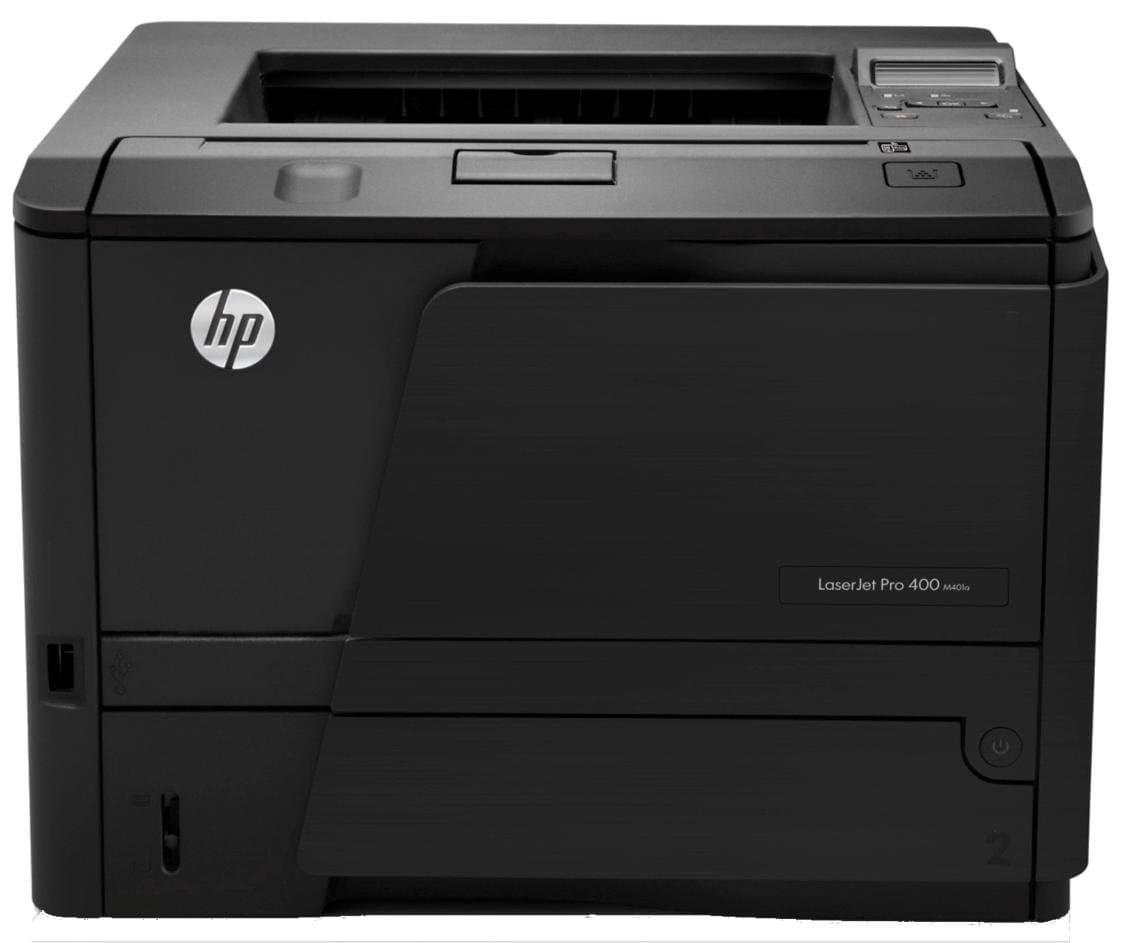
The HP LaserJet Pro 400 M401d is a high-speed monochrome laser printer delivering professional 1200 dpi print quality at 33 pages per minute. Featuring automatic duplex printing, Ethernet and USB connectivity, and a touchscreen interface, it’s designed for efficient, eco-conscious office productivity with seamless mobile device support.
| ASIN | B007Q4VQT2 |
| Additional Printer Functions | All In One |
| B&W Pages per Minute | 33 ppm |
| Best Sellers Rank | 92,781 in Computers & Accessories ( See Top 100 in Computers & Accessories ) 112 in Laser Printers 198 in All-In-One Printers |
| Box Contents | user manual, power cord |
| Brand Name | HP |
| Color Depth | 1 bits_per_pixel |
| Colour | black |
| Compatible Devices | Smartphones |
| Control Method | App |
| Customer Reviews | 3.9 3.9 out of 5 stars (45) |
| Dual-sided printing | Yes |
| Duplex | True |
| Global Trade Identification Number | 00886112362843 |
| Hardware Interface | Ethernet |
| Ink Colour | Multicoloured |
| Item Weight | 10.7 Kilograms |
| Manufacturer | KOMQI |
| Maximum Copy Resolution Black and White | 1200 dpi |
| Maximum Copy Resolution Color | 1200 dpi |
| Maximum Copy Speed Black and White | 33 ppm |
| Maximum Print Resolution Black and White | 1200 dpi |
| Maximum Sheet Capacity | 250 |
| Maximum Supported Paper Size | A4;Legal |
| Maximum print Resolution Color | 1200 |
| Model Name | Laserjet PRO 400 M401D |
| Model Number | LaserJet Pro 400 M401d |
| Model Series | CF274 |
| Network Connectivity Technology | Ethernet, USB |
| Other Special Features of the Product | Touch Screen |
| Output sheet capacity | 150 |
| Paper Size | A4 |
| Print media | Envelopes, Paper (plain), Transparencies |
| Printer Output Type | Monochrome |
| Printer Type | Laser |
| Processor Count | 1 |
| Resolution | 1200 x 1200 |
| Scanner Type | Flatbed |
| Specific Uses For Product | Office |
| Total USB Ports | 1 |
| UPC | 886112362843 |
| Warranty Type | limited warranty |
| Wattage | 570 watts |
S**8
HP Laserjet Pro 400 M401d/33ppm Printer
I eventually had to pension off my old HP LaserJet 5P printer after about 18 years reliable service. This was mainly due to the increasing difficulty of getting toner cartridges, and more importantly the printer's inability to print certain documents because of the lack of sufficient memory. I chose the Pro 400 M401d printer for a number of reasons, but increased printing speed and the duplex printing facility, where both sides of a sheet of paper can be printed upon, were the main ones. I had initial worries when the outer box containing the printer box was damaged, but opening up the inner box I found that no damage to the printer had been caused. HP's method of securing of all sensitive parts had been effective. Once unpacked there were no problems installing the printer on my PC running under Windows 7-64bit. I just followed all the on-screen prompts. In use I have been very impressed at the printer's speed, although some might find it a little noisy. However, the quality of print is excellent and I had to hand some documents that included both text and photos from the old Laserjet 5P. I repeated these documents on the M401d and could see that the print quality had improved somewhat, not surprising as the M401d is 1200dpi against the LaserJet 5P's 600dpi. The duplex facility works a treat and will save me paper. I also checked that the documents that the 5P could not print were successfully printed on the M401d. All in all a most satisfactory purchase.
D**N
As I'd expect from HP
It installed like a dream. Plugged in the USB cable and my PC downloaded drivers from the printer, then checked the internet and updated them. Prints quickly, quietly and beautifully. The engineering excellence I have come to expect from HP since my days in a physics lab using the sig-gens, oscilloscopes and plotters. So, whuy no fifth star? Their engineering is excellent, the software adjuncts are a pain. The printer goes into sleep mode when not used for a while - Big tick for power saving. This causes a little app that it installed on my PC to fail causing an error message on my screen. Another app annoyingly pops up and offers to validate if my laser cartridge is a genuine HP spare. It is, but when it runs out, it won't be as my stationary supplier offers excellent replacements at half the price. My tip to HP: focus on the engineering and don't try to be too clever on the software - get it right. My tip to you: after installation (on a PC), open the MS System Configuration tool and from the start-up list, un-check hpwschd and HPStatusAlerts. That way you get an excellent printer and none of the annoying software interruptions!
A**C
HP M401d
When my trusty 2200D finally packed it in, I wanted a replacement with the same features - and was pleased to find the M401d, which appears to be an updated version with very similar functions. The printer was a doddle to install under Windows 7. The drivers are stored in the printer itself, so as soon as the USB cable is plugged in the printer is recognised and the driver installation starts automatically. There is a software CD included, but it wasn't necessary to use it. Top marks to HP for making it easy to deselect all of the bloatware: as usual there are a multitude of unnecessary programs included, but the only thing you actually need to install is the driver itself. Once installed, the printer is ready to go. The only negative point was a sneaky attempt to install unwanted software (Bing toolbar) - this is slipped in on a separate screen from the main options, so look carefully when installing. OK, it's easily deselected, but this is the kind of thing you'd expect from freeware that needs the sponsorship - not when you've spent two hundred quid on something. Shame on you HP. Once set up, everything works perfectly - the print quality is every bit as good as the 2200D it replaces, and printing seems significantly faster. Printer sharing under Windows 7 was easy to set up: simply share the printer on the PC it's connected to and then you can use it from any other computer on the network - so for me there was really no need for the more expensive wireless or network versions of this printer. Bottom line: fast delivery, took it out of the box, plugged it in and it works - if only all products were as good as this !
C**R
HP printers used to be great . . .
One of the best printers I've ever owned was an HP. A laser jet, complete workhorse, never hogged attention, just did a dependable job for years. Since then, I've bought two more HP printers. One was an inkjet which was heavy on bloatware, but I felt maybe the laser printers, on past experience, would be better. I've had it just over a month and it would have been better if I'd the next day. Instead, I persevered. The installation disk didn't work so I searched for and found drivers (on HP's bloated site, which took some time). Dowloaded the appropriate driver and 'firmware upgrade.' It asked for virus and firewalls to be switched off, sugested every other item in the tray was closed, went for numerous re-boots - in other words, I spent about 8hrs in total just trying to make it work at all. I've managd to get it to perform with my backup computer but it finds excuses every time I try to load it on my main PC. All I wanted was something to print a high volume of sheets. I don't need a control panel, a fancy interface, masses of onboard software to make me a cup of tea, I just want it to sit in teh corner and print. No such luck. I've given it two stars rather than one as it seems to perform reasonably well if you can get it installed and jump through lots of hoops. If. Build quality seems ok - not outstanding, but ok. You have to buy your own cable as not much is included (not much of any use).
A**S
Great printer
Great printer duplex printer. Print quality is great and the machine is quiet during printing. Wish there was an accessory to make it wifi however I just connect it to home group on windows to share the printer wirelessly. Build quality is good but not as good as previous models within the same range
M**.
Ottima per uso domestico, suppongo sia perfetta anche per un ufficio. Veloce, silenziosa, stampa fronte/retro automatica, display di controllo, prezzo ragionevole. Voto: 9/10.
M**N
Rapide, silencieuse, recto-verso. Je suis très content de mon achat qui remplace une vielle HP5 de plus de 15 ans
N**J
working great
E**E
La verdad es que este producto me ha parecido unas de las mejores compras que he realizado en la web. La velocidad y calidad de impresión excelente. Sinceramente, por el precio, pocos productos similares pueden hacer competencia a esta impresora laser.
K**H
Ich habe in anderen Bewertungen gelesen, daß es Probleme mit der Installation und dem USB-Anschluß gab. Trotzdem habe ich mir dieses Gerät bestellt. Die Installation verlief schnell und absolut problemlos (Windows 7) und auch die USB-Verbindung funktioniert einwandfrei. Über das Gejammer der anderen Bewerter kann ich nur müde lächeln. Wer hier Probleme hatte, bei dem liegt es vermutlich am PC oder er ist einfach unfähig, damit umzugehen... Der Drucker ist schnell wie der Teufel. Eine solche Druckgeschwindigkeit habe ich in dieser Preisklasse noch nicht gesehen. Selbstverständlich bei bester Druckqualität. Auch gibt es keine nervenden Geräusche ! Wenn der Druck abgeschlossen ist, hört man absolut nichts mehr. Und das ist einfach wichtig, wenn man den ganzen Tag am Schreibtisch sitzt und der Drucker daneben steht. Ich kann nur sagen daß es ein einwandfreies Gerät ist und ich sehr zufrieden bin. Das soll etwas heißen, denn ich bin sehr anspruchsvoll und kritisch!. Daher kann ich ihn auch begeistert weiterempfehlen. Es gibt auch andere Druckerhersteller, mit denen ich Erfahrung habe, aber dieser HP bleibt der Beste, dem können die anderen nicht das Wasser reichen... :-))
ترست بايلوت
منذ شهر
منذ شهر