Desertcart purchases this item on your behalf and handles shipping, customs, and support to OMAN.
🚀 Elevate your screen game with 4K clarity and zero hassle!
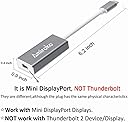
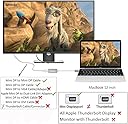
The Amiroko USB-C to Mini DisplayPort Adapter enables high-definition 4K@60Hz video and audio transmission from USB-C/Thunderbolt 3 devices to Mini DisplayPort monitors. Compatible with a wide range of laptops, tablets, and smartphones including MacBook Pro (2016+), Alienware, Dell XPS, and Galaxy S series, it supports both Mirror and Extend display modes without requiring drivers or external power. Ideal for professionals seeking crisp visuals and seamless multi-display setups.
| Asin | B07DRQYWPD |
| Best Sellers Rank | #25 in USB-to-VGA Adapters |
| Brand | Amiroko |
| Built In Media | BATTERY |
| Color | Gray + Updated |
| Compatible Devices | Laptop, Monitor, Projector |
| Connector Type | USB Type C |
| Current Rating | 1 A |
| Customer Reviews | 4.0 4.0 out of 5 stars (569) 4.0 out of 5 stars |
| Finish | Projector |
| Input Voltage | 5 volts |
| Item Dimensions | 6.2 x 0.4 x 0.9 inches |
| Item Weight | 1.12 ounces |
| Manufacturer | Amiroko |
| Mfr Part Number | USB-C to Mini DP-Gray 2 |
| Model Number | USB-C to Mini DP-Gray, New |
| Number Of Items | 1 |
| Number Of Ports | 2 |
| Package Quantity | 1 |
| Power Plug Type | No Plug |
| Specific Uses For Product | Monitor |
| Unit Count | 1 Count |
| Upc | 606829831131 |
| Warranty Description | 12 months |
| Warranty Type | Limited |
User
Works with Apple Mini DisplayPort to Dual-Link DVI Adapter and Achieva Shimian QH270 27" 2560x1440 !
This product works as expected!I had initially tried another similar adapter*, but it didn't work, and only gave a black screen.My screen is an "Achieva Shimian QH270 27" LED 2560x1440 QHD S-IPS PC Monitor" which is a cheap replacement for the Apple Cinema Display (same display, different wrapping). Since others had reported success using this Amikoro adapter with Apple Cinema Display, I hoped that it would work for me as well. And it did! Just plug-and-play. :DBad thing with the Shimian monitor is that it only has a DVI-D port. I needed two other adapters for this setup to work. "Apple Mini Displayport to Dual Link DVI-D", and "Satechi Type-C multi-port adapter 4K with ethernet V2" which gives a regular USB port. I also had a DVI-D to DVI-D cable too (a DVI-I cable could work as well, but not DVI-A).This is how I connected them all successfully:1. Amikoro USB-C to Mini Displayport -> Mini Displayport chord of the "Apple Mini Displayport to Dual Link DVI-D"2. Satechi USB-C to USB 2.0 -> USB 2.0 chord of the "Apple Mini Displayport to Dual Link DVI-D"3. Apple Mini Displayport to Dual Link DVI-D -> DVI-D cable -> Shimian monitorNotice that this setup uses two USB-C ports on the Macbook. Luckily, I can use the additional USB-C exit on the Satechi adapter to connect the Macbook's USB-C power chord. The Satechi adapter doesn't allow the Amikoro adapter to be plugged into its USB-C exit port (since it probably doesn't pass through the DisplayPort Alternate Mode signal), but you can use that USB-C exit port on the Satechi adapter for power instead. So it's all good!Links to the other adapters used together with the Amikoro adapter:"Satechi Type-C multi-port adapter 4K with ethernet V2" is what it is called on the Satechi home page.Apple Mini DisplayPort to Dual-Link DVI Adapter:https://www.amazon.com/Apple-Mini-DisplayPort-Dual-Link-Adapter/dp/B001IF252CDVI-D cable similar to the one I have:https://www.amazon.com/C2G-26911-DVI-D-Digital-Meters/dp/B0000X0VCYAchieva Shimian QH270 27" LED 2560x1440 QHD S-IPS PC Monitor:https://www.amazon.com/Achieva-Shimian-QH270-lite-wide/dp/B009UZ78L0* - The competing product which did not work (gave a black screen): "Delock Adapter USB Type-C™ male > mini DisplayPort female (DP Alt Mode) 4K 60 Hz with PD function" is what it is called on the delock home page.
User
Good
Works good
User
Waste of money
Doesn’t work
User
great it works
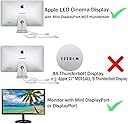
I have a old cinema display and it's mini display port not thunderbolt and not so easy to plug in a new macbook air.It work great but for a mac laptop, if you plug in the mdp port from the monitor to the adapter and then the adapter direct to the laptop, it only worked after plugging in the laptop to a the power source, not on battery. Maybe this a deep power management setting you can adjust but I don't see why you would use that large monitor at home and not have "power" available.Somewhat irrelevant, or maybe it is, if you plug in a drive to that same port it will work without the laptop requiring the power source, but maybe it also isn't operating at full speed without external power.Great device, I verified reviews before purchasing and it worked immediately.
User
Works great with Apple 27" LED Cinema Display and 2018 MBP
When my LCD on my almost-new MPB was destroyed by a cat biting the corner of the display (yes, seriously), I panicked. It seemed the processor was working fine, but the display went completely black. (Apple won't cover it, though it was just over a month old.) I went to the Apple store and wasted $52 on a cable that they said would work - but while it LOOKED just like the mini displayport, it did not work with it. I thought it was a lost cause to have it work with my 2018 MBP at all until I ordered this cable. I plugged it in (nothing else, no extra cables) and boom, instant glorious display!While this is an older display (from 2010), it challenges most of the very expensive new ones. I'd forgotten how crisp everything could be.
User
Distorts console text - but good customer support
The adapter works, but the quality is not as good as HDMI over the Apple brand multi-adapter (the one that has HDMI, USB 3, and USB-C ports). Console text is "out of registry"/distorted along the vertical, still legible, but not sharp. 3440 x 1440 60Hz. Dell UltraSharp U3415W. I am programming so distorted terminal window text is a no go.UPDATE:Excellent customer support. They saw my review and offered a hassel-free refund. Thanks.
User
Outstanding Service
I had a HecToo (brand) computer device to connect my old Macintosh CInema Display with my new MacBook Pro laptop computer. It worked sort of. I say "sort of," because frequently my Cinema Display screen would get very fuzzy, and I would have to remove & re-insert the HecToo device at least five times where it plugged into the laptop before the screen would re-set itself to a clear view. A friend recommended the Amiroko version of the connector device. The first one did not work. I wrote an email through Amazon and received an almost immediate response from someone named "Rachel." The next day I received two versions of the device. The first one was simply a replacement for the first one that didn't work. The second was of a different color, so I assume something is different about it. The replacement one has worked perfectly for about 3 days, and I am very encouraged. When I asked Rachel what she wanted me to do with the different colored one she told me to keep it in case the screen gets fuzzy, and in case the replacement connector stops working.Rarely do I ever get service like this, and I am quite pleased with the way things turned out. Rachel was awesome!
User
Landfill junk
Didn’t work at all. Total junk.
User
Perfect! it's working perfectly.
Trustpilot
2 months ago
4 days ago