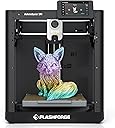


🚀 Print Fast, Print Flawless, Print Future-Ready!
The FLASHFORGE Adventurer 5M is a high-speed FDM 3D printer featuring a 600mm/s max print speed, fully automatic bed leveling, and a 280°C direct extruder with a detachable nozzle. Its built-in vibration compensation technology ensures smooth, precise prints, making it ideal for professionals and enthusiasts seeking rapid, high-quality prototyping in a compact, user-friendly design.


| Asin | B0CPSZ9PGS |
| Item Model Number | Adventurer 5M |
| Manufacturer | Zhejiang Flashforge 3D Technology Co., Ltd |
| Product Dimensions | 36.07 x 37.59 x 41.15 cm; 10 kg |
User
100% would recommend, likely to buy another
Great printer for the price, very happy with this purchase. I got this to replace an older printer I had. The auto bet leveling is an awesome feature, I wish I had it years ago. I've printed several things on it now and they are a nice quality. Setup was easy. I think I had the test print started within 10 minutes of opening the box. The removable bed plate makes getting the prints off really easy but there has been a bit of a learning curve for me to get good adhesion, just need to use quite a bit of the included adhesive. The wireless printing is also a big improvement over the sd card I used on my old printer. The app is pretty intuitive and I'm getting used to it quickly. The standard settings have been working well for the PLA I've been printing except I've had to turn the movement speed down until I can get better adhesion. I would definitely recommend this printer. I may even buy another for my retired parents to try.
User
Impressive printer
This is my first 3D printer and already I'm very impressed with it. It's currently sitting on a less-than-ideal surface that wobbles a lot. Despite this though, the printer's vibration compensation works like magic. It successfully printed Benchy with no significant problems even though the table moved a lot while printing. I was worried at first but I've had a great experience with printing with it so far! At first I couldn't get it to print, but that was because I didn't push the filament far enough in. As soon as I pushed it in to the correct depth, I heard a click, and then it worked! So if you're having trouble with it printing anything, try pushing a little further with a little bit more force. It was also very easy to connect to WiFi and the software (FlashPrint) automatically found it on my network with no issues. Prints are quite detailed and accurate too. Lastly, this printer is very FAST! The keychain test print completed in only 6 minutes! Very happy with this printer!
User
Not READY for Prime Time
I’ve had the Aeventurer 5M for a month and on the 31st day the extruder failed. Flashforge pushed and update and the unit rebooted and the extruder would no longer heats up.Also, I’ve have had other issue with filaments not adhering to the printer board. I tried the blue printer tape and hairspray methods and still had the same issues. The printer pad would not maintain a constant heat and the print would pop up and the printer would continue to print leaving filament strings all over the printer bed. I tried PLA, TPU, PCTG and Flashforge Flexable PLA and they all had issues printing.The printer slices are easy to send to the 5M using the ORCA. You can either send the g-code over WiFi or use a USN stick. Larger files require using the USB stick.The over all 5M printer looks nice on my table but it is very hard to manage installing the filament to be printed. The spool holder is located in the back so you need to pull the 5M away from the wall while turning sideways to expose the back of the 5M of the unit. It is rather cumbersome to feed the filament into the tube. Most people say to 3D print a side spoolholdef which was on my list for accessories to print for the 5M.Probably the best part of owning a 5M is there is not a steep learning curve. There are lots of videos the give helpful hints BUT those videos are from professional 3D printer users. Using ORCA slicer is fairly straight forward if your used to any CAD or photoshop software.I give the Adventurer 5M an over all score of 2 since there are so many small issues that add up to major issues when rolled up into one.
User
Reasonable price, decent quality, easy to use.
TL;DR: A good printer, but be aware it is from China and some of the parts may not be of great quality. It is overall a fairly precise 3d printer at a decent price. Some components may wear faster than expected as a result. But decent overall. If you are looking for your first 3d printer, this has good potential but be aware you may have to repair and/or tinker with it every so often.Alright, picked up the AD5M in June of 2025. As of this review August of 2025, it is still going well. Overall, I am satisfied with the overall capability of the printer out of the box. It was dead simple to get going, get it on the network and start sending print jobs to it. If you are new to 3-D printing, this could be a great first printer. As of this review, it is fairly easy to mod / run a custom firmware.After getting the printer going and printed off the enclosure, I started running into issues during assembly. The filament tube does not line up with the sensor well. Additionally, the sensor if using the manufacture 3mf/stl files; needs to be reversed/installed upside down. There is a tiny > on the top showing the filament direction. There are many options available on thangs or printables to install it 'correctly'I also picked up the LED light strip for this, installation straightforward. Worked no surprises. However, the factory firmware cannot control the LED light strip on an AD5M. So you can't dim or otherwise turn the LED off. Installing / Using the forge-x firmware mod lets you control the LED light strip.The rear plate carriage broke within the first 100 hours of use. I was able to print off a centering part to re-center the carrier on the lift screw. Have not had an issue since the fix. You can detect this if you gently attempt to lift up on the carrier while watching the lift screws; if it lifts without turning the lift screw or attempting to turn it; inspect on why.The bed springs were over tightened from the factory. I did not catch this until ~450 hours on the machine. I ended up replacing the springs with "Prime-Line SP 9700 Compression Spring, Spring Steel Construction, Nickel-Plated Finish, 0.035 GA x 1/4 In. x 1/2 In. (6 Pack)". I have not had an issue with this after replacing the springs. I noticed this when the bed would not keep a consistent z-height.Outside of the issues above, I've not really had any other issues with the machine. My machine is connected via hardware network line. Wireless seemed to work okay, your milage may vary. The stock firmware does work okay, I wanted more control over the printer remotely so I loaded up the Forge-X mod -> https://github.com/DrA1ex/ff5m by DrA1ex. Follow the guides and try not to skip ahead to printing without updating the configuration in Orca-Slicer. For the 'Interface' I run the 'feather' variant to free up additional resources on the machine. Additionally, after I switched to the Forge-X firmware mod, I also switched my slicer to Orca-Slicer instead of Orca-Forge.With Forge-X it gives me additional control over the machine remotely.
User
Very very good printer for general use
This things amazing, prints wicked quickly, only downside it’s very loud but I made the enclosure kit for it and it’s much better, it definitely has a learning curve but once you get it down it’s pretty awesome, it’s good for beginners and intermediate level users, auto leveling is wicked cool, my old Aquila was a pain to level, this one is very plug and play in every aspect,
Trustpilot
4 days ago
1 month ago
2 weeks ago
2 months ago