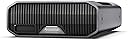




8Tb Sandisk Prof Gドライブ。
Product ID: 727048732
Details
- デジタルストレージ容量8 TB
- ハードディスクの説明ソリッドステートドライブ
- ハードディスクインターフェイスThunderbolt
- ハードディスク容量8 TB
- ブランドProfessional)
- 対応デバイスデスクトップ
⚡7200RPM Ultrastar HDD
💾8TB massive storage
🚀250MB/s blazing transfer
Desertcart purchases this item on your behalf and handles shipping, customs, and support to OMAN.
💼 Elevate your professional storage game—because your projects deserve the best.
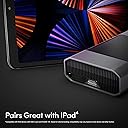
The SanDisk Professional G-DRIVE 8TB external hard drive combines massive enterprise-class storage with a 7,200RPM Ultrastar HDD and up to 250MB/s transfer speeds. Featuring a PRO-BLADE SSD Mag slot for expandable high-speed SSD storage and versatile Thunderbolt 3 (40Gbps) and USB (10Gbps) interfaces, it’s designed for creative professionals demanding reliable, fast, and scalable backup and editing solutions.
| ASIN | B0CF7NKYK4 |
| Amazon 売れ筋ランキング | パソコン・周辺機器 - 105,895位 ( パソコン・周辺機器の売れ筋ランキングを見る ) 外付ハードディスクドライブ - 632位 |
| HDD容量 | 8 TB |
| UPC | 718037901800 |
| おすすめ度 | 5つ星のうち3.9 63 レビュー |
| カラー | ブラック |
| デジタルストレージの容量の測定単位 | 8 TB |
| デジタルストレージ容量 | 8 TB |
| データ転送速度 | 250 メガバイト毎秒 |
| ハードウェアインターフェイス | Thunderbolt, ソリッドステートドライブ |
| ハードディスク 種類 | ソリッドステートドライブ |
| ハードディスクの説明 | ソリッドステートドライブ |
| ハードディスクインターフェイス | Thunderbolt |
| ハードディスク回転数(rpm) | 7200 RPM |
| フォームファクター | 2.5インチまたは3.5インチ。 |
| ブランド | サンディスクプロフェッショナル(SanDisk Professional) |
| ブランド名 | サンディスクプロフェッショナル(SanDisk Professional) |
| メーカー名 | Western Digital Technologies, Inc. |
| メーカー型番 | SDPHG1H-008T-NBAAD |
| ユニット数 | 1.0 個 |
| 互換デバイス | デスクトップ |
| 互換性のあるゲーム機モデル | Microsoft Xbox SERIES S, Microsoft Xbox SERIES X, Nintendo Switch - OLED Model, Nintendo Switch 2, Nintendo Switch Lite, Sony PlayStation 4, Sony PlayStation 4 Pro, Sony PlayStation 4 Slim, Sony PlayStation 5, Sony PlayStation 5 Slim, 任天堂スイッチ |
| 付属品総数 | 1 |
| 取り付けのタイプ | 外部ハードドライブ |
| 同梱商品 | PRO-BLADE SSD マグスロット (10Gbps)。 |
| 商品の用途 | マルチメディア、バックアップ。 |
| 商品の追加説明1 | 使用されていません |
| 商品の重量 | 3.68 ポンド |
| 商品外装素材 | アルミニウム |
| 型番 | SDPHG1H |
| 接続技術 | Thunderbolt, USB |
| 搭載済みキャッシュメモリサイズ | 250 不明な修飾子 |
| 書き込み速度 | 250 MB/s |
| 特徴 | 使用されていません |
| 読み込み速度 | 250 メガバイト毎秒 |
| 通信・接続インターフェース | Thunderbolt, USB |
P**O
Fast, Reliable, Massive Storage
This drive is a beast. I bought it to consolidate scattered backups and media files from years of work — and it handled everything with room to spare. Speeds are consistent even under heavy loads, and Thunderbolt 3 makes a real difference. It’s quiet, cool, and built like a tank. Perfect for large video files, raw images, and project archives. Not cheap, but if you value reliability and capacity, it’s worth every cent. Great choice for professionals who don’t want to mess around with flaky storage.
K**N
I switched to G Drives
The G Drives (HDD) are great thank you. They are different (G Drives) to the ones available in my city as they have an extra USBc outlet that allows other devices to connect (piggybacking) to the same system.
R**U
Short lived G-Drive, look for cheaper HDD
Not reliable, broke down just over a year, changed a new power supply, still not working, some electronic board failed. don’t waste money to but expensive SSD that wouldn’t last.
B**E
Works like a charm.
Great external drive for photo storage!
D**T
MAJOR SCAM ALERT
This item was sold fraudulently. It was sold and was designed to look like a 12 terabyte product, and even designed to look like it was successfully copying files, but months after the return window closed, when I tried to access the files, the product began to malfunction and then encouraged me to download and run an application that mysteriously appeared. When I looked into it and asked claude, i learned this is a common manufacturer's scam and that the actual capacity.When I ran list disc in my command prompt on my windows.It listed the available space as fifteen megabytes, not twelve terabytes. Amazon is refusing to accept a return. And now i'm out thousands of files and seven hundred dollars. I'm questioning if I will continue to use Amazon at all. And wondering about taking this to small claims court. Do not buy from motion media LLC. And I would hesitate to buy from amazon or sand disk either. I may never again
Trustpilot
3 weeks ago
1 week ago