Desertcart purchases this item on your behalf and handles shipping, customs, and support to OMAN.
🚀 Upgrade your wireless game to gigabit speed and Bluetooth 5 brilliance!
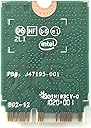
The Intel Wireless-AC 9560 is a high-performance M.2 2230 Wi-Fi and Bluetooth 5 module designed for Intel SoCs with CNVi support. Delivering 2x2 802.11ac wave 2 connectivity with 160MHz channels, it achieves gigabit wireless speeds up to 1730 Mbps. Perfect for professionals seeking fast, reliable, and power-efficient wireless networking on Windows 10 systems, this compact module ensures seamless integration and a plug-and-play experience.
| ASIN | B07G42J6KQ |
| Best Sellers Rank | #168 in Internal Computer Networking Cards |
| Brand | Intel |
| Built-In Media | 1 |
| Color | multicolor |
| Compatible Devices | Desktop, Laptop |
| Compatible Operating System Family | Linux, Windows |
| Customer Reviews | 4.6 out of 5 stars 970 Reviews |
| Data Link Protocol | Bluetooth |
| Data Transfer Rate | 1730 megabits_per_second |
| Hardware Interface | Bluetooth 5, PCI |
| Item Dimensions L x W x H | 1.18"L x 0.87"W x 0.09"H |
| Item Weight | 5.67 g |
| Manufacturer | Intel |
| Mfr Part Number | 9560.NGWG.NV |
| Minimum Required Operating System Version | Windows 10 |
| Model Number | 9560.NGWG.NV |
| Number of Items | 1 |
| Product Dimensions | 1.18"L x 0.87"W x 0.09"H |
| UPC | 735858358293 |
| Unit Count | 1 Count |
| Warranty Description | 1 Year |
S**R
Cheap - Works great - Card swap took 5 minutes!
As long as you have a small screwdriver set and are comfortable opening up your laptop, it’s an easy inexpensive fix. I didn’t even want to think what a maintenance charge from a repair shop would be. Be careful while opening laptop and removing old card, do the work on a anti-static mat. I used a pair of non conductive tweezers to snap the antennas on the new card as it was rather difficult on first attempts with just my fingers. If this is an exact replacement for your defective card then the existing driver on your device should work fine. At first startup WiFi worked immediately with no driver or software needed. If you need a driver search on intel’s site for their driver downloads and select the card you bought and should be as easy as that.
T**S
Excellent
This is a game Changer, I updated my dell optiplex 3070 mini pc and it was a perfect fit came on time and I haven't had any issues the speed was a great boost from my previous USB adapter strongly recommended if you want wifi and Bluetooth on ther pc if it supports it
A**R
Good little device for the money.
The Intel Wireless-AC 9560 mounted into my computer and was recognized the second my computer powered up. Only thing is my old antenna kept getting interference and would only pick up 50% WiFi signal and only a 3% bluetooth signal only when bluetooth devices wire 6 inches from the computer. I can almost guaranty this problem is caused by my old antenna so I'm hooking a new one up to it. Will submit another review once I reconnect my new antenna. Update My New antenna is connected and despite high power interference surrounding my computer and new antenna, the Intel Wireless-AC 9560 now gives me 100% WiFi signal with my home network being located on the opposite side of the house from my computer and I get 100% bluetooth signal through out the back half of my house where my computer and bluetooth devices are located. This wireless card works great for the money and I'm glad I bought it to replace a PCIe card I paid $130.00 for because it's 70 times faster, a lot more reliable, and uses less power.
A**R
Great value and works perfectly
Used this on my new build that featured an Intel CNVI slot on the motherboard. Love that this is completely hidden off and recognized immediately on bootup on Win10--no drivers were needed and bluetooth worked too. NOTE: if you're ordering antennas for this, make sure it has the MHF4 connector on not something else. Also, the connector is super tiny and impossible to mount the antennas is the card is already installed in the mobo. Connect the wires first and then route the whole assembly where you need it. In my case I was able to route the wires behind the mobo and drilled holes for the external antennas on the back of the case. TIP: if you're building a rig with glass panels, this green wireless card really clashes against the mobo pcb (in my case, mostly black). I cut a piece of cardboard a bit larger than the size of the wifi card and put shrunk some black heat shrink tubing around it. I then slid the molded heat shrink onto the wifi card and routed the antenna leads tight to the mobo and this thing is totally discrete now. See pics.
G**G
Buy elsewhere
Works great. Except, there is no package protection, so the naked circuit board arrived crushed. And I had to call for the return and wait for a replacement. Removing a 0.0001 cent plastic package to save the company money, wasted my time. Do yourself a favor and buy from another vendor.
C**D
Good upgrade for Dell 3060 Tiny PC. 10x FASTER than The Original Qualcomm Unit
DELL 3060 Tiny PC. I3 16 Gig 500 SSD Windows 10 I replaced the as-shipped Qualcomm Atheros with this WiFi unit. I am very pleased with the upgrade. There is another version of this WiFi card with a 'KILLER' label that is supposed to be even better than this one at twice the price. We have Gigabit internet service through a Linksys The Qualcomm delivered 2.4 Mhz only about 25 Megs and 45 Megs at 5.0 Mhz. This unit installed easily. The only hard part was carefully attaching and clinking into place the small antenna connectors onto this WiFi card. I used Windows 10 to Uninstall the Qualcomm Wifi Card and then powered down. The card was replaced and I powered up. It installed a Windows driver automatically rather than a Intel 9560 driver and I have left it alone. This Intel 950 delivers about 360 Megs at 2.4 Mhz and 525 Megs at 5.0 Mhz.. I added a 9db antenna to external port on the Dell 3060. It is about 11 inches tall. The PC is located at the far end of my house away from the Linksys AC router with four walls to go through. The PC is used for old-person entertainment using You Tube, Netflix, and there is no lag or buffering. Very good upgrade
A**R
Check CNVi support before you buy
This is a great card in the right machine and a paperweight in the wrong one, and the listing will not tell you which one you have. The 9560 is a CNVi card. Half the radio actually lives in the Intel chipset, so the card only works on Intel platforms with CNVio support, roughly 8th gen laptops and newer. Drop it in an AMD system, an older Intel box, or a generic desktop M.2 slot and it will not come up at all. That is the design, not a defect, and it is the one thing to verify before you click buy. In a machine that supports it, it is excellent. 2x2 Wi-Fi 5, real world throughput near a gigabit on my fiber, Bluetooth 5 that pairs and stays paired, and Intel driver support that simply exists instead of being a scavenger hunt. Do not forget antennas. Two u.fl connectors, none included. Reuse the leads from the card you are pulling and go easy on those tiny connectors.
E**D
Works on Dell Inspiron 7586
The Dell WIFI Bluetooth card failed in my Dell Inspiron 7586 and this is a direct replacement for that card. The only tricky part of the installation is Dell antenna connectors are extremely small and hard to line up. One was easy, but for me, the other took much longer to click into place. Make sure you don't reverse the two wires. Also the label on this card for the connectors is printed incorrectly so put the connectors back the way you found them. Suggest you take a photo of the old card still in place to refer to. Had to reboot twice before Windows 10 saw the new Bluetooth card. Wifi worked right away. Worth the money. Not too hard to install if you have some experience opening up notebook computers.
K**N
Wifi kort till MSI laptop.
Fungerade som utlovat, drivrutiner fanns tillgängliga i Window11.
F**I
Excelente tarjeta
Todo bien, solo tuve que instalar el driver desde el repositorio y ¡vuala! plug and play. Me gustaría decir que todo fue sencillo, ¡pues no!, ¿es necesario que los conectores sean tan pequeños?, fue muy difícil conectar los cables a la tarjeta, sin embargo al final lo hice. Para quien le sirva esta información: la tarjeta fue conectada en una dell optiflex 5070 con Debian GNU/Linux 12 (bookworm) x86_64. funcionando al 100% 4G, 5G y bluetooth.
B**E
Good oem replacement
Works well fixed issues on laptop
S**O
Facile da installare
Funziona bene
M**C
Extra en remplacement sur portable ASUS, compatibilité parfaite avec l'originale!
J'avais des gros soucis de wifi qui se stoppait sur mon ordi portable ASUS, allant même jusqu'à provoquer un freeze complet du pc. Après quelques investigations dans l'observateur d'évênement de Windows j'ai rapidement identifié que la carte Wifi en était la cause. A réception, j'ai d'abord cru que l'emballage était vide car la carte est tellement petite qu'elle disparait au milieu de l'emballage. Finalement elle était bien là. Une comparaison attentive avec l'originale ne me permet pas de douter qu'il s'agit bien d'une carte originale et non d'une copie. Le remplacement se fait sans aucune complication à l'intérieur du portable, il faut juste bien faire attention à clipser correctement les deux antennes sur les connecteurs (ça fait un peu comme une sensation de bouton pression qui se clipse). A l'allumage, la carte est détectée comme une nouvelle carte wifi et il est donc nécessaire de reparamétrer le code du Wifi. Les drivers sont automatiquement installés par Windows et ça fonctionne. Depuis le changement mon portable fonctionne de nouveau parfaitement, je suis donc entièrement satisfait du produit et vous le recommande sans la moindre réserve!
Trustpilot
4 days ago
2 weeks ago