Desertcart purchases this item on your behalf and handles shipping, customs, and support to OMAN.
🚀 Elevate your workspace: 8K clarity meets ultimate control!
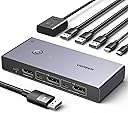
The UGREEN DP1.4 KVM Switch lets professionals control two DisplayPort-enabled PCs with a single 8K60Hz or 4K240Hz monitor, sharing USB peripherals seamlessly. Featuring USB 3.0 and USB-C ports with 5Gbps transfer speeds, it offers driver-free, instant switching via physical or remote buttons. Included cables ensure easy setup, making it an essential tool for maximizing productivity and workspace efficiency.


| ASIN | B0CFFFHFJT |
| Amazon 売れ筋ランキング | パソコン・周辺機器 - 9,131位 ( パソコン・周辺機器の売れ筋ランキングを見る ) 切替器 - 35位 |
| おすすめ度 | 5つ星のうち4.1 852 レビュー |
| カラー | グレー |
| ケーブルの形状 | DisplayPort |
| ケーブルタイプ | DisplayPort |
| コネクタタイプ | プラグイン |
| コネクタータイプ | プラグイン |
| パック数 | 1 |
| ブランド | UGREEN |
| ブランド名 | UGREEN |
| ポート数 | 5 |
| メーカー名 | Ugreen Group Limited |
| メーカー型番 | 25962 |
| ユニット数 | 1.00 個 |
| 互換デバイス | ノートパソコン, モニター |
| 付属品総数 | 1 |
| 保証内容 | 2年間のメーカー保証 |
| 商品のハイライト | キーボード・マウス・プリンター・外付けHDD対応、DPケーブル・AtoCケーブル各2本付属で接続が簡単 |
| 型番 | 25962 |
| 対応デバイス | ノートパソコン, モニター |
| 色 | グレー |
D**R
2台のPCを1台のディスプレイで。
二台のPCを1つのディスプレイで運用するために購入しました。設置も簡単でしたし、問題なく使えています!!
Z**N
USBハブの動作があと一歩。←訂正。USB仕様を理解すれば問題なし。
星5つに修正。 本製品によるものではなく、USB3.0の特性のようでした。 と言うわけで、本製品起因ではないということで星5つとしました。 ---以下が最初のレビュー記載--- 4Kモニターを2台のPCで共有しています。 モニターの切換器としては動作に問題ありません。 USBハブについて、以下のように接続して、1口開けていました。 ・無線キーボード、マウスのドングル ・USBハブ-USBヘッドセット -USB-A - USB-C ケーブル (スマホを接続してデータ転送できるように) ・空き:USBメモリやUSB-HDDを取り換えて使うため ※DC入力は、念のため10W(5V-2A)出力のUSB-ACアダプタを接続しています。 手の届きやすい場所に本KVMを置いて、USBメモリ、USB-HDDなどをつなぎ変えて使いたいと思っていたのですが、PCの電源ON状態でUSBメモリ、USB-HDD等をつなぐとキーボード、マウスが反応しなくなります。 この状態でキーボード、マウスのドングルを抜いて、差しなおすとキーボード、マウスが使えるようになります、たまにフリーズするように引っかかるような動作をします。 最初、USB-HDDをつないで同現象が発生したため、電力不足かと思ったのですが、USBメモリでも同じ現象が発生しました。 と言うわけで、PCの電源ON後、本KVMのUSBハブの抜き差しができません。 なので、私は最後の1口に128GBのUSBメモリをつないで使うことにしました。 ---以下がネット情報収集し検証後の追記--- 詳細は不明ですが、USB3.0の仕様上、USB3.0対応ハブに、2.4GHzの無線製品を接続し、USB3.0接続の製品と同時に使用すると、USB3.0機器の高周波ノイズの影響で2.4GHzの接続が不安定になるようです。 具体的には、2.4GHzの接続は、無線キーボード/マウスやBT等で使用されています。 私はBTは未確認ですが、無線キーボード/マウスが2.4GHz接続でした。 この状態で、開いているUSBポート(A、Cどちらでも)に、USBメモリ、USB-HDD等のUSB3.0接続をすると、キーボード、マウスが動かなくなったり、プチフリ状態になったりしていました。 ちなみに、この状態で同時に接続している、有線のUSBヘッドセットの音も切れていました。 本製品のレビューに、「ハブを経由したら安定した」と言うレビューも発見したため、試しに、本製品にUSB2.0ハブを接続し、USB2.0ハブに無線キーボード/マウスと、USBヘッドセットを接続したところ、本製品のUSBポートにUSBメモリ、USB-HDD等を接続しても、マウス、キーボード、ヘッドセット共に問題なく使用できるようになりました。 これまでこの現象に遭遇せず知りませんでしたが、USB仕様というか特性起因らしいことがわかりました。 USB接続機器が安定しない方は、2.4GHz無線製品を同時に使用されていないかご確認されると良いと思います。
「**!
買って良かった。ありがとうUGREEN!
Dell u4025との接続に使っています。 →接続機器 ・Windows ゲーミングPC(RTX4070) ・Mac mini(M4) →良いポイント いずれも接続は良好で、5k2kの解像度に加えてリフレッシュレートも120Hz出ています。 HDMI2.1対応の切替機ではどの製品でもチラつきが発生して使い物にならなかったですが、こちらの製品では問題なく対応できています。USB機器の切替え動作も問題ございません。マジで最高すぎる! マイナスポイント ★-1 →別売りの電源について詳細が記載されておらず分かりづらい。というかAmazonで買えるのかものも不明。電源なくても動作しますがUSB機器を接続する場合は電源不足に陥ると思うので他の電源等で代替することを推奨します。
白**だ
8K対応の高クオリティ機、ただしEDIDには非対応
8K対応で質感も良く、製品自体のクオリティは非常に高いです。この価格帯では間違いなくおすすめできます。 ただEDID非対応な点には注意が必要です。AppleCinemaDisplayで利用していますが、 WindowsからMacに切り替えた際、OS側で「モニター切断」と認識されるため、 Macに戻すと画面が真っ暗なままディスプレイを認識しなくなることがあります。
A**ー
1年と数ヶ月で故障しました。
2025年3月に購入して使用していましたが、 本体への給電がされなくなり、 モニターへの出力が不可となりました。 ケーブルを交換してみたり、充電器を変更しましたが改善されなかったのでKVM切替器本体の問題のようです。
Y**I
DisplayPortケーブル2本が付属しています
「この商品には新しいモデルがあります」と表示され、仕様は同じみたいだけど新モデルが少し安いのでそちらにしようかと思いましたが、こちらにはDisplayPortケーブル2本が付属しているのに、新モデルには付属していないということだったのでこちらにしました。 なお、こちらに付属しているコントローラーには選択側のLED表示がありませんが、本体についているので問題ないです。
ラ**ト
瞬断に注意!
二台のタワー型PCで一台のモニターを共有したくて本器を購入しました。結果から言うと安定動作していますが、安定して使えるまでに試行錯誤した。原因はPD電源(Type-C 6個、Type-A 2個口)から電源を取ると、他の機器を接続したときにネゴシエーションによる瞬断が発生するようで、その電源の瞬断が本器に悪さをするらしく、マウスやキーボードの接続が切れて操作不能になることが何度も起きた。そのため、本器の電源は別に専用に用意する必要があるようです。ニ個口のPD電源でも必ず本器専用に用意してください。
A**O
PC本体複数、接続機器は共有したい場合にとても便利
PC本体複数、接続機器は共有したい場合にとても便利です モニタの出力の切り替えだけでなく、USB機器の切り替えもできるので 私の場合は会社PCを持ち帰ってきた場合にも、 簡単にモニタとその他キーボード・マウスの切り替えができて便利です。
A**D
Quality product
Compact, takes less space, easy to use. One push and it switches from one pc to another. High resolution
G**A
great switch, works as expected on 144hz 5120x1440 HDR display
I used this switch to connect both my work laptop and my gaming pc to my 47" Samsung 5120x1440 monitor. It works great! The max 144Hz of the monitor is reached as expected and the HDR works fine. No fus, no hassle, it just works.
G**A
KVM de buena calidad
La calidad de construcción del KVM es muy buena, con buenos terminados. Es muy fácil de instalar, y el producto incluye todos los cables necesarios para realizar la conexión de dos computadoras a un mismo monitor con DisplayPort. Todos los cables son de buena calidad, aunque los DisplayPort pueden ser algo cortos (alrededor de 1m) si tus computadoras están lejos de tu monitor (algún standing desk con computadora de escritorio en el piso, por ejemplo). El cambio entre dispositivos funciona muy bien y es rápido. Muy contento con la compra, Ugreen no decepciona.
A**C
good quality for the money paid
Works well enough, even for G-Sync. The one annoying bit that makes me deduct stars is this: I have a Macbook and a PC connected; when I power up the PC, I have image until I get to the Windows logon screen, when the monitor doesn't detect a signal. IF I cycle between the two systems (PC > Mac > PC), the image comes back fine. Most intriguing is, if the Macbook ain't plugged in, the whole annoyance I described above does not happen; this leads me to assume that signal separation ain't that clean. Anyway, for the money paid it's a good deal, perhaps if not using a Macbook it doesn't even manifest the problem, but for me... I cannot give it 5 stars when I have to cycle daily. EDIT: Finally found a cable that fixes the behaviour. I'm going to assume the others were bad, so switching to 5-stars.
C**N
A great KVM at a great price
I've tried several KVMs with my ultra wide monitor. None of them have worked correctly. I plugged this thing in and it's working perfectly. I'm getting full 3820x1200 @144Hz refresh rate HDR and full color! Also, there's no emulation so it doesn't create any latency. A few things to note - This is obviously a display port KVM. On most modern laptops you'll only have thunderbolt ports. This means you'll need to buy thunderbolt to display port cables for each laptop. You'll also need a 2 thunderbolt ports on each machine (one for the display cable and another for the data cable). 4 cables on the desk can create a cable cluster, so I spent a few bucks on some velcro straps to help keep it all organized. The unit itself is heavier than I expected, very well made, doesn't shift around when my standing desk is lifted up/down, and switches instantly between computers. It a great value for the money! Does the job at a fraction of the cost of a pure thunderbolt kvm setup. Even the cheapest pure thunderbolt setup will cost $300 with pricier units being sold at $700+. For that level of savings, I can deal with a little cable clutter.
Trustpilot
3 days ago
1 month ago