We remain fully operational. Our teams are working around the clock to ensure your deliveries continue safely.

قم بتنزيل التطبيق


معلومات عنا
حقوق الطبع والنشر © 2024 Desertcart Holdings Limited
قم بتنزيل التطبيق


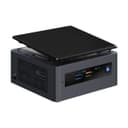
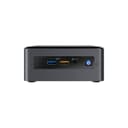
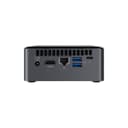
🚀 Small Size, Giant Leap in Power & Speed
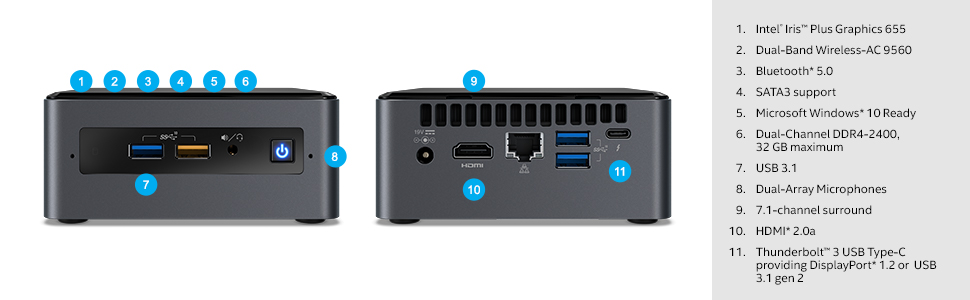
The Intel BOXNUC8i5BEH1 Bean Canyon NUC is a compact mini PC powered by an 8th Gen Intel Core i5-8259U processor with turbo speeds up to 3.8 GHz. Equipped with 32GB DDR4 RAM and Thunderbolt 3 connectivity, it delivers desktop-class performance in a sleek, space-saving design. Ideal for professionals seeking a powerful, versatile machine that supports 4K visuals and multiple high-speed ports, this NUC redefines what a mini PC can do.




| ASIN | B07GX59NY8 |
| Additional Features | Microphone |
| Aspect Ratio | 16:9 |
| Best Sellers Rank | #25,056 in Computers & Accessories ( See Top 100 in Computers & Accessories ) #739 in Mini Computers |
| Brand | Intel |
| Built-In Media | 19V Power Adapter, Manual, NUC, VESA Mounting Plate |
| CPU Model Number | Core i7-1065G7 |
| Color | Black |
| Connectivity Technology | Bluetooth, HDMI, USB |
| Cooling Method | Air |
| Customer Reviews | 4.2 4.2 out of 5 stars (322) |
| Display Resolution Maximum | 3840 x 2160 pixels |
| Display Type | LCD |
| Global Trade Identification Number | 00735858384001, 05032037133814 |
| Graphics Card Interface | Integrated |
| Graphics Card Ram | 1 |
| Graphics Coprocessor | Intel Iris Plus Graphics 655 |
| Graphics Description | Dedicated |
| Graphics Ram Type | DDR DRAM |
| Hard Disk Description | SSD |
| Hard Disk Interface | eSATA |
| Hardware Interface | 3.5mm Audio, DisplayPort, HDMI, USB, USB 2.0 |
| Human-Interface Input | TrackPoint pointing device |
| Item Dimensions | 6.1 x 5 x 4.6 inches |
| Item Type Name | Bean Canyon NUC |
| Item Weight | 2.7 Pounds |
| Keyboard Layout | QWERTY |
| Manufacturer | D&H |
| Memory Clock Speed | 2400 MHz |
| Memory Slots Available | 2 |
| Memory Speed | 2400 MHz |
| Memory Storage Capacity | 32768 MB |
| Model Name | Intel NUC 8 |
| Model Number | BOXNUC8i5BEH1 |
| Model Year | 2018 |
| Native Resolution | 3840 x 2160 |
| Number of Component Outputs | 2 |
| Operating System | Windows 10 |
| Personal Computer Design Type | Mini PC |
| Processor Brand | Intel |
| Processor Count | 4 |
| Processor Series | Core i5 |
| Processor Speed | 2.3 |
| RAM Memory Installed | 32 GB |
| RAM Memory Technology | DDR4 |
| RAM Type | DDR4 SDRAM |
| Ram Memory Maximum Size | 32 GB |
| Resolution | 3840 x 2160 |
| Screen Size | 2.5 |
| Specific Uses For Product | personal, gaming, business |
| Style Name | Core i5|Tall |
| Total Expansion Slots Quantity | 2 |
| Total Number of HDMI Ports | 1 |
| Total Thunderbolt Ports | 1 |
| Total Usb Ports | 1 |
| UPC | 735858384001 |
| Video Output | HDMI, DisplayPort |
| Video Output Interface | HDMI |
| Video Processor | Intel |
| Warranty Description | 3 year limited |
| Wireless Compability | 802.11a, 802.11b, 802.11g, 802.11n |
| Wireless Network Technology | Wi-Fi |
| Wireless Technology | Bluetooth |
H**N
Small but Powerful Mini PC
This mini PC is definitely worth my money as it delivers more power than I expected. It is easy to install and has various IO ports and runs smoothly. Note that the i5 8259u used in this model is even more powerful than i3-8100! I noticed that on the benchmark websites before I made the purchase. And there has been a YouTube video comparing this NUC 8th gen i5 with hackintosh build against the i3 Mac Mini 2018. It shows that this smaller intel PC is even more powerful than the Mac mini! In some applications the NUC is almost 35% faster than the Mac mini. The cooling is ok. You can’t expect it to be as cool and quiet as a custom PC with a high TDP cooler. But it does a good job and the temperature looks reasonable. It is around 36 Celsius when idle, around 55 Celsius when running light weighted applications. And the highest temperature is around 80 Calcius for intensive computation tasks (when the fan noise becomes significant). I don’t see an obvious throttling issue, and usually it runs at almost full turbo boost speed (3.7GHz). In one word, I really love this mini computer and find it really capable and competent for my need. The only pity is that the price dropped by $40 one week after I bought it.
M**S
Great Hardware, Terrible Documentation
This review is for the BOXNUC8i5BEH1, the "tall" i5 "kit" that does not include RAM or HDD. (Note that i3, i5, and i7 reviews are unhelpfully combined here, unless you know how to filter the reviews.) First things first: this is a great piece of hardware. I have owned several mini-PCs including GIgabyte's last generation and an Atom-based Asus. I've built dozens of PCs over the years. I use this NUC as a media center (HTPC) and so far it is *completely* silent and emits no discernible heat. Considering that my Gigabyte would occasionally sound like a hair dryer and my fanless Atom ran hot, I am very happy with this. I'm not gaming on this unit but for casual use I am very pleased with the thermal profile. On the other hand. The out-of-box experience on this kit is the absolute worst I have ever seen, anywhere. The instructions/documentation is essentially non-existent. The assembly instructions omit many important details, e.g. the direction that components are inserted, etc. And the "support" on Intel's website it literally non-existent. I had to jump through many hoops to get drivers for this thing, since the support pages are only for the non-kit versions and Intel doesn't make an effort to clarify any of this. It wasn't even easy to find a BIOS manual or get into the BIOS configuration. I think most anyone with less experience building PCs would have given up. In short, Intel's hardware team is doing great work with this model. But their support, driver and documentation team are letting the side down.
U**R
Great size, easy to customize
I bought this to set up as a Linux general-purpose desktop computer, and it has worked out very well. Going with the kit instead of one of Intel's pre-configured models allowed me to pick my drives and RAM to suit my needs. Ubuntu 18 installed without any glitches, and I was up and running quickly. I could have put together a somewhat more powerful computer for the same cost in a more conventional (larger) form factor, but since I'm not a gamer this little NUC has enough oomph for my purposes. Build quality is nice, as one expects from Intel, and that's certainly worth a few extra dollars. Some have complained about the fan noise: It does run sometimes even during my non-CPU-intensive use, but it's not obtrusive. I gave it 4 instead of 5 for noise only by comparison to the IMac it replaced.
D**K
mixed emotions
i love my intel nuc 8i5beh, it is powerful and fast. but you need to remember this is a kit. yo still have to install operating system, ram, and data storage. i am already well over a grand,(windows 10-$139, timetech 32 gb ram-$110,itb m.2 storage-$108-,1tb ssd-$110), plus the cost of the kit. all of that and i still can't get my blue tooth to work. also, this kit does not have blu-ray (and neither does windows 10), had to purchase(free editions won't work)power dvd-another $69. hope this is helpful, could not find many reviews with the actual cost. a fun device though,i got play pretend computer geek for a month or so.
K**P
Great unit, does not come with cord
So this may seem nit-picky, but wow it sure would have been nice to know that this didn't come with a power cord. I've built several NUCs in the past few months, and this is the first one to not come with the cord. Yes, you can get one for like 6 bucks. And I did manage to find one from a switch I had laying around so I could get this going while waiting for a new cord. Nothing in the product description indicated the lack of a cord, and several other sites selling the same unit show that a cord is included. I know, I know... calm down, it's just a cord. Right, but not the point. If the product description had just said no cord, then there would have been no problem. All that said, this is a fantastic unit. The i5 really is a great performer. I was weighing spending the extra for the i7, but for my purposes, I'm perfectly happy with this.
P**H
My new fave
I've bought or built a lot of PCs over the years, usually big chunky things, but I love this tiny little fella. I've not experienced any noise or overheating. I got this one versus the slim one as I wanted to re-use an SSD I have, and it works perfectly. The connectivity is just about exactly what most folks might need, with 4 USB, 1 USB-C, 1 HDMI, 3.5mm audio, and a card reader. The best thing tho is the fast bluetooth - I now use wireless mouse and keyboard, among other things. It comes with a little adapter so you can hang it on the back of a monitor that has standard VESA holes, which makes it just disappear, along with most cables. Very happy.
K**A
This is a brilliant device not marketed well. It’s powerful with enough expansion options packed for a really small size. I had purchased a 1 TB SSD, which I was looking to find a home for. This device has been a worthwhile investment. I’ve connected it to my TV via HDMI and this has allowed me to not only have a fully functional computer but also a smart TV with the ability to stream or play local / internet content without any restrictions. I use a wireless keyboard and mouse combo with it so there’s literally no sign of a computer sitting near my TV until I switch it on. You have to buy a separate power cord as the box doesn’t come with one, so keep that in mind when you buy this.
A**O
Excelente
P**P
I cannot recommend the standard case for people who want really quiet/silent systems. But I installed the system in an Akasa fanless case and it is running great. Very good quality system.
V**7
Funcionalidad en tamaño reducido. Ideal para el salón.
R**S
en la descripción señala 32gb de memoria instalada, cuando no es así
ترست بايلوت
منذ أسبوعين
منذ شهر