🚀 Print fast, print smart, print like a pro.
The HP LaserJet Pro 400 Color Printer (M451dn) is a high-performance laser printer designed for professionals seeking fast, high-quality color and black & white prints. Featuring a print speed of up to 21 ppm, 600 x 600 dpi resolution with advanced HP ImageREt 3600 technology, and automatic duplex printing, it integrates seamlessly into wired or wireless office networks. With a robust monthly duty cycle of up to 40,000 pages and versatile connectivity options, it balances productivity, quality, and eco-conscious features for the modern workspace.


| ASIN | B006X2FE1O |
| Additional Printer Functions | All In One |
| B&W Pages per Minute | 21 ppm |
| Brand | HP |
| Built-In Media | Four preinstalled introductory HP LaserJet toner cartridges, in-box documentation, software drivers and documentation on CD-ROMs, power cord, built-in Wireless card, USB cable, and four replacement cartridges |
| Color | Light Gray/Black |
| Color Depth | 24 bpp |
| Color Pages per Minute | 21 ppm |
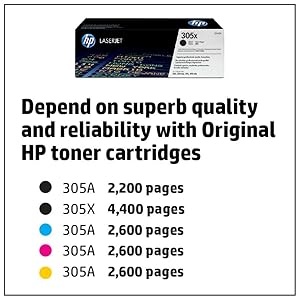
| Compatible Cartridge | HP 305A Black, HP 305X Black, HP 305A Cyan, HP 305A Yellow, HP 305A Magenta |
| Compatible Devices | Computers and mobile devices with USB and wireless connectivity |
| Connectivity Technology | USB |
| Control Method | App |
| Controller Type | Wired Ethernet, USB |
| Customer Reviews | 3.8 out of 5 stars 230 Reviews |
| Display Type | LCD |
| Dual-sided printing | Yes |
| Duplex | Yes |
| Global Trade Identification Number | 00886111731541, 00886111731602 |
| Hardware Interface | USB 2.0 |
| Initial Page Print Time | 17 seconds |
| Ink Color | color |
| Item Weight | 52.1 Pounds |
| Manufacturer | HP |
| Maximum Copies Per Run | 40000 |
| Maximum Copy Resolution Black and White | 600 dpi |
| Maximum Copy Resolution Color | 600 x 600 dpi |
| Maximum Copy Speed Black and White | 21 ppm |
| Maximum Media Size | 8.5 x 14 inch |
| Maximum Print Resolution Black and White | 600 x 600 dpi |
| Maximum Sheet Capacity | 550 |
| Maximum print Resolution Color | 600 x 600 dpi |
| Model Name | M451dn |
| Model Number | 400 M451dn |
| Model Series | 400 |
| Number of Ethernet Ports | 1 |
| Number of Trays | 2 |
| Paper Size | 8.5 x 14 inches |
| Print media | Paper (plain) |
| Printer Connectivity Type | USB |
| Printer Output | Color |
| Printer Output Type | Color |
| Printer Type | Laser |
| Printing Technology | Laser |
| Processor Count | 1 |
| Resolution | 600 x 600 |
| Scanner Type | Sheetfed |
| Series Number | 400 |
| Specific Uses For Product | Home, Office |
| Total USB 2.0 Ports | 1 |
| Total Usb Ports | 1 |
| UPC | 886111731459 886111731602 069991919388 886111731541 |
| Unit Count | 1.0 Count |
| Warranty Description | One-year limited warranty |
| Warranty Type | limited warranty |
| Wattage | 425 watts |
O**Y
Great printer - Installation Issues Addressed
I just unboxed and installed our new 451dn. Given the hesitation I had in purchasing this product after reading some of the reviews, I thought I might help others by addressing the installation, invasive software, and memory issues others have described: 1. Driver software installation: HP shipped the driver software on an included CD. After reading the reviews citing problems with installing the software from the printer, I decided to try the CD instead. Clean/easy install. Reviewer D. Matheny points out you can also download the driver off the HP website, but the CD saves that tiny bit of time, plus it checks for any updates during the install. I was able to customize which parts of the software I wanted as another reviewer described, also. Only thing I chose not to install (With the first install! See #2 below.) was HP's "Product Improvement Study," as I do not choose to be part of some study and I read elsewhere that it can be an annoyance. 2. Invasive software complaint: During installation I didn't see any sort of "monitoring program" reviewer Joanna Ward complained about, and that reviewer YiANNI said you could choose not to install. YiANNI does explain why HP would want people to use their cartridges, and HP makes that case on their web site. However, even though I ALWAYS use genuine HP cartridges from reputable suppliers (had a very bad experience with non-HP cartridges gumming up another printer plus printing with awful quality), I am in agreement with Joanna and do not want an "Authentication" dialog popping up. I THOUGHT I had taken care of that by choosing Custom Installation, and deselecting the check mark next to "Product Improvement Study" per #1 above, BUT, a few minutes later the Authentication box did pop up on my screen. I wasn't even printing at the time - it just popped up. I tried clicking "Authenticate," thinking it would validate that my cartridges were genuine then go away and not bother me anymore, but it said the validation had not worked and I could "Try Again." After trying again twice and the process not working, I knew the annoying "Authentication" dialog box would keep coming back, and back, and back... like a virus. OK, so I went to my computer's Control Panel and uninstalled all the HP driver software, then reinstalled it from the CD. This time, I deselected the boxes under Custom Installation next to three things to be sure: "HP Product Improvement Study" as before, plus "HP Printer Status and Alerts" and "HP Update." So far so good. I turned the printer on and off and printed several pages and no "Authentication" annoying virus popup box, ahem, I meant "Authentication" dialog box, has appeared. 3. Reviewer Joe Cambridge mentioned insufficient memory at 128 Mb, and that also slowed my purchase decision as my old printer had insufficient memory. Certainly a valid concern, and it looks like HP listened to Joe. The printer I received has 192 Mb - a big improvement over my old printer's single digit Mb memory. Finally - I do like this printer a lot. Very clean, nice document and web site printing. I just tried printing a photo of a sunset, too, and it's almost photo quality. A huge improvement over our old HP laser printer that was 6.5 years old. Right now the printer is on but sitting there completely silent, waiting for its next job. Not noisy when printing, either, and quite fast. Good duplexing - our last printer had duplexing, too - it's a great feature to have. So if you address the issues above to your own preference, I do highly recommend this printer.
M**Y
Absolutely a fantastic printer. I bought this for use in an ...
Absolutely a fantastic printer. I bought this for use in an office environment. We don't print color all the time but we do host events in which case we will print out close to 2500 double sided pages for an event. We've burned through multiple color printers. The only ones that ever do anything worthwhile have been HPs. I tried a more expensive Brother and Epson and both don't print pictures (head shots of speakers/guests) the way an HP does. Our marketing person flat out refused to use anything printed on the Brother. There is a noticeable difference in printed picture quality. The HP printers seem to be the only ones that can actually print a decent picture. Ok, onto the greatness of this device. It's perfect for an office environment. It networks beautifully or can be shared using a direct connection with USB. It rates at 40,000 pages PER MONTH. Seriously, if you are printing more than that you should not be looking at a printer that costs below $400. It prints crisp and bright on bond paper. Double-sided printing works great as well. It's not as quick as super floor models, but it will continuously chug along for hours without complaint. Optional add-on tray (250 sheet) is also a great purchase. Printer recognizes it immediately and it all just works. The worst con about this printer is the size of the toner cartridges. They are SMALL. Rated for about 1500-2500 pages depending on what you are printing. Of course, HP totally gouges you for them. However there are a few other brands on Amazon that work just fine. MTI brand (MTI © PRO Compatible HP 305A / 305X Color Toner Set (CMYK) for HP LaserJet Pro 300 & 400 Series) works wonderfully at half the cost. Lasts just as long and prints just as fine as HP toner will. In the end, a small business or home office that likes to print their own marketing materials won't go wrong with purchasing this. It won't print glossy photos like an inkjet will, but this is one of the best small business-class laser color printers that you can buy.
J**G
Do not buy this printer if build quality and speed are important to you
I purchased this printer to use in a small business for printing color brochures. It was not used too much (less than 1000 sheets/month) I have many other b/w lazers to do the bulk of our work. This printer worked ok ( much slower than anticipated) until I had it just over a year. I went to replace the paper that had run out an that's when the trouble started. It began making a loud thumping noise and the print quality was shot. I searched for info online, but the problems I read about didn't affect the print quality. My problem required a call to HP support. The bottom line is they said a gear or something probably broke off. Since it was over a year old (14months) they could only offer a swap out for a refurbished model at get this $364.00. I paid $408.00 for this on amazon. so what kind of option is that. My only other option is to have it repaired at a service center at my expense. I can't believe the poor build quality of this machine to have such a problem after being babied for 14 months. I would not recommend this product to anyone as there are much better options out there. Needless to say this was my 1st and last HP. I have $80 brother and $160 Oki's that are still working fine after 5-6 years of heavy use.
K**N
Great Printer, Great Price!
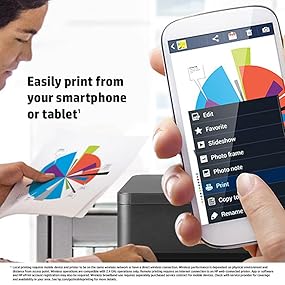
We've deployed two of these at our office, and one similar HP LaserJet Pro 400 M451NW Laser Printer - Color - Plain Paper Print - Desktop (the wireless version of the same printer, but no duplex so about 1" shallower) at a home office. Great printers for the 6 months we've been pounding on them! We're networked-only, no USB, so I can't comment on local connections. As always, I stick the CD the printers came with in a drawer and downloaded the current driver from the HP website. I set a hard IP address (only laptops use DHCP/auto-addressing on our office network), installed the driver, and good to go! The output is everything I would expect from an HP color laser. Crisp, clean, essentially perfect laser prints. Nice enough photo quality for basic business use, but they're certainly not true "photo" prints. Very handy to be able to print from iPhones and iPads. I don't do this all the time, but it's quite handy to have the ability on tap. My sole complaints are (1) price per page is higher than the cost for higher end models, such as the aging LaserJet 4600N this replaced (which needed a new transfer assembly at a cost nearly equal to the purchase price of this entire new printer!), but I knew that going in. Worth it for the reliability. And (2), we've had a higher number of paper jams than we ever had with the really ancient LaserJet 5N that the other printer replaced. Perhaps 4 over the past 6 months, which is not a lot, but I guess the paper handling of that 5N was stellar because that's about how many jams we had over 12 years with that 5N, so perhaps I'm just spoiled. Minor issue that's fairly rare, considering how much these printers are used. I'd give it 4.5 stars if I could, but I just didn't feel right about giving it a full 5 stars... it was a close call, though. Overall, highly satisfied with this purchase.
G**N
Excellent -- Best Printer I've Ever Owned
I've had this for well over a year and I'm very happy with it. I'm amazed at how long the included toner cartridges have lasted, but finally I had to replace the black one. Compared to the piece of junk this unit replaced, a Konica-Minolta Magicolor 1600W, replacing the toner cartridge was super easy. My first laser printer was an HP Laserjet IIP in 1990. I used it for over a decade until it stopped working right. Then I picked up a used HP Laserjet 6L around 2002. I was very happy with the super sharp text and used it for for over a decade until my young kid killed it with forceful experimentation. Then I decided to try the Konica-Minolta Magicolor 1600W, a color laser which I found for only $95 at Fry's. It was nice to have a color laser at that price, but there were two problems. First, the text was much less crisp. Second, changing the toner cartridges was torture; I don't know how a worse system could be designed. I don't know how a worse system could even be imagined, except maybe by having a sharp knife suddenly spring out and stab you while changing toner cartridges. I changed a couple, then lost a couple important tiny pieces of the printer on the next cartridge change. I decided I was done with the stupid Konica-Minolta and that I would go back to HP even if I could not afford color laser. I thought about looking for a used Laserjet 6L on eBay. But by this time, this M451dn was available for just under $200. With great reviews. And duplex printing!! I'd never had a duplex printer before. $200 was a little more than I had wanted to spend but I decided to go for it, and I'm so glad I did. This is the best printer I've ever had. This printer has my highest recommendation. UPDATE FEBRUARY 2025 I've now had this printer TEN YEARS. I just replaced a cartridge; I use cartridges from LD Products. I printed a custom test page downloaded from Cartridge People and it looks fabulous. This printer might be the best $200 I ever spent.
A**A
My detailed review !
Inasmuch as it took me weeks to correctly install it (!!!) It is quite superb; the results are flawless; yes the toner is criminal, but ya can't fight city hall... The duplex is great. The logical face up in either input paper path is very welcome, quite unlike other brands where you have to work and turn or work and tumble. The only thing WRONG wit ALL of these printers is that everyone uses euro measurements, while paper in the us uses a basis weight. Therefore you have to find a comparison chart. The really clever part (again, unlike other brands) is how it treats heavier stock or label stock: it simply prints a little slower so the paper goes by the heat source slower. In general the curl factor is the same or a BIT worse than other brands. It has never jammed. The installation is wonderfully peculiar. It's on the network. The driver (and a couple of tons of other useless corporate garbage) is inside the printer and you download it via your browser, and then it installs itself. I find it completely unnecessary to have all their silly toolboxes and notifications and buy me buy me buy me software running. The easiest way to disable this is by using autoruns and experiment by turning things off that seem overly annoying. All you REALLY need running is HPLaserJetService.exe , and this will call all the necessary dialogs so you have full control. Do not be dismayed when the front panel says you need toner. That notifies you WAY too early... part of the buy me buy me buy me philosophy. No I have not tried off-brand toner. I bit the bullet and bought a whole CMYK batch. OF COURSE the toner that it COMES WITH is an annoying teaser amount which lasted oh, probably 300 sheets. I do notice that ALL HP printers have lots of trouble with the area around purple, for whatever reason the toner chemistry is. But generally speaking, even of you try and print a rather well done photo on even modest paper, you will be quite surprised at the result. It's also quiet. And my cat already broke off one of the feeder floats (on the left side) but that doesn't seem to affect anything. It still stacks pretty well, even with duplex. (I use 28 lb 96 bright nice paper) Because of the way it's built it does NOT get dirt inside. And if it does, (the aforementioned cat) since everything is white plastic it's easy to see. I put a few loops of packing tape all over the top of the printer and the cat took the hint. Now he sleeps on my desk. Oh, and the reason I got this is my relatively annoying dell printer broke a couple of weeks after the warranty was up and I was outta luck. Scooter, the tech support guy on his bicycle somewhere in the himalayas, tole me I had to reinstall my operating system and I told him where to go. My operating system has nothing to do with your supposedly good delrin gears... So why did I have the Dell printer? because my previous HP was a piece of junk -- I think there was a class action suit abut it -- there was a front-surfaced mirror rotating inside a chassis buried in the printer. Somehow the fine toner particles, over time, deposited themselves on the mirror surfaces, and the colors got washed out. There was no fix, although someone in Norway I think posted a 30 PAGE website with gorgeous pictures about how to take it completely apart and rebuild it, but it took him weeks... so I gave up. Bottom line: except for my LJ4MP, which lasted for 20 YEARS (!!!) (monochrome, but an absolute straight paper path) this is about the LEAST annoying HP I've ever used.
D**D
HP 400 Printer
While the product is a good one and seems to work very well (too soon to make a final judgement) The vendor is not truthful about where it sends from. His product details say "ships From California" but the item actually shipped from Barrington New Jersey". I wonder what else is not quite correct?
M**H
Good color, auto-duplex printing, fast setup
I've had an Hp2600n since March of 2005 and decided it's time to get a new printer. I will echo the comments of some of the other reviewers that this printer series nomenclature is confusing: * 451dw: auto-duplex, wireless * 451nw: wireless * 451dn: auto-duplex Be very careful which model you order. I tried to order the 451dw because I wanted auto-duplex and thought wireless would be nice to have, but mistakenly selected the 451nw which didn't have auto-duplex. I returned it and got the 451dn. Note: if you want duplex printing then you need the "auto-duplex" feature. The 451nw is listed as a "duplex" printer, but it only will print on both sides if you take out each page and manually reload it. I digress: my setup experience was a breeze. I plugged in the power and Ethernet cables and turned off the Smart Install feature on the front panel of the printer. Next, I set a static Ethernet address and then used the Control Panel/add printer feature on Windows 8 (32 and 64 bit systems). It found the printer immediately and I used the "have disk" option. It loaded on all 3 of my PC's w/o any issues. I was able to use Airprint on my iPad without any setup issues after I connected the printer to the LAN. The photo on the test page looks surprisingly good for a laser printer and the text is sharp.
P**J
Exceptional printer for home!!
Prints color images a lot clearer then I had expected. I have the printer setup as a network printer and the installation was pretty straight forward for me, just set the IP I wanted the printer to use on the printer before attaching to the network and everything fell into place. Linux and Windows machines had no problem connecting to it and printing. Printers memory is a little low but for a home office it should not be an issue and an upgrade is available.
C**N
Excelente equipo.
Ya tenía una igual solo que con el uso como todas las hp láser color , la banda de transferencia terminó su ciclo y no hay refacciones para sustituirla. Tuve mucha suerte de encontrarla aquí en amazon. ESTOY FELIZ por mi COMPRA.
B**X
A true work hosrse!
This thing is like the Energizer Bunny - it just going and going and going! Buy after market toner for it. I've gone through several non OEM cartridges and they have all worked. Just be careful of using Inkfirst cartridges. The ones I got were had used rollers in them and were all badly scarred. I swapped in my original toner rollers and they now work great.
A**R
Good printer! Cartridges are pricey (like most color printers)
Good printer! Cartridges are pricey (like most color printers), but this is very compact and nice. Works better off my computer's USB port than through my router's Ethernet port.
P**A
Good deal
Includes toner, working fine so far. Warning: it's really heavy to move about or lift onto a table, with or without toner installed. Decide the ultimate location before you start!
Trustpilot
1 month ago
1 month ago