Desertcart purchases this item on your behalf and handles shipping, customs, and support to OMAN.
🚀 Mesh WiFi that moves with you—never lose signal, never miss a beat!
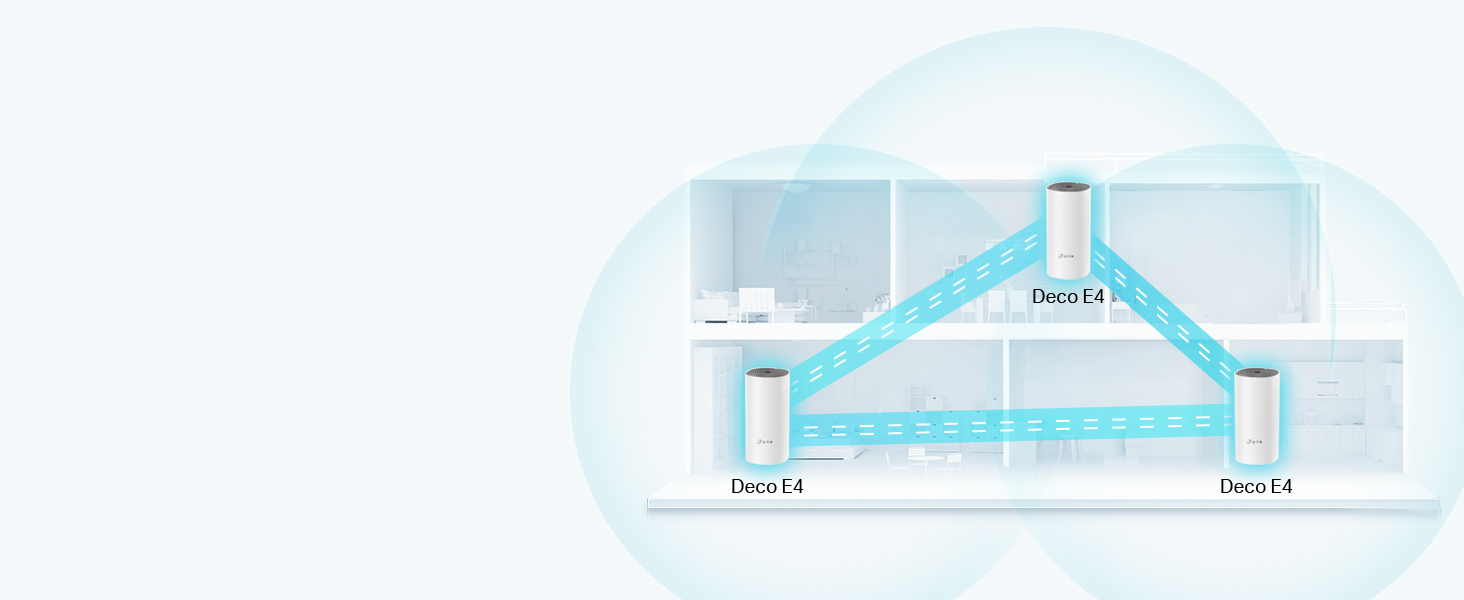
The TP-Link Deco E4 (3-pack) is a Wi-Fi 5 mesh system designed to blanket up to 4,000 sq ft with seamless, high-speed AC1200 dual-band WiFi. It supports up to 100 devices simultaneously, offers easy setup and management via the Deco app, and integrates with Amazon Alexa for voice control. Ideal for medium to large homes, it eliminates dead zones and allows effortless network expansion by adding more units. Parental controls and device prioritization ensure a secure, optimized online experience for the whole family.


| ASIN | B07RXLF5XZ |
| Antenna Location | Home |
| Antenna Type | Internal |
| Best Sellers Rank | 578 in Computers & Accessories ( See Top 100 in Computers & Accessories ) 2 in Whole Home & Mesh Wi-Fi Systems |
| Box Contents | 3 Deco units |
| Brand | TP-Link |
| Brand Name | TP-Link |
| Colour | White |
| Compatible Devices | Laptop, Personal Computer, Smartphone, Tablet, Amazon Echo/Alexa |
| Compatible devices | Laptop, Personal Computer, Smartphone, Tablet, Amazon Echo/Alexa |
| Connectivity Protocol | Wi-Fi, Ethernet |
| Connectivity Range | 4000 Square Feet |
| Connectivity Technology | Ethernet, Wi-Fi |
| Control Method | Voice |
| Controller Type | Switch |
| Country of Origin | China |
| Coverage | up to 4000 square feet |
| Customer Reviews | 4.5 out of 5 stars 10,500 Reviews |
| Data Transfer Rate | 1167 Megabits Per Second |
| Frequency | 2.4 GHz |
| Frequency Band Class | Dual-Band |
| Frequency band class | Dual-Band |
| Has Internet Connectivity | Yes |
| Has Security Updates | No |
| Is Modem Compatible | Yes |
| Item Dimensions L x W x H | 9.1L x 9.1W x 19H centimetres |
| LAN Port Bandwidth | 100 Mbps |
| Manufacturer | TP-Link |
| Manufacturer Part Number | Deco E4(3-pack) |
| Maximum Upstream Data Transfer Rate | 1167 Megabits Per Second |
| Model Name | E4 |
| Model Number | Deco E4(3-pack) |
| Model name | E4 |
| Number of Antennas | 2 |
| Number of Ports | 4 |
| Operating System | ZyNOS |
| Other Special Features of the Product | Alexa Compatible, Parental Control |
| Product Warranty | 3 year manufacturer |
| Router Firewall Security Level | Medium |
| Router Network Type | mesh |
| Security Protocol | WPS |
| Special feature | Alexa Compatible, Parental Control |
| Wi-Fi Generation | Wi-Fi 5 |
| Wireless Compability | 802.11ac |
| Wireless communication standard | 802.11ac |
D**B
Sorted out our WiFi
We currently have a Virgin Hub 3, which gives great speeds but only really for the room it's in and the signal degrades pretty quickly in any other room. We live in a 3 bed semi and our Virgin Hub had to be installed in the living room at the front of the house, so signal is pretty poor (even when using Repeaters) in our rooms at the back or the extension & garden, and so I thought I'll give the Deco E4 a go. Installation generally was pretty easy - the biggest faff was getting our Virgin Hub to go into modem mode - for most routers/modems this is usually a simple process but the Virgin Hub took a few times to restart before it properly entered modem mode. Once sorted though, installing the Deco units via the app was simple - just plug in the unit, connect it to the modem and let the app do the rest. Once the first unit was connected, there was already a massive improvement in WiFi signal across the house, without any drop in speed. Adding the additional units was just as easy - just plug them in to the socket in your chosen room (in this case, at the far end of our dining room and one of the bedrooms upstairs) and let the app connect them to the network. Once these were added, the signal across the house and garden is much improved and can now use the WiFi across the house without needing to switch to WiFi repeater networks. It's much simpler to use now as it's essentially one WiFi network across all the units. Naming the new WiFi SSID to the same as my existing network helped as all devices were able to reconnect without needing to add them again. One issue, although minor, I did have is that although the Deco offers 2.4Ghz and 5Ghz bands, it doesn't seem to give the option to use a certain band for specific devices. By leaving both 2.4 and 5 on, it apparently chooses the most suitable band for whatever use you device needs - although I'm not sure if that is the case. A workaround I found, rather than turn one of the bands off, was to create a guest network solely on the 5Ghz band and connect my phone specifically to it. Overall I'd highly recommend this to anyone who has weak signal or dead zones in parts of their house, as it should make a massive difference. One thing to watch out for, although not an issue for me, is that the apparent maximum download speed these units offer is 100mb so anyone with higher connection speeds will need to consider this.
M**D
WiFi finally reaches the places it used to avoid! 📶😂
After years of watching my WiFi disappear the moment I walked upstairs, I finally gave in and bought this mesh system. I wish I’d done it sooner. Setup was genuinely straightforward using the app, and within minutes I had all three units connected. The signal is now strong throughout the house, with no more wandering around holding my phone in the air trying to find that one magical spot where the internet works. One feature I really like is how easy it is to assign devices to a specific Deco unit. If you’ve got devices that work better with the nearest mesh point, you can pin them to it in the app instead of letting them randomly connect elsewhere. It’s been especially useful for my CCTV cameras. You can also set high-priority devices with just a couple of taps, so things like CCTV cameras, Netflix streaming or gaming get first dibs on your bandwidth when the network is busy. It’s a simple feature, but it makes a noticeable difference. Streaming, gaming, video calls and smart home devices have all been rock solid since installing it. Devices switch seamlessly between the Decos as you move around the house, so there’s no constantly reconnecting to different networks. The app is easy to use too, with plenty of options if you want to customise things, but it’s simple enough to leave everything on the default settings if you just want reliable WiFi. If you’re fed up with WiFi dead spots or extenders that promise the world and deliver disappointment, this is well worth the money. My only complaint is that I spent years blaming my broadband when it turned out my old router was the real culprit! 😄
G**H
Great product for seamless coverage
This is a great bundle. I've gone from having no coverage in parts of the house and trying to limp by with repurposed routers acting as access points to having seamless coverage in the whole house. Initial setup of the first unit was slightly tricky but it turned out my phone's security setting wouldn't let it connect to the initial temporary open wifi network, probably because I have work related apps on the phone. When I tried it using my wife's phone it worked first time and was really easy. The second and third units were plug and play and needed no further config. No degradation of speed and overall really happy. This product was recommended to me by a friend and I'm happy to recommend as well.
A**R
Great value WiFi solution
I’ve been using the TP-Link Deco X10 AX1500 Mesh WiFi 6 system for a few months now, and overall I’m pretty happy with it. Setup was quick and straightforward using the app. For effective meshing, one of the hubs needs to be used as a replacement router whilst putting your existing router in bridge mode so you need to take this into account when planning where to place the other hubs. I have done some tests and found that there is around 50% reduction in speed on each hub but in areas of my home where there was dead spots, I now have reliable signals. One downside is that advanced settings are a bit limited in the app, so power users might find it lacking. But for most people who want reliable, hassle-free WiFi, it does the job really well. Great value if you’re having WiFi issues.
D**I
TOTALLY SUPERCHARGED my Virgin SuperHub!!
**** Overview **** I should be working, but I’m taking time out to write this elongated review of the Deco M5 X3 for good reason. Read on…. I purchased the Deco x 3 after reading a review here on Amazon stating that it worked great with Virgin Superhub 3. I carried out additional research and the Deco was listed as the best to buy on a few websites, especially for the price. I took the plunge and eagerly awaited it to be delivered 2 days later after suffering a seriously bad wifi connect for 2 months. In the past week, it became even worse and I decided I had to make the move to fix the issue. Packaging Upon receiving the package, I admittedly wasn’t particularly ecstatic to see that it was in its cellophane covered retail box without any Amazon other packaging. I usually save boxes for my gear and like them to be in good condition if I resell, but as luck would have it, there wasn’t any damage worthy of note. More to the point, I’ll be damned if i’m selling this any time soon due to it’s astounding performance! The box is well presented with the 3 ‘Deco’ nodes on the front with PC Pro ‘Recommended seal as well as Amazon Alexa and IFTT logo assuring that the product will work with those devices and service. There’s also a sticker on it which assures that the hardware will work with any broadband provider which definitely gives peace of mind. There a ‘HomeCare’ 3 year free service emblem too, which I believe relates to virus protection. Opening the box, you’re greeted with the 3 futuristic looking dish style ‘nodes’. Beneath this tray, is a row of 3 power adapters, ethernet cable and a Quick Start Guide. The presentation is immaculate and resembles that of Apple. It looks like quality and feels like quality which gives assurance of a quality product from the get go. **** Product **** Each node is a circular disc, around 2.5cm in height and 12cm in diameter with a small multicoloured LED in the centre. The nodes design suggests the form of a radar which I thought was quite innovative. They are fairly light, they look like part of the ‘Deco’. Ports on the back include power and 2 ethernet. Power adapters and cables are high quality, as is the supplied ethernet cable. **** Setup **** On the top tray, there is a clear, simple instruction to download the app from the Apple or Android store. A quick search and I had the app installed within a minute or so through my then slow wifi. The app is very basic and to the point. It requests the user to create an account (or login if you have an account) choosing email and password. You then confirm on that email address. After this, it prompts the user to plug one of the 3 nodes (it doesn’t matter which) into the modem / router and then plug it in using the power adapter. The light on-top of the node lights up and signifies its state: Yellow - Start up Blue Pule - Ready for setup Blue Solid - Setting up Green - All is well. Red - Issue The app shows a 3D plan of a property and prompts you to select one of three which matches your home best - one floor, two floors and 3 floors. The diagram shows how you should consider spacing the nodes too. After asking which room the node will be placed in, the app then connects to the node through your router / modem and the lights change according to the state. After going from all stages (apart from red) from yellow to green, it notifies the user that it’s successfully connected. The user is then given the option to name their network and apply a password to access within wireless devices. It then gives the user the option to add another TP Link product. In this case, there were two more to add so I added the second in the same way and the third. Each was a breeze just like the first. There was a notification for a firmware update, so I ran that and it installed and rebooted all devices within 4 minutes. Although the product comes with a Quick Start Guide, this wasn’t necessary. The app makes things simple. This setup process was a godsend, since i’m not tech minded and I always prepare for things like this to just fail to work. It was absolutely childsplay! Approximately 20 mins to unbox and set up! **** Speed & Coverage **** After installing the first node in my office (connecter to the router), I ran a set eager to see what effect it had and to my amazement, on my 100 mbs connection, after testing my wifi previously and getting a mere 8 mbs, I was clocking in 105 mbs- through the air! It’s clearly solved a huge problem with pertaining to Virgins Superhub 3! What’s more after installing the next two in the same way - one in the lounge and one in the kitchen at the rear of my flat, the speeds, as I moved around with my iPad (after connecting with new Network and password) were almost the same minus a few meg. Delighted! I reached for the TV remote for my new 60 inch OLED LG which was previously bottlenecking with it’s capability and my previous poor wifi, entered network and Password and booted dup Netflix. It painted the screen immediately with all content. I clicking into a movie and it played after a second and fast forwarding was done equally as quick. Despite it previously pixelating and buffering often throughout media, it is now working perfectly! General Internet browsing on iPad and iPhone is notably faster. Whats more….At the very end of a flight out stairs, outside, on a level below, I have full strength WiFi in my GARDEN which i didn’t have previously. RESULT! Streaming tunes in the summer! Full Strength literally everywhere where I will go throughout the vicinity of my entire 2 bed upstairs flat with downstairs remote garden. **** Experience **** Netflix, Amazon Video and Apple TV would take a while to load and the content would often be pixelated and buffer, however now it’s as slick as butter. General Internet browsing is so much more effective and enjoyable now too. I click and something happens - usually a near immediate download of a web page or stream of a video, stable as can be. **** Alexa **** To use Alexa with the devices, you need to install the relevant skill. This is not mentioned in the app, but I’m told it is mentioned in the quick start guide. Searching ‘TP-link Router’ within ’Skills’ in the Alexa app and clicking ‘Enable to Use’, the skill is downloaded. You are prompted to log in to your TP-link account to enable the skill. You do so, by clicking ‘Authorise’ once logged in. The Alexa app prompts to find new devices to which we accept. It then discovers the TP-Link router. Clicking ’Set up Device’ and ‘Done’, the Deco will be shown in ‘Devices’. You can then add it to any room Although I’m an ardent Alexa fan as an owner of a ‘Smart Home’ I wasn’t aware of how these devices would work with Alexa. Having searched for the skill however, the page informs us that Alexa allows us to: * Enable Guest Network when friends come over * Activate WPS to add new devices to the network * Turn off the routers (‘nodes’) LEDS at night * Check the Internet connection speed you’re getting from your provider * Prioritise online applications or devices at those important moments Primary commands (at time of writing): ‘[Alexa] Turn off the LED’s’ ‘[Alexa] Enable night mode’ ‘[Alexa] Enable my guest network’ * I haven’t managed to get Alexa to work with any commands as yet, but will report back. **** Summary **** As a Virgin Superhub 3 user, I’m over the moon with this! As an owner of a two bedroomed flat, I did consider that this package might be overkill. Seeing the performance, I could have possibly done with only two, but the pricing for 3 and the availability here on Amazon (x2 were only available for delivery in a few weeks) promoted me to buy the Deco M3 X 3. This hasn’t only changed the way I entertain myself, but also my actual work which pays for this kind of stuff. I can now work much more faster and more efficient. With this considered, it’s one of the best investments I’ve made in years. I wish I had of bought this much sooner. My fear of tech, error and complications always deters me, but as mentioned, this could not be more simple. It products like this that give me the confidence to spread my wings and buy more. Running circa 106 mbs - That’s a 98 mbs increase! Very pleased! Thoroughly recommended!
N**N
Great for 3-4 bed house with wifi deadspots
If you are using the router from your ISP and have around 15-20 devices in the house, with 5-10 being used at any one time and suffer from wifi deadspots and drop out, then I would definitely recommend the Deco M5 3 kit Mesh system. However, if you perhaps have a more complex set up, you might want to do more research as I couldn't say whether or not it would do the job. We have a talktalk router which is upstairs as our phone point is there (don't ask!). My teenager's room is right next to it but complained that they kept losing connection and couldn't do their homework or talk online to friends. Devices would drop out constantly and we would have to reboot the several times a week. The router was obviously not coping as we added more and more devices, so much so that I honestly thought of getting talk talk to send another router. However, I hesitated as I felt it would just be 'more of the same'. I'm so glad I did as this system (so far) has been absolutely ideal. Firstly, before you do anything I would advise that you watch the set up video (search on youtube if you can't find the link on the product page). You then need to download the deco app to your phone, register your email address and complete the registration when you get the email. Don't start the set up or plug anything in until you've done this as this step is very important! Once you have downloaded the app and registered, open it up and start the set up and it will guide you through the process. You will first need to name your new network and give it a password. Make sure you make a note of this as you will need to reconnect all mobile devices, tv's etc to this new network once you are up and running. The first deco device you set up will be your main one and this needs to be placed near your router, as it is the only one that will be physically connected to it (it doesn't matter which one you pick for this as they are all the same). You do need to turn your router off before plugging everything in (the app will show you what to do) and then turn everything back on. The app will then tell you if the first deco has been 'found' and set up successfully. With the next device, again use the app but set the next deco up using a plug socket near the router and first deco. I initially tried to do this in the location I wanted the 2nd deco to be but the app couldn't connect with it so I moved it near the router and retried. This worked but you might have to do this a couple of times. When this was set up I moved the 2nd deco to where I wanted it and then plugged it back in and I could see on the app that it was back online. The app also allows you to select the room where you have placed the devices eg lounge, bedroom, kitchen or custom name your own (you can change this at anytime). It also asks you to pick a house layout that is similar (again watch the video as it walks you through the app). You can also change the layout at any time. Do the same for the 3rd device ie place near your router to set up and once found by the app you can then unplug and take it to the location you want. When finished setting up all 3 (all should have green lights), reconnect all your mobile devices and tv's etc to the new network. Your phone will ping when each new device is connected. Finally, once every device has been connected, you can use the app to optimise the network. What this does is to spread the device load around the deco mesh system so that there's less strain on any one deco or the router. So far it's worked brilliantly, and we have a strong wifi signal in pretty much all the deadspots. One slightly 'cautious' note: I did use one of them for the room with my office space but even though it was right next to my pc it wasn't getting the speed I needed so in the end I've connected it to my pc using an ethernet cable with fantastic results. Our laptop and Macbook though work absolutely fine with the deco mesh system wifi so I think this is more due to the wifi adapter on my pc as it's never really been right! Overall, well worth the investment and the issues around our house have now been officially solved!
M**N
Compare mesh v ap, mesh worked best for me
I have 1gb fibre broadband, but unfortunately they placed my router at the front of the house (modem and router separate) I recently purchased a ubiquiti u7 access point and placed it in the center of a 3 floor home Originally worked great but noticed there was a lot of dead zones for wifi I then looked into replacing it with this product and so far it is great, quick and easy setup, however it wouldn't work directly off the modem so it does need to be connected to the router WiFi is never guaranteed speeds but I'm safe to say that I'm getting great download and upload speeds, and because it comes with 3 units, all 3 floors are fully covered This product has fixed all the dead zone issues I've had before and great value
D**S
Works Perfectly, 4G Internet Users - Read Here!!!
Firstly, really easy next day delivery from Amazon as per the usual standard. The TP Link Deco devices were purchased not only to help boost the wifi signal around the house for a couple of deadspots, but to provide a better wireless signal generally. In January 2019 we decided to get rid of conventional broadband and fibre solutions and move to 4G home broadband. We purchased a TP-Link MR6400 4G Router and a 12 month sim only Unlimited data from Three. Initially we were super impressed with the speeds and the reliability of Mobile Internet as a home solution. We were excluded from any phone line issues that people in our street still tackled with standard broadband providers, or issues with the lines direct to older houses. We live in a good area for broadband generally with a steady 30mbs download, however the further away you are from the FTTB (Fibre to the box) the worse your internet was, we were these people im afraid and usually got a consistent 15-20mbs. However we noticed after a few months, speeds were slow, ping response from the 4G box was rubbish. Initially doing some reboots of the box resolved some issues, but not all. We have recently just moved to EE unlimited sim only data plan hoping we would see a dramatic difference, to no avail. Albeit inconsistent due to the 4g Router issues, the speed is faster with EE at up to 90mbps. So i came to the conclusion that the 4G Router must have an internal issue that effects the wifi signal it sends out, effecting the speed. I purchased these and as previously mentioned above, they arrived in great time. The box is well packaged and the product itself seems a good standard. Plug and play standards meaning i simply unboxed, power lead and ethernet into the back of my 4G router and hey presto. Download the iOS or Android app and go through the simple step by step instructions. Renamed the Deco to the name of my already implemented wifi (Dans Fibre), and all my devices previously linked to the router that was called (Dans Fibre) just linked to the Deco. (This also saves alot of time not going through all those devices you have and pairing to a new wifi name with a new password) 10 minutes and my first deco was out the box and receiving 4G EE mobile data and sending it out to the house. Signal and ping speeds were massively better, however i needed to route into the 4G Router 192.168.1.1 and turn off the wireless which then allowed the Deco to be the only wireless signal we could see. Which proved my theory right about the box having an internal issue. Ping speeds were back down to a healthy response instead of the randomly fluctuating 200ms 178ms etc. Im happy with low 30ms ping speed. Continuing with my setup i placed another one upstairs and paired via the app, bang fast reliable internet upstairs. These really are simple to use, and albeit i know my way round most computer technology, im definitely not a network guy, but seriously these were an absolute breeze, and have temporarily fixed my internal wifi issues. I will still need a replacement 4G router, but that will only make things better. For what these are designed to do, they do a fantastic job. It boosts the signal around the house really well, and the intelligent switching between Deco units to provide the best signal is great. Ive only scratched the surface with some basic use, but i like some of the built in features within the app that let you prioritise device bandwith and speed, and parental controls, guest networks etc. Its great to see who is using what also including who is using all the bandwith downloading netflix 24/7. If you have home broadband or a 4G solution, this will work just fine. My situation may be different to yours for use, it may be the same. But i couldnt find any reviews that related to using in a 4G Environment. I hope this review helps other would be 4G Solution people. Roll On 5G!!!
D**R
UK plugs only
The product is sold for delivery Belgium, but cannot be used, due to UK standard plugs, not compatible with Belgian power outlets. This is NOWHERE mentioned explicitly!!
A**B
ممتاز
لو بتحب تكون كل حاجة عند تعمل بشكل ممتاز ومغطية البيت بالكامل هتحتاج النوع دا من Mesh wifi, ولكن حابب أنبهك أن دا مش مودم بيستقبل خط الانترنت, لا دا بيشتغل على المودم الأصلي فعلشان كده إنت هتستخدم قطعة جنب المودم الأصلي وكده أنت مش هتستفيد إلا بالقطعة التانية في مكان تاني في البيت يعني القطعة الأولى مش هتعرف تنقلها بعيد عن المودم, علشان كده حاول متجبش قطعتين هات قطعة واحدة Deco DSL أي نوع بحيث تكون هي المودم وقطعة واحده من النوع دا تاخد بيها واي فاي لمكان تاني بعيد في البيت. أنا جربت Mesh network من كذا شهر وبصراحة يعمل بشكل ممتاز حتى لو اتوصل عليه عشرين جهاز في وقت واحد
J**N
Recommend this product to everyone I talk to
Great WiFi product
T**L
Great product to say the least, 300 sqm coverage at least
Perfect in every sense
H**H
Best
Finally it works as advertised. Best one.
Trustpilot
1 month ago
1 day ago