Desertcart purchases this item on your behalf and handles shipping, customs, and support to OMAN.
🎨 Elevate your art game—draw like a pro, work like a boss!
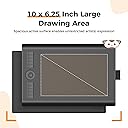
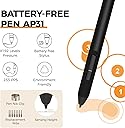
The GAOMON M10K is a professional-grade drawing tablet featuring a large 10 x 6.25 inch textured surface and a battery-free stylus with 8192 pressure sensitivity levels. It offers 10 customizable shortcut keys and a programmable touch ring to optimize your creative workflow. Compatible with Windows, macOS, and Android, it supports major design and remote collaboration software. Ideal for artists, designers, and educators seeking precision and efficiency in digital drawing and editing.


| ASIN | B07HQDN7W6 |
| Active Surface Area | 10 x 6.25 inches |
| Additional Features | Battery-free Stylus, Built-in Pen Loop, Extra Replcement Nibs, Programmable Press Key, Touch Ring |
| Best Sellers Rank | #12 in Computer Graphics Tablets |
| Brand | GAOMON |
| Built-In Media | Battery-free Stylus, Carrying Bag, Pen Nib Clip, Pen Sleeve with Extra 8 Nibs, USB Cable |
| Color | Black |
| Compatible Devices | Certain Android Tablet & Smartphone, Desktop, Laptop, Mac |
| Connectivity Technology | USB |
| Customer Reviews | 4.4 out of 5 stars 17,946 Reviews |
| Display Type | No Screen |
| External Testing Certification | 0000 |
| Item Dimensions L x W | 14.17"L x 9.44"W |
| Item Highlight | Battery-Free Stylus, for Beginners/Students/Teachers, Ideal for Design, Writing & Editing, Works with Mac/Windows/Android |
| Item Type Name | Computer Graphics Tablets |
| Item Weight | 695 g |
| Manufacturer | GAOMON TECHNOLOGY CORPORATION |
| Mfr Part Number | A0.M10K00-1-002018-EU |
| Model Name | GAOMON M10K |
| Model Number | M10K 10*6.25 inches |
| Native Resolution | 1920x1080 |
| Number of Items | 1 |
| Operating System | Android 11, 12, 13, and 14, Windows 7 or later, macOS 10.12 or later |
| Pressure Sensitivity | 8192 levels |
| Screen Size | 10 inches |
| Software Update Supported to Date | unknown |
| Special Feature | Battery-free Stylus , Built-in Pen Loop, Extra Replcement Nibs, Programmable Press Key, Touch Ring |
| Specific Uses For Product | Designing, Drawing, Painting |
| Target Audience | Artist, Content Creator, Designer, Student, Teacher |
| UPC | 653334993496 |
| Unit Count | 1 Count |
| Warranty Description | 1 year warranty under non human made damage |
G**N
Cheap & reliable - a great tablet for beginners and teachers
When I first saw this tablet I was rather skeptical; even for a smaller tablet it was incredibly cheap, especially when compared to the prices set by other brands. I went ahead and ordered this tablet, after all there’s not much to lose; on top of the Gaomon warranty I was also offered a 3 year long protection plan for a little under $5. Already a better start than any other tablet I’ve purchased. The tablet arrived much quicker than expected and I was also pleased to see how nicely everything was packaged. I attached a little unboxing video here; I went ahead and removed the plastic from the products (tablet, tablet pen, and glove) before recording, but everything was re-placed as how it was when it came in. The contents include: Tablet features: 6.5” by 4” Work Area. 4 Shortcut keys Everything else: The S620 tablet itself Battery-free AP32 pen (8192 levels pen pressure, aka pretty standard pen pressure but impressive for such a small tablet) 1x USB Type-C Adapter & 1x Micro USB Adapter Drawing glove Spare pen nibs (enough for the tablet’s whole lifetime, more nibs are available on their website but they provided plenty to start with) Setting up this tablet took no more than 10 minutes, Gaomon’s site was really easy to navigate. If you have another tablet make sure you uninstall that driver before installing this one, the same goes for any tablet, only one can work at a time. Not that big of a deal, just a tip for beginner tablet users! After around an hour working with the tablet, I got an error message on my computer and the driver stopped working. I went back to Gaomon’s website and right there on the front page (it’s so big you can’t miss it) was a link to download their universal driver that would fix the issue right up. kudos to them. Driver issues are super common with all tablets, but I’ve never seen a company that openly acknowledges & tries to give you as much access as possible to fix them as Gaomon does. I didn’t have to dig for this fix AT ALL, and the tablet worked normally after taking the 2 seconds to download the new driver. Super rare for tablet companies, you usually have to dig. There was only 1 cord for this tablet, which I was really pleased about. There’s no clutter! It’s definitely portable and quick. The glove fit me as well, which I wasn’t expecting since tablet companies tend to either send huge gloves or extremely tiny ones, but this one fit me perfectly! There’s also USB connectors in case you want to use the tablet on your phone; like I said, it’s made for portability and ease of use. The pen nibs supplied are enough to last the tablet lifetime, it’s overall a great deal. As for the tablet performance itself, it works just as well as my $350 Wacom Intous (medium). Obviously, it’s a lot smaller than I’m used to, which took some adjusting, but that’s expected. I got the hang of it within the same hour and worked on it as I would any other tablet after that. It performed just as well drawing wise as my Wacom. The only con really was the pen. For the first hour or two I was really enjoying the pressure of it. After an hour or so I had to push a bit harder for it to connect & to get the pressure I wanted. Again, this took some adjusting too and wasn’t my favorite, I’m more used to pens that don’t have so much “buffer room” so that’s more of a personal preference. Once I was more used to it after another hour or two it wasn’t so bad. For such a small and well priced tablet though, it’s surprising that it works THIS well. You definitely get bang for your buck I’ve never been one to use shortcut keys before, but I decided “why not” and set some up to use for this tablet, and wow I’ve been missing a lot! I like how these keys click a lot more than my Wacom’s do. Their sensitivity is really nice and the shortcut menu is right on the driver menu so it’s super easy to navigate and set up. I highly recommend this tablet to beginner artists (I’m going to be giving this tablet to my younger sister, who’s just recently getting into digital art/animation), it’s cheap, easy to understand, and very portable. It does it’s job well, what more can I say? In a time like this with the lot of us doing everything online, I’d also recommend this tablet to teachers (my own struggles to write equations with his mouse), it would really help with signing things online as well! I’m actually astounded that I spent hundreds on a tablet I could have gotten for less than half the price for the same quality from Gaomon. Leading tablet companies aren’t always the way to go, Gaomon has much better protection plans as well! And I got a free tablet glove. Now, I wouldn’t suggest this particular tiny tablet for full time artists like myself, they have other sizes that I expect to hold up just as well for under $100. Hell, I could even get a screen tablet for cheaper than I got my Wacom desk tablet for. Had I known about Gaomon when I was first looking for a tablet, I surely would have saved a lot of time, money, and clutter buying from them.
A**A
BEAUTIFUL
I ordered one from another company, and that one was super glitchy. I ended up deciding to spend the extra $8 to get a better one, and this one is AMAZING! I love the dots to help orient my self, and the size is quite big! It is very portable, and the pressure sensitivity is amazing. I love how easy it is to use compared to the other one I purchased from another company. Will be keeping. Quite thin, but that is good! I love love love this I totally recommend. I am just using this for note taking.
S**S
Very good product for the price.
Imma be honest, it's pretty good tablet, I had to change the nib on the pen as soon as I got it because it came out easily, it's left hand friendly and it's got a hover over the area function and it reads variable touching pretty well, that being said it is a budget option but it carrys weight in the buying options around Amazon. You could use it for getting into drawing and it's got a lot of buttons.
R**E
Recommended.
Amazing for a off brand tablet. I've found non name brands do better than name brands. Gaomon is a really good tablet. I've been using it a few days and rather impressed with it. The pen pressure is good and responds to various degrees of pressure. It tracts really well to real time when you're trying to draw with zero delays. I've done some simple sketches in krita and am rather impressed with it. Personally I could care less for the button keys but they're industry standard so your'e stuck with them. Overall I am impressed with this off brand tablet and would recommend it if you don't want a tablet that breaks the bank.
C**F
Go buy
Granddaughter was very happy with it and still uses it.
B**Z
Easy, fun, lightweight to be creative anywhere
So easy to use and compatible with a variety of products…from laptops to iPhones. The size isn’t cumbersome and lightweight. Great for easy travel.
A**R
Works ok, mostly.
Mid. Got it in July, had quite a bit of difficulty getting it to work. I have an ultrawide monitor and since the resolution was different it sometimes gives the drawing weird proportions. I’ve used it on and off, it seems to have been getting worse over time. The strokes have been detected less and I’ve been having it randomly think I zoomed my pen across the tablet and make a line all the way to the left. Unfortunately it got knocked off my desk and now any time it’s plugged in my cursor is stuck jiggling around in the bottom corner of my screen and clicking randomly, opening apps stored there and a few other things. It’s broken. You get what you pay for. It’s cheap and acts like it, but it’s good to see if this type of thing is something you can work with before going for something more expensive.
D**I
Best by for beginners
It’s well worth the money. Best way to learn is by trial and error
D**G
Bon produit
Très bon rapport qualité prix, bon produit pour débuter dans le dessin virtuel
E**I
A little slow and the pressure sensor is wack
I ordered this because my tablet from Wacom was broken. Its easy to say that my last tablet was more worth the money. The finess and touch on Gaomon does not even come close to a Wacom tablet. If youre looking for a tablet thats good with details, has high sensitivity and follows your pen easily, Gaomon is not the one. This is great for a beginners tablet tho.
Y**R
p good
very tuff works well especially for the price deff cop ts twin
C**A
Tablet for Osu!
Good tablet for osu!, easy setup, build quality is nice, it’s awesome
A**.
ottima
Ottima tavoletta grafica, l'installazione e la configurazione sono semplici, l'utilizzo è ottimo e facile, la penna non ha bisogno di batterie, la confezione include inoltre molte puntine di ricambio. consiglio.
Trustpilot
2 months ago
2 weeks ago