We remain fully operational. Our teams are working around the clock to ensure your deliveries continue safely.

DOWNLOAD THE APP


Copyright © 2025 Desertcart Holdings Limited
DOWNLOAD THE APP






Buy anything from 5,000+ international stores. One checkout price. No surprise fees. Join 2M+ shoppers on Desertcart.
Desertcart purchases this item on your behalf and handles shipping, customs, and support to OMAN.
🚀 Scan smarter, not harder—your desk’s new productivity powerhouse!
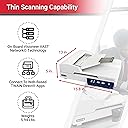
The Xerox Duplex Combo Scanner delivers high-speed duplex scanning at up to 25 pages per minute (50 images per minute) with a compact footprint ideal for small office spaces. Featuring 9 one-touch preset jobs, it supports a wide range of media including cards, photos, passports, and oversized documents up to 8.5" x 118". Designed for professional environments, it offers a robust 1,500-page daily duty cycle and USB connectivity, making it a versatile and economical scanning solution for retail, healthcare, finance, and government sectors.
| ASIN | B07SFX878R |
| Best Sellers Rank | 230,767 in Computers & Accessories ( See Top 100 in Computers & Accessories ) 266 in Document Scanners |
| Brand | Xerox |
| Brand Name | Xerox |
| Color Depth | 24 |
| Connectivity technology | USB |
| Customer Reviews | 4.1 out of 5 stars 713 Reviews |
| Global Trade Identification Number | 00785414120567 |
| Item Dimensions D x W x H | 33D x 40.1W x 12.7H centimetres |
| Item Type Name | Xerox Duplex Combo Scanner |
| Item Weight | 2.7 Kilograms |
| Light Source Type | LED |
| Manufacturer | Xerox |
| Media Type | Paper, Photo, Receipt |
| Minimum System Requirements | Windows 7 |
| Model Name | 100N03448 |
| Model name | 100N03448 |
| Network Connectivity Technology | USB |
| Optical Sensor Technology | CCD |
| Paper Size | Letter |
| Product Warranty | 1 Year |
| Product dimensions | 33D x 40.1W x 12.7H centimetres |
| Resolution | 600 dpi |
| Scanner Type | Duplex Combo, ADF |
| Scanner type | Duplex Combo, ADF |
| Standard Sheet Capacity | 250 |
| UPC | 785414120567 |
| Unit Count | 1.0 count |
| Wattage | 100 watts |
N**.
Quick flatbed with document feed
I wanted a document scanner but with option of a flatbed and this seems to tick the boxes. Pros: quick document feeder and good quality scans. Bundled OCR software. Cons: One touch buttons don’t work on MAC. Biggish footprint (as per flatbed)
K**9
Software lets it down
I make about 200 scans per month for my business & home use. I was hoping that the Xerox Duplex Combo Scanner would allow me to make my two existing Canon scanners redundant. The Xerox Duplex Combo Scanner is well packaged and protected in its shipment box, but none of the items in the box are marked as to their function; I.e. included in the box is a a4 sheet of plain paper wrapped in cellophane ??? . I later found out that this is for aligning the scanner and is critical for maintenance. When the DVD is inserted the installation of the scanner software is straight forwards. However some of the software is only available online and activation is required for the 3rd party software on the DVD. A Product key was shown during the scanner installation for the 3rd party software but I copied the number down wrong and I cannot find it again. (Photograph the number) The help on the enclosed DVD is their but it is not easy to find. However the help files are very useful when you find them. Within the scanner software there are help links and a help button, but these require an internet connection to operate and without a connection I cannot comment. At first sight the scanner appears well built and my only gripe’s with the scanner is the power light flashes once a second when in sleep mode; this is infuriating but sleep mode can be disabled. And the 24volt power supply lead from the plug to the scanner is only 1.5 meters long. The user interface software for the scanner is challenging to say the least. The Duplex Combo Scanner interface is over complex with the TWAIN menu having 60 buttons or sliders to choose from; frustrating is an understatement. It took me an hour to work out how to make multiple scans on the flatbed scanner into a single PDF file. The principle behind this user interface is speed. Once you have mastered the software and the scanner presets are setup for the job it can plough through documents at an alarming speed; i.e. a document containing five A4 double sided colour pages, from pressing the duplex button on the scanner to scanning and storing the file in the PC was 25 seconds. There are also nine presets that can be set up with each one able to configure its own colour, page size, dpi, and so on; however there in no facility to edit scans once they have been made; All rotation, cropping, colour adjustments have to be made before you start the scan. In comparison the Canon software can delete, rotate, crop, alter the page position, and then save to PDF or Jpg; and all after the scans have taken place. This makes the Canon better for individual tasks where the Xerox is better for larger quantities of work. Using the Xerox Duplex Combo Scanner for photographic work was disappointing as the scanner does not give a linear greyscale towards the white end of the spectrum, leaving photographs of clouds looking blotchy. I was very surprised when photographs went through the ADF without jamming. I would not recommend this scanner for a beginner or somebody who occasionally does a scan or two; but for an office or constant use where the software can be mastered the Xerox Duplex Combo Scanner it is a good scanner.
Trustpilot
3 weeks ago
2 days ago