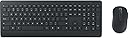
🖥️ Elevate your desk game with secure, sleek, and silent productivity.
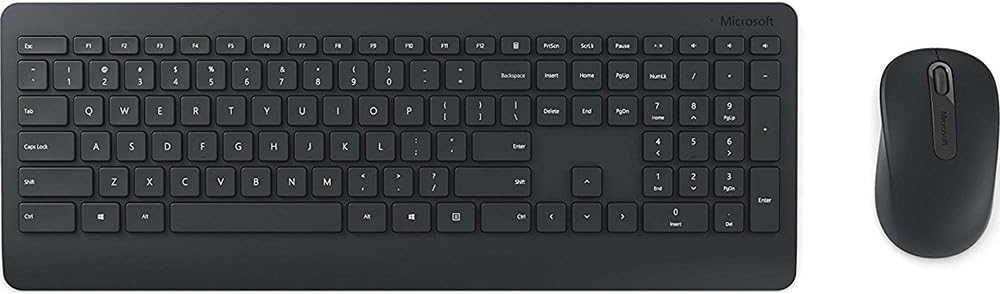
The Microsoft Wireless Desktop 900 combo features a full-size wireless keyboard and ambidextrous mouse with AES encryption for secure typing. Designed for professional use, it offers up to 2 years of battery life, quiet chiclet keys, and dedicated Windows media controls, all wrapped in a matte finish that resists fingerprints and dust. Ideal for decluttering your workspace while boosting efficiency and comfort.
| ASIN | B014W20BFA |
| Antenna Location | Security |
| Best Sellers Rank | #1,957 in Computer Keyboard & Mouse Combos |
| Brand | Microsoft |
| Built-In Media | Keyboard and mouse set - wireless, Software, USB wireless receiver |
| Color | Black |
| Compatible Devices | PC, Mac |
| Compatible Operating System Family | Windows |
| Connectivity Technology | wireless |
| Customer Reviews | 4.4 out of 5 stars 2,284 Reviews |
| Global Trade Identification Number | 00889842002669 |
| Hand Orientation | Ambidextrous |
| Item Type Name | Microsoft Wireless Desktop 900 - Keyboard & mouse set - English - North America, Black (PT3-00001) |
| Item Weight | 2.1 pounds |
| Keyboard Description | Indoor |
| Keyboard Layout | QWERTY |
| Manufacturer | Microsoft Input |
| Mfr Part Number | PT3-00001 |
| Model Number | PT3-00001 |
| Movement Detection | Optical |
| Number of Batteries | 4 AA batteries required. (included) |
| Number of Keys | 104 |
| Number of Packs | 1 |
| Operating System | Windows |
| Other Special Features of the Product | Wireless |
| Power Source | Battery Powered |
| Special Feature | Wireless |
| UPC | 889842002669 |
| Warranty Description | PT3-00001 |
C**N
Modern yet Classic Wireless Keyboard-Mouse Set
This is a modern yet classic keyboard-mouse set. The keyboard has standard key layout (full size) and the mouse is well-designed (not too small, comfortable curve). - A Classic Wireless Keyboard: Its main layout (except F1 to F12 which are smaller) is exactly the same as the traditional keyboard that I used back in 10 years ago. It doesn't have the fancy function key (the "fn" keys) at the bottom, so you won't accidentally hit the wrong button. Yet, it has dedicated "Volume Up", "Volume Down", "Mute" and "Play/Pause" buttons at the upper right corner. To me, what's really important is that it has independent "Delete", "Home", "End", "Page Up", and "Page Down" keys (which are handy for programmers). However, the feeling of the keystroke is no conventional. It's pretty much like how you feel when you type on an Apple's wireless keyboard (or 2015 Macbook Pro). I personally love it and appreciate that I can get this keystroke feeling on a full sized wireless keyboard. - A Not-too-bad Wireless Mouse The mouse weighs about 2 AA batteries - the batteries it uses. It doesn't have weird curve. Nevertheless, it's comfortable to hold it in my hands. - Complimentary Batteries This set comes with 2 AA and 2 AAA batteries. Interestingly, the mouse uses 2 bigger batteries (AA) while the keyboard uses smaller (AAA) batteries. It is reasonable as a mouse normally consumes more power. - Easy Setup No configuration is needed. It works right out of box. I just plug in the USB receiver, and both the keyboard and the mouse work instantly.
A**W
Great mouse/keyboard combo for the price
I was looking for something simple, effective, and a good price tag...this product delivered on all three of these. The keyboard pattern is similar to many you will find in corporate america, so getting used to the sizing and layout was simple and easy. Setup was also a breeze with the only need being to plug in the USB and go. Overall this was exactly what I was looking for with a price I was comfortable paying for just a keyboard, let alone both a keyboard and mouse. Every now and then the connection will drop for 5 seconds, but it will pick right back up no problem. I don't notice any lag or delay and the keys are true to touch. If you game though, the connection drop every once in a while (like 1x per 6 hours) will get annoying. To the average person you won't even notice it.
A**L
OK combo... but know that it's a "compact sized" keyboard...
UPDATE INFO 09 12 16: I found the Logitech K330 wireless combo on sale at Staples today for $24 today. I bought it, and now remember why I liked the "larger Logitech board... and the slightly smaller mouse." Keys have deep travel with better feel. And the keys are laid out such that I can easily find the BACKSPACE and the DELETE keys, as they're clearly separated. As I mentioned below... I'll quickly retire this Microsoft combo to my computer travel case. UPDATE INFO 09 09 16: Just read another reviewer's comment about "on-screen Cap Lock Indicator"..... and found the authorized Microsoft.com software package/update for MS Keyboard and Mouse gear... which after I downloaded, gave me that "Cap Lock Indicator" at bottom-rt of my screen. Find the Microsoft (actual MS site, not an aftermarket page) at: [...] (I'm running and downloaded the MS Win 10 64bit software) It's been about two months since receiving this keyboard and mouse combination. I can't fault the transmit-recieve distance, the key-touch, feel of the mouse, or the reliability of the duo. But one thing that does bother me to this date, is my difficulty getting used to the locations of the backspace and delete keys. I also sometimes find my hands have shifted to the left. It's because the keyboard keys are closer together, and my "nearly most used key... DELETE" is not as isolated as it is in my larger keyboards. With few "Quick Keys", (it does have the Windows key and a calculator key), it's what I'd call a "minimalized layout." And for travel, that's a good thing for me. In short, I've taken it on trips, and enjoy the smaller size of the keyboard. But I use this keyboard in my home office right now more than on the road. So I'm actually thinking of buying another, larger, conventional-layout keyboard. I honestly hadn't thought about the layout of the keys and overall size of the board when I saw the lower price for this Microsoft combo. I'll put this into my travel kit. But for the next purchase, I'm going to a store to test out some keyboards, and will then check Amazon Prime when ready to buy.
B**Y
Great Wireless Keyboard/Mouse at a Low Price - Microsoft 900
I purchased this Microsoft 900 wireless keyboard and mouse about a week ago and have been using it my office in place of a Logitech wired K120. I had two reasons for purchasing this: 1) I bought the mouse separately a few months ago and really like it, but it has a glossy finish so I wanted to try the matte finish version that comes with the keyboard and 2) wanted to try a different keyboard for home use than my Microsoft Sculpt Bluetooth keyboard-which works really well, but pairing to my main computer and back to my tablet is getting old. First off, I really like the matte finish on both the mouse and the keyboard, feels great. There’s no fingerprinting/smudging, so that’s nice. Not a huge deal on the other mouse, but it did bother me a little. Also, the glossy finish made my palm feel a little clammy until I got used to it. This mouse is essentially the exact same as the glossy version with the exception of the finish. It’s solid, pretty quiet, fairly lightweight (with ability to run on one battery, if you prefer a lighter mouse), has typical Microsoft high quality left/right click buttons and a light press center wheel button. Most mice have a stiff center wheel button and that can really matter if you use it all day. It does only have 3 buttons, no forward/back, so if that’s what you’re looking for, this may not be for you. The keyboard really surprised me. I don’t typically like the chiclet style keys on laptops, but after trying a Surface Pro 4 keyboard out at Staples, I decided maybe I can get used to one. The keys on this are well spaced and were easy for me to adjust to. The big surprise to me was the sound it makes, WAY less. This is a nice change from typical keyboards because I tend to pound out emails and probably sound like I’m typing angry! The buttons have just the right amount of travel, in my opinion, a little less travel than standard keyboards have. There’s no indicator light for numbers lock or caps lock, not a big deal for me. I look at the screen while I type, so it’s obvious if either is turned off and that’s quickly corrected! There are five dedicated buttons and they worked fine with the standard Windows 7 driver: calculator, play/pause, mute, volume down and volume up. There’s also a right-click button by the windows button. I suppose that might come in handy if you’re trying not to use your mouse or just don’t want to. I didn’t download the keyboard center as everything was working with the basic driver and I don’t care much for overcomplicating and unnecessary programs that may fail or get screwed up with a system update. The keys aren’t backlit, doesn’t matter to me as I don’t type in the dark. My only complaint on the keyboard is the function buttons are a little short, again not a big deal as I don’t use them that much. Overall, this is a very nice keyboard/mouse combination that really compliments my workspace well. It frees me from some wires and looks/sounds/feels premium. I intend to get a second set to keep in my office permanently. It’ll be interesting to see if the batteries last much over a year, Microsoft says they’re supposed to last up to two years.
M**T
Loving This Keyboard RIght Out of the Box So Far - Time will tell...
I've tried about a dozen different wireless keyboards from different brands on amazon so far this year trying to find "the one" and after having issues and tons of problems with most of them, several returns and refunds, I have gotta say so far, right out of the box that I am really liking this keyboard from Microsoft. It is quiet, the keys are low profile, easy to type with, very responsive, and install was fast and effortless. It doesn't have a lot of frills and bells and whistles, which I didn't want those anyway… only two things I slightly do not like are that it doesn't have a light showing CAPS or NUM lock to be on, I can live without those, but after having it for years with most of my Logitech keyboards I've become a little used to having it, and the other thing is a dedicated calculator button, again, Logitech has given me one for years so I've become spoiled to having it if I needed it, and this keyboard does have one too, but oddly Microsoft chose to place it above the "backspace" key rather than over the top of the number pad where it would have kinda made more sense, but that's just my opinion. I rarely use this feature so it'll just take a little adjusting and it isn't worth me complaining about. After having used Logitech keyboards for so long, I just got used to having it right there in a place that made perfect sense to me. I still love my Logitech keyboard too, I just wanted something with a thinner profile and with quieter keys, and so my search began…As for the long run, only time will tell how long the batteries will last or how durable the keyboard will be, but for now at least, I'm very happy with it, right out of the box and already using it to type this review. One thing I do find VERY ODD…there is no on/off switch on the keyboard! What were they thinking!?! If the battery life really is as good as they claim then I could see why this would never need an off switch…time will tell I suppose, but they did put an on/off switch on the mouse oddly enough though…that just seems really strange to me, and seems like it would make cleaning the keyboard kind of annoying if wiping it down and pressing on the keys causes unwanted tasks to occur while the PC is turned on...but ok, moving on…Yes this keyboard does come with a mouse, but I can't really give an honest review of it, because I have a Logitech wireless m525 mouse that I'm very happy with the shape, feel, color, and function of, so I'll continue to use it. What I can say about the mouse is this…it's bigger than my m525 mouse, longer, taller, and wider so it has a lot more mouse to rest your hand on, the clicks are slightly louder than my m525, but not by much at all, it's solid black and has a matte finish, so it's not too glossy or shiny. If you like a bigger sized mouse then you're probably going to be happy with it. Well I guess that just about does it for my review. I wish I could say that I got paid or compensated in some way for giving this review, or that my keyboard was given to me free for my review, but it was not. I paid full amazon price of $34.99, and my review was just my honest first impression opinions after my first use straight out of the box. Thank you for reading!
C**N
The best keyboard ever created.
The keyboard is the smoothest, most comfortable and luxurious keyboard in existence. The key presses are smooth as butter. I type so much faster with this keyboard. It's a perfect size, large enough for full functionality and no bigger than it needs to be. It doesn't take up much space on my desk at all. The mouse is good as well, but the scroll wheel on the first one I got broke, so the scrolling jumps all over when you try to use it. I bought another because I love the keyboard so much, and the new mouse is lasting much longer than the first one. Overall, I would by a dozen of these so that I could use only this keyboard for the rest of my life.
P**R
Should have bought another LogiTech
It's a keyboard, and it works....that the good. Now for the bad. It is super compact, meaning the keys are jammed together so tight, and the peripheral keys are so small that you end up hitting INSERT when trying to BACKSPACE ALL THE FREAKING TIME! I am sitting at a desk so I don't need a travel sized keyboard, but that's essentially what this is. A really good, ergonomic, keyboard has space between the right side of the board (think backspace, pipe, enter, shift, etc.) and the insert key, delete key, and arrows. IT's very hard to type fast and not accidentally hit the INSERT or DELETE keys which site right next to the BACKSPACE and ENTER. There are simply too many keyboards out there with a better layout. With so many positive reviews I didn't think I needed to look at the layout - my mistake. Oh my...I almost forgot what prompted me to write this review in the 1st place....THERE IS NO INDICATION THAT CAPSLOCK IS ON! No lights whatsoever on this keyboard. Typing long password in to UI this morning over and over wondering what the problem was. CAPS was on w/no visible indication. Ugh!
B**X
Great Keyboard and Mouse Combination
Keyboard: The keyboard has a great matte plastic finish which is textured, and should do a good job of rejecting dust and debris. One of my big problems with nice keyboards is how they are generally glossy plastic, which is fingerprint and dust prone. The keys feel great, and if you've ever used one of the new Surface Pro 4 TypeCovers, the chic-let type keys should feel comfortable to you. I work in an open floor environment (trading floor), and now I don't feel self conscience typing for hours as others have to hear me clicking away. I also love how every key, all the way across the board is evenly spaced, and I'd estimate key travel at about 2mm which is perfect for me. There is also a dedicated calculator button (which is awesome), along with media buttons (play/pause, mute, volume up, volume down) above the keypad. All of these buttons worked just fine without configuration on my Windows 7 desktop. Mouse: When it comes to desktop mice, there really isn't much to compare. This mouse and keyboard set are clearly meant for office or home office use, and not die-hard gamers. With that said, I really love the weight of the mouse with two AA batteries in it (it can hold two, but only one is required). The manual also says that the batteries could last up to two years, which is a nice change for wireless mice. I am 6' tall with large hands, and the mouse is large enough to hold comfortably, without being too unwieldy. It was nearly identical in size to the corded Dell mouse that I am replacing on my work computer. I am right-handed but also noticed that the mouse is ambidextrous, which I imagine the lefties of the world would appreciate. Bundle: Overall I couldn't be happier with my purchase. Microsoft is also known to have amazing return policies when it comes to their hardware, so I have piece of mind that even know these weren't priced to break the wallet, that I can and will likely use these for years to come. They are a perfect set for anyone looking to clear a bit of clutter from their work desks. I'm not sure you will find a better looking, and better functioning set in the $35.00 price range. Other great desktop items seen in my photos: - Jabra PRO 9470 Mono Wireless Headset with Touchscreen http://amzn.to/2aDK6oy - Surface Pro 4 http://amzn.to/2aDJ9gg - Surface Pro 4 TypeCover (Red) http://amzn.to/2aT0rGx - DecoBros Desk Supplies Organizer Caddy Pen Pencil Holder http://amzn.to/2bcsdjj - iMBAPrice USB-MFAN USB Mini Desktop Fan http://amzn.to/2aDHV4B - iGotTech Cable Clips & Cord Management System http://amzn.to/2aDIeMR
M**Y
Couch convenience
This wireless combo let's me sit on my couch and control my laptop while it's plugged into my HDTV. I love it.
S**R
Finalmente
Un teclado completo pero a la vez compacto, con teclas que parecen más las de una MacBook que las típicas teclas concavas y huecas de otros teclados, planas, ni muy grandes ni muy pequeñas. Con una sensación de que se escribe en algo de calidad y probablemetne duradero. El Mouse, es demasiado simple para lo bien logrado del teclado, pero presiento que me iré acostumbrando. Actualización, Definitivamente estoy muy cómodo con el teclado pero hay dos detalles, que no me terminaron de gustar, no hay botón de encendido / apagado. Para evitar clics accidentales mientras se hace limpieza hay que tener cuidado extra o de plano remover las baterías. Segundo, la tecla de Caps Lock no tienen ningún indicador, por lo que cada vez que tengo que ingresar una contraseña tengo que revisar escribiendo en algún otro lado para saber en que modo está. Vamos Microsoft no podías poner ni un pequeño foquito? Actualización 2: Si existe un software de MSFT para el indicador de CAPS. https://go.microsoft.com/fwlink/?linkid=849754
ع**ف
100 مية حاجة نضيفة مرة انصح بية
I**N
Best bang for buck!
I use this everyday and would totally recommend it. I bought it based on price.
C**R
Excelente producto
Un excelente producto. Llegó empaquetado en perfectas condiciones y justo el día marcado. Me gusto el teclado, ya que es muy silencioso, es de buen material y las baterías vienen incluidas. Un combo de lujo y simplicidad. Un punto negativo es, cuando está inactivo el mouse y lo reactivas tiene un ligero delay, pero no es nada de que preocuparse. -El teclado es en ingles, así que no esperen las Ñ -El Mouse tiene un excelente peso y es cómodo a la palma. Creo yo que si tuviera retroiluminación fuera de lo mejor, aun así, considero que cumple con mis expectativas.
Trustpilot
1 month ago
3 days ago