Desertcart purchases this item on your behalf and handles shipping, customs, and support to OMAN.
🚙 See More, Stress Less: Upgrade Your Jeep’s Backup Game!
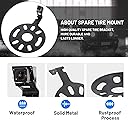
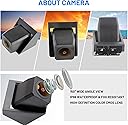
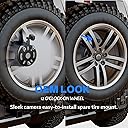
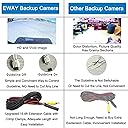
The EWAY Car Backup Reverse Camera is a rugged, high-definition 720p CMOS camera designed specifically for Jeep Wrangler models (2007-2018). Featuring a 150° wide-angle lens and IP69 waterproof rating, it delivers crystal-clear day and night vision. Compatible with both OEM and aftermarket displays via RCA connections, it mounts easily on the spare tire carrier and includes switchable parking guidelines for enhanced safety and convenience.


| ASIN | B07N4H5YXS |
| Brand | EWAY |
| Brand Name | EWAY |
| Compatible Devices | Monitor |
| Compatible devices | Monitor |
| Connector Type | RCA |
| Customer Reviews | 4.2 out of 5 stars 844 Reviews |
| Display Technology | LCD |
| Effective Still Resolution | 0.49 MP |
| Field of View | 150 Degrees |
| Installation Type | Surface Mount |
| Installation type | Surface Mount |
| Lens Type | Wide Angle |
| Lens type | Wide Angle |
| Lux rating | 0.1 Lux |
| Manufacturer | EWAY |
| Manufacturer Part Number | CT-J1002-01 |
| Real Angle of View | 150 Degrees |
| Screen Size | 0.33 Inches |
| Screen size | 0.33 Inches |
| Video Capture Resolution | 720p |
| Voltage | 12 Volts |
S**.
For replacement stereo display...
2018 Jeep Wrangler JK Sport S. 2 door. No existing camera, and stock radio. I replaced the stock camera and added a display with a backup camera input. Installation was super easy with a little bit of Googling and YouTube videos. The toughest part was running the cable up through the carpet and dash and to the back of the display. It might take a little care if you ever need to change a tire, since it mounts on the tire carrier. There was a jumper on the wire that I believe was for displaying backup lines on the camera. The cable is plenty long enough to run through my Jeep, with a lot to spare. It could have easily been run through a 4-door Jeep. Video quality is pretty good, even at night. For the money, it's a very good camera.
A**R
Works and fits
Works well and fits perfectly
E**C
Easy install
Works perfectly! Easy install!
J**N
Great Quality!
Very impressed with the quality of the kit! I read quite a few reviews for several of the kits. Watched a couple of You Tube Videos. "Infotainment" was my favorite! Learned a lot from the reviews and videos. My 2016 Wrangler Sahara has the stock aluminum wheels and the stock touch radio with navigation. The camera bracket in the kit is a full circle, one piece and very heavy duty. I removed the large rubber washer on the spare tire mount and placed the bracket on first then replaced the rubber washer. I used a deep socket to help push the retainer washers that came in the kit onto the studs on the the spare tire mount. I then use a mini bar clamp that I put on the back side of the stud and the end of the socket to press the retainer clips on tight. (I read some reviews that said the camera mount had become loose over time but I dont think this one will the way it installs.) I removed the oval black rubber plug located to the right of the spare tire mount and carefully drilled a 1/2" hole to feed the camera lead through. Makes a very tight fit. Fed a solid fish wire from the inside access to retrieve and pull through. Poped the plug back in. I did cut the white wires and tape so I would have the guide lines before connecting the camera lead to the harness. I taped all connections. I fed the harness through the fabric tube between the door and body. Had to do some untaping and retape. I cut some existing wire ties that are fastened to the body, pulled the cut end through and there is enough room to slide a new tie through the mount and made a clean install. To hook up the power to the camera from the included harness I removed the right rear tail light, fed the red/black wire down through the rubber grommet on the inside to the tailight cavity. Spliced the red to white/grey stripe and black to black of the factory harness just before the tail light connection. Again a little untape and retape with wire ties. This was easier for me than trying to work with little space inside the Jeep. Fed the rest of the harness along the factory harness on the inside right floor under the carpet the hole way to the dash. Had to remove and replace a couple pieces of plastic trim and used a lot of wire ties. Purchase a package of 100 black 4" miniture wire ties, roll of black electrical tape...you'll use them. I then used the Vgate iCar Pro Bluetooth 4.0 (BLE) OBD2 code scan/reader I ordered from Amazon as sugested by another reviewer. Got the Jscan App from the App Store and followed instructions. What an amazing tool! Four hours start to finish and the camera works great! I may have been a little to meticulous but I wanted it to look like it came that way from the factory. Thank you to the reviewers that that provided great information and help. Looking for the grommet now for my Sahara tire cover sugested by Al_Mello
F**E
Instructions provided are not clear or helpful for installation
The instructions that were provided were very limited on how to install. I understand that every vehicle is different, but the instructions also say to look up the year, make and model of the car on Youtube to see detailed installation instructions. I did this and there was ZERO videos related to Eway and this particular backup camera. There are other videos on there that were helpful, but at the end of the day, it really just came down to me making educated guesses on how to do this and thankfully, I was successful. Fishing the wires/cables through the car is one thing...but actually hooking it up to power and/or the radio was completely a crapshoot and very frustrating. I reached out via email several times, but never got a response back from Eway. Their chat function was always closed whether it was day or night. So getting answers was extremely frustrating. I basically installed it my combining bits and pieces from different videos and hoping they would work for my particular vehicle (2008 Jeep Wrangler Sahara 4 Door). The description here on Amazon makes this super easy to install, but the reality is, there are a lot of steps. Please note that you'll have to "flash" your radio in order for it to recognize that there's a camera. This can be done at the dealer (pain in you know what...) or you can purchase bluetooth OBD scanners and download an OBD scanner and purchase a license for your particular vehicle in order to flash the radio. This cost me around $50 total and honestly, was well worth it. You can adjust some other settings on your car, as well, so it was helpful. For me, this is what I had to do: 1. Flash the Radio via the OBD JScan app (app is free, but you have to purchase a license for the vehicle in the app) Link: https://www.amazon.com/dp/B076XVQMVS?psc=1&ref=ppx_yo2ov_dt_b_product_details 2. I have an automatic, so I connected the Red camera power cable to the Gray/White wire in the back corner of the car. The Gray/White wire is the Reverse light. so when you go into reverse, this sends the 12V power through that cable. 3. I connected the Black Ground cable to the Black cable in the back corner of the car. 4. I purchased smaller T-Tap connectors to splice the Red Power and Black Ground wires. I saw a video where someone just sort of stripped the existing cables and tied them together with electrical tape. Obviously that worked for that person, so to each their own. Link: https://www.amazon.com/dp/B0C9GM8TPW?ref=ppx_yo2ov_dt_b_product_details&th=1 5. Fished the wires on the right passenger side of vehicle and up behind glove box and out to radio. 6. I connected the GREEN RCA cable which connected to the back of the MyGig radio. 7. There is a short red wire coming out of the yellow RCA cable that connected to the green cable. I just put electrical tape on this because I figured I was getting power from the Gray/White cable in the back corner of the car...I was correct in this. Other sites show that this is how you get power and that may be true if i did NOT connect the Red power cable to the Gray/White Cable in the back. 8. Enjoy the backup camera. Side note, on the backup camera, there's a small black plastic cover that if you remove, it will show the guidelines on the screen. I removed because it gives me the guide to keep my jeep straight as I backup. Please note that the little hashmarks on these guidelines don't really represent any particular distance...and your car will NOT beep if you're getting close to an object. My wife asked me that and I explained that you need special sensors for that feature and this is just a straight camera. Hope this helps someone...
Trustpilot
3 weeks ago
2 months ago