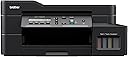
Desertcart purchases this item on your behalf and handles shipping, customs, and support to OMAN.
🖨️ Elevate your workspace with speed, savings & seamless smart printing!
The Brother Ink Tank DCP-T820DW is a multifunction inkjet printer designed for home and small office use, featuring ultra-high yield refillable ink tanks, fast print speeds up to 30 ppm (B&W) and 26 ppm (color), automatic duplex printing, and a 150-sheet Auto Document Feeder. With versatile connectivity options including Wi-Fi, Ethernet, USB, and mobile printing, it delivers professional-quality prints at 1200 x 6000 dpi resolution while significantly reducing operating costs and paper waste.


| Additional Printer Functions | Copy, Scan |
| Asin | B08M4V9WQG |
| B W Pages Per Minute | 30 ppm |
| Best Sellers Rank | #1,013 in Computers & Accessories (See Top 100 in Computers & Accessories) #6 in Ink Tank Printers #47 in Inkjet Printers |
| Box Contents | Printer, Power Cable,CD, Set of Ink Bottles(Black,Cyan,Magenta,Yellow+Black) |
| Brand Name | Brother |
| Color Pages Per Minute | 26 ppm |
| Colour | Rich Black |
| Compatible Cartridge | BTD60BK & BT5000CMY |
| Compatible Devices | Laptops, PC, Tablets |
| Controller Type | Hand Control |
| Customer Reviews | 4.2 4.2 out of 5 stars (2,038) 4.2 out of 5 stars |
| Display Type | LCD |
| Dual Sided Printing | Yes |
| Duplex | auto |
| Global Trade Identification Number | 04977766807296 |
| Hardware Interface | Ethernet, USB 2.0 |
| Importer Contact Information | BROTHER INTERNATIONAL (INDIA) PVT. LTD. UNIT NO. 801 AND 802, 8TH FLOOR, ALPHA BUILDING, HIRANANDANI GARDENS, POWAI, MUMBAI - 400 076, INDIA |
| Ink Color | Black |
| Is Electric | Yes |
| Item Dimensions D X W X H | 43.5D x 43.9W x 19.5H Centimeters |
| Item Type Name | Ink Tank Printer |
| Item Weight | 9.6 Kilograms |
| Manufacturer | Brother, Brother |
| Manufacturer Contact Information | Brother |
| Max Printresolution Color | 1200 × 6000 dpi |
| Max Printspeed Blackwhite | 1200 × 6000 dpi |
| Maximum Copy Resolution Black And White | 1200 × 6000 dpi |
| Maximum Copy Resolution Color | 1200 × 6000 dpi |
| Maximum Copy Speed Black And White | 30 ppm |
| Maximum Media Size | A4, Letter, Legal, Mexico legal, India legal, Folio, Executive, A6, Envelopes, Photo (4" X 6")/(10 x 15 cm), Photo 2L (5" X 7")/(13 x 18 cm) |
| Maximum Sheet Capacity | 230 |
| Model Name | DCP-T820DW |
| Model Number | 8CH74700171 |
| Model Series | Ink Tank Series |
| Network Connectivity Technology | USB |
| Number Of Trays | 2 |
| Other Special Features Of The Product | Auto Document Feeder, Auto-Duplex, Network-Ready, Refillable Ink Tank |
| Output Sheet Capacity | 150 |
| Packer Contact Information | BROTHER INTERNATIONAL (INDIA) PVT. LTD. UNIT NO. 801 AND 802, 8TH FLOOR, ALPHA BUILDING, HIRANANDANI GARDENS, POWAI, MUMBAI - 400 076, INDIA |
| Paper Size | A4, Letter, Legal, Mexico legal, India legal, Folio, Executive, A6, Envelopes, Photo (4" X 6")/(10 x 15 cm), Photo 2L (5" X 7")/(13 x 18 cm) |
| Power Consumption | 16 Watts |
| Printer Output Type | Color, Monochrome |
| Printer Type | Inkjet |
| Printing Media Type | Envelopes, Glossy photo paper, Paper (plain) |
| Resolution | 1,200 x 6,000 dpi |
| Scanner Type | Flatbed |
| Specific Uses For Product | Home, Office, School |
| Total Usb Ports | 1 |
| Unit Count | 9.6 Kilograms |
| Warranty Description | 1 Year On-Site Warranty |
| Wattage | 17 Watts |
User
Quick setup, great build quality, seamless integration, flawless working
Earlier I used HP's basic deskjet printer utilizing color cartridges. I was fade up of drying cartridges and the extremely low print yield of that printer. So I started looking for an inktank printer. Thankfully, I came across this printer. All the reviews seemed pretty positive, so I bought it. interestingly, this printer doesn't list higher up when searching for inktank printers, despite having a reputable positive review rate.The packing of the printer was perfect. I'll straightway head to the Positives and the improvable of this printer. There's not a single negative point worth mentioning for this product.* Positives:1. Quick setup: The setup software is delivered in a CD along with the product package. But I chose to download it from the support page. Finding the right software and installing it was effortless. Wifi connectivity can be setup through the printer as well as through the setup software. I recommend to do it through software, as it's easier to write password.2. Seamless integration: Wifi connectivity works flawlessly. Not a single time did it loose/drop the connection. I printed normal documents to heavy photo files wirelessly. Connection was seamless. Noticeably, the printer could be found within 10-20 seconds after powering ON the printer. Meaning printer boot time is very fast.3. Flawless operations: My earlier HP printer used to stuck 50% of the pages on an average. So it was strightway 50% wastage of papers. With this Brother printer, NOT a single page has stuck yet. NOT a single. be it one-sided printing or duplex printing, this printer works flawlessly.4. Low operating noise: Compared to my earlier HP printer, this printer is way more silent.5. Convenience: The placement of hinges, openings, handles, switches, and buttons is extremely convenient. Most used buttons and handles are prominently placed, while lesser used are hidden yet conveniently identifiable.6. Build quality: While some parts may appear flimsy, particularly the tray from where the print comes out, the overall build quality is very good. Particularly the hinges, sliders, etc seem pretty durable7. Accessories: A set of CMY ink bottles and two black bottles, a USB cable, print head cleaning pads, and a cover for the multifunction tray come enclosed in the package. I particularly loved the fact that they provided 2 black ink bottles, considering the higher usage of black ink. Also, the head cleaning pads seem to be a useful thing, never used them though. The MFP cover is a thoughtful addition to the accessories list, particularly for those who are going to use the MFP frequently.Improveables:1. While printing black & white documents at 'Normal' print quality setting, the contrast of black has to be more. Now it looks like a dark grey print. Never used it on the 'Best' print-quality setting.2. The menu shows an option of 2-sided -> 2-sided copy. But if we add a 2-sided paper in the AFD and chose this menu option for double-sided copying, the command doesn't work. Seems like it can be done, but the firmware doesn't support it for now. If this option is activated in the future, then this would be the best printer at this price point.3. A beep sound for error would've been great!Overall, it's a printer that'd leave you satisfied with your purchase after every print. Buy it without any second thought.
User
Excellent All-in-One Printer for Home Office – Highly Recommended!
I recently purchased the Brother DCP-T830DW and I am extremely impressed with its performance.Pros:Print Quality & Speed: The print quality for both color and monochrome is crisp and professional. It handles high-volume printing without any lag.Auto-Duplex: The automatic double-sided printing works flawlessly and saves a lot of paper.Connectivity: Setting up the Wi-Fi was seamless. The 'Brother Mobile Connect' app makes printing directly from my phone very convenient.Ink Efficiency: The ink tank system is a game-changer. It comes with plenty of ink in the box (including an extra black bottle), and the cost per page is incredibly low.ADF & MP Tray: The Automatic Document Feeder (ADF) makes scanning multiple pages a breeze, and the 80-sheet multi-purpose tray is great for different paper types.Cons: None so far!Overall, it’s a robust, feature-rich printer that is perfect for anyone running a home business or a busy office.
User
Good Printer
Good Quality structure. And good print Speed. Slightly difficult in connecting because of console
User
Value for Money ⭐⭐⭐⭐⭐
Here’s an in-depth review of the Brother DCPT820DW Color All-in-One Ink-tank Printer, covering its pros and cons:The Brother DCPT820DW is a feature-rich color ink-tank printer that serves as an all-in-one solution for home offices and small businesses. It combines printing, scanning, and copying functions, and boasts wireless connectivity, making it versatile and convenient. Here's an in-depth look at its pros and cons:**Pros:**1. **High-Quality Print Output:**- **Vivid Colors**: The DCPT820DW excels at producing vibrant and accurate color prints, making it ideal for printing presentations, photos, and marketing materials.- **Sharp Text**: Black text prints are crisp and clear, comparable to what you’d expect from a laser printer.2. **All-in-One Functionality:**- **Versatile Features**: This printer is a true all-rounder, offering printing, scanning, and copying. It’s a solid choice for offices needing multiple functions in one device.- **Automatic Document Feeder (ADF)**: The 20-sheet ADF simplifies multi-page scanning and copying tasks, saving time and effort.3. **Cost-Effective Printing:**- **Low-Cost Ink Refills**: The printer uses ink bottles instead of cartridges, which are more economical in the long run. This reduces the overall cost per page, especially for color prints.- **Ink Tank System**: The built-in ink tank system is designed to hold a large quantity of ink, reducing the need for frequent refills and making it convenient for heavy users.4. **Wireless Connectivity:**- **Wi-Fi and Mobile Printing**: With built-in Wi-Fi, the DCPT820DW supports mobile printing through various apps such as Brother iPrint&Scan, Apple AirPrint, and Google Cloud Print. This is a significant convenience for users who need to print from smartphones or tablets.- **Ethernet and USB Options**: For those who prefer wired connections, the printer also offers Ethernet and USB connectivity, ensuring flexibility in different environments.5. **User-Friendly Design:**- **Easy Setup**: The printer is relatively easy to set up, even for those who are not particularly tech-savvy. The instructions are clear, and the software installation process is straightforward.- **Intuitive Control Panel**: The control panel is well-designed and easy to navigate, with a 1.8-inch color display that enhances user experience.6. **Duplex Printing:**- **Automatic Double-Sided Printing**: The printer supports automatic duplex printing, helping to save paper and reduce environmental impact, which is a great feature for eco-conscious users.**Cons:**1. **Speed Could Be Better:**- **Moderate Print Speed**: While the print quality is high, the speed is only average compared to some competitors in this category. It’s sufficient for most home offices but might not be fast enough for high-volume environments.- **Slow Photo Printing**: Photo printing, while excellent in quality, can be relatively slow, which may be a drawback for users needing quick turnarounds.2. **No Fax Capability:**- **Lacks Fax Functionality**: Unlike some other all-in-one printers, the Brother DCPT820DW does not include fax functionality. This could be a downside for businesses that still rely on faxing documents.3. **Basic Display:**- **Small Screen**: The 1.8-inch display, while functional, is small and not a touchscreen, which could be less convenient compared to larger, more interactive displays on other models.- **Limited Menu Options**: The menu can be somewhat limited, and navigating through it can feel a bit outdated compared to more modern interfaces.4. **Build Quality and Design:**- **Plastic Build**: The printer’s build is primarily plastic, which feels less sturdy than some higher-end models. While this keeps the printer lightweight, it might not inspire confidence in its durability over the long term.- **Bulky Design**: Despite being an ink tank printer, it is relatively bulky, which could be a challenge in smaller workspaces.5. **No NFC Support:**- **Lack of NFC**: The absence of Near Field Communication (NFC) for quick tap-and-print operations is a missed opportunity, especially when competing models include this feature for seamless mobile printing.6. **Software Could Be Improved:**- **Software Limitations**: While functional, the included software isn’t as advanced or feature-rich as some competitors. Users might find the scanning software particularly basic, lacking in customization and automation options.**Conclusion:**The Brother DCPT820DW Color All-in-One Inkjet Printer is a strong contender in the all-in-one category, offering excellent print quality, low running costs, and versatile connectivity options. However, its moderate speed, lack of fax capabilities, and basic display might be limiting for some users. It’s a great choice for home offices and small businesses that prioritize print quality and cost-efficiency over speed and additional features.---This review should provide a comprehensive understanding of the Brother DCPT820DW printer’s strengths and weaknesses.
User
Good for photo printing also with great yield
After one month of use, can say it is really nice one.Pros:Print quality is good. I use it for photo printing also. It gave approx. 700 color photo in 6"x4" glossy paper. Faced some white lines after 600 photos, but inbuilt auto cleaning operation resolved the issue. No paper jamming in photo print. Two different trays are beneficial. One may be used for regular A4 pages, another for photo print. Giving good quality photo even with lowest color density, lowest contrast and highest brightness which saves ink. Front paper tray is covered, keeping pages safe from dust.Cons:The printer shivers horribly during printing. During multiple photo prints, status is not visible which number of printing is going on. Only one set of custom page setup is possible, it should be more. Mobile app works only with wifi, not possible to connect through the mobile's hotspot. Expect, Brother should work on the improvement in these points. Still, giving 5 star for its overall good performance in regular work. In case of paper jamming inside, it can be removed by opening the back portion easily. Why did you pick this product vs others?:Because of more features in affordable range... Especially, photo print, Duplex and ADF attracted me.
User
Not a better option to buy
Review after 2 years. Please don't byluy this inkjet printer. Service at high prices and even they also not recommended to not buy these brother printers especially inkjet.Now it's not working since 3 months. In service centre they estimated charges more than 8000/-
User
Mind blowing, will spoil you to make prints.
After researching for a long time on what ink tank printer should I be upgrading to from old desktop ink jet cartridges printer.It was a battle between big names, and this product right here caught my eye, the features it offered were extra for the same price as others.If you are looking to upgrade your printer to all in one type with duplex print and auto feeder for scanning, this is the best bet.Setting it up was easy, wifi, Lan, USB works great on all.It's bulky compared to other ink tanks with wifi due to so many features it offers.But be rest assured, it'll become your workhorse.The Borderless prints and the quality of HD images even on a normal plain a4 paper is what will spoil you forever.Pdf printing is a breeze now, booklet printing has solved major office mind peace.No more wasting time printing documents on both sides and scanning one page at a time.It's well worth the money, it'll save so much time which was being wasted playing with old printers, slapping them around when pages got stuck.It doesn't make those squeeky sounds which hp and cannon printer make.It's fast.For sure feels like Japanese people knew they were building a printer that'll work for years to come.Can't comment on ink consumption, will update later.In the meanwhile please check the print images.All in all, if you have the budget around 15k, please add in some more and get this.
User
Best printer
The Brother DCP-T820DW is a great all-in-one printer for home or small office use, especially if you're looking for efficiency and cost-effectiveness. One standout feature is its auto-duplex printing, which allows for automatic double-sided printing, saving both paper and time—a real bonus for users who print a lot.The print quality is excellent, producing sharp text and vibrant images that are more than suitable for professional documents. Its ink tank system is also cost-effective, providing a high page yield per refill, which makes it an economical choice for those who print frequently.The printer is easy to set up and comes with wireless connectivity, so you can print directly from your phone or computer without having to connect via cable. It also has
User
I fond of Brother printers
Purchased several times this and similar model for personal use in my office.I really like quality and interface...
User
Good quality, working very well.
So far so good, worked as expected, easy setup using mobile phone and watching a setup video, it will be easy if you're have patience and you used printers before if not there is setup videos online, shows you how to use the printer and eventually you will figure everything when you use the printerThe printing quilty, was very good as expected from this printer , of course there are better qualities in other printers, but you get alot of features , in good price and even in a glossy paper the printing quilty was amazing , it was detailed and colorful and when it comes to the printer if it can handle heavy load or not ? (not tested yet) but based in my first use I think it wouldThis printer is very good for daily home use, or for a student, and with easy mobile app and various featuresIf there's any updates I will post again here.
User
منتج ممتاز
مطابقة للمواصفة المذكورة عند البائع وصلت جديدة وسليمة وتعمل بكفائة
User
A wow printer
I printed regular photos on a regular a4 papers and the results were perfect..great resolution and printing speed
User
Easy print printer
Good quality picture with right paper, Easy use with wifi connection.
Trustpilot
2 weeks ago
2 weeks ago