Desertcart purchases this item on your behalf and handles shipping, customs, and support to OMAN.
🚀 Elevate your home network to pro-level speed and security — don’t get left buffering!
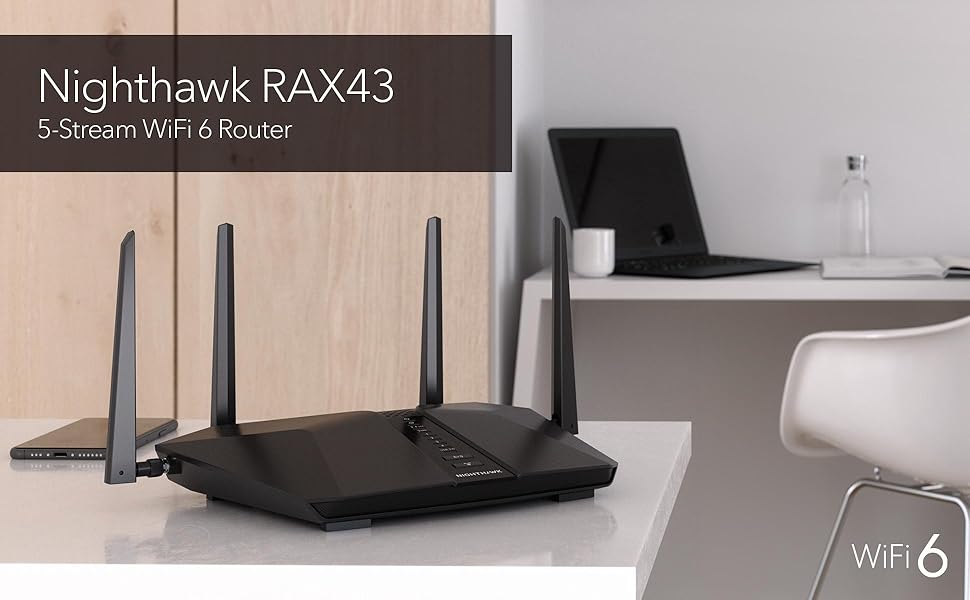
The NETGEAR Nighthawk RAX43 is a dual-band WiFi 6 router delivering up to 4.2 Gbps speeds and coverage for 25 devices across 2,500 sq.ft. Powered by a 1.5GHz triple-core processor and enhanced with OFDMA and 1024-QAM, it ensures efficient, high-capacity connectivity. Integrated NETGEAR Armor provides robust cybersecurity, while the Nighthawk app offers seamless network management. Ideal for professionals demanding fast, secure, and reliable home internet.


| ASIN | B08JY6RMG9 |
| Antenna Location | Gaming |
| Antenna Type | Fixed |
| Best Sellers Rank | #12,342 in Computers & Accessories ( See Top 100 in Computers & Accessories ) #382 in Computer Routers |
| Brand | NETGEAR |
| Built-In Media | NETGEAR Nighthawk AX5/ 5-stream AX4200 WiFi Router (RAX43), Ethernet cable, 4 external antennas, Quick start guide, Power adapter |
| Color | Black |
| Compatible Devices | Gaming Console, Laptop, Smartphone |
| Connectivity Protocol | ethernet, wi-fi |
| Connectivity Range | 2000 square_feet |
| Connectivity Technology | Ethernet, Wi-Fi |
| Control Method | Voice |
| Controller Type | App Control |
| Coverage | 2000 square feet |
| Customer Reviews | 4.4 out of 5 stars 1,720 Reviews |
| Data Transfer Rate | 4.2 gigabits_per_second |
| Frequency | 160 |
| Frequency Band Class | Dual-Band |
| Item Dimensions L x W x H | 11.65"L x 14"W x 2.25"H |
| Item Weight | 1.3 pounds |
| LAN Port Bandwidth | 1 Gbps |
| Manufacturer | Netgear |
| Maximum Upstream Data Transfer Rate | 1600 megabits_per_second |
| Mfr Part Number | RAX43-100NAS |
| Model Name | RAX43-100NAS |
| Model Number | RAX43-100NAS |
| Number of Antennas | 4 |
| Number of Items | 1 |
| Number of Packs | 1 |
| Number of Ports | 4 |
| Operating System | Linux |
| Other Special Features of the Product | QoS |
| Router Firewall Security Level | High |
| Router Network Type | dual-band |
| Security Protocol | WPA2 |
| Special Feature | QoS |
| UPC | 606449152180 |
| Unit Count | 1 Count |
| Voltage | 100240 volts |
| Warranty Description | 1-year warranty |
| Wi-Fi Generation | WiFi 6 |
| Wireless Communication Standard | 802.11ax |
| Wireless Compability | 802.11ax |
P**Y
High-Speed, Reliable Performance for Modern Homes
The NETGEAR Nighthawk WiFi 6 Router (RAX43) is a powerhouse for anyone seeking fast, reliable, and future-proof internet performance. With WiFi 6 capability, this router offers 4.2 Gbps wireless speed, which is more than enough to handle a high-demand household with multiple devices streaming, gaming, and browsing simultaneously. One of the key highlights is its dual-band capability, allowing it to handle both high-speed tasks and standard internet use without lag. The router manages smart traffic distribution exceptionally well, maintaining stable connections even during peak hours, and is ideal for families or shared spaces where several devices compete for bandwidth. In testing, I noticed minimal buffering and impressive speeds even in the farthest rooms of my house, thanks to its advanced signal range. The setup process is straightforward with the Nighthawk app, making it accessible even for those less tech-savvy. The app also provides useful features like parental controls, security updates, and the ability to prioritize certain devices, which adds an extra layer of convenience and customization. For anyone upgrading their home network or investing in high-speed performance for gaming, 4K streaming, or smart home connectivity, the NETGEAR Nighthawk RAX43 is a top-tier option that combines speed, stability, and ease of use.
P**S
Vergas
Title: Works good for us Description: Many wifi items in our house.
B**K
Fantastic Router!
I am definitely a fan of this router. Setup is pretty easy, and the range is the best I’ve owned. I stay connected even outside of my home, at the end of my backyard, which is about half an acre. The speed is excellent, and even after a year of use, I still get my full mbps I pay for. It is still trucking along like a tank after a ton of use. Will purchase the same router when I need a replacement.
R**I
Works great. A few issues, once sorted is an awesome device.
Netgear has different levels of routers dont worry most of them are good. I have been using my old nighthawk modem/router for about 6-7 years and it's not even compatible with the app...so I upgraded my modem courtesy of Spectrum but i needed a router for Wi-Fi. First time buying one in years. I had a few issues with this at first, I couldn't get it to update through the app. So I called Netgear customer service and they instructed me to go through the router itself and update it manually instead of the app. The internet was a little unstable at first. (might be on spectrums end since they had technicians up on the polls fixing their service at night) after the kinks have been resolved, I can gladly say this Wi-Fi 6 Router is working extremely well. I've kept my old Wi-fi name so all my google clocks, TV's and devices synced just fine. I'm very happy for the price I paid being that is used but like new (was missing power cord). Thankfully I can use my old modem/router power cord and not have to replace any serious wiring. If it's on sale buy it. I recommend it.
A**R
10/10
As someone who knows very little about routers this was the one everyone recommended to me. It was very easy to set up, great signal and covers our entire house. Have had for over a year now and never any issues! Highly recommend, glad we listened to everyone!
J**R
Be careful with add-on app Armor!
The modem itself was great. My problem was a 7 day trial of Armor turned into a nightmare! It is made by Bitdefender which I have their Total Security installed on all my devices. A great company. But, having Armor on my router felt very intrusive. Somehow, I either clicked where I shouldn’t have while trying to delete the darn thing or I didn’t click where I should to prevent auto acceptance. I do not know to this day how it came about. I found I did not like having notices from Armor pop up whenever a new person or device was registered as linking on. We are a 2 person household. I do not need to know if my husband opened his ipad. When my large family was visiting I thought the the router might have a spasm with my 11 grandkids ipad-ing and iphoning. I live in a rural area set way back from the road, few neighbors, on dead end street. Not much room for router lurkers to get near my router. I have internet security and did not see the need for Armor. I only called to cancel Armor. They opened a case file..big deal. They couldn’t or didn’t have the answer. I was connected to another group and a second case file was opened. After much back and forth, I asked a simple question..How do I get Armor off the router because I’m not paying $105 for it. I was directed to another group and assigned a third case file..At this point, I “lost it”! I cancelled cases, deleted my account, and returned the Netgear AX 4200 to Amazon. BTW, I’m still getting emails from the 3rd case file :) Please consider this caveat….the device is speedy and worked well for the two days I used it. I hated to give it a lower rating due to Netgear’s horrible tech support. So beware of Armor. It maybe helpful for those folks who live in highly populated areas; but for me, it was DOA
R**Z
Shockingly Poor Security, Antique User Interface, Need to Pay with Auotrenew for More Security
I replaced a failed Netgear R6700 Wireless router with this RAX43 and run it for one month now. Unfortunately past the return date or else I would based on the scary poor security the router offers. Read on for our impression: EXTREMELY DISAPPOINTING SECURITY: There is not much to select in security and its below basic. For example there is no option to block an IP address or group of IP addresses. Shocking actually that was not there. The log shows its detected DoS attacks for example but does not say if blocked or if the sender is aware a connection was made. Scary actually how little insight the router provides. DID NOT DETECT TROJAN ACTIVITY: The router did not detect a trojan nor report the hacker traffic that was sourced from a device on my network. A security camera NVR on the system had the trojan. When using the netgear router this trojan was allowing a hacker to use up my bandwidth and drop my network every few minutes. Another brand router detected and reported the trojan allowing me to take action to physically locate the device. HAVE TO PAY FOR MORE SECURITY! ... I was going to subscribe to their Armor security after the trial stopped but then the only option is auto renewal which I though was very tacky, not giving you any other option. The only way to cancel is to let it charge you then cancel the service and who knows how difficult that would be, probably frustrating to cancel. So based on that single money grab characteristic I did not renew. For that very tacky and unsettling approach to business I remove stars. EASY SETUP: I followed none of the instructions nor used the built in install Wizard or phone app. Connecting the router directly to my PC I logged into it at the default IP address 192.168.1.1. From there I was able to enter all the same names and passwords for the 2.4 and 5GHz wireless and basically recreate all the same parameter that were on the original R6700 including lastly to set the LAN to my IP of 192.168.0.1. After resetting the router I then installed it into my network, connecting all LAN cables and the cable the cable modem (Netgear DM500). Power both the router and the cable modem up the router quickly booted and connected to ISP service as well as the rest of the wired and wireless devices. IT was all very seamless. GREAT RANGE: I have another R6700 that is used as an Access Point in the far opposite corner of the house from the main router as the original routers wireless level was too low there. The signals measured when using the RAX43 at that same far corner are excellent, easily picked up by other devices such as my smartphone. I measured about -70dBm at this location which is 75ft away, through 3 walls and 1 floor. Its strong enough that I may not need the Access Point any longer. A STEP BACKWARDS USER INTERFACE: I was hoping for a modernized interface but the RAX43 was actually a bit less than the original R6700 router. The R6700 used colors such as green to indicate good but the RAX43 is all gray scale with no color. Conclusion: I was shocked how little options are available to set up security features and how poorly it reported issues on my network traffic. For example there is no option to block an IP address...shocking actually. When I attempted to purchase the extra Armor security its states it will auto renew for $100. The security was bad enough to dump the router but when you add the tacky business practice of charging more for inadequate security, this router is going to hazardous waste.
J**E
JKane
The box it came in was extremely dirty but router very easy to set up and working great
G**O
No es compatible con IPTv de TotalPlay México
Lo había comprado para mejorar la red de mi casa, actualmente tengo un TP-Link Ax1500; en relación a la entrega llegó en excelentes condiciones y antes de lo estipulado. En cuanto a la configuración, ahí fue el problema, pasé toda la mañana y parte de la noche tratando de configurarlo, una vez actualizado el firmware me marcaba error al iniciar mi sesión en mi cuenta de Netgear, la red WiFi presentaba intermitencias, la región para WiFi me aparecía predeterminada en Canadá (soy de México), el servicio de IPTv presentaba igual intermitencias, de repente se congelaba la imagen y nada. Configure las VLAN como venía en el manual, como encontré en foros, como estaban en mi ONT, asigné IP fija, active QoS, priorice tráfico, active el modo Bridge de VLAN, y nada, las intermitencias en IPTv nunca cesaron. He iniciado el proceso de devolución 🫠🥹
Trustpilot
1 month ago
5 days ago