🚀 Clone, dock, and conquer your data workflow like a pro!
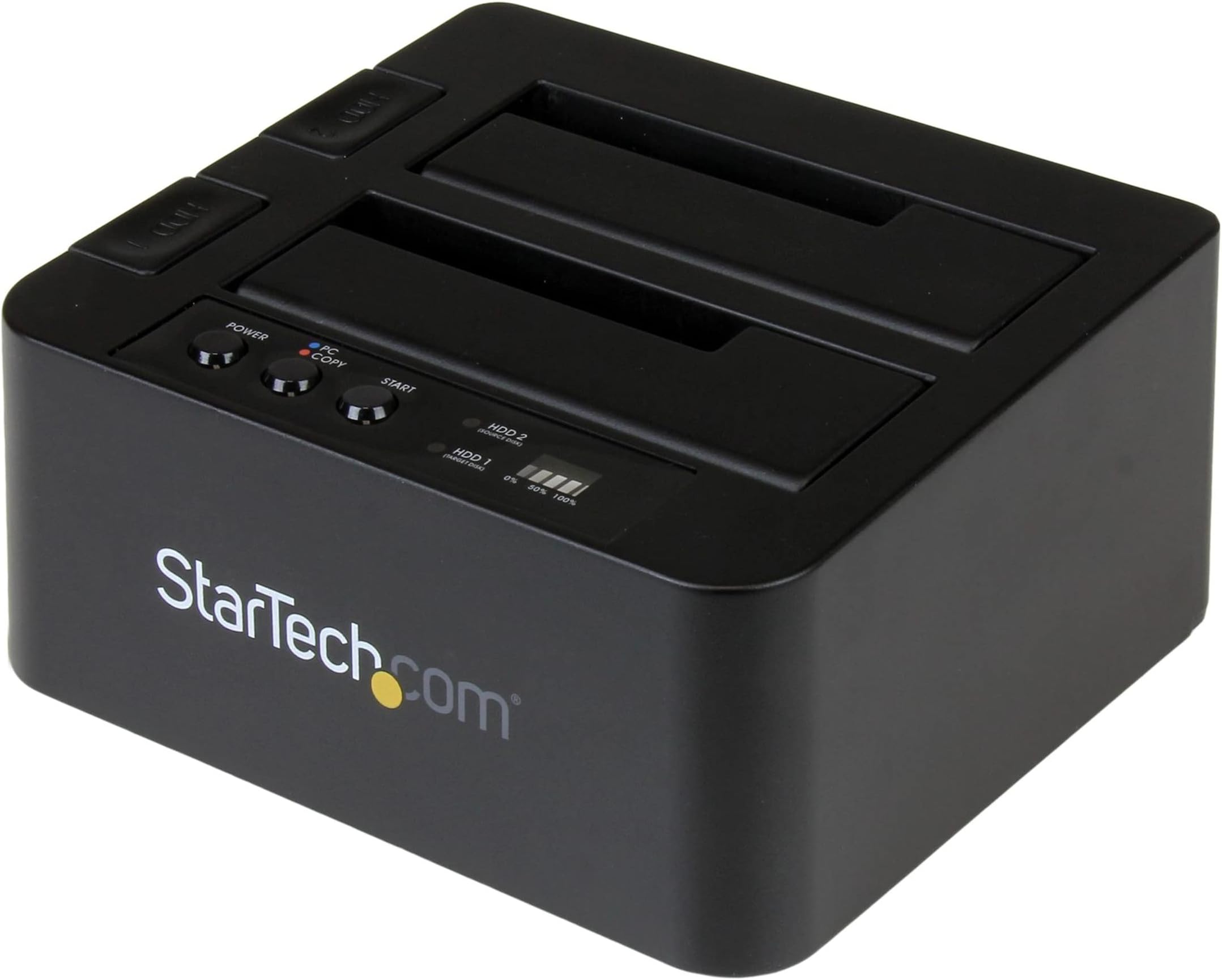
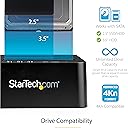
The StarTech.com Standalone Hard Drive Duplicator is a dual-bay SATA HDD/SSD cloner and docking station that enables ultra-fast, sector-by-sector drive duplication at speeds up to 28 GB/min without a computer. It supports all 2.5" and 3.5" SATA drives, including SSDs, with backward compatibility and 4Kn support. Featuring a tool-less, tray-less top-loading design and USB 3.2 Gen 2 connectivity (10 Gbps), it doubles as a high-speed external dock. Designed for IT professionals, it comes with a 2-year warranty and dedicated multilingual technical support, making it a reliable, efficient solution for data migration, backup, and recovery.


| ASIN | B019Y4JE22 |
| Best Sellers Rank | #18 in Hard Drive Docking Stations |
| Compatible Devices | Desktop, Personal Computer, Laptop, Tablet, Smartphone |
| Connectivity Technology | Bluetooth |
| Customer Reviews | 4.4 4.4 out of 5 stars (1,034) |
| Data Transfer Rate | 10000000000 Bits Per Second |
| Date First Available | February 17, 2016 |
| Global Trade Identification Number | 00065030863551 |
| Hard Disk Form Factor | 3.5 Inches |
| Is Discontinued By Manufacturer | No |
| Item Weight | 1.12 pounds |
| Item model number | SDOCK2U313R |
| Manufacturer | StarTech.com |
| Material | Plastic |
| Max Number of Supported Devices | 2 |
| Memory Storage Capacity | 28 GB |
| National Stock Number | 0 |
| Product Dimensions | 5.6 x 5.2 x 2.8 inches |
| UPC | 065030863551 |
K**N
Great piece
Over the years, I have seen many product names come and go. So far, everything I have run across from this company StarTech has really been a good quality item for the price. You can find many other cloners and I am sure for a cheaper price, but the experience I have had with ST, i bought this one. - Good quality -- Nice and heavy for what looks to be plastic. - No issues, worked like a charm - Tested cloning a 250gb drive to a 500gb drive that was a standard boot mbr. Threw the clone in the machine and it booted up without issues. - Win7 self loaded a driver when hooked to the pc and the device then acts like a dock to access the drives via usb 3.0 - Easy to clone. Plug the source in the source slot HDD2 (yes, source is slot 2 in the one i received and i have no idea why they would do that. Logic would have you thinking to clone 1 to 2, not 2 to 1) and the destination disk into slot 1. Make sure the pc/copy button is red for copy and press the button. Wait some time and bam, it is done. Take note that this takes some time. This is not done by wiggling your nose and snapping your fingers. Your fingers will be broken by the time it is done. With 2 drives at 7200 spin SATA 3gbps, the 250gb drive was done in just under 40 minutes by my count. Throw a nice 2gb combo at the same speeds and you might want to just go eat dinner and watch a movie. Only one small thing that is becoming less of a big deal every day; IDE drives. No access to clone older IDE drives as this is for SATA only. At work, I have a lot of older pcs with IDE only. We are using every instance of trouble to simply upgrade pcs which all have SATA anyway but if i needed a quick access to a disk, it would be nice to have it here. There is an option priced on Amazon here at $18 or so that provides a dongle to fit right in this device, giving access to IDE. You need this option, a pair of these might be worth it or then find another option with this built in. Part of the reason i bought this one is that we use the StarTech 2 bay dock to access disks on the desk now as it is and enjoy the quality there as well. I bought this one for the office and may consider one for home with the option of cloning out a large windows drive that is simply ready. Good product and worth the money in my opinion. Update: 12/14/2015 - This device works great, but I did find one snag that most people will not run into, but I sure did; HPA partitions. What you do not see listed is that this will not copy a HPA partition. These partitions are used for older pcs that needed instructions on how to handle larger discs in regards to ATA and were also used for security purposes. If you are trying to clone a disk with one of these and it is the only hard drive left alive with a dead vendor, you are screwed. Now for the good news; StarTech rocks. I only took a survey and man, they were on top of things fast. Not only did they contact me to make sure my needs were fulfilled and why they were/were not, they made the whole situation right by making sure I got the right device that could do so. I offered to send this one back to compensate them back and they said "keep it, you might still use it". Class company that is certainly focusing on customer service and that says a lot of their character and how they do business.
A**N
Great for cloning or copying HD's -- Once you understand the features and the (simple) procedure.
This Startech HD duplicator (SDOCK2U33RE) worked well. (BTW,I have found all the Startech products I've used over the years are good quality.) I used it to clone a 4GB drive, a process that took about 7 hours. The cloned drive was perfect. And the process was easy once I understood how to do it. My one criticism is that I think the instructions could be made more clear and I do not understand why Startech doesn't have short video on their website that explains the process. It would have made it so much easier to get started and to understand how to use this device. Everything is very simple -- AFTER the first time you use it. Here are two things that I did not fully understand: 1. You cannot clone a drive unless the drive is REMOVED FROM THE COMPUTER. A computer is not involved in the cloning process. You just insert your old HD into slot 2 and your new drive into slot, push a button to get into the right mode (red light on) and then push "start." (Just to be clear: "Cloning" is a process to create an identical copy of your old HD. My computer had a drive that was getting flaky so I removed it, cloned it, and installed the new HD back into the computer and got back into Windows without any problems or blips.) 2. The unit can be connected to a computer to copy files -- but not to clone a drive. So, you can use it to backup files from your computer onto another HD -- which is a great feature. You should also note that while cloning, the drives got quite hot. I used a small desk fan to keep them cool. Not required but a good idea.
A**R
Cloned a 14tb hdd
Used it to clone a 14tb hdd. It took about 20 hours to complete but I ended up with an identical drive with no data loss. Just make sure the source and target drives are in the appropriate slots or you’ll have a very bad day. I did a practice cloning of 2 much smaller drives (before cloning the 14tb) to make sure I was doing it correctly. HDDs got very warm during the cloning but caused no issues afterwards.
S**G
Remove one HDD disconnects the other, even if active.
I does connect and work as described for mounting and access hard drives. Unfortunately, there is a single USB bus and if you eject one HDD the other is disconnected even in use. On Mac this results in volume improperly ejected messages. The only solution is to complete work on both HDDs, eject both, turn off the unit, swap the HDD(s) and turn the unit back on. This does not fit my work flow requirements and I will be returning it. I did not test the stand-alone duplicate feature.
L**O
Facil de usar,cumple con las especificaciones
M**L
- Pas besoin de formater au préalable le disque de destination au même format que le disque source ( GUID ou MBR ), le duplicateur s'en charge. C'est un duplicateur bit à bit, donc tous secteurs sont copiés, y compris ceux de démarrage et de partition. - La vitesse de duplication est conforme aux spécifications (Sata III 6 GB/sec) et le fonctionnement très simple à comprendre, même s'il n'y a pas de notice en français dans la boite. En mode UASP entre deux SSD, la vitesse est maximale (impressionnant !) - Toutes les connectiques sont livrées (câble USB 3.0 et e-Sata), et même les embouts d'alimentation européens et américains, bravo ! ------- Retour d'utilisation sous OS X (Mavericks): duplication d'un SSD de 250 Go avec 2 partitions(Yosemite et el Capitan) sur un SSD de 500 Go - Les partitions sont toutes parfaitement clonées, y compris les partitions EFI et de récupération d'OS X. MAIS, si vous clonez un disque de 250 Go sur un de 500 Go, il vous restera 250 Go non alloués sur votre nouveau disque, et vous devrez étendre la dernière partition (ou créer une nouvelle partition) avec l'application "Utilitaire de disque" d'OS X. ------ Retour d'utilisation sous Windows 7 intégrale: clonage d'un disque dur classique de 500 Go vers un SSD de 500 Go: - Les partitions sont toutes parfaitement clonées, y compris la partition de récupération HP. - Le SSD est reconnu et immédiatement démarrable après avoir été re-installé dans le PC. ---- Usage en mode "Dock": fonctionne normalement, tant sous OSX que Windows. Vitesse nominale avec les SSD puisque ce boitier est compatible UASP. - Un seul port e-Sata et USB 3.0, donc la bande passante sera partagée si vous connectez deux disques simultanément.
M**D
Very good duplicator, able to use stand-alone mode like the 5 way model.
J**D
Die StarTech.com SDOCK2U313R Dockingstation überzeugt durch eine konsequente technische Umsetzung und hohe Zuverlässigkeit im täglichen Einsatz an einem Linux-Server. 1. Hervorragende Chipsatz-Wahl (ASMedia ASM1352R): StarTech setzt hier auf den ASMedia ASM1352R Controller, was sich in der Praxis sofort auszahlt. Volle 10Gbps: Der Controller nutzt die USB 3.1 Gen 2 Bandbreite tatsächlich aus. Nativer UASP-Support: Das Gerät wird unter Linux sofort mit dem uas-Treiber eingebunden, was für optimale Performance und geringe CPU-Last sorgt. 2. Stabilität unter Linux: Viele USB-SATA-Bridges haben unter Linux mit Stabilitätsproblemen oder Kernel-Blacklists zu kämpfen. Diese Dockingstation hingegen läuft absolut stabil. Es gibt keine Verbindungsabbrüche, und die volle Geschwindigkeit steht dauerhaft zur Verfügung. 3. Standalone-Duplikator: Die Offline-Klon-Funktion ist ein extrem nützliches Feature. SSDs oder HDDs lassen sich ohne angeschlossenen Computer spiegeln, was Zeit spart und sehr zuverlässig funktioniert. Die Fortschrittsanzeige ist dabei klar und verständlich. Fazit: Wer eine Dockingstation sucht, die technisch auf dem aktuellen Stand ist und unter Linux ohne zusätzliche Konfiguration stabil läuft, wird hier fündig. Die Kombination aus echtem 10Gbps-Speed und der Duplikator-Funktion rechtfertigt den Preis absolut. Eine klare Empfehlung für alle, die Wert auf technische Integrität legen.
A**.
It is easy to use and works well and fast.
Trustpilot
2 days ago
1 week ago