


🖼️ Print smarter, live brighter—your wireless photo studio awaits!
The Epson Expression Home XP-430 is a compact, wireless inkjet printer designed for vibrant photo printing, scanning, and copying. Featuring a 2.7" color LCD, automatic duplex printing, and Wi-Fi Direct, it supports seamless mobile printing from iOS and Android devices. With individual ink cartridges and Amazon Dash Replenishment, it offers cost-effective, hassle-free operation for busy professionals seeking quality and convenience.


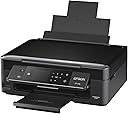

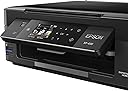


| ASIN | B01BIGO5IW |
| Additional Printer Functions | All In One |
| B&W Pages per Minute | 9 pages_per_minute |
| Best Sellers Rank | #436,896 in Office Products ( See Top 100 in Office Products ) #173 in Desktop Photo Printers |
| Brand | Epson |
| Built-In Media | Epson Expression Home XP-430 all-in-one^CD-ROM for product setup^power cord^DuraBrite Ultra ink cartridges – Four 288-I series ink catridges: Black, Cyan, Magenta, Yellow |
| Color | black |
| Color Pages per Minute | 4.5 pages_per_minute |
| Compatible Cartridge | Epson cartridges |
| Compatible Devices | Laptops, PC, Smartphones |
| Connectivity Technology | USB |
| Control Method | Voice |
| Controller Type | Amazon Alexa, Android, Vera, iOS |
| Customer Reviews | 3.5 out of 5 stars 1,608 Reviews |
| Display Type | LCD |
| Duplex | Automatic |
| Global Trade Identification Number | 00010343920262 |
| Hardware Interface | USB |
| Ink Color | four colors |
| Item Dimensions D x W x H | 11.8"D x 15.4"W x 5.7"H |
| Item Type Name | Multifunction Printer |
| Item Weight | 9.3 pounds |
| Manufacturer | Epson |
| Maximum Copies Per Run | 100 |
| Maximum Copy Resolution Black and White | 600 dpi |
| Maximum Copy Resolution Color | At least 300x300 dpi |
| Maximum Copy Speed Black and White | 9 pages_per_minute |
| Maximum Media Size | 8.5 x 14 inch |
| Maximum Print Resolution Black and White | 1200 dpi |
| Maximum Sheet Capacity | 100 |
| Maximum print Resolution Color | High |
| Model Name | XP-430 |
| Model Number | C11CE59201 |
| Model Series | XP |
| Number of Licenses | 1 |
| Number of Trays | 1 |
| Other Special Features of the Product | Auto Document Feeder |
| Output sheet capacity | 100 |
| Paper Size | 1 |
| Print media | Glossy photo paper, Paper (plain) |
| Printer Connectivity Type | USB |
| Printer Output Type | Color |
| Printer Type | Inkjet |
| Printing Technology | Inkjet |
| Processor Count | 2 |
| Resolution | 1200 x 1200 |
| Scanner Type | document |
| Special Feature | Auto Document Feeder |
| Specific Uses For Product | Home |
| UPC | 010343920262 |
| Unit Count | 1 Count |
| Warranty Description | Limited Warranty |
| Warranty Type | limited warranty |
A**X
Fast, clear black and white printing and good multipage document scans
I misread the product description and misunderstood it to come without ink. Not true it came with all the color and black and white ink, which I installed. Installation instructions appear simple, but they assume a level of familiarity that I didn't have. That's OK; I put it together in about an hour. In black and white the prints are clear, and the pages printed twice as fast as my four-year-old HP that stopped working with my vintage Mac after numerous Mac software updates. This week's XP-430 challenge was to scan several multipage documents, including an 11-page title insurance policy. Again the instructions were incomplete, even those I found on the Web and You Tube. So I'm pasting here my detailed instructions on how to scan to a Mac from trial, error and success. 1. Go to Mac computer Settings 2. Open Printer 3. Click “scan” 4. Click “open scanner” 5. Place document on scanner screen; close lid. 6. Select "kind," "scan to," and "format." 7. Choose pdf format (the only format that combines multis into one document) 8. Check box for “combine into single document.” In "Name" field, insert a name for the document. 9. Click “overview.” Image of document will appear on computer screen. Using mouse pad, adjust the dotted lines to enclose the document text within the dotted lines. What is outside lines will not be scanned. 10. Once certain all text is within the lines, click “scan.” 11. After computer screen says “saving image” and scanner quiets, remove scanned document and place second page on scanner screen. 12. Click "overview." Review overview image to ensure all data is within the lines. 13. Click "scan." 14. Continue process until all document pages are scanned. 15. On Mac, click “Finder” on menu bar. The scanned document will be at the top of the list. Click it and ensure all pages are scanned as desired. 16. Now save the document to your documents. 17. Delete scanned imagfrom “Finder."
C**H
Honest Review: Buy another AIO printer.
I have never used an Epson XP-430 or any other Epson all in one printer before. I bought this printer hoping that it would be much better than my HP model which is not an All In One. Unfortunately, it is not. If I could go back and change my order, I would. Yes, I bought it for several different reasons. 1. It is light weight. 2. It doesn't take up much space. 3. It was all in one and what I really wanted to use was the scanner component. 4. It is wireless. 5. It was a good price. Why I wish I hadn't bought this model. 1. If you run out of ink, it will not let you use any other option available. Not even scan. When I called Epson and asked them was a way I could use the scan option without replacing the ink...at first they said yes, and then after doing everything they said, about 20min later, I was told that I had to replace the ink and that I was not able to use any option when the ink was out. Really? Ink has nothing to do with scanning so I don't understand why that is. 2. It prints a lot slower than my old school HP printer. If you are not in a hurry and have several minutes to spare...it's okay, but if you need to print and go...it isn't worth it. 3. The ink cartridge and the replacements are okay for the price, but considering they run out really quick...you end up replacing them a lot more than you should have to. 4. The picture printing is not good at all. Save your time and money and just go to a picture printer in town and print your pictures there because you will not be happy with the outcome. 5. There is NO two sided printing. I thought that today...all printers would come with that option. I guess you could print two sided if you wanted to flip the paper over and refeed through for the back side but...I wouldn't necessarily do that. 6. No fax option So...if I could go back and choose another printer...I most definitely would and I will be ordering me a new All In One and making sure it does everything I need it to do before clicking buy now. Hope this helps everyone out. Have a nice day. This is my honest review of the product.
G**.
Very good printer for the cost of it.
I bought my Epson 430 printer from Amazon nearly a year ago and as of yet have had no real issues with it. It works well with printing from items I send from my iPad to it. It does a great printing job for the extensive documents I send it. I do have a few complaints though. It does not print documents in a forward order of 1 to 100, it prints in reverse order. A 300 page document then takes time to place back into to a forward order by hand. (Printer connected via printer cable to computer directly). Another issue is the cost of ink for the printer. It seems to go through ink quiet quickly especially in regards to photographs, special occasions cards. I have had numerous types of printers and I do like this one over most others I have had in the past including HP and Canon. While this printer does take up desk space, it takes up less space than any other printer I’ve had in the past except my small laser printer and the old Star dot matrix printer I had back in the 1980’s. Print quality is not exceptional, it is very good, especially given the low cost of the printer. The copier function is also very good. The printer overall is very good in meeting all my requirements. As for the printer overall I give it four stars, and would recommend it for a low cost printer. The cost of ink to keep the printer running is my biggest complaint, although comparable to most other printers on the market. I will look into the Epson high capacity ink printers the next time I purchase a printer.
J**S
Works great with a little help from my friends :)
Epson's kind customer service and tech support means I will never buy another brand again! Love: compact size, all in one, beautiful print quality, with rear loading function for use with card stock and craft papers. I'm a teacher and I needed a printer that could print things for craft projects, bulletin boards, etc. This does everything I need it to at a price a teacher's salary can handle. Best thing about this printer is the tech support. I'm tech aware but not necessarily tech savvy. When I set up my Epson, everything printed beautifully but I could not for the life of me get the danged scanner working and I needed it asap for a school project. Tried to self help on Epson's support website, but eventually had to give in and seek out professional help. A quick skim on Epson's support site revealed something that's becoming more and more rare: a telephone number; a real life, talk directly to a person telephone number! Just my style. I called, waited less than 5 mins for help, talked to two friendly reps who worked together to find a solution to my problem, and in less than 30 mins "Joe" had my scanner up and running for me. Awesome service. BTW, what was causing the problem? Even though I uninstalled the software, my old printer brand had files in my system that prevented other brands from working with my computer. Maniacal? I don't know, but I do love my Epson.
D**N
A no-frills ink-jet printer that plain works
I literally bought this because it was the cheapest printer I could find brand new. Raise your hand if you did the same... My retired mother needed a printer for her desk for the infrequent document here or there that she may need to print out. This was the cheapest one. I bought it. Surprise, it's actually a pretty darn good printer. Quality and fit & finish are just as good as the high dollar Epson printers I looked at in the local Staples. Design and looks wise, it's a very attractive piece, with touches of matte and gloss black here and there. The screen is a cool feature and is easy to read and navigate through. Setup was a breeze (as it should be for anyone installing a printer in this day and age). The included install software worked well and didn't include a bunch of bloatware, which in itself made me happy. Print quality is average for an ink-jet printer. Colors are vivid and blacks are black. The printer spools up quick and docs print quick, printer software isn't clunky or obtrusive. Copy function works well and could prove useful. Overall, it's exactly what you'd expect a $50 ink-jet printer to be. How reliable and trouble free it will remain after a few years, we shall see. I am confident in it and don't regret the purchase at all. Its doing its job nicely.
R**R
Press the back button and buy another brand.
This is my 3rd Epson printer in a decade and will be my last. I've had this printer for 2 years. At first there were no 3rd party inks available so I had to buy the overpriced OEM inks. The problem here is Epson printers clog constantly and cleaning the head burns ink fast. Then the OEM cartridges are only partially filled to begin with. The fact the "XL" carts are the same size proves that. This printer clogged more than any Epson I've had in the past. Often had issues with the WiFi disconnecting as well. Scan a page to PC and 15 seconds later printer is disconnected. >< Finally 3rd party inks arrived and I was saved. Better longevity at 1/4 the price and no noticeable degradation in quality. Fast forward a year and I made the mistake of allowing the printer software to update itself. Immediately it stopped recognizing the ink cartridges and fully disabled itself from any action until I inserted an official Epson cart. Even though the supreme court already came down on printer manufacturers saying they cannot do this Epson still does. Time for a multi billion dollar fine... After some research I've discovered Epson is the most aggressive in this practice. I let it go for several months and purchased a Samsung laser printer that has been ridiculously more reliable, but it's monochrome only. I needed to print something in color recently so I decided to take the time to force the printer into recovery mode and force a firmware downgrade. I'm not buying $60 in ink to print 5 pages, especially when I have a fresh set of carts in the printer and 2 more still in packaging. Success! Printer once again recognizes the carts but heads were clogged badly. Ran the "clean print head" function many times which has NEVER actually worked. No effect. I actually took the time to DISMANTLE the carriage enough to remove the print head for cleaning, rinsed it twice with warmed distilled water, gobs of dried ink came out. Reassembled, inserted fresh carts and heads are still horribly clogged. Thank God I didn't dump another $60 on official carts again. With all the issues I've had with Epsons constantly clogging, this one especially, shady updates to force you into an ink monopoly, spotty wifi, and horrible cartridge capacity I will never purchase an Epson product again. TLDR: Nothing but problems with anything that says Epson on it.
M**Z
Copiadora
Muy buena
C**K
do not buy this-updated review
this printer is the absolute worst printer on the market. That being said, I print out very little. Mostly receipts from my bank for paid bills. And that's only about 4-5 pages a month. The set up was very easy. You just have to continually reset it everytime you want to print something. Just follow the instructions on the printer's screen and access your wifi. The CD that comes with is useless as it only directs you to Epson's website where you may be shilled into buying accessories and now they know where you live. And then you have to enter your wifi info on the printer by following the directions on the printer's screen..oh is that redundant? Sorry, but my partner is in IT and he looked at the info on the CD. Does not take a genius to figure out redundancy. Anyways, it comes with a starter kit of ink. I do not like the fact that the ink cartridge holders, unlike my old canon Pixma, do not have lights that indicate low ink for the various cartridges. And the plastic holders for the cartridges feels very cheap and fragile..don't lose your temper with this one, folks, it will break like an senior citizen's hip after a fall..feels like it will anyways. But, like I said, if you don't print a hell of a lot, you have wifi and a home network set up, this is a good deal. Especially if you want to take the time to continually reset it and wait an hour or so before it shows any sign of life or is printing anything. I plan on having a nice baseball game with it on my front lawn and after I have smashed it to bits and the neighbors have called the cops, I will go to my local Staples and buy another Canon. Screw Epson's and the horse they rode in on.
M**R
Works perfectly!!!
Easy to install and has a beautiful print outs.... It works with windows 10 (mine is windows 10) and connects to wifi which is good thing for me coz i forgot to buy the usb cord for printer through laptop...it comes with ink....what i love most is i can print from my iphone 6 wirelessly and i also downloaded an app called epson creative print on my phone so i can make a designs and print it for fun or for my needs later like invitations, calendars etcetera....also there is a built in in the printer you can make a calendar etcetera but the screen is too small that i cannot see clearly for example you make a calendar through the printer (did not try to print calendar yet but saw it on the printer screen that you can make a calendar etc. maybe soon going to try). Its a bit slow to print but all in all i so love my new printer.... -gonna update my review later for my photo printing print outs 😉 ***update*** Photo printing works great i love the result.... It only takes like 1-2mins printing or less than 2 mins..... Hope my review helps you....have a wonderful day!!! 😊😉
E**A
Great printer for the value!
This was a great buy!! Easy set up and the print quality is really good. LOVE that I can print from anywhere in the house with zero issues and no messy cords. It's a decent size, not too heavy and not too bulky but if you're looking for something slim, this isn't it. If I could've given it a 4.5, I would've. My ONLY qualm is that it's a bit slow to scan but not enough for me to want to return it. For the price, you really can't go wrong! Very happy with the purchase as it highly suits my home office needs.
A**R
Would not buy again.
Printing is good and the unit is reasonably priced. However the price of the ink is expensive and don't last long. Remanufactured ink cartridges are iffy because the machine can tell the difference by the chips and would reject the non-OEM. You cannot have the original cartridges refilled because of the chip as well. Machine failed after 1 year of light use. No red ink coming through. Changing the cartridge did not correct.
K**Y
Research your ink first.
Great price point. Prints good too. The ink is stupid expensive though as a refill and the bloatware that comes with it is just over the top. A printer shouldn't need 4 different pieces of software to operate. It does have nice features though, such as cloud printing and a good scanner. As a pro tip, before you purchase any printer, research cost of the ink before hand. A $50 printer with $35 refills is worse than a $100 printer with $15 refills. Your overtime expense will compensate for the printer cost.
C**5
Great printer. I use this printer very frequently and ...
Great printer. I use this printer very frequently and it has given me no issues thus far. The screen is a good size and very user friendly. Ink prices are about the same for most printers and easy to replace. I have not used the printer for scanning so I cannot comment on this function.
Trustpilot
3 weeks ago
1 day ago