Desertcart purchases this item on your behalf and handles shipping, customs, and support to OMAN.
⚡ Power up your tech IQ with precision and style!
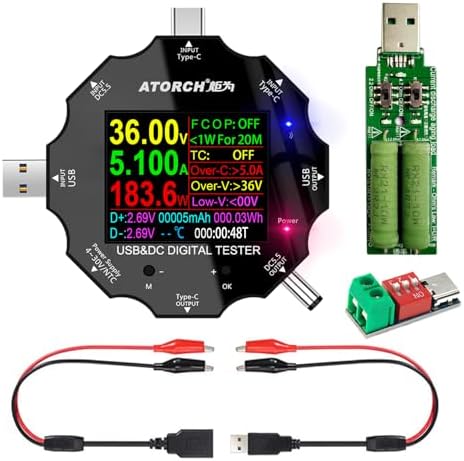
The AVHzY USB C Tester UD18 is a compact, battery-powered digital multimeter featuring a vivid IPS color screen and 3-in-1 interface support (USB-C, DC5.5, Micro USB). It measures voltage, current, power, resistance, and capacity with ultra-high accuracy (0.00001), supports fast charging protocols PD2.0/3.0 and QC2.0/3.0, and offers real-time data syncing to mobile apps. Designed for professionals and tech enthusiasts, it includes advanced safety protections like over-voltage and over-current safeguards, making it an essential tool for monitoring and diagnosing power delivery in modern devices.


| ASIN | B08N6XQF91 |
| Best Sellers Rank | #111,590 in Tools & Home Improvement ( See Top 100 in Tools & Home Improvement ) #157 in Multi Testers |
| Brand | AVHzY |
| Brand Name | AVHzY |
| Color | Black |
| Compatible Devices | Mobile phones, notebooks, desk lamps, routers, set-top boxes, etc. |
| Customer Reviews | 4.3 out of 5 stars 451 Reviews |
| Included Components | No |
| Item Dimensions | 1.97 x 1.97 x 0.39 inches |
| Item Weight | 34 Grams |
| Item dimensions L x W x H | 1.97 x 1.97 x 0.39 inches |
| Manufacturer | AVHzY |
| Measurement Type | Multimeter |
| Minimum Operating Voltage | 3.6 Volts |
| Model | UD18 |
| Part Number | UD18 |
| Power Source | Battery Powered |
| Specification Met | Qc2.0/Qc3.0, Pd2.0/Pd3.0, Safety Protection |
| Style | UD18(Clip Cable+load) |
| Style Name | UD18(Clip Cable+load) |
| UPC | 779288697881 |
| Unit Count | 1.0 Count |
| Upper Temperature Rating | 60 Degrees Celsius |
J**S
What a Versatile USB Meter For All Types of Devices!
This USB Meter does it all! I know it is a bit more expensive than some of the other ones, but this one had versatility written all over it. And it doesn't disappoint. I've been needing something like this to evaluate power usage of different devices, like WiFi cameras for remote locations and to determine what batteries and solar charging I am going to have to use in order to power those devices even more remotely than designed. So this displays Voltage, Current and Power being used. That is just a starting point for what it can do. The video they have on here shows more of the details, and I recommend pausing it at different spots to see how easy things really are to do with it. It's very intuitive to use and it provides a wealth of information. There are instructions that go with it too. By the way, besides USB, it can also be used to measure the power of the 12 volt type plug in cameras, along with other devices using the clip leads that are provided. So for me, this is a very useful tool. I've been using it all evening to measure and document different cameras and charging currents that will be required with a solar charging battery system. In essence, you don't necessarily want to spend more than you have to when putting a battery, solar panel and camera in a remote, but wireless WiFi location. This will give you that information at your fingertips.
J**N
Works well for measuring powerbank capacity and output.
I play with a lot of power banks and portable power supplies that have USB-C output and input up to 140W. I already had one USB meter that worked well, but I wanted one with more input/output options, a better display, and which was unidirectional (so I could control power flow when connecting two bidirectional ports). This unit has ports clearly labelled Input and Output, and so I bought it. Sadly, those are just labels and (like all other meters I've tried) power can flow either way. This means that if I connect two devices with bidirectional ports, power can flow from one to the other and then at some point reverse, draining both. So, back to using the Anker 2-in-1 cable to control flow! So, I dropped one star because I bought a unidirectional meter and found it is bidirectional. Pros: A nice display lots of ports (although so far I've only used USB-C), and Bluetooth Connectivity to an App. Negatives: Ports are bidirectional (typical for these devices) and not as labeled, the App appears to be iOS-only, and the App is not very good (but OK for seeing the numbers). Note: many complain about the documentation, but the Amazon page now has a lot of details (including pressing both buttons to reset), and many complain it doesn't always turn on with USB-C. For the latter, it's complicated! I've learned that USB-C ports have upper and lower signal lines, but not all ports use both, and there's no standard about which one is used. In addition, some cables only have a line for one of the two (upper or lower). True USB-C devices need to communicate before power will flow. So, if there's no connection with a cable between two devices, try rotating one end of the cable, then the other end, and then go back and rotate the first end again (checking all options) and you may find one combination that works - I was able to get the meter to work every time by rotating the cable end(s).
L**T
just what i needed
works fine
K**S
If you have any data or charging cables you need this.
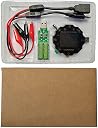
Essential for testing cords and cables. I only wish it had a case to hold all the pieces.
M**G
The Android app E-Test did not work at all with this tester. The rest is ok.
The tester is ok overall but the Android app E-Test that I installed on my Samsung S10+ did not detect the tester. My phone's Bluetooth setting saw it but E-Test itself did not so I could not use the app. The rest of the functions are fine with the following exceptions: 1) The plastic screen was scratched very very easily 2) The clearing/setting of menu items were tedious 3) The manual was not very readable and not clear 4) Some internal calibration functions were not well documented 5) The USB-C female output connector is not reversible. When I plugged in 1 way, I got fast charge at 9V 1.5A. When I flipped the cable upside down, I got 5V 500mA.
S**R
Very useful tool!
I love this little gadget for testing all the USB gadgets we have now. I can tell exactly where the power draw is. I also love that this unit comes with a variable switch loader dongle to test with and alligator clip USB leads. Bonus that it works with Bluetooth to a phone app to see real time data comparison and graphs.
T**P
Great tester, almost worthless instructions
I love this little tester and would love to give it 5 stars. However, some of the instructions that come with it are almost impossible to understand. I uploaded one of the pages to give you an example. To be fair, many people would find this tester intuitive enough, especially with how well it is marked, that for the basics, you would not need any instructions and you would figure many things out for yourself. That said, although I am a retired electronics technician and have fiddled with electronic gadgets and such for 40 years, there are still a few things I could not figure out on my own, and got no help from the instructions. Example, holding down the "M" button brings up the settings menu, and the "OK" button changes parameters, but switching to other parameters in the list didn't work. There is a "Factory setting and calibration method of back-end voltage and current:" section that I tried to follow and quickly got lost. Again, if all you wanted was voltage, current and wattage, and were not concerned with calibrating or anything other than the default settings, you'll be fine. However, I could not say this was a 5 star product if I could not understand the instructions. That is unfortunate because it really is a nicely laid out well constructed little tester. It does come with a USB 3.0 load, and a male USB 3.0 to alligator clips, as well as a female one, which come in handy when testing projects I build on my electronics bench here.
J**H
OK testing device with mediocre app
The application looks outdated, lags and has bugs on both iOS and Android. The device is fine for low-precision measurement
E**.
Value for money.
For quick analyzing of power supplies.
M**L
Works well
Bluetooth was a very pleasant surprise. It measures and connects quickly and well. Fun to use. Informative. Instructions are useless. Check YouTube for detailed instructions
A**S
its a must have. has all the I/O you need
design and quality is super i use it for all my youtube video reviews amazing interface and yes you can use the phone app to log everything. amazing for the cost
Trustpilot
2 months ago
2 days ago