







M43-12
Product ID: 283508223
Details
- ColourBlue and White
- BrandUES
- MaterialPolyester
- Liquid volume15 Millilitres
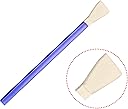
- Brush length12 Centimetres
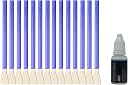
💧15ml ultrapure water-based cleaner
🧼14 precision 12mm swabs
🛡️Class 100 cleanroom vacuum-sealed swabs
Desertcart purchases this item on your behalf and handles shipping, customs, and support to OMAN.
📸 Keep your shots flawless—because your sensor deserves VIP treatment!
The UES Sensor Cleaning Kit is a professional-grade 14-piece set designed specifically for Micro Four Thirds camera sensors. Featuring 12mm swabs made in a Class 100 cleanroom and sealed in vacuum packaging, it ensures contamination-free cleaning. The included 15ml ultrapure water-based, alcohol-free cleaner is safe for both CCD and CMOS sensors, effectively removing dust, fingerprints, and smudges without streaks. Lightweight and travel-friendly, this kit offers a reliable, gentle, and precise solution to maintain your camera’s sensor performance.


| ASIN | B08SCH92K2 |
| Audio Recording | No |
| Best Sellers Rank | 185 in Camera Cleaners |
| Brand | UES |
| Brand Name | UES |
| Brush Length | 12 Centimeters |
| Brush length | 12 Centimeters |
| Colour | Blue and White |
| Compatible Devices | Micro Four Thirds (MFT) Cameras |
| Country of Origin | China |
| Customer Reviews | 4.3 out of 5 stars 473 Reviews |
| Enclosure Material | Polyester, Microfibre |
| Item Weight | 0.1 Kilograms |
| Liquid Volume | 15 Millilitres |
| Liquid volume | 15 Millilitres |
| Manufacturer | UES |
| Manufacturer Part Number | M43-12 |
| Material | Polyester , Microfibre |
| Media Type | Product image |
| Model Number | OEM-Parent |
| Number of Items | 15 |
| Number of Packs | 1 |
| Product Warranty | 1 Year |
| Screen Size | 12 Millimetres |
| Set Name | Micro Four Thirds Camera Sensor Cleaning Kit |
| UPC | 823145002681 |
| Water Resistance Level | Not Water Resistant |
M**A
It worked!
Excellent. Did a great job of cleaning the GH5 sensor. Took 3 attempts to clear all the bits of dust, but did the job well. Would definitely recommend. Would also seriously recommend following someone on YouTube explaining how to properly clean the sensor when attempting it for the first time.
A**R
It does the job, could be a bit wider
It well cleaned the sensor, but is a bit small for my Panasonic Lumix G9. The swab is 11.78 mm wide. I used 2 swabs to cover the entire sensor.
P**E
Simple to use and - it works
My kit arrived today and within minutes I had it open and used it on two mirrorless cameras. I am absolutely delighted (DELIGHTED) with the results. Why did I wait so long before trying to clean the sensor myself? I did watch a couple of very helpful videos on YouTube before commencing. I now want to get a kit to clean my eos80D sensor when it needs it. The two cameras I used the mirrorless 4/3 kit on were Lumix dmc_GX8 and Lumix dmc-gm1. The GX8 I purchased second hand - so it had quite a lot of use and the gm1 I purchased new and had never had the sensor cleaned. There was a 'smear' as well as dust on the gm1 and I I was a little concerned it could not be removed - but with two swipes the sensor was clean. Do watch the tutorials - at the very least they gave me confidence.
V**S
Used with trepidation but simple and effective.
Have had splotches on my old Panasonic GFX7 Micro 4/3 camera for years. I always thought that these cleaners were expensive and since my camera was only £250 new in 2013 I'd thought that sending the camera off to the shop for sensor cleaning wasn't worth it. Now the camera is almost 9 years old I thought that I'd nothing to lose. In any case the process took less than 5 minutes. 1 swab, 4 drops , 2 firm swipes and the sensor is pristine. Wish I'd done this years ago. Now I have 13 swabs left and loads of sensor gluid left. Now I'm using the old camera with more confidence than for years.
M**B
worked well,
did the job
P**N
Watch A Video First
Very pleased with the cleaning kit although I was a bit apprehensive when I first used it. There are lots of videos on social media & I would recommend that you watch these before cleaning what is an expensive item.
C**S
Not impressed.
Have cleaned sensor successfully in the past with a similar product which is no longer available, so purchased this product. Followed the instructions to the letter, and carried out a dry clean using swab which seemed to leave specks of dust on the sensor. Used blower to try to remove, without success, so used another swab to do a wet clean applying one drop of liquid applied to the swab. This left small stains on the sensor, but dust was removed. Used yet another swab with one drop of liquid and this removed the stains. Didn't have this staining issue when using the discontinued product, so not impressed so far.
D**A
First time attempt!
i have been trying to get those horrible spots off the sensor and used horrible swabs that just smeared everything and made it worst. I thought I was wasting more money on this but boy was I wrong!!! Never going back again! Thank you
A**O
Efficace e semplice
Prodotto consigliato, è stato efficace nel rimuovere accuratamente polvere e segni di sputacchi del precedente proprietario dal sensore seguendo le istruzioni semplici fornite. In confezione sono presenti spatole sigillate ognuna nella propria confezione e liquido in abbondanza. Includo foto del prima e dopo. Forse 15€ sarebbe il prezzo più consono visto che a 30€ lo fate fare in maniera professionale, però funziona ed è rapido quindi va bene.
M**S
Works well!
Works well, doesn't smear.
A**R
Fantastic First Time Cleaning a Sensor
My sensor on my Lumix G9 was quite dirty after 3 years of heavy use. There appeared to be small oil spots from shutter as well as dust. Dry clean with blower got most dust but oil spots remained. After watching several cleaning vids on YouTube I decided to give it a try. The UES Digital Camera Micro Four-Thirds 4/3 (MFT) 12mm Sensor Cleaning Swabs did the job I had to clean 5 times using a new swab every time until all the spots were gone. I highly recommend this kit.
R**N
Va bien
Me ha ido bien. Lo use con miedo pero funciono. Ok. Leer articulos sobre como hacerlo.
M**C
très bien
un peu hésitant à toucher au capteur, mais resultat super. attention, si vous avez un capteur stabilisé pensez à le bloquer avant la manip. pour ma part , sur un lumix, aller dans les menus, desactiver la fonction stabilisation et laisser l appareil allumé pendant toute la manip et ainsi le capteur ne bouge pas.
Trustpilot
1 month ago
3 weeks ago