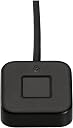

🔒 Unlock the future of desktop security with a touch of your finger!
The VeriMark Desktop Fingerprint Key by Kensington is a cutting-edge biometric security device designed for enterprise desktops. Certified for FIDO U2F and FIDO2 WebAuthn, it supports passwordless and multi-factor authentication with seamless Windows Hello integration. Featuring advanced Match-in-Sensor technology, it delivers ultra-precise fingerprint recognition with industry-leading false acceptance and rejection rates. Its long USB cable offers flexible placement, while compliance with major privacy laws and federal standards makes it ideal for professional environments seeking robust, convenient security.


| ASIN | B08WPHWN83 |
| Batteries | A batteries required. |
| Best Sellers Rank | #11 in Security & Surveillance Biometrics |
| Brand | Kensington |
| Computer Memory Type | DIMM |
| Customer Reviews | 4.2 4.2 out of 5 stars (982) |
| Date First Available | February 16, 2021 |
| Item Dimensions LxWxH | 5.2 x 4.6 x 1.8 inches |
| Item Weight | 2.01 ounces |
| Item model number | K62330WW |
| Manufacturer | Kensington |
| National Stock Number | 0 |
| Product Dimensions | 5.2 x 4.6 x 1.8 inches |
| Series | K62330WW |
M**O
Secure, Convenient Fingerprint Login
This Kensington VeriMark Desktop Fingerprint Reader works great for Windows Hello and Passkeys, making logins incredibly easy. It sets up quickly and the speedy technology ensures secure authentication every time. It's so much more convenient and frankly, more fun than typing passwords. Highly recommended for a seamless, secure desktop experience. Reads fingers very fast and is very small and lightweight.
J**O
Best Fingerprint in the Market
This is a good product to use at your PC without any issue. I recommend it It is easy to install and it works without any effort.
E**N
Works great after a bit
Initially I thought I was going to end up returning this. My laptop installed drivers for it, but almost immediately it stopped working. I tried installing the driver from the manufacturer website, but it said the latest driver was already installed. I think at that point I rebooted my laptop and then it just recognized it after that. If you already have a fingerprint reader you will most likely need to register new fingerprints using this reader. It would not recognize my fingerprint, which I guess is understandable, since every reader is different. Once I registered my fingerprint using this reader, it worked great. It works for signing in and also to authenticate for passkeys. This was on Windows 11.
C**O
Windows Hello, Passkey
very good product. good quality. You can activate Windows-Hello and passkey using this.
T**D
Win11 Hello fingerprint reader....THANK YOU
I have wanted to add a fingerprint reader to my desktop setup for quite some time. I love the ease of use and added security of my laptop setup. Now that Microsoft has added ESS support to the latest windows update you can now add supported hardware and enjoy the same ease of use and security of the TPM. I received this, opened and connected to my pc, downloaded the drivers and was finished with setup in a few minutes. Great device, is small but well built and sturdy.
R**T
Worked for a couple of weeks, but now is junk
Worked for a couple of weeks with Windows hello login, then started to recognize fewer and fewer fingperprints, and now it doesn't work at all. I tried having it relearn fingerprints, but this didn't help. An expensive piece of junk that is now in the trash. Don't waste your time.
G**M
Actually is Plug and Play on my Win 11 machine
I expected problems making this reader work but had no installation problems. The reader works really well and solved a problem I had using an external monitor.
N**L
It would have been nice know...
If you're considering the Kensington VeriMark Desktop Fingerprint Reader as your biometric login solution, be prepared to pay a premium—and unfortunately, not for a premium experience. 💸 Price vs. Performance This is one of the most expensive fingerprint readers on the market, and with that price tag, you'd expect seamless plug-and-play functionality. Instead, setup feels more like a scavenger hunt. Drivers may not install automatically, and troubleshooting becomes a rite of passage. ⚙️ Setup Experience Despite being marketed as Windows Hello compatible, the device often fails to register properly on Windows 11. Even after manually installing drivers and jumping through configuration hoops, the reader doesn’t consistently recognize fingerprints. 🚫 Reliability Issues When it does work, it’s hit-or-miss. More often than not, you’re greeted with the dreaded “Something went wrong” message. This forces you to revert to using a PIN or password—defeating the entire purpose of biometric security. 🧠 Final Thoughts For a device at this price point, the lack of reliability and user-friendly setup is disappointing. Unless Kensington releases a major firmware or driver update, this reader feels more like a high-cost gamble than a dependable security upgrade.
N**.
Der Kensington VeriMark Fingerprint Key funktioniert zuverlässig und erkennt den Fingerabdruck schnell. Die Einrichtung unter Windows war unkompliziert, und die Anmeldung geht nun deutlich schneller und sicherer als mit Passwort. Auch die Verarbeitung ist hochwertig – das Gerät wirkt robust und unauffällig auf dem Schreibtisch. Fazit: Top Fingerabdruckscanner für mehr Komfort und Sicherheit im Alltag. Absolute Empfehlung für Büro und Home-Office!
Z**A
Prachtige hulp bij het inloggen, herkent uw vingerafdruk door een simpele tik, uit alles richtingen, en leeret snel.
E**2
Muito bom
L**N
No problems installing / using it on Win 11
C**2
Surprised how heavy & solid this little thing is for its small size. The weight makes it sit flat on the surface rather than float about on its cable & it also has an anti slip pad on its undersurface. Like: Went to "setup fingerprint recognition" (for Windows Hello) in Windows 11, & the device was there waiting for selection. Recognition is very fast, faster than any I have experienced on previous laptops or an older USB device. Also using it with Bitwarden & KeepassXC for quick unlock via Win Hello. Microsoft account recognized it for signing in to MS-365 Heavy & small enough to stay put on the desk a LED turns on when it is expecting a print input, flashes red if it doesn't recognise. Don't like: Not much so far Expensive I'm not sure how to take advantage of U2F/FIDO2 for other apps or in browsers. Regrets? Not buying it earlier. Update 2024-04-29: 1: Since the wider re-learning as item 1 below, performance has been rock solid. Fantastic. 2: Item 2 problem below RESOLVED. Uncheck: "Allow the computer to turn off this device to save power" found in Windows Device Manager>Biometric Devices>VeriMark DT Fingerprint Key>Properties>Power Management. Update 2023-09-16: 1 I found I was inconsistent in positioning my finger for reading, so I re-learnt my print, using an especially broad finger print area with the learning process. That really helped with improved reliability of recognition. 2 For some reason the driver or something occasionally goes to sleep & it gets unresponsive. I had this problem with a windows hello camera in the past so I assume it is somewhere in windows. Sometimes unplugging, pausing, & plugging back in restores life.
Trustpilot
1 month ago
1 day ago