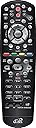


📺 Elevate Your Viewing Experience!
The DishNetwork 40.0 UHF 2G Remote is a sleek, ergonomic replacement remote designed specifically for Hopper and Joey receivers. With a maximum range of 10 meters and the ability to control up to 4 devices, this lightweight remote ensures seamless operation and comfort for all your entertainment needs.
| Additional Features | Ergonomic |
| Asin | B0088NUP7E |
| Battery Type | 4 AAA batteries |
| Best Sellers Rank | #114,633 in Electronics (See Top 100 in Electronics) #7,716 in Remote Controls (Electronics) |
| Brand | dish |
| Button Quantity | 40 |
| Color | Black |
| Compatible Devices | Dish Hopper, Dish Joey |
| Connectivity Technology | Radio Frequency |
| Controller Type | Button Control |
| Customer Reviews | 4.6 4.6 out of 5 stars (1,525) 4.6 out of 5 stars |
| Item Weight | 4 ounces |
| Manufacturer | Dish Network |
| Maximum Number Of Supported Devices | 4 |
| Maximum Range | 10 meters |
| Mfr Part Number | EL-UDON-81457 |
| Model Name | EL-UDON-81457 |
| Model Number | EL-UDON-81457 |
| Number Of Batteries | 4 AAA batteries required. |
| Number Of Items | 1 |
| Unit Count | 1 Count |
| Upc | 796594550549 033587154873 753960013152 753960000329 |
User
BONUS BUTTONS with Hopper 3 receiver! More features than Hopper 3's 52.0 remote, and One-click CC!
The Hopper 3 came with a new 52.0 remote that is COMPLETELY different. It had ONE extra function, but lacked several key functions of the older 20 series remotes. Like me, you may have the old 20.1, 21.0, or 21.1 remote buttons memorized. I found out you could use the old remote with the Hopper 3 receiver, but only with IR infrared communication. My old remote worked, but now I had to aim it at the receiver whenever I used it. Kind of a pain, but still better than the new 52.0 remote.My 21.1 remote (old style) was starting to wear out requiring the buttons to be pressed extremely hard in order to function. I started looking for a new remote and came across the 40.0 version. It's fully compatible with the Hopper 3, and it has all the same shaped buttons in all the same places. YES! It also uses RF communication, not IR. Beyond that, the Hopper 3 now utilizes the colored buttons that were useless on the previous receivers. Win-win-win!Some of what you gain when 40.0 remote is paired to a Hopper 3 receiver:- The Red Button gives different options (sorting, view format, etc.) depending on what you're doing.- The Green button now cycles CC (closed-captioning) on and off with a single click!- The Yellow button offers sorting and menu options depending on what you're doing.- The Blue button opens up the Apps page.There are also colored button legends on the screen telling you what they do when you're in any mode with a menu. I don't think the colored button legends are there when using the 52.0 remote.Features the 52.0 remote (issued with Hopper 3) lacks:There are no fast-forward or rewind buttons - You have to hold the SKIP and BACK buttons for about a second to activate FF and REW.When browsing the guide, you have to hold down the SKIP FWD button to move forward a day, and SKIP BACK button to move back a day.There are no dedicated Page Up and Page Down buttons for use in the programming guide. You have to use the channel button to move up and down to change pages.The Left/Right/Up/Down/select is just a slightly indented flat panel rather than the dedicated buttons. It's perfectly usable, just a bit awkward compared to the old remote, at least in my opinion.The ONLY thing I've found that you lose when going from the 52.0 remote to the 40.0 remote:No HOME button, but you can access it quickly by hitting MENU twice.I don't even use the 52.0 remote anymore. I'll update any other significant differences I find when I get a chance.
User
Excellent Product ! Great replacement
It was awesome to be able to replace our remote after our two lab puppies grabbed our old remote control and took off chewing it! Ugh! The remote control is super easy to set up and functions like our old remote control with volume control and all the buttons including the volume control functions exactly like our old one! Grateful we could find another one!
User
Easy set up
Yup, works as designed. It took me more time to read the instructions to set up than it took to set up. Pair with your Joey, then TV. I no longer have to push buttons multiple times to get the old worn out one to work.
User
No audio control
Audio controls do not work
User
I hate the new Dish Remotes for FWD, which I do all the time
The new Dish Remote, I had the Google One, except the back lighting, I don't like Google listening to me all the time, so if you have in your house unplug batteries, or you'll see uncanny ads popping up in your life, I have the smaller one before the newest, but I constantly use FWD and RWD, but the newer remotes are goofy in it skips but to FWD or RWD you have to hold, it doesn't work great, I got this remote totally dial with instructions in 2 seconds, then I added my TV, DVD, and Audio Bar in seconds after a quick search, it's under setting, and pairing wizard, then I switched my there from TV to Audio Bar, so it's working great, the only feature I like and I am addicted to on the newer remote is back, this one is cancel, there might be a way to use like that but cancel is no biggie, overall, glad to have the control and a remote you can feel the betters much better on, it's bulkier, since I am used to the new one, right now I will keep both connected, and I just ordered a 2nd for my Joey in my bedroom!
User
Perfect replacement for the original Dish Joey remote
Exactly like the original Dish Joey remote. Pull a small plastic tab to connect the batteries (included) then follow the instructions. Got it working in 2 minutes.Then work through the dish box menu to pair with the TV and Sound system.This is my second replacement remote. After a couple of years use and a few drops to the floor, the buttons start to become slow or unresponsive. The new remote looks and works just like the original.
User
Works fine
It took me a few minutes to figure out how to get the device to work with my hardware, but it was worth the trouble. The key, for me, was finding the right support page. With the following very simple instructions, setup is a snap -- including getting the remote to work perfectly with our TV. The device's appearance and functioning are identical to the original remote that I received with my Dish installation. Setup simply requires that you (1) push the "SYSTEM INFO" button on the front of the satellite-receiver box (NOT the remote) [a "System Info" screen should open on your TV], (2) press "SAT" on the remote [at this point the remote should beep -- in my experience, for some reason on the first try I did not hear a beep], and (3) press "CANCEL" on the remote [the "System Info" screen should close]. Voila!
User
Finally received a quality product
I have ordered a similar product from others and the results were very disappointing to say the least but I am very pleased with this product. I received it in a very timely matter and the remote itself is clean and works great. Nothing but kudos for this seller. I would definitely order from him again and totally recommend you buy from him..
Trustpilot
1 day ago
1 week ago