Buy DEAFidelity Elfidelity DSD DAC integrate Audio Headphone Amplifier, Desktop USB Digital Analog Convertor, External PC Soundcard, Support DSD 256 direct decoding: Electronics - desertcart.com ✓ FREE DELIVERY possible on eligible purchases Review: Great Sound via headphones and speakers. Needs driver update to access all DAC/Headphone Amp capabilities. - Update: 7/7/17: I am torn about keeping this DAC. Many of its advanced features remain unavailable because the current driver software does not support them and sellers honest and responsive attempts to upgrade the drivers have gone badly. While installing the updated driver software my McAfee Antivirus Security program caught and quarantined 2 separate dll files that each contained a Trojan. I immediately deleted these quarantined files, then tried to do a Windows restore to an earlier date, but that failed. I ran a full McAfee security scan that flagged and quarantined the .rar file. I deleted that file with a file shredder and I still need to run a few cleaning programs. If I start to get more virus warnings, I may need to reinstall my Windows 10 system software. To me this was an alpha or beta level upgrade. The Sain Store seller also did provide some brief key English language pointers to help with installation, but the app that did get installed was in Chinese which would be difficult to translate even with the Google app. See my impressions below and the first reviewers about the good features of the current software. If you are willing to wait for a user friendly software upgrade that accesses all of this unit's advanced features, this DAC/Headphone amp may be worth considering. The first reviewer of this DAC felt that the current driver was well written producing clarity, good volume and very low distortion with headphones. I felt the same with speakers connected to an amplifier. Compared to my newer PC's onboard DAC I heard more secondary details, clearer dialogue and richer music. Except when I move my 2.4GHz mouse there is no background hiss or noise. Heard this only with headphones and mostly when music was not playing The driver disk has a single compressed(.rar) Elfidelity XMOS USB Driver Version 2.38 setup file. The setup script says that the DAC will be setup as a USB 3.0 device, but the device manager indicates that USB 2.0 XMOS drivers were installed. Windows 10 Control Panel Sound PCM settings are limited to no better than 24 bit/192000 Hz for digital and analog outputs under the Advanced Tab. There are no settings available for DSD. An ELfidelity XMOS app is installed that permits some tweaking of settings. I was unable to find newer drivers on the Elfidelity site. If you simply connect the DAC before installing the V2.38 file, Windows10 will install some basic Microsoft drivers. The DAC seems to work with these. The Control Panel Sound will then offer settings up to 24 bit/384000 Hz, but these seem to be unstable and the Device Manager will warn about driver errors. The seller (Sain Store) answered my email about the drivers. They say they are contacting the manufacturer about issuing new ones. The only input to this DAC is a blue USB 3.0 port that supplies both data and power to the unit; nice, as you don't need to connect an external power source. A 5V DC (less than 2Amps) power input jack is also on the unit, but a wall wart is not included. Outputs are RCA, Optical S/PDIF and both a 3.5mm and a 6.3mm headphone jack. The RCA outputs are actually labeled as "COAXIAL U/BAL" but work with standard RCA cables) The rub here is that this DAC/Headphone Amp is advertised as an advanced 32 bit/384000 Hz PCM and 256 DSD unit, but the current drivers hobble it. At this price point it would seem to compare well with other 24 bit/192000 Hz PCM units. The question remains that IF this DAC gets upgraded drivers, will it become an outstanding performer at a bargain basement price. I am weighing if I should keep or return mine as so far it seems to work well, but it does not work as described. Review: Clean Sound - This DAC blew away my onboard sound card in clarity and in volume. It has very low distortion and has enough volume to drive my Audio-Technica ATH-M50x headphones. I cannot compare this to other DACS because this is the first one I ever owned. I use Windows 10 on my computer and the driver worked flawlessly. It was easy to install and easy to use. I thought the driver was a well-written asio driver. Using this DAC with J River media center and it was easy to set up. I only use this as a headphone amplifier so I cannot say how it works with another amplifier. The only problem I've had was sometimes when I plug it in it does not come on I found out by unplugging and plugging it in within like 2 seconds that it solves that problem. I would highly recommend this DAC!!
| ASIN | B01MRH918E |
| Audio Output Mode | Surround |
| Customer Reviews | 4.0 out of 5 stars 2 Reviews |
| Hardware Connectivity | USB |
| Hardware Interface | USB |
| Hardware Platform | Headphones, PC |
| Manufacturer | DEAFidelity |
| Mfr Part Number | DSD-1 |
| Model Number | 4330141889 |
| Surround Sound Channel Configuration | 5 1 |
| UPC | 816619020304 |
R**L
Great Sound via headphones and speakers. Needs driver update to access all DAC/Headphone Amp capabilities.
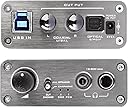
Update: 7/7/17: I am torn about keeping this DAC. Many of its advanced features remain unavailable because the current driver software does not support them and sellers honest and responsive attempts to upgrade the drivers have gone badly. While installing the updated driver software my McAfee Antivirus Security program caught and quarantined 2 separate dll files that each contained a Trojan. I immediately deleted these quarantined files, then tried to do a Windows restore to an earlier date, but that failed. I ran a full McAfee security scan that flagged and quarantined the .rar file. I deleted that file with a file shredder and I still need to run a few cleaning programs. If I start to get more virus warnings, I may need to reinstall my Windows 10 system software. To me this was an alpha or beta level upgrade. The Sain Store seller also did provide some brief key English language pointers to help with installation, but the app that did get installed was in Chinese which would be difficult to translate even with the Google app. See my impressions below and the first reviewers about the good features of the current software. If you are willing to wait for a user friendly software upgrade that accesses all of this unit's advanced features, this DAC/Headphone amp may be worth considering. The first reviewer of this DAC felt that the current driver was well written producing clarity, good volume and very low distortion with headphones. I felt the same with speakers connected to an amplifier. Compared to my newer PC's onboard DAC I heard more secondary details, clearer dialogue and richer music. Except when I move my 2.4GHz mouse there is no background hiss or noise. Heard this only with headphones and mostly when music was not playing The driver disk has a single compressed(.rar) Elfidelity XMOS USB Driver Version 2.38 setup file. The setup script says that the DAC will be setup as a USB 3.0 device, but the device manager indicates that USB 2.0 XMOS drivers were installed. Windows 10 Control Panel Sound PCM settings are limited to no better than 24 bit/192000 Hz for digital and analog outputs under the Advanced Tab. There are no settings available for DSD. An ELfidelity XMOS app is installed that permits some tweaking of settings. I was unable to find newer drivers on the Elfidelity site. If you simply connect the DAC before installing the V2.38 file, Windows10 will install some basic Microsoft drivers. The DAC seems to work with these. The Control Panel Sound will then offer settings up to 24 bit/384000 Hz, but these seem to be unstable and the Device Manager will warn about driver errors. The seller (Sain Store) answered my email about the drivers. They say they are contacting the manufacturer about issuing new ones. The only input to this DAC is a blue USB 3.0 port that supplies both data and power to the unit; nice, as you don't need to connect an external power source. A 5V DC (less than 2Amps) power input jack is also on the unit, but a wall wart is not included. Outputs are RCA, Optical S/PDIF and both a 3.5mm and a 6.3mm headphone jack. The RCA outputs are actually labeled as "COAXIAL U/BAL" but work with standard RCA cables) The rub here is that this DAC/Headphone Amp is advertised as an advanced 32 bit/384000 Hz PCM and 256 DSD unit, but the current drivers hobble it. At this price point it would seem to compare well with other 24 bit/192000 Hz PCM units. The question remains that IF this DAC gets upgraded drivers, will it become an outstanding performer at a bargain basement price. I am weighing if I should keep or return mine as so far it seems to work well, but it does not work as described.
G**H
Clean Sound
This DAC blew away my onboard sound card in clarity and in volume. It has very low distortion and has enough volume to drive my Audio-Technica ATH-M50x headphones. I cannot compare this to other DACS because this is the first one I ever owned. I use Windows 10 on my computer and the driver worked flawlessly. It was easy to install and easy to use. I thought the driver was a well-written asio driver. Using this DAC with J River media center and it was easy to set up. I only use this as a headphone amplifier so I cannot say how it works with another amplifier. The only problem I've had was sometimes when I plug it in it does not come on I found out by unplugging and plugging it in within like 2 seconds that it solves that problem. I would highly recommend this DAC!!
Trustpilot
1 month ago
1 month ago