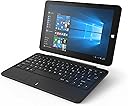
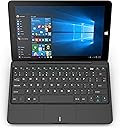
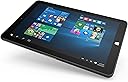
🚀 Power your hustle anywhere with Linx 1020 — compact, capable, and always ready.
The Linx 1020 is a sleek 10-inch Windows 10 tablet featuring a 1.92GHz Intel Atom quad-core processor, 2GB RAM, and 32GB eMMC storage. Weighing just 640g and boasting a 7-hour battery life, it offers a sharp 1280x800 display, dual USB ports, HDMI output, and dual webcams, making it an ideal lightweight device for professionals seeking portable productivity.


| ASIN | B01LWK42GM |
| Age Range Description | Adult |
| Aspect Ratio | 16:10 |
| Battery Average Life | 7 Hours |
| Battery Cell Type | Lithium Ion |
| Box Contents | Keyboard |
| Brand | LiNX |
| Brand Name | LiNX |
| CPU Model Number | x5-Z8300 |
| Camera Description | Front |
| Colour | Black |
| Compatible Devices | Keyboard |
| Customer Reviews | 3.6 out of 5 stars 228 Reviews |
| Display Type | LED |
| Display resolution maximum | 1280 x 800 |
| Front Photo Sensor Resolution | 2 MP |
| Generation | 1st Generation |
| Graphics Description | Integrated |
| Hard-Drive Size | 32 GB |
| Hardware Interface | USB |
| Human Interface Types | Keyboard |
| Item Type Name | Linx 1020 10" Tablet with Keyboard (2GB RAM, 32GB Storage, Windows 10, Office Mobile) |
| Item Weight | 0.64 Kilograms |
| Lithium Battery Energy Content | 25.9 Watt Hours |
| Manufacturer | Linx |
| Manufacturer Part Number | LINX1020/BUN |
| Maximum Display Resolution | 1280 x 800 |
| Memory Slots Available | 1 |
| Memory Storage Capacity | 2 GB |
| Memory storage capacity | 2 GB |
| Model Name | Linx 1020 |
| Model Number | TS-180662 |
| Model name | Linx 1020 |
| Native Resolution | 1280 x 800 pixels |
| Network Connectivity Technology | HDMI, USB |
| Operating System Family | Windows |
| Operating Systems | Windows 10 |
| Operating system | Windows 10 |
| Other Special Features of the Product | Includes keyboard, runs Windows 10 |
| Processor Brand | Intel |
| Processor Description | Intel Atom x5-Z8300 |
| Processor Speed | 1.44 GHz |
| Product Warranty | 12 Months Warranty |
| RAM Memory Installed | 2 GB |
| RAM Size | 2 GB |
| Rear Webcam Resolution | 5 MP |
| Screen Size | 25.65 Centimetres |
| Screen size | 25.65 Centimetres |
| Size | 10" |
| Specific Uses For Product | Entertainment |
| Style Name | Laptop |
| Total USB Ports | 2 |
| Video Capture Resolution | HD 720p |
| Warranty Type | Limited |
| Wireless Compability | 802.11a/b/g/n/ac |
| Wireless Technology Type | Wi-Fi |
C**N
Excellent value easy to use but windows update has made it stop working. Linx and Amazon resolved problem not of their making.
Bought for my wife and she is very impressed, the advantage of windows which is a familiar system. Runs windows software so lots around. Can be used when charging, not always the case, so does not need to stop to charge it. Runs for about 3-4 hours before it needs charging when doing basic stuff, internet and simple games. Very good value, only problem was that a lot of the games were Android only, no windows versions yet. This can be worked around with an android emulator if you need to run android stuff. Has real USB ports, separate to charging port, so can connect straight to PC. Android was always via software tha was often not easy to set up. Plug into a PC and it sees all frives on the tablet instantly, good for copying music and video easily. Edited to comment on the current round of problems with the windows 10 update. After this update our, and thousands more it seems, died completely with not even a charging light working. Linx support (Exertis) have asked for it back to repair it. Not sure what the repair involves, awaiting response. As it is a software fault I assume just a reset somewhere so could be a simple task. Amazon has offered to pay for a local repair (great service as ever) but I will wait for Exertis to respond. Seems mad that I have to post it all back, wait while it works it's way up what must be a large queue, then finally get it back. Easier to go to a local reapirer to remove the back and press reset inside ? If the repair is massive I would like a new one please, if it is small why can't an approved local repairer do it. We shall see, also don't see why Amazon should pay as not their fault. Fault is really microsoft so now thinking of going back to android as safer. Edited again, restored stars, as now resolved, replacement on the way. As ever Amazon were great and (as I am not in UK at present) offered to pay for a repair at a local store. Not needed as Linx (Exertis) support were also excellent and worth noting if looking to buy a Linx product. They answer mails within a day and phones in a few minutes, very helpful people. They tried the usual wake up sequences, then said they were looking for a software/boot from usb solution call back in a couple of days. I did so but some tablets are dead and staying that way, not all but mine was one of the non recoverable ones. So they are sending a replacement tablet which is en-route as we speak. As they say, it isn't the problem as much as how you deal with it. Tedious that microsoft can walk away from this leaving others to bear the cost. Also now to say I have just recieved a brand new unit so many thanks Linx / Exertis. It took a while doing the now dreaded 'preparing to configure windows don't turn off your computer' and it keeps doing it. All very nerve racking but hopefully all problems resolved, perhaps windows will spread updates to a lot of small ones rather than the odd massive one which seems to have caused this. Updated August 2017 Just to say new 'creators' windows release nearly killed the tablet, Exertis (Linx support) did an excellent job and sorted it out within 24 hours. This is exceptional customer support, help like this is ever more essential these days as the machines are reliable but constant windows 10 updates are not. Great machine great backup.
J**Z
It was 5 stars for the second example - until it auto-discharged its battery!
Revised: I have just returned the second example of Linx 1020 because it also self-discharged to zero when powered off overnight (so now lowest stars), it was otherwise brilliant, and please see further down for comments about the first one... Tablet - What's the point? The point is that, as a 10" tablet, this is small enough to take around, and large enough to see the screen and control with a finger tip. I was new to this but find it is quite manageable once you can get used to where your finger will touch, and the screen responds beautifully. The settings can be adjusted to suit Tablet or Desktop layout or to have this changed automatically but first impressions are very good all round, although I have never used a mobile phone. It feels heavy but small and durable. Laptop - what's the point? Again, it is small but still usable. The keyboard is quite excellent in operation and fits positively both by magnets and a couple of prongs in a tough carrier. Well balanced, and the touchpad moves the cursor steadily and smoothly, neither being far behind my very expensive Dell XPS laptop. A replacement battery pack for that would have cost half the price of a Linx, so I just use the mains for that. I believe the free program 'Touchfreeze' helps to prevent interference from the touchpad when typing and the two full size USB ports on the Linx are a godsend, so that a memory stick and USB mouse can be attached at the same time. Tablet-Laptop combo - what's the point? I just finished writing a simple database program with JustBasic (as easy as Spectrum or Amiga Basic but much better screen functions) which needs to be taken out to be used. I can operate it with the Linx touchscreen when out and about, and edit the program itself with the keyboard and a mouse back at home. It's just the ticket. Not enough memory? Of course that depends, but with Winzip, Irfanview, JustBasic, and all the great built in Win10 accessory programs like MS Paint, and OneDrive for file transfer and access to all the stuff on my other laptop, there is still 17.5GB free, but installed a 64GB micro SD card anyway and just in case have a 1000GB usb drive for things like videos or photos which try to eat up a lot of space. No problem, at least for me. Entertainment? I have only used YouTube and BBC IPlayer, but the results on good quality nature progs on iPlayer still looked breathtaking, yes because 1280 x 800 is plenty for a 10" screen! and colours looked very natural. Sound through the speakers is a bit reedy but earphones sound fine. WiFi? No problems even with our home setup which is pretty marginal most of the time and connection is quick. What was the first example like? Terrible but in retrospect that might have been due to problems thrown up by installation and updating. Would not switch on predictably, battery lost all its charge overnight, and touchpad was jittery. After much fiddling around I could not get it right and returned it. The second one played up after first installation of Windows10 and the update and I was about to send that back too but glad I tried again by resetting it and going through the rigmarole once more. Didn't understand all of it but gathered that the reset did not go right back to the original Windows version, whatever that was, and the update required manual restarts because 'we will restart for you' did not do that. It's not just a case of 'cheapo laptops' because my gaming laptop at fifteen times the price needed rescue by a Microsoft technician to get Win10 updated. Problems due to the manual:- Re. Keyboard driver It might be because the tablet part was once sold on its own, with the keyboard as an accessory, but page 15 "Connecting to your laptop - Important" should probably be read first. I think it is so that the drivers can install correctly. Re. Operating the power button: Nor is it explained properly how the Sleep/Power button really works, which the user needs to understand because there is no feedback as to what is happening, or not, until the screen eventually shows a "Linx" logo, or nothing happens at all. From much trial and error I believe the power button needs to be pressed and held for up to 20 seconds, and that the logo does not necessarily appear for up to another 15 or 20 seconds after releasing the button (while the user might think it had not worked). If the button really doesn't work, it is probably necessary to give it a rest for 15 seconds before trying it again. The overall start up time seems fairly good, or at least reasonable, but the procedure is confusing. For the second example, after doing a full reset and reinstalling everything, it was so far so good, but next morning the battery had also discharged itself to zero! Exertis Support replied within a day with details of how to reset the device again using the Recovery Media which they will send, and: "Devices powering themselves on, discharging when shut-down or not holding a charge and/or experiencing difficulties with powering on is a now-known Windows issue. Please follow the steps below to disable ‘fast startup’ and resolve the issue", but not sure if I want to order another one.
A**R
Cheap and cheerful.
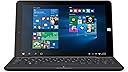
Mine was delivered this morning and I've spent a few hours messing around with it. It's responsive and easy to use, although the it's not the powerful machine out there. Managed to get a few, low spec games going on it and they run fine. The screen is well lit, sharp and and responsive to touch input. The camera works fine too. The keyboard dock is mostly great; it feels good to type with and the keys are spaced out well. However, the mouse pad is absolutely dreadful. It's unresponsive and jittery and will drive you crazy after just a few minutes, the touch screen is great but it can't beat the accuracy and versatility of a mouse pointer. Of course you can just plug in a USB mouse but the device doesn't come packaged with one so one the merits of the device itself, this is a major black mark for me. Also as a minor gripe, the enter key is just a little bit small for my big hands. Windows 10 is great so no qualms about the software. Overall it's a great machine for day to day browsing and typing. An absolute bargin at this price as long as you have a spare mouse kicking around. And it arrived a full week earlier then expected!
S**E
First Impressions
I purchased this tablet as Christmas gift for my mom, with the intention being that it's something simple she can use for web browsing, email, video/music etc. So far I have only used it for around half an hour or so to set things up so it can be used right away at Christmas, but I am already incredibly impressed with it. First of all, the build quality is excellent. The tablet feels very sturdy in the hands and the volume/power buttons have a nice tactile click when pressed. The Keyboard keys have decent travel and the mouse pad does what you need it to. The only issue is how cramped it all feels, but at the end of the day it's a 10" tablet so I can't really hold that against it. One thing that did surprise me however was the fact there is no locking mechanism attaching the keyboard to the table, just two "Prongs" that slot into the tablet either side of the electrical contact. I could potentially see these wearing out eventually under heavy use, so maybe something to consider. On the software side, there really is nothing to fault. The tablet is fast and responsive performing all the basic tasks you would expect something like this to be used for. The first thing I did after setting the tablet up was open Control Panel to see what bloatware was installed. To my surprise there were a total of three items on the list, and all were sound/graphics drivers. On a tablet with only 32GB of storage this is a big plus for me as storage really will be at a premium. Speaking of storage, for anyone wondering how much of the 32GB is taken up by the OS, there is around 20GB of free space when you first turn the tablet on. I have not finished installing all the current windows updates however so I expect this may change slightly by the time it's finished. For the price this is currently selling for (£140) it's an absolute steal and would be an excellent first computer for a child or a great for someone who is less technically minded and just wants something to do the basics.
G**L
It has it's limitations, so it depends on what you want it for.
It depends on what you need. If you need a tablet, walk away now. If you need a fan-less notebook to browse (gently) the web and to watch videos, and if you take it out of the house you won't need it to hold the charge for long, for £120 it's unbeatable. It only has 2GB or RAM, that will limit you a lot as to what you can do with it simultaneously, so no wild multitasking either... So, in what scenarios would I recommend this notebook?. As a second computer to move around the house or if you need a humble computer that is totally quiet, to study for example. Pros: - No fan - Processor is ok to browse the web and watch videos. I've done some light programing on it and it can handle Netflix without problems. - Keyboard included - Price - Windows 10 included (full version, no "S" version crap). - Keyboard is comfortable to write with. Cons: - Windows 10. Forget about putting linux in. No way Manuel (tried). - As other reviews have said, it looses the charge when powered off and if charged, it will refuse to wake up unless you threaten it with throwing it in the bin and holding the power button until your finger breaks. - 2GB of RAM. You'll be amazed how fast 2gb can go. - Heavy as a rock (a big one). - No community around the product. There is an unofficial forum that is as friendly as a Llama. - Zero support from the manufacturer (this model is not even listed in their web page). - The base doesn't double up as a battery pack, nor as a USB hub. - Only two USBs - The touch-pad is useless Would I recommend this notebook (again, this will NOT work as a tablet)? It depends. Would I buy it again?. Tough one... for that price it's difficult to find similar products with the keyboard included, so I'm happy with it for the use I'm giving it.
[**]
Potentially a great device, let down by flaky wifi
Great device, especially considering the money, but can't give it more than 2* at the moment as the AC3165 wifi adapter has vanished after the first few uses, meaning I have no wifi. If I can sort this out, I will upgrade and update with a full review, but obviously this is a major problem. Edit: After a few days of owning this, multiple resets, hard resets, re-installs, safe boots, driver installs, playing around with various power settings, I've decided that this is not worth the hassle. The Bluetooth/wifi combo is too unreliable. If you are happy to use external dongles for wifi/Bluetooth, then you will have a fully functional 10" table/laptop, but I am concerned about other things going wrong post the return period. The nail in the coffin for me was the fact that the 1020 doesn't even feature on the vendor's site currently, not any real support, drivers or community. I'm going to try a similar HP device. For most people, this will be a travel device and therefore reliability is paramount. It's a shame, because at this price point, it's quite compelling otherwise.
G**N
A honey of a computer
A really nice computer. When I bought it I also bought a 128gb SD which caused the computer to be unreliable. I was on the point of sending it back when I tried a 32gb. Problem solved. The computer became a honey. Handy for meetings as it is A4 size. It's really quick with a good battery life. The only downside is the power supply which is pants. I ditched it and bought a RAV unit. I now have a computer which is what I wanted when I bought my laptop many years ago. Very sadly I have had to return this unit as it died when a Windows 10 update started to install. I loved the computer even with its foibles and I don't know where I am going to go to replace this handy computer. I am now awaiting confirmation from the supplier.
M**N
So far, so good..... Great actually!
Despite a number of really negative reviews I still thought I'd give this a go and I'm very pleased with it, initially it did have trouble charging with the charger supplied, but once I purchased a 2 amp charger it works great. Great value, compact and surprisingly fast performance for office work and streaming Netflix. Ps. I've only had it a week so it still may completely breakdown.
Trustpilot
1 month ago
1 month ago