

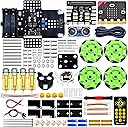



Robot Car Kit with Microbit V2 Board
Product ID: 496993690
📱Bluetooth & IR remote app control
🔄360° omnidirectional Mecanum wheels
⚙️4 DC motors with independent control
Buy anything from 5,000+ international stores. One checkout price. No surprise fees. Join 2M+ shoppers on Desertcart.
Desertcart purchases this item on your behalf and handles shipping, customs, and support to OMAN.
🤖 Drive your STEM skills into the future with the ultimate Microbit V2 starter kit!
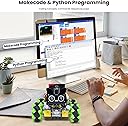
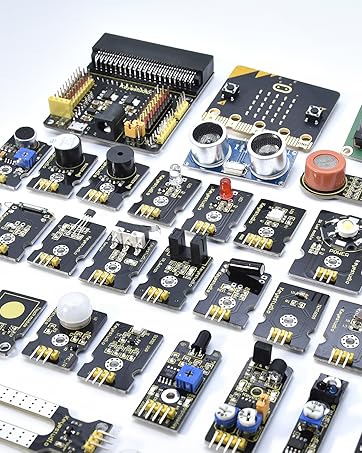
The KEYESTUDIO BBC Microbit V2 Starter Kit is a comprehensive educational robotics kit designed for teens and adults to learn programming and electronics. Featuring 4 powerful DC motors with omnidirectional Mecanum wheels, Bluetooth and IR remote control, and over 20 programmable projects, it combines hands-on STEM learning with flexible coding options in Makecode and Python. The kit includes sensors, RGB LEDs, and expansion ports, making it perfect for creative robotics exploration. Batteries not included.



| ASIN | B0BKRQQ3PM |
| Age Range Description | Baby,Kid |
| Animal Theme | Cat |
| Are Batteries Required | Yes |
| Best Sellers Rank | 112,618 in Toys & Games ( See Top 100 in Toys & Games ) 131 in Toy Robots |
| Brand Name | KEYESTUDIO |
| Collection Name | STEM Robot Car Kits |
| Colour | Black |
| Country Of Origin | China |
| Customer Reviews | 3.2 3.2 out of 5 stars (32) |
| Educational Objective | Learn Electronics, Programming, and Robotics; Enhance STEM Skills |
| Finish Type | Glossy" or "Shimmery |
| Included Components | Keybord |
| Is Assembly Required | Yes |
| Is Autographed | No |
| Manufacturer | keyes |
| Manufacturer Warranty Description | 6 month |
| Material Type | Plastic |
| Maximum Age Recommendation | 144 |
| Model Name | Yes |
| Model Number | Yes |
| Number of Pieces | 2, 4 |
| Number of Players | 1 |
| Occasion | Robot |
| Operation Mode | Automatic |
| Outer Material | plastic |
| Play Activity Location | Floor |
| Power Source | rechargeable battery |
| Recommended Uses For Product | STEM education, DIY building, programming projects |
| Scale | Full-size |
| Set Name | 1 |
| Size | 120*120*120mm |
| Special Features | 4WD Mecanum Robot Car, 360-degree movement and drift |
| Style | Modern |
| Supported Battery Types | Not included |
| Theme | Car,Robot |
| Toy Figure Type | Interactive Gaming Figure |
| Unit Count | 1.0 count |
| character | Robot |
B**Y
Tricky but fun... Batteries not included.
My 8 year son and I built this robot as a project on a wet Sunday afternoon. The build instructions pdf need to be downloaded from a website referenced in a sheet of paper included in the kit. There are some very small nuts and bolts that my 8 year old could fit, but I would have to have changed the build order to get my shovel sized hands into the robot to fit them. The build instructions are a bit whimsical, like they were written by someone who is easily distracted, and often wander off on tangents relating to other aspects of the MicroBit (beyond the robot being built), but jumping over those sections gets you back on the robot building. The source code to run the robots many projects is available on another website (a popular software repository called GitHub). In that repository are many pre-written modules that can be drag-and-dropped onto the makecode application in a browser or onto the MicroBit drive presented to the operating system of your PC, phone or table. We went for the hex file "Project 20.2 Multi-Purpose Smart Car" which allowed us to remote control the robot, and the led lights, from a tablet over Bluetooth. The tablet app allowed line tracking, chase me, and avoid obstacles modes, as well as regular remote control and light controls. One word of warning about this kit... As it states clearly in the product description, you need to buy some specific batteries and a charger for those batteries (we picked up two 18650 Battery, Li-ion 3.7 V, Flat Top, Rechargeable Battery Cells) and a compatible charger. This does add to the cost of the project somewhat. Another tip for these batteries is to place a strip of ribbon across the battery box on the robot before inserting them, so you can use the ribbon to pop the batteries back out, because getting them back out of the battery holder without damaging them can be tricky otherwise. The project took about 2 hours to build, including finding the code and flashing it onto the included MicroBit. The batteries charged in about the same time. There are squillions of other projects that can be applied to this kit, but those are for the next rainy day. :) Great STEM kit and my son and I had great fun building and playing with this robot.
A**N
No power to unit
Instructions are not straightforward but when my daughter and I managed to put it together we found the battery pack gave no power to the unit. A you tube reviewer “articlesByAPhysicist” reviewed it and found the same problem - so looks like a design flaw or a common quality assurance flaw. She could only get it moving using an external battery pack. I’ll be returning this unit and reordering in the hope of getting one that works. I’ll try and update this review once the replacement is assembled.
A**M
Great product son loves the microbit
Great microbit controller, components are good quality, the assembly instructions however are online only so you have to go find them using the link written down on the paper you do get. Building the unit is a bit fiddly so will require some patience
M**H
Bad- doesn't work properly
very bad, does not work, no proper instructions. I had to return.
M**E
Doesn’t come with the main batteries needed
Very fun for a child to learn to code. It’s good value until you realise it doesn’t come with the main batteries that you need for it to work. Bear in mind the batteries are very expensive in comparison to normal batteries. Fully functional and good once you buy batteries separately
V**A
It's not working :-(
The microBit by it self is working, but the robot is not, it's very upsetting
D**Z
Lovely idea, very poorly executed.
Lovely idea, very poorly executed. Missing parts from the kit. Some badly manufactured items. Non-standard batteries not included. Building instructions difficult to find online, quite difficult to follow. Could not complete the build due to poor quality parts and missing parts. Returned.
D**Y
limiting software
Vital functions for accessing the base electronics are hidden in Makecode which means you can't use microPython or other languages and are restricted to using the supplied Makecode files.
E**)
Sobre sus prestaciones, que se los cuente la gente de Keyestudio! Excelente robot basado en microbit. Muy buena documentación, con lecciones para el aprendizaje progresivo tanto en la plataforma makecode como en python. Se los recomiendo ampliamente. yo adquirí dos en su momento. El segundo no lo he armado. No olviden adquirir las baterías con su cargador. Les dejo unas fotos: la inicial, en la que le agregué capacidades de control adicionales, todas integradas para su uso simultáneo... y otra como luce actualmente, con una camara ESP32 Cam incorporada...
J**Y
This is the fourth Keyestudio car I’ve purchased, and at this point I have to say it plainly: Keyestudio is a poor investment. Their kits use multiple languages, multiple configurations, and multiple tutorial sources, all of which create more confusion than clarity. Even finding the correct instructions feels like a scavenger hunt. If you want to actually *program* the robot, you’re required to learn the coding language and write the code yourself — and unless I’m missing something, that’s the hardest part of the entire experience. The instructions come in different formats, from different locations, and none of them line up cleanly. If that sounds confusing, just wait until you’re knee‑deep in their code examples. Assembling the car is the one part that’s genuinely fun and fairly straightforward. But once it’s built, what do you have? A non‑working brick. As a brick, it’s fine. As a robot, it’s terrible. This company should be embarrassed by how often they ship faulty parts and publish tutorials that are incomplete, inaccurate, or outright wrong. What really bothers me is that they never send out errata sheets. Not once. They know the documentation has problems, and they still ship it as‑is. So you spend your hard‑earned money, fight through the confusion, and then end up returning the kit to Amazon because the flaws are too much to overcome. I honestly don’t understand how they make money sending out products in this condition. Fortunately, I have Complete Protect in case I fall outside the 30‑day return window — and if you’re planning to dabble in Bluetooth robot cars, I’d strongly recommend having that safety net too. As for Keyestudio robot cars, my advice is simple: don’t. Other companies might be worth a try, but Keyestudio has let me down too many times.
U**R
Straightforward build. The software is a bit tricky due to Android permissions you probably don't know exist. Page 105 of the manual provides the answer if you have the control app crashing repeatedly. (screenshot attached) The nearby device thing is something Android doesn't PROMPT you for you have to dig for it. Support was quick to respond, but didn't steer me directly to this.
T**E
Good Quality. Fun for Microbit coding!
J**L
Nice kit, helps get your kids interested in STEM projects.
Trustpilot
1 week ago
1 month ago