💨 Upgrade your workflow, outrun the lag, and never look back!
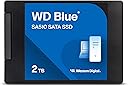
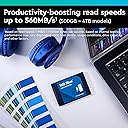
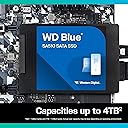
The WD Blue SA510 2TB SATA III SSD delivers a powerful performance upgrade with up to 560 MB/s read and 520 MB/s write speeds in a versatile 2.5-inch form factor. Designed for professionals and creatives, it offers reliable, high-capacity storage with a 5-year warranty, making it an essential tool for boosting productivity without replacing your PC.


| ASIN | B0C14TF467 |
| Additional Features | Dropbox Offer |
| Best Sellers Rank | #19 in Internal Solid State Drives |
| Brand | Western Digital |
| Built-In Media | Internal Solid State Drive |
| Cache Memory Installed Size | 500 |
| Color | Blue |
| Compatible Devices | Laptop, Desktop, PC |
| Connectivity Technology | SATA |
| Customer Package Type | Standard Packaging |
| Customer Reviews | 4.4 4.4 out of 5 stars (11,573) |
| Data Transfer Rate | 560 Megabytes Per Second |
| Digital Storage Capacity | 2000 GB |
| Enclosure Material | SATA |
| Form Factor | 2.5-inch |
| Global Trade Identification Number | 00718037884660 |
| Hard Disk Description | Solid State Drive |
| Hard Disk Form Factor | 3.5 Inches |
| Hard Disk Interface | Serial ATA |
| Hard-Drive Size | 2000 GB |
| Hardware Connectivity | Solid State Drive |
| Installation Type | Solid State Drive |
| Item Dimensions L x W x Thickness | 5.1"L x 4"W x 1"Th |
| Item Type Name | SSD |
| Item Weight | 60 Grams |
| Manufacturer | Sandisk Technologies, Inc. |
| Media Speed | 520 megabites_per_second |
| Model Name | SA510 |
| Model Number | WDS200T3B0A |
| Number of Items | 1 |
| Read Speed | 560 Megabytes Per Second |
| Specific Uses For Product | Business, Multimedia, Personal |
| UPC | 718037884660 |
| Warranty Description | 5 year limited warranty |
A**R
Great Drive but Arconis Didn't work
I wanted to add a second SSD to my system as my original Samsung SSD is almost 10 years old. Black Friday sealed the deal. As my home build only had two bays and they were both in use, I bought the Corsair Dual SSD Mounting Bracket which allowed me to put the old SSD and new SSD in the same bay (they stack on top of each other). I also planned to clone the new drive as a boot drive. When I ran the Arconis program (that you download off the WD website) and waited two hours I got a warning from Windows (when I tried to boot) that the new drive was corrupted when I tried to boot from it. I made two attempts. It just wouldn't work. A YouTuber had recommended the trial version of Macrium Reflect cloning software. I downloaded that and followed along on the provided video on their website. Super easy. I did have to go into the BIOS to change the boot order as I left the Samsung in place as a backup drive. Overall the WD drive works perfect but I recommend using Macrium to clone the drive.
A**N
It works until it doesn't.
This worked flawlessly for 2 years. Then it died suddenly and is unrecoverable.
R**I
Fast, reliable, reasonably-priced
I got this to put into an enclosure to use as an external USB drive for backup purposes. Windows has a feature called File History where your library folders (Documents, Pictures, Music, etc.) is backed up to a second drive. As files in those libraries change, the updated versions are stored also, letting you roll back files or directories to a previous date. It works fine for that. I also use it to temporarily store large files. All in all, it was a good purchase.
T**N
Be Sure To Update Firmware With Dashboard Software
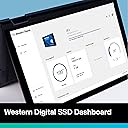
OK, besides the initial glitches with Windows, once I updated the SSD Firmware with WD/Sandisk Dashboard the drive worked perfectly! That said, my initial issues drove me nuts trying to update the firmware in Windows!!! I blame Microsoft more than WD for this instance. I would still buy WD drives over other SATA SSD's though because the firmware update process was seemless & I haven't encountered anymore faults since.
L**N
Failed After 30 Months
I purchased this Western Digital Blue SSD (WD SSD) to replace a 500GB Seagate hard disk drive in my Dell Latitude 3460 laptop running Windows 10. The motivation was to improve I/O disk storage performance. Installation was a snap. The included (via download) Acronis disk duplicator software was helpful, but not flawless. The WD SSD dramatically improved computer performance, which was highly desirable. While I wasn't noticing any specific errors accessing my data on the SSD, I did see that the Western Digital SSD monitoring software stopped working after about one year and then the Dell Support Assist software also stopped working. I didn't think anything of it and just kept on using my laptop as usual. Sadly, when I opened my laptop on the morning of May 27th, 2025, the BIOS screen displayed with an error reporting no hard disk drive found. I was not able to recover from this error using typical troubleshooting techniques including reseating the SATA cable at both ends, etc. Fortunately, I still had my old Seagate disk drive, which had been removed 30 months earlier and not touched since, and reinstalled it. My laptop started right up with the hard disk and so began the ordeal of 30 months' worth of Windows and other software updates. Fortunately, I had been using Windows File History to back up my data and was able to recover my data and avoid any noteworthy data loss. Using the Sabrent external hard drive enclosure I originally purchased to facilitate the hard disk to SSD migration, I attempted to access the WD SSD by connecting it to a USB port through the Sabrent device. The SSD was not detected by my laptop and therefore no longer accessible. I'm not sure I will purchase another SSD and try this migration again. While I was able to avoid data loss, the effort to recover from the mess amounted to an enormous inconvenience. I have read in articles and seen on YouTube good things about Crucial SSD so if I try this again, that would be the next brand I try. I am not likely to purchase another Western Digital product. My suggestion is to avoid this specific product and, if you do decide to go the SSD route, make sure you have a daily backup strategy in place to minimize the risk of data loss. I do not recommend Windows File History though. It did ultimately save my data, but it was not flawless and I had to manually restore my files little-by-little because the Windows File History restore facility would not restore my files to a different hard drive. Now, I am using Free File Sync with a custom script to back up my data to an NAS. Thank you for reading my remarks.
K**K
Reliable SSD Upgrade with Great Performance
I purchased the Western Digital 1TB WD Blue SA510 SSD as an upgrade for an older computer, and the difference in performance was immediately noticeable. Installation was quick and easy, and the drive was recognized by the system without any issues. The SSD delivers fast boot times and much quicker application loading compared to a traditional hard drive. With speeds up to 560 MB/s, everything from starting the computer to opening files feels much more responsive. The 1TB capacity is also great for storing operating systems, programs, and plenty of files without running out of space. Another thing I like is that the drive runs quietly and stays cool during normal use. Western Digital has a good reputation for reliability, and so far this drive has been stable and consistent. Pros: Fast and responsive performance Easy installation in standard 2.5" SATA slot Large 1TB storage capacity Quiet and energy efficient Cons: Limited by SATA speeds compared to NVMe SSDs Overall, this is a great SSD for upgrading a laptop or desktop, especially if you're replacing an older HDD and want a noticeable boost in speed and reliability.
A**R
Dead and replaced
Well, it died on me suddenly after a year of rare usage, like 2 or 3 times writing a backup to it. It took around 2-3 weeks to get support to decide on a replacement (the vendor), but they sent the RMA stickers and the replacement less than a week after (internationally). Since then, I have been using it frequently, but not for critical data, to be honest. So far, the device is good and fast, and I believe it will not fail before the MTF state in the spec.
E**Y
Great computer part!!!
Super fast, easy installation, exceptional loading times
T**N
Kvalitet
A**K
Muy buena SSD, una de las mas baratas, la compre para una PS3 Slim, y funciona perfectamente, muy ligera, no se calienta, no aprovecho los 3 meses de Dropbox ni el software Acronis, pero no la compre por eso, la compre porque es de una marca reconocida, de las mas baratas que hay en Amazon con 500GB, con buena velocidad y fiable.
D**S
Product arrived timeously and clearly good quality befitting the Western Digital brand image/promise. Once installed it works well, as expected. Install/usage instructions to install/use, etc. are not that great, got to say, and can be described as reasonably acceptable. No doubt at all that WD could/should have made the process a whole lot easier .... disappointing. As WD and SanDisk are now clearly part of the same group and it therefore needs to be clearly explained (PLEASE NOTE, WD!) that SanDisk is now the lead brand / product and that, for instance, management of WD products seem to clearly be via the use of SanDisk software, etc. Thus, a whole lot of "greyness" pervades around the implications of both these brand names existing within the same company. I would imagine that non-techie / newbies to SSD installation to replace their HDD's would find this process unnecessarily difficult. One has to ask the question why the greyness around this modern, popular SSD usage, etc. to replace one's older technology HDD's? Weird ... Deserved criticisms aside, as mentioned, the WD SSD is good value and, once properly installed, works well. Newbies can trust the delivery of this WD SSD but will be a little challenged in finalising the installation/usage/management process. As a new, working SSD therefore, once properly installed, I can recommend the quality, speed and expected reliability expected from the WD brand name/promise. Make sure, however, that you go through the frustrating, clunky process of registering the disk, otherwise any possible future failures will not be honoured.
H**R
I used this SATA drive for my Eufy homebase 3. Very easy to install and is working seamlessly, it screws straight in.
M**Y
منتج رائع 😎 اعجبنى
Trustpilot
3 weeks ago
3 weeks ago