


Desertcart purchases this item on your behalf and handles shipping, customs, and support to OMAN.
⌨️ Elevate your workspace anywhere, anytime — because your hustle deserves the best.
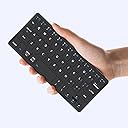
The Kenkor K08 Universal Wireless Mini Keyboard is a sleek, foldable Bluetooth keyboard compatible across Android, iOS, and Windows devices. Featuring a rechargeable 180mAh battery with 80+ hours runtime, dual device connectivity, and an adjustable PU leather stand, it’s designed for professionals who demand portability without sacrificing performance.
| ASIN | B0D2XYLZ7X |
| Additional Features | Foldable, Integrated Stand, Lightweight, Portable, Rechargeable |
| Antenna Location | Connect Bluetooth: Press "Fn" + "1" or "2" for 3 seconds to enter pairing mode, Esc function: Press "Fn" + space bar, Lock/Unlock the keyboard: Press "Fn" + Caps Lock, Shortcut Keys: Press "Fn" + shortcut keys,Apostrophe:FN" + ' |
| Best Sellers Rank | #182 in Computer Keyboards |
| Brand | Kenkor |
| Built-In Media | USB Cable, User Manual |
| Button Quantity | 78 |
| Color | Black |
| Compatible Amazon Tablet Models | Amazon Fire 7 5th Generation, Amazon Fire HD 10 5th Generation, Amazon Fire HD 8 5th Generation |
| Compatible Devices | Android,Windows and iOS,iPad,Phone,Tablet or Laptop, Samsung Galaxy Z Fold 8 Ultra/Z Fold 8 Wide/7/6/5/4 Series Compatible Devices Android,Windows and iOS,iPad,Phone,Tablet or Laptop, Samsung Galaxy Z Fold 8 Ultra/Z Fold 8 Wide/7/6/5/4 Series See more |
| Compatible Operating System Family | Android, Windows |
| Compatible Tablet Computer Models | Apple iPad (10th generation) |
| Connectivity Technology | Bluetooth |
| Customer Reviews | 4.4 out of 5 stars 227 Reviews |
| Enclosure Material | Acrylonitrile Butadiene Styrene |
| Hand Orientation | Ambidextrous |
| Item Dimensions L x W x H | 7.68"L x 3.34"W x 0.6"H |
| Keyboard Description | Three steps to connect the mini keyboard ①Turn on the power of the keyboard from [OFF-ON] ,Press “FN”+“1”or “2” for three seconds,until the indicator light between flashes frequently ②Then turn on the buletooth of the device you want to connect ③Find the “wireless keyboard” on the device and connect Note: It will automatically connect after connecting once.If it has not been connected for too long, you need to remove the wireless keyboard first and then repeat the above steps Keyboard Description Three steps to connect the mini keyboard ①Turn on the power of the keyboard from [OFF-ON] ,Press “FN”+“1”or “2” for three seconds,until the indicator light between flashes frequently ②Then turn on the buletooth of the device you want to connect ③Find the “wireless keyboard” on the device and connect Note: It will automatically connect after connecting once.If it has not been connected for too long, you need to remove the wireless keyboard first and then repeat the above steps See more |
| Keyboard Layout | QWERTY |
| Manufacturer | Kenkor |
| Minimum Required Operating System Version | Android 3.0 Honeycomb, Windows 10, iOS 10 |
| Model Name | K08 |
| Model Number | K08 |
| Number of Batteries Required | 1 |
| Number of Items | 1 |
| Number of Keys | 58 |
| Number of Packs | 1 |
| Number of Sections | 1 |
| Power Source | Battery Powered |
| Recommended Uses For Product | Connect Bluetooth: Press "Fn" + "1" or "2" for 3 seconds to enter pairing mode, Esc function: Press "Fn" + space bar, Lock/Unlock the keyboard: Press "Fn" + Caps Lock, Shortcut Keys: Press "Fn" + shortcut keys,Apostrophe:FN" + ' Recommended Uses For Product Connect Bluetooth: Press "Fn" + "1" or "2" for 3 seconds to enter pairing mode, Esc function: Press "Fn" + space bar, Lock/Unlock the keyboard: Press "Fn" + Caps Lock, Shortcut Keys: Press "Fn" + shortcut keys,Apostrophe:FN" + ' See more |
| Special Feature | Foldable, Integrated Stand, Lightweight, Portable, Rechargeable |
| Style Name | Classic |
| Switch Type | Linear |
| Theme | Minimalist |
| Unit Count | 1 Count |
| Warranty Description | 1 Year Warranty |
S**E
Easy to use
I like the way this keyboard feels when I type. It has real keys you can depress. It fits my hands better than my cellphone's keyboard. It doesn't work with my 15-year-old computer, but it works with my smart TV, my cellphone, and my printer. I've had this roughly a year and never had any problems. I've dropped it once, but it didn't affect it's performance.
R**N
Great lil KB
It's a wireless keyboard. It works. Gotta get used to the small keys at my age (64) , and some of the keys are in other places. But when I'm at my recliner I can do things to my computer from my chair.. it's the right size for my little side table...battery last days...
M**M
Amazing mini keyboard!
Love this! I use this with my tablet, that doesn't always register finger touch anymore but registers pen touches. This mini keyboard helps me easily type things in whenever I need to. It's also about the same size as my tablet so it looks really cool! The keyboard is easy to connect over Bluetooth and has a cool stand attachment to place your tablet or phone in while you use it. Very happy with this keyboard!
O**I
Amazing keyboard, too small for my XL hands
Amazing little keyboard, just a little too small for my XL hands. On one hand the size is the reason I like it so much, on the other hand the size of the reason I can't use it. It's amazing and works in a pinch, but wouldn't work for me to fast type. Otherwise this would be an amazing pocket or backpack keyboard. Love this little thing, just wish it was expandable to my size
K**.
Great time saver! Pleasantly surprised with this great keyboard.
This keyboard is one of the best purchases I've made in a long time. I have to do weekly reports for work, and was using my phone to write paragraph after paragraph.... It took me FOREVER to get them finished. I ordered this little time saving gem and cut the time I spent typing in HALF! I had a little bit of a problem getting it to connect initially, but figured it out: If you have any trouble getting it to connect there is an easy fix once you know the trick. If you look at the number keys, the number "1" and "2" have little numbers in the upper right hand corner in blue with wi-fi signal arcs on top. If you are having trouble finding "wireless keyboard" on your bluetooth connections when trying to connect, simultaneously press the function button (blue "fn" in the bottom row on the left) and the "1" key. There are 2 different bands that this keyboard searches for connections on, most phones will only recognize the first band. If that doesn't work, try hitting function+2 key at the same time to try the alternate band. I've used this keyboard nearly every day for the last 3 months, and have only had to charge it once. Some of the keys got stuck after I spilled something sticky, but was happy to find you can carefully pry each key off with a small screwdriver, clean them in the sink, then put them back. Everything worked great after rinsing them off.
Z**E
Look at the layout before you buy
I've had other mini keyboards in the past, but they were all folding and after a few months they had dead keys. I thought this was due to the folding so I decided to give this one a try. The build seems solid and I like the cover. It pairs easily with my phone and have had no mechanical issues after about 3 months of use. So why 3 stars? Some of the keys are located in odd spots and I just could not adapt. I thought that after using it for some time that I would adjust to it but it's been slow going with lots of backspacing and pausing looking for keys. Because of this, I've decided to try another folding keyboard which has been working well for me so far. It's nice to be able to type fast again! Take a close look at the layout of the keys before you buy, and if you think you can adjust to it, then this is a solid keyboard that I can recommend.
T**Y
Transforms iPad Mini into an Equally Adorable and Epic Netbook
(same keyboard enjoyably used to write this review) UPDATE: Now consistently typing at over 85WPM on this little sucker. It really is a killer keyboard once you adjust to the size! Even my dreams could not have conceived a netbook this epic. This is the only keyboard I could find on amazon that matches the exact proportions of the ipad mini, making it a little touchscreen laptop wonder. That said—this thing is CRAMPED because ipad minis are only slightly over 7 inches long (most smaller keyboards tend to be around 10-11 inches long). Another downside to the size is apostrophes and question mark keys are in an abnormal spot, and require holding down the function key to insert. It definitely takes some getting used to, but I can manage to consistently type over 65WPM on this little guy now. The keys, while tiny, have a remarkable amount of travel and feel very nice to type on. I wouldn’t want to write a novel on this thing, but for lighter typing tasks and to keep the virtual keyboard from taking over the ipad screen, it’s great! The built-in case with a kickstand is better than using the folio case, too—it supports a wide range of viewing angles similar to a Surface pro. TLDR: this little keyboard kicks butt, but really only makes sense for an ipad mini and even then only if you really want a keyboard to match the diminutive size. Any larger keyboard will be surely be easier to type on, but this one can be used quite well after a bit of practice and is a joy to tote around.
S**L
Compact and powerful, on the go!
I’ve always been into tech and willing to try all new products, so when I came across this keyboard, claiming to be of high quality and able to be compatible with all major products (iOS and Android) I knew I had to try it. I instantly discovered when I opened the package that it’s very compact and easy to carry. I noticed that to set up and to use proved to be simple and easy to do. The connectivity was strong and battery life was very practical. I really enjoy the ability connect a wireless keyboard for when I’m on the go and being able to function on the go. Highly recommend this product for its practicality and reliability.
F**S
Difficult to connect
Difficult to connect, and the Bluetooth pairing is very slow.
E**.
No tiene ñ
Está en inglés
Trustpilot
1 month ago
2 months ago