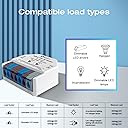
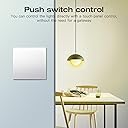
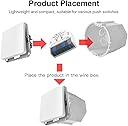
💡 Dim your lights, not your style — smart control that fits your vibe!
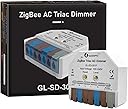
The GLEDOPTO ZigBee 3.0 Triac AC Dimmer Switch is a compact, ultra-mini smart dimmer supporting up to 400W LED loads. Compatible with major ZigBee hubs like Philips Hue and Alexa, it offers versatile control via app, voice, or RF remote. Its simplified wiring and trailing edge dimming technology ensure easy installation and stable, flicker-free lighting performance, making it a must-have for modern smart homes.


| ASIN | B0D9LYG8TH |
| Actuator Type | Push Button |
| Best Sellers Rank | #184,360 in Tools & Home Improvement ( See Top 100 in Tools & Home Improvement ) #375 in Dimmer Switches |
| Brand | Sogledwow |
| Circuit Type | 1-way |
| Compatible Devices | Zigbee-based smart home systems and hubs |
| Connectivity Protocol | ZigBee |
| Connector Type | Crimp |
| Contact Material | Plastic |
| Contact Type | Normally Open |
| Control Method | App |
| Control Type | Power Output, Device Control |
| Controller Type | Amazon Alexa, Push Button |
| Current Rating | 1.5 Amps |
| Date First Available | August 11, 2024 |
| International Protection Rating | IP20 |
| Item Weight | 0.882 ounces |
| Item dimensions L x W x H | 1.65 x 1.5 x 0.67 inches |
| Item model number | LT-GL-SD-301P |
| Manufacturer | Sogledwow |
| Number of Items | 1 |
| Number of Positions | 1 |
| Operating Voltage | 110 Volts |
| Operation Mode | ON-OFF |
| Product Dimensions | 1.65 x 1.5 x 0.67 inches |
| Terminal | Press |
| Unit Count | 1.0 Count |
| Upper Temperature Rating | 45 Degrees Celsius |
| Wattage | 400 watts |
V**M
Works with Phillips Hue!
Works perfectly with Phillips Hue. Can be turned on and off with Hue automations. Can be dimmed via the Hue app (be sure to use dimmable bulbs). NOTE these work best with a push button switch... They will work with a toggle switch, but you must flip the toggle from OFF to ON to OFF quickly, then the light will come on 100% bright (or whatever the app brightness was set). If you toggle OFF to ON the light will come on 100%, but it will quickly dim. Once the light is dimmed to zero, the only way to get it lit again is thru the app. I suspect because of this "feature" many people "think" this product doesn't work, but they just don't understand how to use it These switches are not color, but I have used several different Gledopto Zigbee products successfully with Hue. I have found if the Gladiator Switch is color paired with color lights then you can change the color via the app... but you can't apply Hue effects, otherwise they work perfectly. Happy with this Brand's price and Hue compatibility.
T**S
Hueeeege
Can confirm this works magically with Philips Hue as well as dims LEDs effortlessly. Awesome little product. Update: died after a week.
A**6
It actually works on the hue app.
It actually works on the hue app. It turned a not smart light fixture into a smart light fixture. Set it up as a bulb in the app
A**W
Easy to hook up to Zigbee Network and Home Assistant, but...
I got a couple of these for turning a duplex switch into 2 smart dimmer switches since there aren't any smart duplex switch options out there that fit my needs. The devices themselves are fairly small, but I could not get them to fit into my 3 gang wall box, so your mileage may vary. In my situation, the 3-gang box has 6 wires coming into it because there's power, 2x 3 way switches, and 2 single pole switches (on the duplex switch), and wires for load. The existing 3 gang box was 2" deep, and I was installing Kasa KS230s for the 3 ways, so not much room with all of the wires. So the next step was I decided to swap out the box with a deeper box, and picked up a "Smart box" from Lowes that was 3" deep and could be mounted deeper into the wall if desired. I got about 3.75" of space deep in there with the mounting. I still could not get these to fit behind my switches in that box, even with the extra space. So what I ended up doing was creating a single gang access box on the other side of the wall where it isn't really visible, running 4 standard romex wires to the new access box, and tucking them in there. 1 wire for line and neutral, 1 line for load (switch 1 white wire, switch 2 black wire), 1 wire for duplex switch 1, and 1 wire for duplex switch 2. For the duplex switch I found a TM811DTMOW worked well as it is a momentary press style switch. I didn't try any other style switch to determine if you could use a standard switch or not. I did have a few problems along the way: 1. Trying to stuff these into the box, the wiring can come out of the connection terminals pretty easily and/or get moved just right where they don't make proper contact. 2. During the "stuffing" attempts I had 1 of the cases crack, and 1 case that opened up and exposed all the electronics inside. I requested replacements and they are graciously being sent. Dimming function: 1. My recessed lights dim perfectly. 2. I have a light fixture over my table with 3x LED standard dimmable bulbs (8w). The dimming would not work with this setup for some reason. I tried a different set of bulbs that are also listed as dimmable and they would not dim properly, just lots of flashing. I'm not sure if there's a setting I could tweak to make this work better, but I couldn't figure it out for this one fixture. I'm going to try some other bulb options as well. By the way, these bulbs work fine with every other dimmer I have. Home Assistant with MQTT: The Good: 1. Connects easily via MQTT and is recognized immediately. The Not as Good (required tweaking): 1. Once connecting to Home Assistant and adding the switch to one of my Dashboards I found that if I turned the switch on by using the physical momentary press button, Home Assistant's state for the device was not getting updated. I did find some forum posts on how to fix this, but for those interested you need to go into the MQTT settings for the device(s) > reporting tab. You need to add attribute: 11, cluster: onOff, attribute: onOff, Min rep interval: 0, Max rep interval: (I set mine to 1200, up to you), Min rep change: 0. That will get your on/off state synced to Home Assistant properly. You may also want to add endpoint: 11, cluster: LevelCtrl, attribute: currentLevel, Min rep interval: 0, Max rep interval: 1200, Min rep change: 0. 2. One other thing I ran into with Home Assistant is if you have an automation of type lights to turn off for an area, if you turn the lights back on with the physical switch, the dim will be at 0. So I had to add an additional automation triggered by the device's turned on state to set the brightness level at a desired level since I don't have a physical dimmer attached. Just a heads up if you run into this. Final thoughts: Responsive, easy to adapt dimmable switches. Depending on how much of a rat's nest your wall boxes are, you may or may not be able to fit them behind your switches. Overall positive on this product even though I had some initial problems fitting them and had to adapt my install location.
A**R
Works with Smartthings
Works with Smartthings using generic Edge driver. Operation limited by Smartthings. Only stepped dimming is available.
K**O
Not a usable device
I've purchased three, 1 needs to be constantly reset, 1 has failed. Last one I'll return... I would consider a different solution for your needs
J**P
Don't buy at least for Tuya
I give it two stars instead of 1 for they say that it may not work w smartlife. Many users say it does work, it kinda does, but not at all reliable. So if u are planning to use this w tuya read on. The good: EXCELENT build quality. Size, connectors, physical buttons. Dims very well (when it works) The bad: Unstable. Some basic local scenes I fire w my zigbee switch like turn on at 40%, show executed by smarlife (shows light on) but switch doesn't do anything. Some scenes work, others don't. I have an "on @20%" scene that works, and an "on @40%" that doesn't. When i change the 40% to 20 in that faulty scene it still doesn't work (so i have 2 identical scenes, one lights up the dimmer the other one doesn't). I tried re creating the working scene. Nothing. If u add anything that makes this same scene run through the cloud instead of locally, then they work fine every time. I just tried turning off in google home (i have smartlife link) and it went unresponsive. Had to restart. It exposes only 2 controls (on/off and brightness) no relay memory for power outages. I even did the 3 resets, the switch blinks acknowledging, but nothing changes. So if power outage in the middle of the night, the light will wake u up when power is restored. Power outage while you are away on vacations, and the lights will welcome you shiny when u come back. All this drove me crazy. I even tried with a different zigbee hub, and same thing. I bought two of these, same w both. 3 different zigbee controls. Same w all. Maybe outside tuya, if you are willing to use the vendor's ecosystem, it works fine, idk. Seriously don't buy for smartlife
S**Y
Simple to use and the Zigbee functions work well.
Using 2 of these to control 4 LED lights in our chicken coop. Easy to set up in Hubitat and linked them to a virtual dimmer group so that I can control the lights as one unit. Make sure you have a momentary switch available to set up and make changes. Zigbee devices can be a bit of a hit or miss, but these work well.
R**O
Ideal para controlar lámparas de focos comunes (no inteligentes) se integra con Hue a la perfección como si fuera un foco Hue. Las instrucciones incluidas son muy pobres, para integrarlo la App de Hue tuve que ver varios videos.
Trustpilot
5 days ago
1 month ago