Desertcart purchases this item on your behalf and handles shipping, customs, and support to OMAN.
⌨️ Elevate your Mac setup with the ultimate wired keyboard experience!
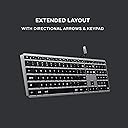
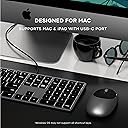
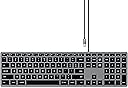
The Satechi Slim W3 Wired Keyboard offers a premium aluminum design optimized for Mac users, featuring a full QWERTY layout with numeric keypad, seamless USB-C plug-and-play connectivity, and adjustable backlit keys with three brightness settings. Compatible with a wide range of Apple devices including MacBook Air/Pro, iPad Pro/Air/Mini, Mac mini, and iMac, it delivers a sleek, comfortable typing experience backed by an 18-month warranty.


| ASIN | B08Q67XPFT |
| Amazon 売れ筋ランキング | パソコン・周辺機器 - 21,324位 ( パソコン・周辺機器の売れ筋ランキングを見る ) パソコン用キーボード - 327位 |
| GTIN (Global Trade Identification Number) | 00879961009083 |
| UPC | 879961009083 |
| おすすめ度 | 5つ星のうち4.2 403 レビュー |
| カラー | スペースグレイ |
| キーボードの説明 | マルチファンクション |
| キーボードバックライトのカラーサポート | 単色 |
| キーボードプレート素材 | アルミニウム |
| キーボードレイアウト | QWERTY |
| スイッチのタイプ | メカニカル |
| セクション数 | 2 |
| パック数 | 1 |
| ブランド | Satechi |
| ブランド名 | Satechi |
| ボタン数 | 78 |
| メーカー名 | SATECHI |
| メーカー型番 | ST-UCSW3M |
| モデル名 | W3 |
| 互換デバイス | MacBook Pro 14/16インチ(2026年 M5/M3/M2/M1)、MacBook Air 13/15インチ(2026年 M5/M4/M3/M2/M1)、MacBook Neo 13インチ(2026年)、iPad Pro 11/13インチ(2025年 M5/M4/M3/M2/M1)、iPad Air 11/13インチ(2026年 M4/M3/M2/M1)、iPad mini(A17 Pro/第6世代)、iPad(A16/第10世代)、iPad Pro 12.9インチ(第6/5/4/3/2/1世代)、iPhone Duo、iPhone 18 Pro、iPhone 18 Pro Max、iPhone 17、iPhone Air、iPhone 17 Pro、iPhone 17 Pro Max、iPhone 16/15/14/13/12シリーズ、Mac mini(M6/M5 Pro[2… |
| 保証内容 | Satechi Japan 18か月保証 |
| 利き手 | 左右共用 |
| 同梱商品 | USBケーブル |
| 品目寸法(L x W x H) | 42.3長さ x 11.4幅 x 1.1高さ cm |
| 商品のハイライト | USB-C接続。MacBook Air/Pro/Neo、iPad Air/Pro/mini、Mac mini、iMac対応、US英語QWERTY配列 |
| 商品の推奨用途 | ビジネス |
| 商品の追加説明1 | バックライト付き有線キーボード,3段階明るさ調整, コンパクト, アルミニウム仕上げ, プラグアンドプレイ,2年間保証 |
| 商品の重量 | 429 グラム |
| 型番 | ST-UCSW3M |
| 外部機関認定情報 | 16364859011 |
| 対応デバイス | MacBook Pro 14/16インチ(2026年 M5/M3/M2/M1)、MacBook Air 13/15インチ(2026年 M5/M4/M3/M2/M1)、MacBook Neo 13インチ(2026年)、iPad Pro 11/13インチ(2025年 M5/M4/M3/M2/M1)、iPad Air 11/13インチ(2026年 M4/M3/M2/M1)、iPad mini(A17 Pro/第6世代)、iPad(A16/第10世代)、iPad Pro 12.9インチ(第6/5/4/3/2/1世代)、iPhone Duo、iPhone 18 Pro、iPhone 18 Pro Max、iPhone 17、iPhone Air、iPhone 17 Pro、iPhone 17 Pro Max、iPhone 16/15/14/13/12シリーズ、Mac mini(M6/M5 Pro[2026年]、M4 Pro/M4)、iMac(2024年 M4/M3/M1)、Mac Studio(M5 Max/M5 Ultra[2026年]、M4 Max、M3 Ultra、M2、M1)、Lenovo ThinkPad、Microsoft Surface、Google Pixelbook、Google Pixel Pro 8/9、Samsung S24/Z Flip 5 対応デバイス MacBook Pro 14/16インチ(2026年 M5/M3/M2/M1)、MacBook Air 13/15インチ(2026年 M5/M4/M3/M2/M1)、MacBook Neo 13インチ(2026年)、iPad Pro 11/13インチ(2025年 M5/M4/M3/M2/M1)、iPad Air 11/13インチ(2026年 M4/M3/M2/M1)、iPad mini(A17 Pro/第6世代)、iPad(A16/第10世代)、iPad Pro 12.9インチ(第6/5/4/3/2/1世代)、iPhone Duo、iPhone 18 Pro、iPhone 18 Pro Max、iPhone 17、iPhone Air、iPhone 17 Pro、iPhone 17 Pro Max、iPhone 16/15/14/13/12シリーズ、Mac mini(M6/M5 Pro[2026年]、M4 Pro/M4)、iMac(2024年 M4/M3/M1)、Mac Studio(M5 Max/M5 Ultra[2026年]、M4 Max、M3 Ultra、M2、M1)、Lenovo ThinkPad、Microsoft Surface、Google Pixelbook、Google Pixel Pro 8/9、Samsung S24/Z Flip 5 表示を増やす |
| 必要な最小オペレーティングシステムバージョン | macOS 10.15 Catalina, macOS 11 Big Sur |
| 接続技術 | USB-C |
| 特徴 | バックライト付き有線キーボード,3段階明るさ調整, コンパクト, アルミニウム仕上げ, プラグアンドプレイ,2年間保証 |
| 製品の推奨用途 | ビジネス |
| 通信・接続インターフェース | USB-C |
| 鍵盤数 | 104 |
M**M
よい
よい
不**王
USB-Cケーブルとキーボード本体の接続部分が急所?
MacBookAirをクラムシェルモードで使用するために、3年半前に「Satechi アルミニウム USB-A 有線 キーボード テンキー付き(US配列, シルバー)」を購入。打感のみならず外観も大変気に入っていたが、突然、USB-Aケーブルとキーボード本体の接続部分が接触不良となり、今回こちらの製品を購入。使い勝手は変わらず、とても良い。しかしながら、USB-Cケーブルとキーボード本体の接続部分に同様の接触不良が生じないよう、取り扱いには注意が必要。この接続部分もUSB-C接続であれば文句なしです。
ポ**郎
姿勢改善に役立ってほしい
在宅ワークのお供にと購入。自分に必要だったのはJIS配列だったことがわかったため星をひとつ減らしていますが、商品はとても良いです。やはりテンキーがあると仕事がはかどる。
T**5
fnキーの固定(ファンクションキーを標準のキーとして使用する)方法がわからなかったが...。
fnキーの固定(ファンクションキーを標準のキーとして使用する)方法がわからなかったのですが、サポートより教えていただきました。"FN機能ロックを有効にするには「Fn + Esc」を押します。"とのこと、たしかにescキーにfn鍵マークの表示が...(^_^;) 無事に動作確認できました。 バックライトが便利で、使いやすいです。長く使い続けたいと思っております。
Y**O
Some F keys are not available.
This keyboard cannot be used for PCs but only for macOS. I have to use another keyboard, instead of this one, to access the bios of the PC.
コ**ク
有線のバックライトキーボードです。
有線のキーボードですが、純正のものよりかっこよくバックライト付きです。タッチ感は良好で使いやすいです。値段が安いのも魅力です。bluetoothでなく、USB-C接続なので、注意が必要です。
A**ー
Fnキー設定は毎回リセットされます
Mac用のバックライト付き日本語キーボードというものが純正含め存在しないようなので、こちらを試してみました。他の方のレビューにあるように、Fnキーの設定は毎回リセットされる点が-1。 他は打鍵感含め純正に遜色ありません。 全角/半角切り替えはkarabinaインストールして、左右のコマンドキーをかな/英数キーに割り当てることで快適に使えてますが、やはりJIS版があるとありがたいです。 バックライトの明るさは、最大でもホドホド。普通にキーを打つ、斜め手前から見下ろす位置だと、キートップの透過光よりもフチの光漏れのほうが強く目障りですが、Macbookとかも同様なので、まあこんなものかと。 あと、USBのケーブルは本体側固定なので、ここをやっちまうと買い替えです。ここもtype-Cだったら尚良しでした。 エジェクトキーは、我が家の環境では機能しません。仕様? 総じて満足度は高めなので、長く使っていきたいです。
I**S
だめですね。
10000円近くしてバックライトが付いている点で購入しましたが 半年使いました。なんか反応がおかしくなり「D」「R」キーが反応しなくなり使い物にならなくなりました。
G**G
Excelente
Excelente porém achei que era sem cabo kkkk
B**U
An excellent keyboard
This is a very high quality, great keyboard. Having tried both the X3 and the W3, I would say this (the W3) is just slightly worse than the X3 (the bluetooth version) in a couple of ways, but is definitely better in one way. In terms of ways in which the W3 is (slightly) worse, firstly the W3 has only 3 brightness levels where the X3 has 10. (However, they 3 levels are still well chosen, and the darkest is not too bright.) Secondly (and slightly weirdly), on the W3 then £ and # symbols are printed the wrong way round on the 3 key. (Since this is basically a US layout keyboard, the # symbol should be printed at the top of the key, not to the side, corresponding to the symbol accessed when pressing shift, as is done on all the other numeric keys on this keyboard, and indeed as is done on the 3 key on the X3, which has the same layout!) Related to this, I (again, only slightly) prefer the X3's key labelling, where they just haven't bothering to include the ALT (€ and £) symbols on the 2 and 3 keys at all, I prefer this as it makes the keyboard look slightly neater and less cluttered. Nevertheless, if you're only going to use the keyboard wired, I'd still get this one, even though the X3 can be used in wired mode. In particular, and one key reason why the W3 is better, if you're the kind of person who regularly uses Del/F2/F12 to break into the BIOS menu, then definitely get this wired model, the W3, as *even when used wired* the X3 cannot consistently do this, and (not always, but often, half the time or more) causes the BIOS to report that there is no keyboard attached. To point out another (very minor) imperfection shared by the X3 and the W3, the lighting on these keyboards is just not quite as beautiful as the lighting on a real Mac laptop keyboard - specifically, there are small overly bright spots here and there around the keys, where the light shows through too much, rather then the really uniform lighting around the keys on real Mac laptop keyboards. Nevertheless in build quality, in looks, and even in the above-mentioned quality of the lighting, this and the X3 are _way_ better than any of the (several) other illuminated external keyboards for the Mac which I have tried recently. Finally, the X3 booklet documents this, but the W3 booklet does not: fn+ESC is the way to swap the default behaviour of the function keys, between multimedia key or function key behaviour. The same key combo works on both keyboards.
D**A
zeer mooi maar anders
Het toetsenbord is zeer mooi en tot mijn grote spijt in QWERTY. Ik had hier jammer genoeg over gekeken. Ik heb het dus maar teruggestuurd.
L**L
Stille tikplank.
Prima toetsenbord, artikel is zoals beschreven. Goed verpakt geleverd.
J**E
Better than the Apple one
Great quality
Trustpilot
1 month ago
2 weeks ago