Desertcart purchases this item on your behalf and handles shipping, customs, and support to OMAN.
🎯 Master precision & comfort—lefties, this is your game-changer!
The Elecom EX-G Wireless Trackball Mouse for left-handers combines ergonomic design with a gaming-grade optical sensor and a large 34mm ruby-supported ball for smooth, precise control. Featuring 6 customizable buttons, a tilt wheel for horizontal scrolling, and up to 273 days of battery life, it’s engineered to elevate productivity and comfort in professional and creative workflows.

| Additional Features | Ergonomic Design, Multi-function Button |
| Amazon Bestseller | #2,035 in Computers (See Top 100 in Computers) #13 in Computer Trackballs |
| Antenna Location | Business, Gaming, Office, Home, Television, personal |
| Are Batteries Included | Yes |
| Are Batteries Required | Yes |
| Asin | B016QCPRBM |
| Battery Average Life | 6 months |
| Brand | エレコム(ELECOM) |
| Button Quantity | 6 |
| Color | Black Ball |
| Compatible Devices | Compatible models: Windows OS and macOS equipped with USB port, Compatible operating systems: Windows 11, Windows 10, Windows RT8.1, Windows 8.1, Windows 7, Windows Vista, Macintosh OS X 10.10. *Updates to the latest version of each OS and installation of a service pack. The landscape scroll function cannot be used on Windows RT8.1 |
| Connectivity Technology | 2.4GHz Wireless, USB |
| Country Of Origin | China |
| Customer Reviews | 4.1 4.1 out of 5 stars (3,298) 4.1 out of 5 stars |
| Embellishment Feature | Logo |
| Global Trade Identification Number | 04953103473690 |
| Hand Orientation | Left |
| Hardware Platform | Mac, PC |
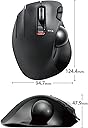
| Item Dimensions L X W | 12.4L x 9.5W cm |
| Item Weight | 127 g |
| Manufacturer | エレコム(ELECOM) |
| Mfr Part Number | M-XT4DRBK |
| Minimum Required Operating System Version | Windows 1 |
| Model Name | M-XT4 Series |
| Model Number | M-XT4DRBK |
| Movement Detection | Optical |
| Number Of Batteries | 1 AAA batteries required. (included) |
| Operating System | Windows 10, Windows RT8.1, Windows 8.1, Windows 7, Windows Vista, Macintosh OS X 10.10 |
| Power Source | Battery Powered |
| Range | 5 |
| Style Name | Single Item |
| Theme | Office, Home, Telework, Cafe |
| Unit Count | 1 Count |
| Warranty Description | 6 Months |
User
値段、性能、使いやすさ、すべてが高水準
まずコスパがいい。5000円未満の製品としては最も完成度が高いと感じる専用アプリでボタン配置やショートカットを設定でき、アプリの使用感も良い持ち運びにも便利な大きさで、電池持ちも良く、トラックボールもなめらかであるこの製品を買っておけば失敗しないと思う
User
マウスジェスチャーが難しい
親指トラックボールはすぐに慣れますし、確かにやりやすいですし、左利きにとっては、左利き用マウスはありがたいです。ボタンもカスタマイズ可能なので、ページアップ、ページダウンなどを設定しました。が、他のトラックボールマウスもそうなのですが、マウスジェスチャーがやりにくい。ブラウザでタブを閉じるのをL字に動かすマウスジェスチャーを使ってますが、やはりトラックボールだとそのL字に動かすのさえ、ちょっと難しいです。できれば、マウス自体を動かしてもマウスが動くようにしてほしいです。トラックボールがあるので難しいのかもしれませんが、トラックボール+光学式マウス両方ができれば、微調整も可能なのでかなり便利だと思います。
User
普通に使えています。
右手でも他社のトラックボールマウスを使っているのですが、左手用はこれしか見つかりませんでした。普通に使えています。右手だけが疲れることがなくなりました。
User
無し
最初は使い勝手が良くないが、慣れればこちらのほうが良いかも
User
唯一無二の左手用
若干引っかかり感があり、微妙な操作が難しいが、フッ素など滑りの良くなるものを塗っておけばしばらくは大丈夫。親指用トラックボールより人指指用のほうが使いやすいが、どれも値段が高いのでこちらを購入。右利きなら、右手を繊細な作業に充ててトラックボールは左手で扱ったほうが生産性がよいはずなのに、左手用はこの製品が唯一無二。ボタンの割当もでき、使い勝手もかなり良いのでずっと生産していて欲しい。欲を言えばボールが大きいほうが扱いやすいので、そういったのが発売されれば浮気しそう。
User
感想
なかなかの使い心地です。ロールを離すとポインタが動いてしまいますが、慣れれば問題なさそうです
User
楽です。
フツーのマウスだと、ポインターの移動にマウスを動かす場所をとるのですが、手を置いたままできるので、省スペース&手首の負担が減って、楽になりました。右手でもマウスを使う事があるので、右手用のも購入しようかと思うくらいに使い勝手がいいです。ただ、ちょっと手の大きさに合わないので、もう少し小さいのが欲しいです。
User
使えない。誤作動が起こる
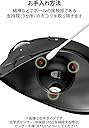
説明書通りに清掃しても、勝手にカーソルがピクピク動く。購入して1ヶ月でゴミになった。誤作動が起こるので買わない方が良いです。
User
Tutto ok
Ottimo x i mancini
User
Sidewise scrolling is not good.
Sidewise scrolling is not good. Which is main function we are buying this mouse for.
User
Feels great
First time I've worked with this type of static trackball mouse and it's great. Your hand stay still and you just move your thumb with the trackball, which I find makes it more accurate than the typical mouse where you move your whole hand.I thought there was going to be a learning curve of a few days but no, it's a pretty quick, same-day adaptation. I find that the wheel and back and forward buttons are easier to use and more functional than the Apple mouse. You don't get mixed up, they are clearly and intuitively separated and it flows.I've had it for a month, I didn't download the software that I understand could add some functionality but I may do so later.The unsual thing is that I'm using it with the USB adaptor in my M2 Mac Mini but it's not bluetooth nor wireless, so it must be another radio frequency that doesn't show up on the computer. Cool, in a way, so it doesn't load bluetooth or wireless channels.I really like it, a definite must-try for lefties.
User
Perfectly designed, versatile, full of features. Impressive for its price
I've been using Trackball mouses for more than 20 years, but on these last months I can't endure long sessions of PC usage or gaming anymore. Mi right hand and wrist end up stiff and hurting. That's why, even though I'm right handed, I decided to learn to use a Left handed trackball, so that I can alternate between both hands.I didn't look too much into the perks and features of this model. It just seemed nice and affordable (even with the addition of shipping costs to Spain). But boy was I in for some pleasant surprises.I was still using the old version of the Logitech M570 (standard left and right buttons, wheel + wheel button configuration plus 2 additional customizable buttons). Now, I don't know about the recent M570 v2, but this ELECOM, compared to the old M570 wins by a landslide, let me tell you...First of all, when you rest your hand on the mouse you get a feeling as if the shape of the hand was kind of sculpted into the mouse, as if you had slightly pressed your fingers on some clay and then it had dried.In addition to the usual left and right buttons (which you normally would press with your index and middle finger), there's one extra for your ring finger.It has also two additional buttons for the index finger (similar to those of my Logitech), and -the quirkiest- the wheel not only works as an up and down scroll and button, but has also a right and left tilting movement which function as TWO MORE buttons. The neat part is you can assign any key or keyboard functions (and even most combinations of keys except Ctrl+Alt+Del for safety reasons, or so it says) to each of the buttons.The configuration software is NOT provided on the eco-friendly sober packaging (nice touch). You just get the mouse, the small USB receiver (which you can attach to the back of the mouse for storage or transportation), the needed battery (another nice touch) and a brief quick start guide in japanese, but with enough annotations in English to succesfully start using the thing.Speakinf of the customizable buttons, I find REALLY useful to have CTRL+C and CTRL+V (Copy and Paste) on the left and right wheel tilt buttons. Also the SPACEBAR and ESC on the index extra buttons and right now I have "maximize window" on my ring finger one, which suits my current needs for one of my most used programs.By the range of functions assignable to the buttons, it's clear that this mouse is meant to be versatile not only as a gaming mouse but mostly as an office worker mouse. It must be great for Excel users, and maybe photo or video editors too. Also for enviroments using more than one screen.It has another function called "flying scrolling", in which you can use your mouse wheel not for manually scrolling but to start and stop scrolling. Not useful for me at the moment, but I understand it can save a lot of manual flicking in many scenarios.Since I'm not a hardcore gamer (mostly point and click adventures and puzzl-like games) I cannot say for sure how this mouse behaves as a gaming device, but I reckon that must be good. It has a DPI selector, which is also new for me, so that you can choose between covering about 60% of the screen (horizontally) with one movement of the thumb rolling the ball, or covering the whole screen in less than the full range of the ball. I'm sure that must be handy when trying to shoot zombies or whatever kids are doing nowadaysOn the bad side (but not really): Call me old schooler, but I miss the days of having a phisical copy of the drivers and software included with the periferials. That's the only "con", if any, that I've found on this mouse so far.But all in all I find it a great product, I am very satisfied with the purchase and I think I'll end up buying the right handed version also. I'm finding that controlling this mouse with my left hand is a lot easier than I anticipated. But I wonder if I'll be able to edit video with 2 mouses at once with SO MANY ASSIGNED BUTTONS (lol). Maybe I'm on to something here, who knows...You don't have any way to confirm this, but I assure you that ELECOM has not paid me anything for this review, I kid you know. I REPEAT: ELECOM didn't sponsor this review, nor did they promise me to send me the right handed one... yet. (But surely wouldn't hurt, either, wink, wink).
User
Having profiles, makes this awesome.
If you are a left handed gamer, you should get one of these. I could never go back to using a mouse.The software you have to download to customise this with, allows you to have a different profile for each game/software.The profiles can be triggered when you start the game/software of choice.This is done by linking the exe file to the profile.I like this so much, I bought a second one to use with my laptop. Highly recommend.
Trustpilot
2 months ago
1 week ago