We remain fully operational. Our teams are working around the clock to ensure your deliveries continue safely.

DOWNLOAD THE APP


Customer Services
Copyright © 2025 Desertcart Holdings Limited
DOWNLOAD THE APP


🖱️ Elevate Your Play, Protect Your Wrist — Game Smarter, Not Harder!
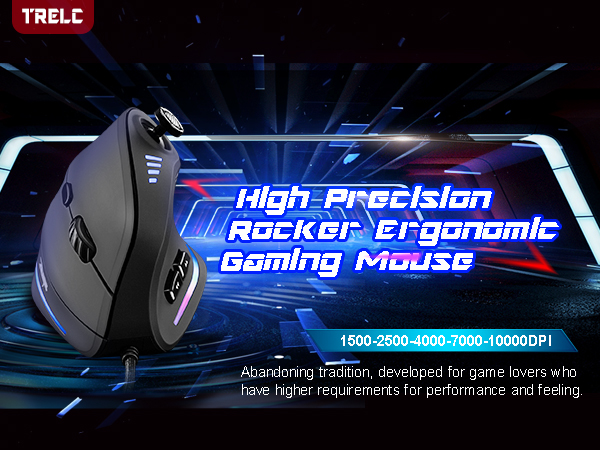
The TRELC Gaming Mouse combines cutting-edge ergonomics with pro-grade performance, featuring an innovative vertical design to reduce wrist strain, 11 fully programmable buttons including a 5D rocker for versatile control, and a high-precision 10000 DPI optical sensor with 20G acceleration. Wired for zero-latency gaming, it also boasts customizable RGB lighting to enhance your gaming environment. Ideal for gamers and professionals seeking comfort without compromising on speed or customization.


| ASIN | B07THFMNQ2 |
| Additional Features | 5D Rocker, Ergonomic Design, LED Lights, Programmable Buttons |
| Antenna Location | Gaming, Office |
| Are Batteries Included | No |
| Are Batteries Required | No |
| Best Sellers Rank | #2,426 in Video Games ( See Top 100 in Video Games ) #126 in PC Gaming Mice |
| Brand | TRELC |
| Built-In Media | 1 Ergonomic Mouse, 1 Instruction Manual, 1 Foot Mat |
| Button Quantity | 11 |
| Color | Wired (10000 DPI) |
| Compatible Devices | Laptop, Personal Computer, Tablet |
| Connectivity Technology | USB |
| Customer Reviews | 4.2 out of 5 stars 2,009 Reviews |
| Embellishment Feature | LED |
| Enclosure Material | Plastic |
| Hand Orientation | Right |
| Hardware Platform | PC |
| Item Dimensions L x W | 4.33"L x 2.83"W |
| Item Weight | 0.36 Pounds |
| Manufacturer | TRELC |
| Model Number | ffa9f2bc-df4c-43d8-b09b-b9ba1c59d13a |
| Mouse Maximum Sensitivity | 10000 Dots per Inch |
| Movement Detection | Optical |
| Movement Detection Technology | Optical |
| Number of Batteries | 1 AAA batteries required. |
| Number of Buttons | 11 |
| Operating System | Windows/Mac/Linux |
| Power Source | Corded Electric |
| Range | 5.9 Feet |
| Special Feature | 5D Rocker, Ergonomic Design, LED Lights, Programmable Buttons |
| Style Name | Modern |
| UPC | 787446991061 |
| Unit Count | 1.0 Count |
| Warranty Description | 1 Year Manufacturer |
A**I
Budget Ergonomic Mouse that doesn't compromise on quality.
Vertical mice saved my wrists. As someone who works on a computer all day, I was getting severe wrist pain. Made the jump a few years ago and just reordered same product after four years and have only positive things to say. First, the ergonomics. I can use this all day without tiring or pain. I even use the vertical mouse for some casual gaming (hence also prefer wired so no latency delays), and it works great. You get used to it very quickly and the customization between DPI is great! Turns out the extra buttons are also a great feature as well, often using it to go back and forth between history (or even custom mapping in games). All in all, great product if you care about your health while not spending $50+
A**Z
Really Cool
This is a great mouse; it feels great in the hand, and just looks really cool. The resolution indicitaor lights on top look cool, and the flowing multicolor lightbars on the bottom look really slick as well. The thumbstick on top is especially nice, and is really great for easily adjusting the map in RTS and tactical wargames (such as BattleTech, which I play A LOT.) The bottom two thumb buttons are placed just a bit too far forward and can be a little hard to reach, but that will depend on the angle of your arm and how you hold the mouse (they would be much better if they were positioned just a bit further back, closer to the palm.) I got this mouse because about two months ago I suddenly developed a really bad case of tendonitis in the middle two fingers of my mouse hand, to the point that my finger knuckle went *CLUNK* every time I bent my finger, and eventually I couldn't even close my fist. I had seen upright ergonomic mice like this before and thought they looked cool but I never had a reason to justify the cost of buying one before, but when I developed the tendonitis I decided I'd give one a try to see if it helped. And thankfully after starting to use this mouse instead it cleared up after a few weeks. I had initially worried that it would be hard to get accustomed to this new style of mouse with my hand in a different position, but I quickly realized that it was actually easier for me and gave me even more control than with a standard mouse; the position of your hand on the mouse allows you to rest the heel of your palm on the mousepad, allowing you fine precision control over the movement of the mouse. You just need to make sure that your mousepad has a surface that isn't too slick or the mouse can slide all over the place the moment you take your hand off it. I only wish it was wireless, since I use a laptop that I literally sit on my lap and the cable can get in the way, but that isn't any kind of complaint against this mouse in particular; the cable is actually really nice and coated in a woven fabric material that keeps it from getting all tangled and knotted up. Overall it's a really nice mouse, and I consider it well worth the price.
S**N
Surprisingly Great Vertical Gaming Mouse
UPDATE: 2/20/2022 Tried this mouse with Hell Let Loose (HLL) and remapping the buttons does work. However, the thumbstick does not work well for driving tanks. Also, the software is limited in that it does not allow for multiple buttons to be pressed at the same time. i.e. squad talk was set to joystick right and marking targets to wheel click. I cannot figure out how to hold squad talk and mark targets at the same time, you get one or the other but not both, with my G502 I can be talking and marking with no issue on mapped buttons. This mouse is almost perfect for my use. I bought it to play Fishing Planet in hopes to one-hand game with limited use of the keyboard while also hoping to avoid wrist pain I have been experiencing with my G502 Hero SE. I still have to rely on the keyboard, because 11 programable buttons doesn't cover the commonly used keys for me. However, the thumbstick is great for driving the boat and trolling motor, because it is mapped as WASD, and this is outstanding! The software to create macros and reassign keys is functional, but by no means as robust as the major gaming accessory companies. For instance, you cannot record mouse clicks in a macro. So far, I have only used the mouse on Fishing Planet but I plan to test this on Hell Let Loose and other FPS to see how it function. Overall this is an excellent mouse and provided strain relief, but I would like to humbly suggest a couple improvements: 1. Relocate the joystick to the side of the mouse above the forward and back side buttons. (Image highlights the area in red). This is a more natural position for the thumb. 2. The joystick click (not the directions) requires to much force to activate. 3. Add 2 or 3 more buttons for the thumb side or even one for the ring or pinky finger, or just add a button to allow secondary mapping of all the other buttons (Like G-shift). 4. Add a pinky finger and palm rest so they do not have to slide across the mouse pad or whatever is being used for a mouse surface.
K**S
Awesome Mouse for Smaller Hands
This Zelotes vertical mouse is 4.5” long, 3.25” high, 3” wide. It has a colorful light strip at the bottom when active and comes with preset function defaults. It is advertised to have 11 programmable settings, but it is really 9 since most people will maintain the left-click and right-click button defaults. It comes with a Zelotes CD that allows you to customize each function. I have a small hand (3.25” inch from bottom of thumb to bottom of palm) with thick, stubby fingers so this mouse felt extremely comfortable compared to other vertical mice I had previously used. I liked the fact that the joystick was easily accessible and could serve as 5 functions. My fat thumb found it easier to utilize the joystick with better accuracy than other mice that have a number “keypad” on the left side of the mouse. All of the functions were easy to activate except for the “forward button” which I have to stretch my thumb to reach. The vertical mouse construction is easier on my wrist compared to the traditional mouse. This is the best vertical mouse I have come across for a smaller hand. Pros: Easy to install and set up Well constructed with quality materials Smaller product frame was excellent for my small hands The joystick provided 5 functions that were easily accessible The vertical nature was easier on my wrist for long-term use Improved my gaming skill activation time Snazzy colorful light strip at the bottom Cons: People with bigger hands might not like this function layout or size Made only for right-handed people
N**T
Neither Fish Nor Fowl
3 stars — I returned it. It does only an okay job at being a mouse or being a controller. That said, if I had cramps or other mobility issues, I would add a star. The biggest dealbreaker for me is that the software doesn't allow you to auto-swap profiles. You have to manually swap between e.g. Excel and Blender or your browser. Pros: I find this a really comfortable mouse, for moving it around, for accessing (most) of the buttons, and when "at rest." It looks funky, but now I wish more manufacturers tries this "upright" style. The joystick is programmable, so it can be used for moving the cursor, for movement in a video game, for running video software (e.g. ffwd, rewind, etc). Cons: Unfortunately, there are a lot of cons. First, the "joystick" only registers four directs (→↑←↓) and nothing in between. So it's more of a "four-button stick" than a joystick. Second, there aren't many other buttons, so it's not useful enough as a gaming or programming or artist mouse. Worse, the software for programming the buttons is too "20th century" and comes without instruction. It's also convoluted. The best I can say about it: it's not the worst I've seen. There's also no wheel-tilt, which is unfortunate, since that alone would provide two more functions. As I mentioned above, one has to manually swap profiles. That's a dealbreaker for me, because it makes having profiles 10 times less useful. A couple of tips: The software interface is poorly translated. When you want to "apply" changes to a profile, you press the "Application" button. (There's another button to tie for connecting to a program.) It's branded on Amazon as TRELC, but the packaging says "Zelotes". Near as I can tell from internet reviews, this isn't anything to worry about; it's just odd. Finally, it was pretty clear that this mouse was no longer "new". It was pretty obvious that the package had been previously opened and resealed. Again, I didn't see anything worrying about this mouse. It's just something to look out for if you want a pristine mouse.
C**R
Good quality mouse!
I recently bought this mouse because of pain in my wrist, and let me tell you that it was the best purchase I've ever made! Starting with ergonomics, its just amazing, really great on the wrist, and is a nice shape that you don't even need to use your thumb to grip. For quality of material its very much on the high end of materials, the plastic used for the grip feels great and the clicks for the mouse buttons are amazing! They don't have any odd sounds, its just a simple click. I really like the inclusion of the joystick on the top, though I wish it was more similar to an xbox controller where you can vary your speed. The scroll wheel is top quality and has an interesting design that lets you know how far you've scrolled it. The software that came with the mouse is on a disk, though in some spots its poorly translated to english. Overall its a really good mouse though it'll certainly take some time getting used to if you've been using a standard mouse for about 5-20 years.
H**A
Best bang for your buck
Look, I've had the same mouse for ten years, about a week ago. The middle mouse button has stopped working very well it has been my ride or die mouse for ten years and it's worth and worth every single penny I loved this mouse so much. I bought another one. It is extremely comfortable and works very well.every single penny I loved this mouse so much. I bought another one. It is extremely comfortable and works very well
C**G
Waste of plastic, terrible quality, MANY MANY red flags
Absolutely TERRIBLE product all around. KEY POINTS.... (1) Directly out of the box, the stick drift is so bad, it makes a 30 year old N64 controller look like it has a Hall Effect stick. (2) Manufacturer's website uses (http://) protocol for anyone to access the installation software, customization, drivers, etc. So, there's a high possibility of malware (IMO). (3) Overall terrible quality. I was looking for a vertical mouse to help ease the strain on my wrists since while playing games on my PC. Having CTS (carpel tunnel syndrome) and RA(Rheumatoid arthritis), my wrists and hands are easily fatigued so I decided to give this mouse a try. The stick drift on the joystick is atrocious. For something that is meant to be used as your WASD substitute for games, the joystick should be robust, given the use it will get while gaming. The manufacturer was nice enough to include a micro disk for the software installation, but let's all remember what year it is. It's 2025 in case the manufacturers of this product aren't aware, and computer's with disk drives are few and far between. My issue isn't with them including the disk, it's more along the lines of not having SAFE access to the software for everyone else. The manufacturer choosing to use an http protocol for their website is littered with red flags. There are too many people that wouldn't think anything of it and visit the website to download the installation software (along with computer AIDS....probably). The product just reeks of red flags so, don't waste your money.
Trustpilot
1 month ago
2 weeks ago