Some deliveries may take a little longer than usual due to regional shipping conditions.

DOWNLOAD THE APP


Customer Services
Copyright © 2025 Desertcart Holdings Limited
DOWNLOAD THE APP

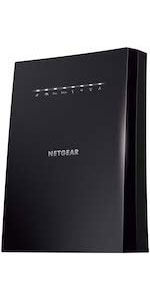
🚀 Never Buffer, Always Belong: Elevate your WiFi game with NETGEAR EX6120!
The NETGEAR EX6120 WiFi Range Extender dramatically expands your wireless coverage by up to 1,500 sq. ft., supporting over 25 devices with AC1200 dual-band speeds up to 1.2 Gbps. Its compact wall-plug design and easy 5-minute setup make it ideal for professionals seeking reliable connectivity in every corner of their home or office. Featuring a dedicated Ethernet port, it bridges wired and wireless needs effortlessly, ensuring smooth streaming, gaming, and remote work without signal drop-offs.




| ASIN | B014YN7LVE |
| Best Sellers Rank | #11 in Repeaters |
| Customer Reviews | 3.8 3.8 out of 5 stars (119,537) |
| Date First Available | September 14, 2015 |
| Is Discontinued By Manufacturer | No |
| Item Weight | 4.6 ounces |
| Item model number | EX6120-100NAS |
| Manufacturer | Netgear |
| Product Dimensions | 2.64 x 1.54 x 2.17 inches |
R**H
Easy to Set-up & Connect
After logging into NetGears Setup Page and making a password and 2 security questions I found it fairly simple and quick to get the AC1200 WiFi Range Extender to lock into my router. I live in a mobile home and the WiFi connection in the living room where the router is located is fine but when you take your laptop or Ipad down to the other end of the trailer, in the bedrooms you lose quite a bit. On a lot of sites you would get a lot of buffering. Once I put AC1200 in the back bedroom it was like having the router in the room. Plus there are no cord connections, just plug it in the wall socket. If I want to use an Ethernet Cable with my laptop in the bedroom there is an Ethernet Port on the side of the AC1200 Extender to plug into. Some Extenders I reviewed before buying this one don't have that feature. You can't go wrong with this model. Works great. And if your a member of Amazon Prime you'll get it in 2 days. I did.After logging into NetGears Setup Page and making a password and 2 security questions I found it fairly simple and quick to get the AC1200 WiFi Range Extender to lock into my router. I live in a mobile home and the WiFi connection in the living room where the router is located is fine but when you take your laptop or Ipad down to the other end of the trailer, in the bedrooms you lose quite a bit. On a lot of sites you would get a lot of buffering. Once I put AC1200 in the back bedroom it was like having the router in the room. Plus there are no cord connections, just plug it in the wall socket. If I want to use an Ethernet Cable with my laptop in the bedroom there is an Ethernet Port on the side of the AC1200 Extender to plug into. Some Extenders I reviewed before buying this one don't have that feature. You can't go wrong with this model. Works great. And if your a member of Amazon Prime you'll get it in 2 days. I did.After logging into NetGears Setup Page and making a password and 2 security questions I found it fairly simple and quick to get the AC1200 WiFi Range Extender to lock into my router. I live in a mobile home and the WiFi connection in the living room where the router is located is fine but when you take your laptop or Ipad down to the other end of the trailer, in the bedrooms you lose quite a bit. On a lot of sites you would get a lot of buffering. Once I put AC1200 in the back bedroom it was like having the router in the room. Plus there are no cord connections, just plug it in the wall socket. If I want to use an Ethernet Cable with my laptop in the bedroom there is an Ethernet Port on the side of the AC1200 Extender to plug into. Some Extenders I reviewed before buying this one don't have that feature. You can't go wrong with this model. Works great. And if your a member of Amazon Prime you'll get it in 2 days. I did.After logging into NetGears Setup Page and making a password and 2 security questions I found it fairly simple and quick to get the AC1200 WiFi Range Extender to lock into my router. I live in a mobile home and the WiFi connection in the living room where the router is located is fine but when you take your laptop or Ipad down to the other end of the trailer, in the bedrooms you lose quite a bit. On a lot of sites you would get a lot of buffering. Once I put AC1200 in the back bedroom it was like having the router in the room. Plus there are no cord connections, just plug it in the wall socket. If I want to use an Ethernet Cable with my laptop in the bedroom there is an Ethernet Port on the side of the AC1200 Extender to plug into. Some Extenders I reviewed before buying this one don't have that feature. You can't go wrong with this model. Works great. And if your a member of Amazon Prime you'll get it in 2 days. I did.After logging into NetGears Setup Page and making a password and 2 security questions I found it fairly simple and quick to get the AC1200 WiFi Range Extender to lock into my router. I live in a mobile home and the WiFi connection in the living room where the router is located is fine but when you take your laptop or Ipad down to the other end of the trailer, in the bedrooms you lose quite a bit. On a lot of sites you would get a lot of buffering. Once I put AC1200 in the back bedroom it was like having the router in the room. Plus there are no cord connections, just plug it in the wall socket. If I want to use an Ethernet Cable with my laptop in the bedroom there is an Ethernet Port on the side of the AC1200 Extender to plug into. Some Extenders I reviewed before buying this one don't have that feature. You can't go wrong with this model. Works great. And if your a member of Amazon Prime you'll get it in 2 days. I did.After logging into NetGears Setup Page and making a password and 2 security questions I found it fairly simple and quick to get the AC1200 WiFi Range Extender to lock into my router. I live in a mobile home and the WiFi connection in the living room where the router is located is fine but when you take your laptop or Ipad down to the other end of the trailer, in the bedrooms you lose quite a bit. On a lot of sites you would get a lot of buffering. Once I put AC1200 in the back bedroom it was like having the router in the room. Plus there are no cord connections, just plug it in the wall socket. If I want to use an Ethernet Cable with my laptop in the bedroom there is an Ethernet Port on the side of the AC1200 Extender to plug into. Some Extenders I reviewed before buying this one don't have that feature. You can't go wrong with this model. Works great. And if your a member of Amazon Prime you'll get it in 2 days. I did.After logging into NetGears Setup Page and making a password and 2 security questions I found it fairly simple and quick to get the AC1200 WiFi Range Extender to lock into my router. I live in a mobile home and the WiFi connection in the living room where the router is located is fine but when you take your laptop or Ipad down to the other end of the trailer, in the bedrooms you lose quite a bit. On a lot of sites you would get a lot of buffering. Once I put AC1200 in the back bedroom it was like having the router in the room. Plus there are no cord connections, just plug it in the wall socket. If I want to use an Ethernet Cable with my laptop in the bedroom there is an Ethernet Port on the side of the AC1200 Extender to plug into. Some Extenders I reviewed before buying this one don't have that feature. You can't go wrong with this model. Works great. And if your a member of Amazon Prime you'll get it in 2 days. I did.After logging into NetGears Setup Page and making a password and 2 security questions I found it fairly simple and quick to get the AC1200 WiFi Range Extender to lock into my router. I live in a mobile home and the WiFi connection in the living room where the router is located is fine but when you take your laptop or Ipad down to the other end of the trailer, in the bedrooms you lose quite a bit. On a lot of sites you would get a lot of buffering. Once I put AC1200 in the back bedroom it was like having the router in the room. Plus there are no cord connections, just plug it in the wall socket. If I want to use an Ethernet Cable with my laptop in the bedroom there is an Ethernet Port on the side of the AC1200 Extender to plug into. Some Extenders I reviewed before buying this one don't have that feature. You can't go wrong with this model. Works great. And if your a member of Amazon Prime you'll get it in 2 days. I did.After logging into NetGears Setup Page and making a password and 2 security questions I found it fairly simple and quick to get the AC1200 WiFi Range Extender to lock into my router. I live in a mobile home and the WiFi connection in the living room where the router is located is fine but when you take your laptop or Ipad down to the other end of the trailer, in the bedrooms you lose quite a bit. On a lot of sites you would get a lot of buffering. Once I put AC1200 in the back bedroom it was like having the router in the room. Plus there are no cord connections, just plug it in the wall socket. If I want to use an Ethernet Cable with my laptop in the bedroom there is an Ethernet Port on the side of the AC1200 Extender to plug into. Some Extenders I reviewed before buying this one don't have that feature. You can't go wrong with this model. Works great. And if your a member of Amazon Prime you'll get it in 2 days. I did.After logging into NetGears Setup Page and making a password and 2 security questions I found it fairly simple and quick to get the AC1200 WiFi Range Extender to lock into my router. I live in a mobile home and the WiFi connection in the living room where the router is located is fine but when you take your laptop or Ipad down to the other end of the trailer, in the bedrooms you lose quite a bit. On a lot of sites you would get a lot of buffering. Once I put AC1200 in the back bedroom it was like having the router in the room. Plus there are no cord connections, just plug it in the wall socket. If I want to use an Ethernet Cable with my laptop in the bedroom there is an Ethernet Port on the side of the AC1200 Extender to plug into. Some Extenders I reviewed before buying this one don't have that feature. You can't go wrong with this model. Works great. And if your a member of Amazon Prime you'll get it in 2 days. I did.After logging into NetGears Setup Page and making a password and 2 security questions I found it fairly simple and quick to get the AC1200 WiFi Range Extender to lock into my router. I live in a mobile home and the WiFi connection in the living room where the router is located is fine but when you take your laptop or Ipad down to the other end of the trailer, in the bedrooms you lose quite a bit. On a lot of sites you would get a lot of buffering. Once I put AC1200 in the back bedroom it was like having the router in the room. Plus there are no cord connections, just plug it in the wall socket. If I want to use an Ethernet Cable with my laptop in the bedroom there is an Ethernet Port on the side of the AC1200 Extender to plug into. Some Extenders I reviewed before buying this one don't have that feature. You can't go wrong with this model. Works great. And if your a member of Amazon Prime you'll get it in 2 days. I did.After logging into NetGears Setup Page and making a password and 2 security questions I found it fairly simple and quick to get the AC1200 WiFi Range Extender to lock into my router. I live in a mobile home and the WiFi connection in the living room where the router is located is fine but when you take your laptop or Ipad down to the other end of the trailer, in the bedrooms you lose quite a bit. On a lot of sites you would get a lot of buffering. Once I put AC1200 in the back bedroom it was like having the router in the room. Plus there are no cord connections, just plug it in the wall socket. If I want to use an Ethernet Cable with my laptop in the bedroom there is an Ethernet Port on the side of the AC1200 Extender to plug into. Some Extenders I reviewed before buying this one don't have that feature. You can't go wrong with this model. Works great. And if your a member of Amazon Prime you'll get it in 2 days. I did.After logging into NetGears Setup Page and making a password and 2 security questions I found it fairly simple and quick to get the AC1200 WiFi Range Extender to lock into my router. I live in a mobile home and the WiFi connection in the living room where the router is located is fine but when you take your laptop or Ipad down to the other end of the trailer, in the bedrooms you lose quite a bit. On a lot of sites you would get a lot of buffering. Once I put AC1200 in the back bedroom it was like having the router in the room. Plus there are no cord connections, just plug it in the wall socket. If I want to use an Ethernet Cable with my laptop in the bedroom there is an Ethernet Port on the side of the AC1200 Extender to plug into. Some Extenders I reviewed before buying this one don't have that feature. You can't go wrong with this model. Works great. And if your a member of Amazon Prime you'll get it in 2 days. I did.
J**A
Very affordable bargain to extend your WiFi...at least
NETGEAR WiFi Range Extender EX6120 with AC1200 Dual Band Wireless Signal Booster & Repeater Pros Affordable and handy alternative a $40 total Easy to setup Works as advertised with WiFi Cons Do not exceed wireless devices connected to it Same data speeds as the router that transmits to it The Ethernet port failed in my sample The NETGEAR EX6120 WiFi Extender is a nice and compact piece of communications hardware that can be beneficial in homes or large apartments where the main Router / Gateway has difficulty to reach the farthest corner of your place or you insist to keep your main Router hidden, weakening its signals. Having used an earlier technology NETGEAR router in the past I was counting on an easy and smooth installation experience: I was well pleased about this one. For the newbie, it is as easy as plugging the extender to an AC outlet, pressing the WPS button in your main router and another WPS button on the extender. But, yes: there are some tech heads among us that demand to get “under the hood” of any gadget. Guess what? You can login to the extender via your web browser of choice to tweak things – or just presume that you know how they work. At any rate, both ways of setting it up are user friendly for each kind of audience. And its 2 antennas can be rotated 180 degrees each, just in case you are as obsessive with catching your main router's WiFi signal as I am with Digital TV antennas to get the strongest signal with the most channels. Do you have in a far corner of your home a computer, game console or video disk player that won't connect to your network unless it can connect with an Ethernet cable? No problem! The EX6120bWiFi Extender has one Ethernet port. So, you can have WiFi AND Ethernet in a place 'far, far away' from your main router within your house. I tried it with a desktop PC connected by Ethernet, several WiFi devices and it ran a windows update download, rebooted and then... the Ethernet port stopped working! Tryouts with other PC and cable didn't work: the Ethernet port failed. Now, don't try playing wise guy or wise girl by trying to connect via WiFi more devices that it is recommended to support, specially if you use one of those devices for teleconferencing (“ZOOM, TEAMS, anyone, anyone?”). This device won't make your WiFi network run faster or better if your main router and / or internet provider's service level subscription has limitations (remember the last time your favorite interstate highway suddenly got all lanes jammed and you though that the next exit will take you to your place faster?). So, if you see a “internet connection is unstable” message during teleconferencing with an application like ZOOM, you may need to compromise between dining out weekly each month or paying for an upgrade to your internet service that allows at least 20 MBPS. A WiFi extender won't make the cut. Sometimes, you may convince your significant other to relocate your main router in a better location to broadcast your WiFi or may get a Router upgrade that can actually extend the signal reach out. But, for those of us who can't, the NETGEAR EX6120 is a good alternative with an extensive WiFi reach. All photos (c) 2021 by reviewer.
G**G
Works great so far
Just got it, so far so good. Easy setup if you choose the right procedure. WPS worked fastest for me, even though it might not be the most secure method. The wifi signal is stronger than before, without it. Well made and solid, doesn't seem cheap made. I doubled my wifi area creating better coverage. It was more pricey than the other generic extenders but I think it is worth the charge. I recently had problems with my streaming TV app with occasional interruptions but I don't seem to have those anymore. My streaming is more reliable now. The extender size is about average compared to others so not much difference. The antennas are internal so no messing with angles. I have the same brand router so it works seemlessly.
M**A
It's very convenient to install It's very useful for those apartments where bedroom has low signal strength. It strengthens the signal strength.
P**R
I love it man.. I had alot issues with wifi signal in bedroom, I just plugged it, and it is working perfectly fine.
L**R
Facil de instalar, muy buena cobertura, la señal se extiende entre 30 y 40 metros fuera de la casa. Recfomendable
P**O
Lo uso en una casa de dos pisos de concreto donde la señal del router principal no llega a la planta baja con suficiente intensidad, con este repetidor se crean 2 redes nuevas (para 2.4Ghz y 5Ghz) con suficiente intensidad y muy buen desempeño. Muy fácil de instalar.
J**L
VERY VERY VERY VERY VERY BAD PRODUCT DONT BUY
Trustpilot
2 months ago
2 weeks ago