We remain fully operational. Our teams are working around the clock to ensure your deliveries continue safely.

DOWNLOAD THE APP


Customer Services
Copyright © 2025 Desertcart Holdings Limited
DOWNLOAD THE APP
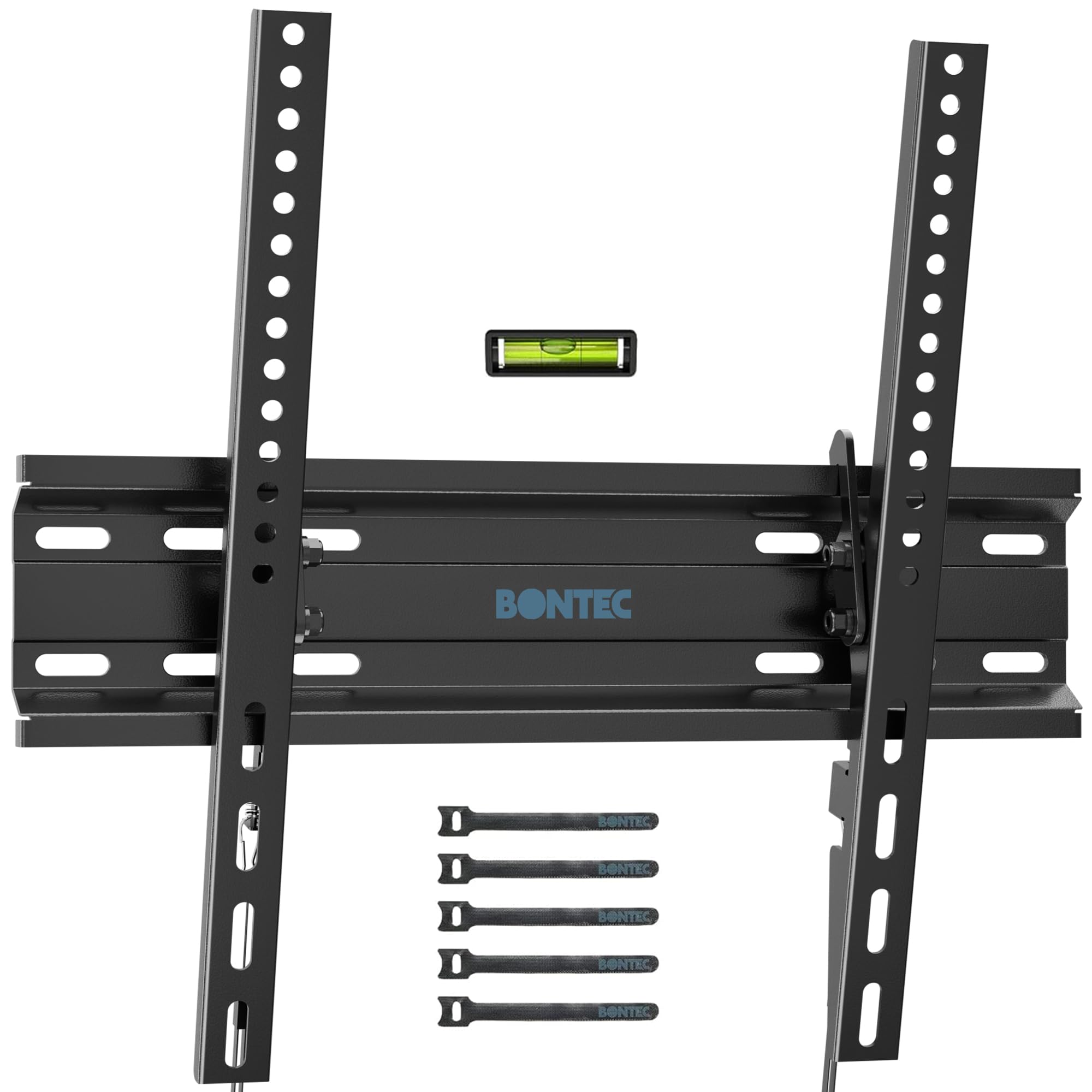
🖼️ Elevate your space with the sleekest, sturdiest TV mount—because your screen deserves the spotlight.
The BONTEC TV Wall Mount Tilting bracket supports 23-60 inch TVs with VESA patterns up to 400x400mm and holds up to 115 lbs. Its heavy-duty steel build ensures stability, while the 10° tilt feature reduces glare for optimal viewing. The ultra-slim design places your TV just 1.18 inches from the wall, perfect for modern, space-conscious interiors. Installation is straightforward with included hardware and instructions, fitting standard 16" studs for secure mounting.




| ASIN | B07TJGXV1G |
| Best Sellers Rank | #14,069 in Electronics ( See Top 100 in Electronics ) #257 in TV Wall & Ceiling Mounts |
| Brand | BONTEC |
| Color | Black |
| Compatible Devices | Television |
| Customer Reviews | 4.5 out of 5 stars 21,960 Reviews |
| Enclosure Material | Metal |
| Item Height | 30 millimeters |
| Item Weight | 0.24 Kilograms |
| Manufacturer | BONTEC |
| Material | Metal |
| Maximum Tilt Angle | 10 Degrees |
| Maximum-Supported Screen Size | 60 Inches |
| Minimum-Supported Screen Size | 23 Inches |
| Mounting Type | Wall Mount |
| Movement Type | Tilt |
| Warranty Description | 1 Year Manufacturer |
S**A
high-quality
"Fantastic Mount – Slim, Sturdy, and Easy to Install!" As someone who recently upgraded their living room setup, I was on the hunt for a TV wall mount that was both low-profile and reliable. The BONTEC Low Profile Tilt TV Wall Mount for 23-60 inch TVs absolutely delivered! First off, the "ultra-slim" claim is no joke. My 55-inch OLED now sits incredibly close to the wall, giving it that sleek, modern, almost picture-frame look I was going for. It really makes the TV blend seamlessly into the room rather than sticking out like a sore thumb. Installation was surprisingly straightforward, even for a DIY novice like myself. All the necessary hardware was included, and the instructions were clear enough to follow without too much head-scratching. I particularly appreciated that it's designed to fit 16" studs, which is a common spacing and made finding a secure mounting point a breeze. The tilt feature is also a huge bonus, allowing me to easily adjust the viewing angle to eliminate glare from windows or lights – a small detail that makes a big difference in comfort. With a loading capacity of 99LBS and support for VESA up to 400x400mm, I felt completely confident hanging my fairly hefty TV. The build quality feels very solid and secure; there's no wobbling or creaking whatsoever. If you're looking for a low-profile, tilting TV mount that's easy to install and feels incredibly robust, I can't recommend the BONTEC highly enough. It's a fantastic value for the quality and convenience it provides.
M**O
Excellent price and easy mount
Was easy to install and mount. Good value for $$.
T**H
Does what it says
This TV wall mount does exactly what it’s supposed to do. Installation was straightforward, and the pull strings on the bottom make it very easy to adjust and level the TV after it’s mounted. One thing to note is that the included bolts can strip easily, so you may want to use your own bolts instead. Overall, it’s a simple and functional mount that works as advertised.
J**Y
My tv is on the wall, no tears during install.
Went up. Stayed up. Easy install. Wife happy
D**A
Span two 16 inch studs
The wall plate is designed to span two studs. Unless you have 8 inch or lower stud spacing it can't be centered on a stud. For standard 16 in stud spacing, it must be centered between two studs (for wider stud spacing it doesn't work). If you are picky about the wall position of the TV and wanted it centered near a stud, buy a different wall mount. With 400mm wide VESA the TV must be centered within 0.75 in of the center of the wall plate. Narrower VESA gives you more range to mount the TV off center on the wall plate, up to 4.7 inches to either side for 200mm and 6.6 in for 100mm. But you might want up to 8 inches off center before a different pair of studs would work better and you can't get that much with this wall mount. The L and R marked on the vertical pieces are from your viewpoint as you attach them to the back of the monitor (not from the completed orientation looking at the front of the monitor). A pair of pictures in the instructions makes that clear. If you have 400mm wide VESA, you must get L vs. R correct or it won't work at all. Several of the bad reviews say it doesn't work with 400mm VESA, one of which (saying it was done by a professional installer) shows it not working and clearly shows the L vs R pieces are reversed. My photo of this product attached to the back of my 50 inch TV with 400mm wide VESA shows it working well with L, R pieces correct. It also works for 400mm high VESA, but I don't have a photo of that. For narrower VESA, I don't think it is important to get L vs. R correct (unless you need the full flexibility for off center positioning). My photo (top down view) of the verticals attached to my 32 inch monitor shows L vs. R intentionally backward, because I think that works a little better for this monitor's recessed 75mm VESA mount. If you have power or display cord sticking straight back (as you see in my photo of my 32 inch monitor) that may be a problem. The cords as shown do not work. The monitor mounts slightly too close to the wall. I had a spare right angle power cord and I bought a right angle DPMI adapter, that would fix this problem. But for other reasons, I wanted this monitor an inch further from the wall and kludged standoffs between the monitor and the vertical pieces. For most monitors, the provided standoffs (much less than an inch) might add just enough for rear facing cords to work. But for most monitors you would need to buy longer screws for the standoffs to work. (Of course most TVs don't have this issue at all because the plugs are built sideways and only need standoffs if the back is curved). The provided standoffs don't work at all with the strange recessed 75mm VESA of my monitor. If you have a monitor smaller than 32 in, or you have 75mm high VESA mount, the vertical pieces will protrude as seen in the photo of the top of my 32 in monitor (75mm VESA). I wouldn't mind that because it is part of a bank of monitors that hide each other's mounting. But for a normal TV, this is likely a bad choice of wall mount for under 32 in and/or 75mm VESA. For 100mm to 300mm VESA on a 32 in or bigger TV there is enough flexibility in how you attach the verticals to the TV to hide them. For 400mm VESA, the verticals couldn't protrude even if you wanted them to. The wall mount screws look like you could use either philips or 10mm hex drive to tighten them. But, as mentioned in a few of the bad reviews, the screws are not high enough quality for the philips to work. The head will strip. The screws are plenty for holding a 50Lb TV on the wall (I'm not sure about the 99Lbs advertised). But you should use a 10mm hex drive, not a philips screw driver. Having put up a large number of similar devices, I would always use hex drive anyway (buying different screws if the ones provided were not hex drive). If you don't have a good stud finder and a ratchet set including 10mm, maybe this is not a product for you. (You still use a philips screw driver to attach the vertical pieces to the TV).
W**Y
As described
Easy to mount. 10 minutes
T**M
You won’t be disappointed
Dismount is wonderful. There’s not much to say, but it does his job and it has sturdy build quality.
A**R
Bueno
Excelente
Trustpilot
1 month ago
1 week ago