
DOWNLOAD THE APP


Customer Services
Copyright © 2025 Desertcart Holdings Limited
DOWNLOAD THE APP


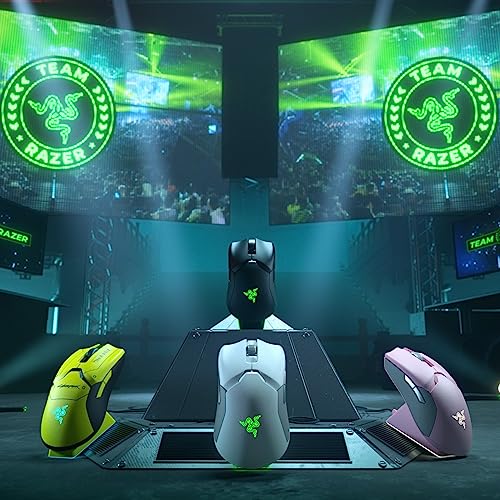


🎮 Rule the game with speed, precision, and freedom — the Viper Ultimate is your wireless weapon of choice!
The Razer Viper Ultimate is a premium ambidextrous wireless gaming mouse featuring ultra-fast optical switches, a 20,000 DPI optical sensor for exceptional accuracy, and a long-lasting 70-hour battery. Weighing just 74 grams, it offers a lightweight, ergonomic design with 8 programmable buttons and seamless wireless connectivity, making it the top choice for serious gamers seeking performance without compromise.


| ASIN | B08565C5BB |
| Batteries | 1 Lithium Ion batteries required. (included) |
| Batteries Included | Yes |
| Batteries Required | Yes |
| Battery Average Life | 70 Hours |
| Battery cell composition | Lithium Ion |
| Best Sellers Rank | #1,153,469 in Electronics ( See Top 100 in Electronics ) #1,109 in Gaming Mice |
| Brand | Razer |
| Compatible Devices | Personal Computer |
| Connector Type | USB |
| Customer Reviews | 4.6 4.6 out of 5 stars (14,997) |
| Date First Available | 14 April 2020 |
| Does it contain liquid? | No |
| Generic Name | mouse |
| Hand Orientation | Ambidextrous |
| Hardware Platform | PC |
| Item Dimensions LxWxH | 6.6 x 12.6 x 3.8 Centimeters |
| Item Weight | 77.1 g |
| Item model number | RZ01-03050200-R3U1 |
| Manufacturer | Razer Inc. |
| Material | Plastic |
| Model | RZ01-03050200-R3U1 |
| Model Name | Viper Ultimate |
| Movement Detection Technology | Optical |
| Number of items | 1 |
| Operating System | Windows 7, Windows XP |
| Power Source | Battery Powered |
| Product Dimensions | 6.63 x 12.65 x 3.78 cm; 77.11 g |
| Special Features | Wireless |
R**L
Too beautiful!!!! And excellent performance
Clicks feel nice,side grips feel soft and very comfortable,excellent software and firmware implementation,charging dock,a nice addition.scroll wheel feels good.optical switches,so no double click issue.excellent sensor and LOD optimisation.what more can you want.weight feels right for me,and the wireless connectivity so GOOD.i didn't notice a single connection drop or cursor jumping
M**M
good responding and the battery last longer
A**D
excellent product
A**E
El producto llegó totalmente sellado (es nuevo), su caja es de tipo cofre que al abrirlo deja ver el mouse y su dock (base de carga), los dos presentan acabados muy estéticos, destacando el del mouse ya que de igual forma tiene una buena distribución. Es para ambidiestros, lo que permite que tanto diestros como zurdos puedan hacer uso de el, su peso es muy liviano, no he tenido ningún tipo de molestias durante las sesiones. Debo mencionar que trae una tira de goma (me parece), para mantener sujetado el cable con el que viene incluido el producto y un protector (de goma) para el receptor usb, esto es algo muy estético pero me gustó mucho. La precisión del mouse es excelente más por los modos dpi configurables, el rgb cuenta con una amplía gamma de colores, casi no se notan las transiciones entre tonalidades. El software de Razer Synapse, el cual se instala al momento de conectar el mouse, brinda todo el servicio de configuración para este, me gustó mucho de este aspecto las posibilidades que brinda para asignar botones, ya que en el Razer Viper Ultimate se cuenta con 4 botones extras. A la hora de jugar no noto la latencia, a mi percepción es instantáneo cada comando, yo antes usaba un mouse con características muy básicas, a la hora de jugar shooters al presionar clic para disparar tardaba a veces poco más de un segundo en hacerlo, es por ello que notó un gran cambio con este nuevo mouse y su fluidez me hace estar totalmente satisfecho. También quiero mencionar que se coloca a la base mediante imantación, al principio me sentía un poco perdido a la hora de posarlo, pero te terminas acostumbrando a hacerlo bien. El puerto que se conecta a la base o al mouse (creo que es de tipo B), trae una anotación que dice "TOP", para que sepas como ingresarlo y no vayas a dañar tu producto. Yo antes usaba agarre de tipo garra (claw grip) y este mouse es apto para hacerlo, pero, desde el momento que lo empecé a usar me sentí más cómodo con un agarre de palma (palm grip). He notado que si se usa claw grip puedes acceder mejor a los 4 botones que están distribuidos a los costados. Por último y algo que me agrado bastante es que su instructivo cuenta con varios idiomas incluido el español y contiene una serie de pegatinas de las cuales algunas son tornasol. Es un excelente producto, lo recomiendo totalmente.
Y**S
I've owned both, and wanted to share some insights that I would have liked to have known before laying down this kind of cash for a mouse: Right off the bat, I need to say that the G903 is an excellent mouse but has a massive, fatal flaw: Logitech refuses to source an alternative to the frequently defective switches in its primary buttons. If you google 'G903 double click issues,' you will find that these switches fail at an alarming rate. This happened to me, after around 14mos for the original, 10mos. for the replacement under warranty. Logitech refused to replace the replacement. I consider this failure rate completely unacceptable for a "premium" mouse. My last mouse is 5+ years old and still going strong; I'm only switching because I wanted to go wireless. Personally, I will likely not trust Logitech for some time. If you're willing to take the risk, see below for a comparison. Performance Both of these mice are incredibly responsive. I would be hard pressed to tell the difference between wired and wireless modes on either mouse. Both sensors are excellent and perform well on all surfaces. Both of the mice have 5 steps of mouse sensitivity that can be individually modified by the user in the mouse software. I love this. The G903 has two dedicated buttons on the top of the mouse to move up and down between these sensitivity steps, which is much more convenient than the Viper's single button located on the underside of the mouse. I assigned one of the Viper's side buttons for this, but it's not as convenient. Ergonomics: Both of these mice are ambidextrous. (I'm left handed.) The G903's larger size and rounder shape is probably best suited for a palm grip, but I use a claw grip and was totally fine. The main thing is the G903 is a large mouse. People with smaller hands will likely find this mouse cumbersome. I slightly prefer the G903's side buttons, which protrude further than the Viper's which makes them a little easier to click, but this will be very subjective. The Viper is a little flatter, a little narrower, and a little shorter, and the form factor a little better for my medium sized hands. It's also a lot lighter. The G903 does have customizable weights, although I don't really see the necessity of this. Battery Life: The Viper is rated to have a much longer battery life than the G903, but I found myself charging both of these mice every 3-5 days or so, depending on computer use. The Viper does have the option to come with a dock, which I find convenient. However, the USB connection, though standard, is hidden in an extremely narrow cutout that most generic cables will not fit in. The G903 has a mousepad that lets you charge as you play, which is a cool idea, but it's expensive and really, as long as a mouse lasts a full day it's not that hard to charge at night. Wow, that was a long review. Never done one that long before. I just spent a ton of time researching and a ton of money buying these two mice, so thought I'd try to share some of that.
R**N
رهيب وانصح فيه بس فيه عيب واحد الي هو انه الازرار الي على جنب في اليسار اذا جيت تضغطها لازم تضغط الين تدخل جوا عشان يستجيب معك الكليك وشفت هالحركه بعد في الريزر ڤايبر ميني بعد. 🫀🤍
Trustpilot
2 months ago
3 weeks ago