Desert Online General Trading LLC
Dubai, United Arab Emirates
Desert Online General Trading LLC
Dubai, United Arab Emirates


🔗 Connect & Conquer: Elevate your desktop experience!
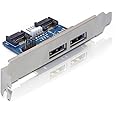
The JIUWU Desktop Computer Dual Port SATA to Power eSATA eSATAp 9Pin to USB 2.0 Converter Expansion Rear Bracket Card is a versatile solution for expanding your SATA host's connectivity. With dual Power Over eSATA ports, it supports 12V/5V power delivery, hot swapping, and plug & play functionality, all in a compact design that weighs just 2.39 ounces.
| Brand | JIUWU |
| Item model number | LYSB01LXA35Z2-ELECTRNCS |
| Item Weight | 2.39 ounces |
| Package Dimensions | 5.98 x 4.02 x 0.79 inches |
| Manufacturer | JiuWu |
| ASIN | B01LXA35Z2 |
| Is Discontinued By Manufacturer | No |
| Date First Available | September 22, 2016 |
A**I
a hidden gem
a hidden gem for anyone dealing with bare drives. good quality. works great when paired with the dual power cable, and is able to power up 3.5" drives without any issues. the board can also be used without 4 pin power connector (usb power jumper link on the back has to be bridged), with just usb power if using only 2.5" drives. very convenient and inexpensive.
R**N
Functions as expected.
I used this adapter to connect backup drives to my host externally, when the USB3 solution I tried proved unreliable. Can confirm no issues with hot-swapping, and no need to connect the USB cable if you use the 4-pin floppy power connector. The external drives run just as fast as internally connected drives.
P**T
Worked exactly as expected. Did not include low profile bracket.
This is working exactly as expected with a full-size BD drive. It was easy to install. It would have been nice if there were a couple of SATA cables included but I had some extras I was able to use.As many others have noted, mine did not come with the low-profile bracket. It isn't clear from the description that it is supposed to come with one but it is in pictures. Thankfully, I didn't need it but it is worth noting.
B**E
Low profile bracket was not included.
I read another comment saying, even though this item is pictured, with a low profile bracket, it was not supplied with one. That didn't matter to me, because I just happen to have the tools need to modify the larger bracket, to fit in a small form factor case. I shouldn't have had to do the extra work. However, the device works fine. I love being able to clone and test drives, without having to open the case, or connect a slower external device. I prefer not to have my backup drive installed internally. This device allows me to drastically reduce the number of operating hours, on the backup drive. So, I'm happy. Deducting just one star, for the missing bracket. I can see where that would be a deal breaker for some.
J**G
You do not have to connect it to usb.
In the description it says it must be plugged into USB which worried me a bit because I don't have another USB header on my board, happy to say that it was unnecessary and it works perfectly without. It looks good and is super convenient if you're constantly transferring data, cloning drives or just backing things up.
D**R
Poor build quality -- I do not trust it to not break my system
The build quality on the item I received was so poor that I wouldn't want to put it in a machine I remotely cared about. One of the eSATAp connectors was lifted up in the back and not well soldered on. I removed half a dozen tiny solder blobs hanging around on the board before I gave up and stopped when I saw they were all over the board. With the solder blobs that could short out this board or another board in a computer, I wouldn't want this anywhere near a running system.I will be returning and suggesting that this one be thrown in the trash. I hope that this is an outlier, but it has a QC sticker, so I'm guessing this isn't uncommon for this manufacturer. I'm disappointed because this is otherwise exactly what I needed to solve a problem.
S**S
Simple eSATAp support for desktop
For me, this provided straight-forward plug and play esatap functionality. No drivers required. I use it so I can use the same hdd for SATA-speed backups of my desktop and laptop, which supports esatap but not USB 3.0. Connects to your motherboard via two SATA cables (not included) and one internal USB connector. Power is provided by a spare SATA power connector from your power supply.
M**I
Works fine. I needed eSATA ports to power an optical ...
Works fine. I needed eSATA ports to power an optical drive that required 12V power and this did the job.
Trustpilot
1 week ago
2 weeks ago