


📞 Stay connected, stay in control!
The AT&T DECT 6.0 Expandable Cordless Phone system offers long-range coverage, a digital answering machine with 22 minutes of recording capacity, and advanced call-blocking features. With a user-friendly design that includes a large screen and lighted keypad, this system is perfect for both personal and professional use. Expandable to 12 handsets, it ensures seamless communication throughout your home or office.
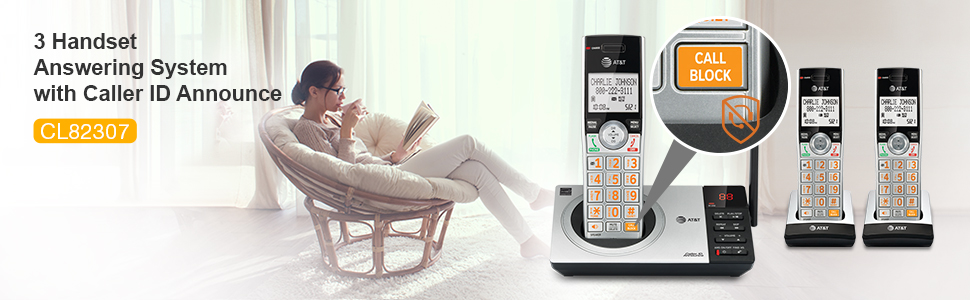


| Recording Capacity | 22 minutes |
| Conference Call Capability | basic |
| Is there Caller ID | Yes |
| Multiline Operation | Single-Line Operation |
| Dialer Type | Dual Keypad |
| Answering System Type | Digital |
| Compatible Devices | AT&T cordless headset, AT&T cordless accessory speakerphone, VTech (brand) |
| Number of Batteries | 6 AAA batteries required. (included) |
| Power Source | Corded Electric |
| Item Weight | 1 Pounds |
| Item Dimensions | 6.3 x 7.26 x 3.96 inches |
| Material Type | Plastic, Metal |
| Color | Silver |
J**S
Ordered Used, & Seems Great!!
Prior to this phone, I had the Vtech version for a few years (& it's terrible!! Don't do it just to save a few bucks, buy anything else). So this AT&T one I settled on after looking at one by Panasonic, this one had better reviews. I ordered it from the Amazon Warehouse "Very Good" and it arrived in the box, with all the parts and plastic protectors. It works perfectly. Only small issues, the number 8 is a bit wonky, like it's got a small rock under the button, so just need to be deliberate when pressing it. The other issue was the handset battery cover occasionally fell off, but after really looking into it, if anything it's a design flaw. I made sure all the little hooks were aligned, and so far it's fine.There are lots of reviews that people mentioned the directions being complicated, I did not find that true. The machine walks you through setup (so you don't need the manuel, tho it does help clarify things if you want to know more detailed things about the phone). This phone works with out power, at least for in and out going calls (the Vtech version did not, only allowed outgoing). When power returns, this phone does start over with its tutorial setup. I thought it had erased everything, but if you have already set it up and the power goes out, even if it prompts you, you do not have to reset up everything. You can skip it, and your presets are all still saved.The main thing you need to do, if youre using the smart blocker, is to make sure to add anyone you actually want calling you without hassle, to the directory (basically save their number). You can manually enter them or if they call, you can add the number from caller ID. You can also block people who made it through from the directory or when they call. Anyways, add the people you want to just ring through like normal, and anyone else, when they are announced, you pick up and still get to choose if you want to talk, save, block, or send them to the machine, without them even knowing you are on the line. Each one of these options has an assigned number (1-4). So most important, add to the directory & remember the functions of numbers (tho the phone will tell u each time, it's faster if you just know: "1=answer 4=send to the machine"). Saving or blocking can be done afterwards, if you can't remember the other numbers. I say faster because the person on the line, after announcing themselves to the smart blocker, gets put on hold. They don't hear a ringing, they hear a long beep or buzzing (which if you didn't know what smart blocker is, you may think there's been an error on the connection).I'm making this sound more complicated than it is, it's really simple and the phone prompts you for everything. There's even different smart block options, where u "screen/block"everyone except directory numbers, or only unlisted numbers get the smart blocker, or everything comes through. There's a fair amount of customization. I have not figured out how to use the intercom from the base (not sure it's even an option), but the handheld has a button on the side and you have to pick the receiving device (ex. "Base" or if you have other wireless phones), and hit the "select" button, then the intercom goes through.The sound is clear, the volume is great. I haven't tried adjusting the tone. The setting screen is a bit weird, seems like it skips categories sometimes, but it all functions. I love the way the phone looks. The buttons are big and light up orange on the handheld. As long as the base is plugged in you can add several wireless sets to your home. You only need an electrical outlet for the wireless base, not a phone line, so you can put a wireless phone anywhere in your home, which is awesome. I don't think the phone has a customizable ring tone, the default one it has is classic ring, but still kinda digital sounding (not like an old school metal ringing). I like it, it's loud without being jarring or sharp.Only had the phone for a week, but I really like the look and the functions so far. The power went out, day after I put it up, so I did get to test it in that scenario (which is basically why I have a landline). It worked as expected. I do not regret buying a used version, though if I do buy used it's always "like new", but I took a gamble on this, and I'm glad I did! I would totally recommend this phone, and the discounted ones from the warehouse (I have gotten bad things from the warehouse, but 95% of the time the items are fantastic and don't look used at all). With "Very Good" I was expecting it to have scratches somewhere noticable, or missing manual, but nope! I am happy with this purchase. Paid as much as I did for the vTech nightmare phone, and this one is SOOOO much nicer!
O**L
Exactly as promised.
We chose the CL82307 as it was the best value, three sets of phones and the base, to replace a 17 year old AT&T cordless. The old three piece set that had batteries going out and those were $52.00 for EACH phone (ouch!). Time for a new cordless phone. The CL82307 batteries are currently $8.00 per phone. So yes, checked that!Speaking of batteries, this phone's talk time is measure in HOURS where the old phone was more like MINUTES. New stuff is way more efficient, and the frequency (~ 1.921-1.928 GGHz) for DECT 6.0 compliant phone has been moved to not intefere with wi-fi or have your micro-wave knoock off your phone call.The phone's OS was pretty much the same as the old phone, but with caller I.D. (annouinces very clearly) and a far superior directory (1,000 entries). The set-up for that was easy, as you just use the blue tooth connectivity to download your CELL phone address book with phone numbers. I down loaded mine, and my wife's CELL phone, and presto all our typical calls are available. But 1,000 entries seems like a lot to scroll through one at a time, yes? But it isn't too bad if you use the jump feature. Jump uses the number key to quickly jump to letters. If you press #3 once for example, you jump to "D" adddress book listing. Press #3 twice you jump tp "E" listings so on and so fourth for each number pads alphanumeric entry. You only need to then scross within that letter's entries.All the base phone's setting go to the satellite phone automatically, where the older phone had a hidden "broadcaste" feature to do that operation, this new phone does it automatically. So once and done as they say.Voice quality is really clear and crisp, so no complaints on that.The voice mail (at your provider's cloud) versus phone mail (in the phone's receiver station) was a problem, however, as the instructions are not proper to use BOTH at the same time. Here is the catch, you need to set the rings to be FEWER than the VOICE mail needs to answer in order for the PHONE mail to answer the call. For example, if I set the rings to six, only VOICE mail answers, If I set the rings to three, the PHONE mail and the VOICE mail both answer. Or, you can turn either or "off".I like PHONE mail as it is displayed in the satellite LED base with the number of missed calls and also allows a 1.5 second interval BEEP to be heard if you turn that feature on to audibly let you know a call was missed. VOICE mail does show a missed call in the handset display, but that's it, you need to go look at the phone's display, then dial the prvider's voice mail to retrieve missed calls.All in all this is a great phone in the initial use and set-up. Will it last seventeen years and going for the old phone? Not sure. It isn't built as well as the old phone but what is. For ~$65.00 for three phones I can't complain. It has the features I use and want and not the exotic satellite base we don't use. We opted for the basic feature set that is still a luxury compared to the old phone. The phone rates really well and so far I agree with the ratings. OK, it has fewer base features, but that's not going to bother me at all. I never use them. Maybe you won't need the exotic base features either, and if not check out this phone.
F**S
good call blocking features but not great sound quality
I needed a call-blocking phone that allowed more than the paltry 50-call limit of most phones. this one, as you've read, blocks 1,000! You need to read the instructions well in order to understand how to set it up, but once you do, it becomes a joy to get unwanted calls, as the phone deals with them instead of you.the sound quality is good, and it seems sturdy and durable.my only complaint is they have the usual paltry small directory capacity--only 25 numbers; doesn't make sense, when you must have numbers in the directory or allow list in order for them not to be blocked.also, it's hard to find the "allow" list in order to edit it.but I do recommend this phone as a good spam-blocking phoneupdate oct 2020:the phone still works well, but I am revising my 'sound quality" estimate. I actually don't use the handsets for speaking on the phone-I use my other phone, as this one tends to have a sort of "hollow" or strange sound effect, and somewhat of an "echo" or something. It's annoying for me, however, this is the handset my husband chooses to use, as it's loud enough for his hard hearing, so it's a trade-off.Also, i discovered that when I'm on a call with someone (on any handset), since we have "call waiting", when a call comes in, both of us on the call hear the announcer announcing to the other caller the blurb that everyone (that's not on the allow list or directory), and it's so loud it interrupts our communications, and then continues to repeat that announcement---=argggh=so, I had to discontinue my call-waiting feature. That's a bummer, I guess.But, at least the phone is still humming away; that's good.
Trustpilot
2 days ago
1 month ago
1 month ago
4 days ago


