🚀 Elevate your 3D printing game—precision, power, and peace of mind in one sleek package!
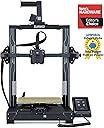
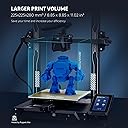
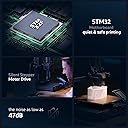
The ELEGOO Neptune 3 Pro is a high-performance 3D printer featuring a spacious 225x225x280mm build volume, a robust dual-gear direct drive extruder made from SUS303 stainless steel, and a 36-point auto bed leveling system. Designed for professionals and enthusiasts alike, it offers quiet operation, quick assembly, and smart features like filament runout detection and power-loss resume. Its upgraded nozzle system and precision Z-axis mechanics ensure consistent, high-quality prints, making it a reliable choice for complex and daily projects.


| Best Sellers Rank | #13,230 in Industrial & Scientific ( See Top 100 in Industrial & Scientific ) #20 in 3D Printers |
| Brand | ELEGOO |
| Color | Black |
| Compatible Devices | Laptop, Personal Computer |
| Customer Reviews | 4.1 out of 5 stars 2,132 Reviews |
| Item Weight | 22 Pounds |
| Material | Aluminum |
| Product Dimensions | 23"D x 9"W x 19"H |
M**R
This is a great machine
I’ve only had a short time. I have zero prior experience with 3D printing. Once received, I watched many many YouTube videos. Setting up the machine. Using the supplied modified for this machine, Cura software. I have download some EZ to print from Thingiverse. Learned I had to extract the files. Then move the object to print onto the Cura print platform. Sometimes rotate the object on the Cura platform. Slice it, save to a removable microSD card. Make sure to click the pencil icon at bottom left of Cura screen and name it what you want before saving to the microSD card. Then insert card into the printer. I use nozzle temp 220 and plate 70. I only print one object at a time, unless small and I can place very close to each other in the Cura platform before I slice and save to microSD card. The Amolen silk shiny PLA is very nice to print great definition and to remove from plate when finished printing. Let it cool before removing. The Elegoo PLA works, but just not as nice. I use the full auto level between different objects. I try to print 3 of same objects before I do a full re level. I’ve discovered to check nozzle distance to plate after each full leveling. I run a sheet of typing paper under nozzle and adjust so there is a good drag. I first did not adjust nozzle close enough. I learned. I adjusted my Cura for a wide brim for greater adhesion of piece as it prints.watch YouTube for this. I watch carefully first several minutes to be sure the filament is lying down good. If not , i stopped , cleared away the mess, and did full leveling and nozzle distance adjustment. I watched a lot of YouTube videos. Once I decided to spend time in leveling, nozzle distance and set my nozzle and bed temperature up, it’s been really great pieces printed. Watch many YouTube videos as you learn about each aspect. After one or two days commitment to basic learning and adjusting your routine, you will be very happy with this machine. Take the time and learn. This is a great machine and overall satisfying little hobby. UPDATE. I have been using for awhile. GREAT MACHINE. I have printed many different items. All came out great. Make sure your bed heat is high enough and bed is thoroughly heated. Watch the first several layers, get in there with a flashlight. If not laying down perfectly. Stop and clear it out and start over. I’ve only needed to do this twice. This machine is a pleasure to use. Great Great! UPDATE. I’ve been using almost daily, running all night, for a little over 2 months. STILL GREAT. I’ve used ThingIVerse and also bought STL files, from Etsy. Dinosaurs, Astronaut, Furby, Candy dispense using mason jar, squishy turtles, many variations of whistles, Recorder, Bird shaped multi tone whistles, many different key fobs, pull helicopters, lots more, many items. Nozzle 220 and bed 70. Keep nozzle height low, a sheet of typing paper has pretty good friction to pull out, but not too tight either.Now a situation. My nozzle got clogged. I YouTube it. Easiest is replace it. Two extra came with the machine. Extras look inexpensive. YouTube has a very simple method to replace with needle nose pliers and 6mm socket. EZ and quick. Runs perfect after I did that. I think I’ll change that every month, just to be sure I don’t have a clog during a print job. This machine is simple to use. You MUST perform the total automatic re leveling of the bed before each print job. I’ve been disappointed when I skipped this. Great Quiet Simple machine that produces perfect items easily!! You can spend more money, but if you want a simple to use , reliable machine, BUY THIS.
P**R
Awesome printer easy setup. Not for beginners
This 3D printer went together fast. In the box is a USB stick with SD card with videos on assembly and software. Install the Elegoo Cura (thats the program you use to output files onto your SD card to print). Then watch the assembly video if needed, but directions were pretty clear with pictographs. After assembling I made a few quick test prints and they came out phenomenal with factory settings. To be honest, I had purchased an Ender 3 pro before I got this printer. I was semi- familiar with the process of 3D printing due to this. I've had NOTHING but bad luck with the Ender. Wasted TONS of filament and time. This printer hasn't had a failed print yet... im impressed! The process of outputting files to your card is called "slicing". Then that "slice" must be saved to the SD card as a .gcode file. Then you pop the SD card into the Elegoo and navigate to the gcode file and print it. The Elegoo Cura software is the program you can make changes to the model and fine tune the settings. Temperature, speed of print, support structures, thickness of the lines etc. are all done through the cura software. Its fairly intuitive and little info windows pop up to tell you about the area your hovering over...very helpful. There are a few draw backs to this machine but none would be a deal breaker. 1. The print Head assembly is GIANT. This makes seeing smaller pieces being printed near impossible. The first few layers of a calibration cube for example are dwarfed by the enormous print head. Hard to check adhesion and print quality that way. 2. The slot to insert the SD card is inset into the machine under the front of the build plate. It's hard to get the card inserted especially for an old fart like myself. 3. You can NOT adjust the e-steps from the display pad. E-steps are the settings we use to "fine" tune the control motors. Y axis, X axis, and Z axis; Y being for and aft, X being right and left, Z being up and down. You can edjust the steps for filament dispensing but not the rest. In order to adjust and fine tune your printers e-steps you'd have to get software to output a programming gcode file. This means you'll need to learn a new software and programming style. It's not impossible but this isn't something you'll want to buy for gramma at Christmas as she will be lost. Hopefully in the future ELEGOO will update the firmware to include this ability. As for why it's important to adjust the e-steps... these control how far a motor is actually moving. Take a calibration cube for example. The dimensions of the finished cube are expected to be 20mm tall X 20mm high X 20mm wide. With an untuned e-step your cube may come out being 21mm X 19mm X 20.5 mm. This may not seem like a big deal, but in the grand scheme of things if we are printing items with threads or a certain diameter to fit into/onto something else we need them to print exact. Out of the box this printer was within a few tenths of a mm of being dead on. Make SURE to level your bed BEFORE you do anything. The bed must be at temperature and the nozzle at temperature as well. This is not in the instructions. If you set your level with them cold or room temp your plate to nozzle distance will decrease when you start a print. Things expand when you heat them and this will decrease the gap if you don't pre-heat. The second thing you need to do after leveling is measure and extrude some filament to set the e-step of the extruder. This will make sure your not pushing too much or too little filament out. Measure 120mm of filament from the top of the print head and make a mark there. Then after preheating the nozzle to the temp your filament needs to melt, command the printer to extrude 100mm of filament. Then measure the exact amount the filament traveled. Use that distance to calibrate your e-steps using this formula... yes you're going to get math on you. Your current e-steps programmed in the machine multiplied by 100 (thats the distance we wanted extruded). Take that number and divide it by the actual amount the filament traveled when you measured it. That number will be your new e-step setting. Once you've leveled the bed, and set your filament e-steps your ready to print. My first print was a threaded funnel for my new car. It threads in to where my oil cap is so I wanted to see how precise the prints were. See my pictures. Using default settings the print came out spectacular with nylon filament. True test was threading it into my car... it went right in with no issues. All in all this is an AWESOME printer. It BY FAR outperforms the Ender 3 pro. I've had the printer running non-stop for 4 days now and not a single issue with it. If your willing to tackle a bit of a learning curve with programming e-steps this could be an amazing printer. You will NOT be disappointed.
A**Y
Don't Buy
I bought this believing I was buying a good product, that Elegoo stood behind their product. I used my neptune 4 pro for about a month and a half with no problem. I loved how quick the prints were, and the quality was great. I bought the three-year warranty in case I ran into problems. One day my print failed but only at the last part of the print. It started knocking the supports off and making a mess. I haven't been able to get a good print since. I contacted the warranty company, and they sent me back to Elegoo. I have been working with them for about a month, trying everything they asked to no avail. I think I have re leveled the print bed 50 times. The prints work for a few layers, and then it starts acting rough. I have wasted more than a spool of filament through his process. I have tried PLA and PETG to see if that had anything to do with it. I updated the firmware as directed by Elegoo. The problem continues. After all the back and forth, I decided to just buy a new motherboard, only to find out they aren't available anywhere. Frustrating. I'm glad that I didn't buy the plus and/or max as I planned to do. You cannot replace the motor drivers on the motherboard like on other brands. I have a Artillary and Flashforge that I have been happy with.
T**T
The best machine, with mindful use
My new HP copier died. This machine did not. This elegoo printer is the best affordable and high quality intro to 3D printing. The parts provided, tools, and starter filament are all fantastic. I am another one to say that it did work straight out of the box and producing high-quality prints though results may vary. Because of the nature of the printing experience, it’s very important to understand fundamentals of how the machine works, and make sure certain things are adjusted properly and certain things are tightened. Regular maintenance of the machine would be recommend. I’ll begin now with faults here which are related to the setup. The setup of the machine and use is not fully detailed in the manual. There are several things to pay attention to, that’s not in the manual. For instance, they don’t tell you that the build plate is magnetized onto the machine and you remove it after a print and the bed cools, then you flex the plate to get your print job off. Took me a good moment to find this out. Other things left out are related to setup and maintenance. Do research on the machine before you get it, and you’re certainly more likely to have a good printing experience. It also does have a couple software faults maybe to keep aware of. I had a print job fail to resume after pressing pausing it. And I’m not sure if it had anything to do with how my model gcode was written by the slicer. Also keep aware, be sure to remove your model after a print. Further actions you might take after you return to the home screen are not aware of whether any material is still on the build plate. So if you’re not careful, you could run the print head into your build and destroy things including the printer. Furthermore, the machine is not WiFi connected and I thought it was supposed to be. I’ll have to check on that later, however it still does have an Ethernet jack. Now onto print fails. Running the printer at high speed is nice, but it can introduce problems in both the machine and prints. Be sure to upgrade the machine maybe if you want super high speed like advertised and use a high speed filament. The servo motors can do it though. My other fail is possibly from a bad slice from Cura slicer. Cura provided a warning about the STL I was printing, so I’m assuming that the print issue there was not related to the printer itself. Lastly, the auto bed leveling is working well. It took time because some of it is still manual. Again, experience may vary and do your research. Overall, as a first time user, I’m extremely satisfied because I’m a user that understands nothing is perfect and overall, elegoo has put out a noteworthy milestone in 3D printing. I’ve also attached a photo of my 3D benchy for reference of print quality
O**O
Great machine to get started with 3D printing
I think this printer is a great starter machine to get into 3D printing, but there are some things that aren't obvious or need changing. I'll try to summarize what I've learned in the last couple of weeks with this 3D printer: - The instructions don't tell you how to maintain the thing, they only tell you how to get started. The Elegoo website has support documentation which leads to YouTube videos. They're quite good, but it would be nice to be able to download a manual. I don't know how long the existing videos will be up on YouTube for. - You'll want to buy some lithium grease, because the machine only comes with enough to lube it up for the first time. Elegoo recommends cleaning off the old grease from the rails on the X and Y axes, and the screw mechanism for the Z axis every couple of weeks. - More thought should've gone into cable management for the bed and the extruder. This can result in the cables catching on whatever you're printing, or even catching on the machine itself. Luckily, you can easily find models to print your own cable management clips or cable armor. I'd highly recommend going to Thangs, Printables, or Thingiverse to find some modifications. It feels good to fix the problem, and it gives you something to print. I would almost say it's a requirement to download and print anything that turns the extruder cable 90 degrees so it doesn't droop onto the bed anymore, and something that keeps the bed cables straight so they don't catch on the Y axis motor. You can also find tool holders that clip right onto the printer so they don't end up strewn about or lost. - Elegoo doesn't yet sell replacement nozzles for this machine, and the Neptune 4 nozzles aren't compatible with previous Neptune models. This means if you intend to print abrasive filaments (glow in the dark, carbon fiber, wood fiber, or anything else with additives) you have to go third party to get hardened steel nozzles, and if you intend to print anything to be food safe you'll also need to go third party for stainless steel. Unfortunately, Amazon doesn't yet have many options for third party nozzles, but other sites that focus on buying directly from China are starting to. This doesn't only apply to you if you want to print using exotic filaments, but also if you just want to print at a different nozzle diameter should you want to print faster (larger diameter) or finer (smaller diameter). Their support has said if you need a replacement 0.4mm nozzle you can contact them directly to buy them, and they'll hopefully have them available for general purchase on the website soon. - This printer can move at 500mm/s, but you won't be printing at that speed. You can find guides, or even great tools within something like Orca Slicer (an alternative to the Elegoo skinned Cura slicer that's included) to fine-tune your settings, like flow rate, filament temperature, pressure advance, retraction, etc., but things will start to fall apart (literally, in the case if whatever it is you're printing) if you try to print anywhere near 500mm/s. I find myself printing at 100mm/s when I want to print something detailed, but the travel distance can be faster, like 300-500mm/s. For parts that don't require as much care, like prototypes or just isn't decorative I'll print as fast as 150mm/s. You can likely get away with going up to 250-300mm/s, but the faster you go the more likely your print is to fail at some point. Weigh the pros and cons of how quickly you need the part versus waiting a little longer to ensure you don't need to start over and waste more time and filament. - If you're new to 3D printing, don't blindly follow numbers listed on the machine, in the slicer, or even on the filament. You'll want to tune things and find your own sweet spot. Also, each filament will have different recommendations for how to print with it (speed and temperature), which is shown as a range. Don't assume all filaments are created equal. PLA, PLA+, and Rapid PLA+ from Elegoo all have slightly different properties. This is doubly true if you go to a different brand, or a different material (ABS, ASA, PETG, PCTG, Nylon, composites, etc.). It's better to use up a little bit of the filament in a roll figuring out those parameters than wasting time and filament because you started a 14 hour print and it went wrong toward the end. - 3D printers are not yet "set and forget" machines, and aren't for kids to operate unsupervised. Parts of the printer move very fast and get very hot. You'll want to check in on your prints, especially the first few layers, to make sure things are going as expected. You'll need to be hands on. You can purchase a USB webcam to monitor your prints from afar, and use the web interface to remotely stop your print if it goes awry. That said, this is probably one of the quickest machines to get started with out of the box for the price. Setup was quick, lubricating the rails wasn't a big deal, and leveling the bed has its own instruction sheet, but the screen walks you through the process anyway. This has auto bed leveling, but you'll still need to set the Z-offset and fine-tune the bed using the knobs under it. There's a lot to like about this machine, and a lot to learn about 3D printing as you get into the hobby. While 3D printing is FAR easier to get into today than it was a few years ago, you'll still need to be a bit more hands on with most 3D printers you find today than almost any other device you buy. Pay attention to what filaments are good for what applications (ASA and ABS hold up better to higher temperatures and to UV), but pay attention to the toxic gasses something like ABS lets off during printing to ensure you remain safe. Do some research to avoid issues. Similarly, some materials are much more difficult to print with and might require an enclosure to avoid parts warping during printing. Turning the fans off may also help in that regard.
K**F
The Best FDM printer I ever purchased
I got this printer because I was tired of messing with my monoprice ultimate which was heavily modified with a Bondtech direct drive, micro swiss all metal hot end, dampener bushings and other printable mods, and its enclosed which was good for ABS etc. I just got to the point where I wanted a printer that you turned on and didn't have to mess with the settings, and boy was I shocked with this printer. Everything was just perfect the assembly its simple navigation menus and its use straight out of the box. Leveling was super easy compared to my previous manual monstrosity. It was so simply that a total new user could perform the bed leveling without any issues. Elegoo knocked it out of the park with this 3D printer, I fell in love with it so much I purchased their Saturn 3 MSLA printer because I heard nothing but good things about that printer also which I will write a review under that product once I get to use it, along with Elegoo's cleaning station set. Bottom line if your new to 3D printing and don't want to spend your entire life savings on a $5K printer this budget friendly model is plain out amazing. If this one goes years down the line I would purchase another with no questions asked. The software is good and I haven't ran into any crazy printing issues, however I use Simplify3D which is an amazing slicer but is geared more towards advanced users because of all the granular controls it offers over your FDM printers. I ran two models through both the slicer that came with the printer which is Cura, not a fan of it but it gets things done. And I did the same print with Simplify3D and the base settings for this printer and it pushed the model quality even further to a really good level that you could see with a close inspection. When a company creates a printer that you can just use the default setings on a another slicer that is next level quality. My monoprice under Cura was ok under simplify3D was a literal train wreck. Granted the monoprice was fully enclosed and built and weighed like a tank but at the time I purchased that one they were running for $600 to $700 bucks. They are more of a tweakers printer than anything else, I learned a lot from that printer but at a high price tag and lots of invested time learning all the ins and outs of that printer. The Elegoo has been my favorite printer since I bought it, the build quality is exceptional and the nice added touch of the removable magnet build plate just makes it that much better. They also include a glue stick which is funny, I haven't had to use a glass plate, glue stick, or NASA tape on the bed at all everything like I said just works with no fuss or Macgyvering anything. Here is another thing since I got this printer I have been running it hard with some complex FDM models non stop and I have not got a single peep out of printer about any issue. Thank You ELEGOO and keep up this fantastic work you do, I highly appreciate it!
J**S
**VERY IMPORTANT FOR AUTOLEVELING** .... and a great machine!
After you put it together, preheat the machine to the material your using first, then start the leveling process as instructed. ***YOU WILL HAVE TO REPEAT THE AUTOLEVELING PROCESS UNTIL YOU NO LONGER NEED TO MAKE ADJUSTMENTS*** Metal expands and contracts with temp changes, and also needs to settle after assembly... It took me about 4 or 5 times until it finally settled. My nozzle height setting first leveled at -12.6mm and ended at -2.25mm after it finally settled. This should be included in the instructions but isn't, and this is also the primary source for bad reviews here. After that you'll probably never have to touch it ever again unless you move it or bump it hard Assembly is a breeze, I'm sure some folks here have had to deal with the IKEA inspired torment of instructions that came with Enders. My Ender 3 lasted served me well for many years until yesterday everything catastrophically failed, but it was a blessing in disguise cause this machine rocks! It prints suuuuper fast for medium quality settings, and decently fast for high quality. It preheats almost instantly and aside from the pc fan noise its pretty quiet. The magnetic printing mat is awesome! It came with a glue stick to help with adhesion but it doesn't need it. There's a awesome, bright and adjustable built in LED light on the top bridge under the ELEGOO logo. Thait's a nice surprise as they don't show it or mention it in the photos or maybe i just overlooked it. Construction is very solid, these particular Chinese manufacturers are definitely great quality.. reminds me of Winwing's Q&A. Honestly for the price this thing is a steal if you're new or not
A**R
What a workhorse!
I bought this Elegoo Neptune 3 pro for my husband's birthday and he already wants another Elegoo printer. He absolutely loves it. After he got the printer and printed the test print I found some little ghosts online with pop out legs and he printed a bunch of them, they all came out great. He did have a little trouble with one large ghost he printed but a quick search on Facebook groups helped him discover what went wrong and all he needed to do was tighten some belts. This printer is easy to use and has been printing like a dream since it was purchased and for $200 it was an amazing deal. The big reason for this purchase was to help my husband make a halloween costume for our son. He was able to print a full sized kids helmet on the Neptune 3 Pro without much trouble and it looks amazing. He did have an issue with the Z offset which he accidentally did incorrectly and it led to his scratching the PEI build plate but he reached out to Elegoo about the issue and they were extremely quick to respond, sent him a new PEI build plate free of charge and shared helpful tech support videos. Really this printer is high quality at a low price, has tons of peer resources on social media, and has top notch customer service. I have seen a lot about people purchasing Creality Ender series printers because they are a little cheaper and then added a bunch of upgrades costing them more money. While I can't say if that is a good route to go or not I can say that straight out of the box, this printer took 30 minutes to set up and get printing and does not seem to need any upgrades. It is a great purchase at a great price. If you are thinking of getting a 3d Printer I highly recommend the Elegoo Neptune line of printers.
Trustpilot
2 months ago
2 weeks ago