Some deliveries may take a little longer than usual due to regional shipping conditions.

DOWNLOAD THE APP


Customer Services
Copyright © 2025 Desertcart Holdings Limited
DOWNLOAD THE APP


🚀 Your ultimate on-the-go productivity and gaming companion — small size, big impact!
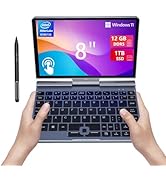
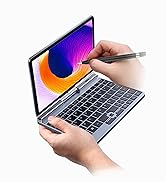
The KOOFORWAY Mini Laptop is a sleek 8-inch 2-in-1 touchscreen device featuring a powerful Intel N100 processor, 12GB LPDDR5 RAM, and a spacious 1TB SSD. Weighing just 0.78 kg, it offers exceptional portability with a 180° rotating screen that converts into a tablet. Running a clean Windows 11 Pro OS, it supports fast WiFi 6 and Bluetooth 5.2 connectivity, multiple ports including USB-C and HDMI, and delivers 4-5 hours of battery life with quick charging. Ideal for professionals and millennials seeking a compact yet powerful device for work, travel, and casual gaming.


| ASIN | B0CKW3HZRP |
| Average Battery Life (in hours) | 4 Hours |
| Batteries | 1 Lithium Polymer batteries required. (included) |
| Best Sellers Rank | #41,952 in Computers & Accessories ( See Top 100 in Computers & Accessories ) #617 in 2 in 1 Laptop Computers |
| Brand | KOOFORWAY |
| Card Description | Integrated |
| Chipset Brand | Intel |
| Color | Silver |
| Computer Memory Type | DDR5 RAM |
| Customer Reviews | 3.7 3.7 out of 5 stars (113) |
| Date First Available | October 11, 2023 |
| Flash Memory Size | 12 GB |
| Graphics Card Ram Size | 12 GB |
| Graphics Coprocessor | Intel UHD Graphics |
| Hard Drive | 1 TB SSD |
| Hard Drive Interface | PCIE x 2 |
| Item Dimensions LxWxH | 8 x 5 x 0.8 inches |
| Item Weight | 2.86 pounds |
| Item model number | P8 |
| Max Screen Resolution | 1280x800 MP |
| Memory Speed | 4800 MHz |
| Number of Processors | 1 |
| Number of USB 3.0 Ports | 2 |
| Operating System | Windows 11 Pro |
| Processor | intel_processor_n100 |
| Processor Brand | Intel |
| Product Dimensions | 8 x 5 x 0.8 inches |
| RAM | 12 LPDDR5 |
| Screen Resolution | 1280 x 800 pixels |
| Series | POCKET PC P8 |
| Standing screen display size | 8 Inches |
| Voltage | 11.4 Volts |
| Wireless Type | 802.11ax |
H**S
Very nice, with surprising performance & value -- some updates & concerns w 2 months of use.
Updated review October 11 2025 The screen rotation mechanism is getting loose, with increasing wobble or wiggle when opening and closing the screen and rotating the screen. This may be a variation in manufacturing or it may be a feature of the components used. Either way, I am increasingly cautious when opening and closing the screen on this device. Also, with continued awkwardness with touch typing on the device, I compared the keyboard layout with a full size notebook computer and a 75% keyboard. I noticed that while the letter and number keys are in the expected places, the relationship of home row keys to keys above and below the home row is different from other keyboards. This is most noticeable with Q W E, and I O P keys. Perhaps not coincidentally it is with these keys that most of my touch typing errors occur with this device. I find myself having to keep my eyes on my hands and the keyboard for a few minutes to recalibrate my touch typing when first using this device. After a few minutes my hands seem to be much better at finding the right keys and typos decrease substantially. Original review below: I have had this machine online for about 2 weeks. I purchased it because my work often requires me to be remote from my normal workstation and other things that necessitate "packing very light." I have not experienced the non-charging battery reported by some others here. However, I can say that the device doesn't charge with just any USB charger block. The charger block provided with the device is rated as a fast-charger (30W) unit. I have also found that the device will complete a charge with a 30W fast charger block from Anker that was purchased on Amazon. The seller was very quick to answer questions on Amazon. I have no hesitation to say that their support is better than most and certainly a _lot_ better than one would expect for a device with this pricetag. There is certainly a lot of value for the money with this device. My experience with the device so far has been more than acceptable. It is surprisingly fast for the hardware specs. This may have to do with the fact that the installed Windows 11 system is not burdened with add-ons that are frequently included with name-brand computers. Battery life is as described -- 4-5 hours if the machine is set for best efficiency. The screen is acceptable quality. Yes. It is a very small screen. I run applications full screen and often tweak the application interface to hide menubars and other tools so to get more usable screen space out of the thing. I often adjust text size within applications to suit my 20/15 but still 65 year old eyes. I have successfully and unproblematically linked it to a 60" TV that I use as a monitor at my home-base workstation. This allows me to get past the admittedly small screen on the device itself. I have successfully and unproblematically linked it using bluetooth to a 75% mechanical keyboard and mini-mouse, both purchased on Amazon. This allows me to treat the machine as a regular workstation. The integrated keyboard is functional, but spacing of the keys seems a bit hard for my 65 year old hands to acclimate to. I'll get it with practice, and maybe you will do better at it than me. The integrated mouse/touchpad thingie is surprisingly sensitive and useful, though its sensitivity can lead to RMM (random mouse movements) if your palms get close to it during typing. The machine feels very sturdy -- even more so than a 16" one-year old name brand computer I have acquired as a late-model hand-me-down from colleagues. It seems to run hot, but that isn't really surprising given the very small footprint and necessity for components to be packed very close internally. I purchased an Amazon Basics hard shell case designed for go-pro camera equipment. The computer, mini-mouse, charger block, charger cord, and a port replicator all fit in the case. Very nice kit.
J**T
39 Day Computer! Now it's junk!
Well, this is my updated review, one day AFTER writing a glowing review, this little computer will not recharge. So disappointing, but after reading a bunch of other negative reviews it turns out I'm far from the only one to have this problem. So now I have a very pricey paperweight and it worked perfectly for exactly 39 days. Old review before the computer stopped recharging: My husband works from home, he has worked from home for about twelve years now. But we have a two story residence now and he was having to run back upstairs over and over for work stuff. He got this laptop thinking it would be nice for trips, it is small enough to fit on the tray backs on a plane or a train, but surprisingly, he has been using it at home. He is using it at my desk downstairs (it only takes up a small corner of the space and he has it plugged in there now). It is super portable, about the size of a Kindle and only slightly heavier. The keyboard works just as well as a regular sized keyboard, though it isn't as nice as his pricey mechanical keyboard (he likes the clacking noises, I don't). This little computer plus a small sized mouspad and mouse are all he needs to keep from running back upstairs everytime he comes down for coffee or a snack. It even has a built in camera and he has conducted more than a few video calls with it, the picture quality isn't great, but it's good enough for a zoom call. All in all, this isn't a toy, it's a real computer and probably one of his best tech buys in the last few years. I can't recommend it enough.
L**M
Not as bad as you might think.
**Updated**: The screen flicker seems to have stopped completely after seeking out and manually updating the drivers for the accelerometer. I'm giving this thing 5 stars for now, because I really haven't had issues other than outlined below. Ok, the opening line is there for a reason: I expected to feel like I wasted my money on this thing, because I went for the cheap, unknown brand. But it runs great, the performance is nice for some basic games (but I got it more for productivity, programming, IT tools), and the only major issue I've noticed so far is that the screen can flicker if you put pressure on it. Probably due to the hinge, since those have been known to be problematic. Also, on that note: it doesn't rotate 360⁰, just a 180⁰ flip counter-clockwise. You might be tempted to turn it clockwise, and that could hurt the hinge (according to their warnings). Seems to hold a charge for a reasonable amount of time, considering it has active cooling, which hasn't gotten noticably loud, yet. I also might have done some Linux stuff with this, and if that's what you're doing, it works out great 👍👍 (not voiding any warranties). Also, the pen is nice, but if you already have an active (battery or rechargable) Wacom stylus, it should work, too. I was able to use the one that I got for my Surface. It's heavy, for it's small size, but I find it tolerable since I'm replacing a full size laptop. This weight is also apparent in the toughness of the aluminum shell. The keyboard is only slightly awkward to me, but I frequently go from one keyboard to another, so I have to look before I type anyway. It's still resulted in some funny typos, and putting it to sleep by hitting the power button instead of Backspace. All of that aside, the feel and sound of the keys are quite satisfying, and it's very responsive. I'm not sure what to say about the little....freckle that serves as the 'touchpad'. It's not terrible, but not great. It is what it is, and when I need something more precise than my shaky finger, I can use that to position the cursor like it's a trackball 🖲️. Works just fine for that. Lastly, I'm only holding out that fifth star due to the screen flickering. I'm guessing most of the hinges are going to be that way, because these types have always been problematic.
E**O
Sou professor e estou gostando muito dessa máquina.
Q**N
I really love this pc
A**L
Funciona muy bien hasta ahora. Es muy práctica de tamaño y procesa con velocidad. Eso sí, se calienta un poco. Pero con buena ventilación, eso queda resuelto. La puedes llevar a todas partes por lo pequeña pero poderosa que es.
S**U
外出や移動が多い生活の中で、大きなノートPCを持ち歩くのがだんだん負担に感じるようになり、サイズが小さくてもしっかり使えるサブ機を探していました。 この8インチのコンパクトPCは、まさにそのニーズにフィットしました。見た目はほぼ電子辞書サイズ。 手にした瞬間、その小ささと軽さにちょっと驚きました。 作業用として使っていますが、オフィス系のアプリやブラウジング、メールチェック、軽い画像編集くらいならストレスなく動作します。 メモリ12GBに加え、SSDが1TBあるので容量の心配も当面は不要ですし、SSDは交換も可能な構造のようで、将来的な拡張性も確保されている点も気に入っています。 タッチ操作も問題なく、画面の反応も良好。手書き入力を試したところ、遅延も少なく快適に使えました。 ただ、タッチパッドは少し感度が高めなので、誤操作が起きやすく、ここは設定で調整したくなります。 バッテリーの持ちは思っていたよりも良く、移動中やカフェなどコンセントのない環境でもしっかり活躍してくれています。 また、本体サイズが小さい分、収納や持ち運びにも工夫がしやすいのが利点です。 私は100円ショップで売っているクッションケース(Bサイズ)を使っていて、この端末にぴったり。 そのままバッグに入れても安心感があります。 キーボードは小型端末ゆえの制約が多少ありますが、使い慣れればそこまで気になりません。 持ち運び重視の方や、外でしっかりWindows環境を使いたい方には、バランスの良い一台だと感じました。
う**ご
とても小さいので出張で使える。ただ重い。これが改善されるとより良い。キーボードは特殊ですが慣れました。重さだけ頑張ってほしい。完全にWindowsなので仕事用です。ゲームはスペック的に無理かな。
Trustpilot
3 weeks ago
2 weeks ago