Desert Online General Trading LLC
Dubai, United Arab Emirates
Desert Online General Trading LLC
Dubai, United Arab Emirates



🚀 Unlock pro-level storage speed & security with IO CREST’s RAID adapter!
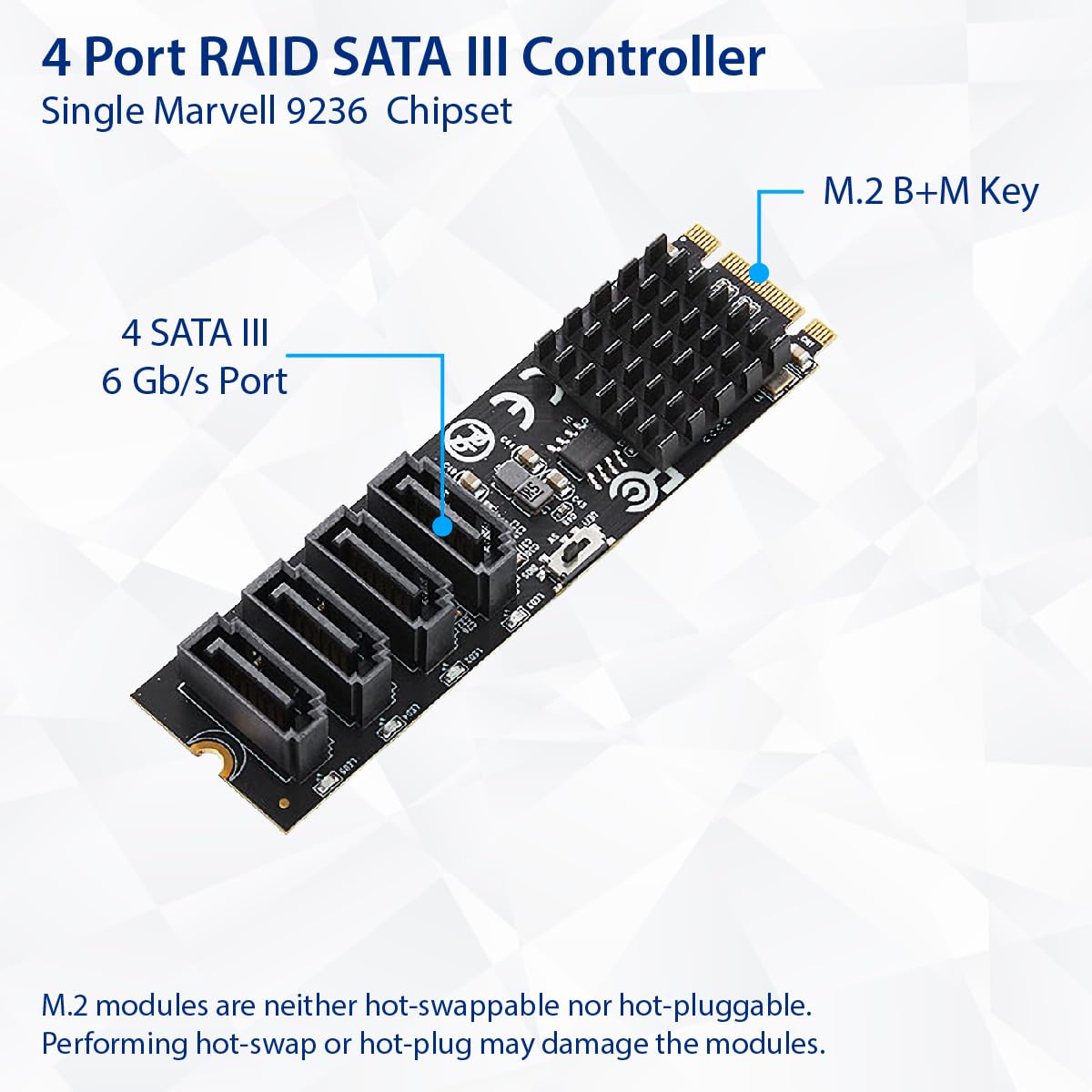
The IO CREST SY-ADA40172 is a compact, high-performance 4-port SATA III to M.2 B+M Key adapter featuring a Marvell 9236 chipset and PCI-e 3.0 x2 interface. It supports multiple RAID modes for enhanced data redundancy and speed, designed for easy plug-and-play installation on Windows systems, making it the perfect upgrade for professionals seeking reliable, scalable storage solutions.
| Brand | IO CREST |
| Item model number | SY-ADA40172 |
| Operating System | Windows |
| Item Weight | 2.08 ounces |
| Package Dimensions | 4.45 x 3 x 1 inches |
| Manufacturer | IO CREST |
| ASIN | B0CLFQ3K1W |
| Date First Available | October 19, 2023 |
W**1
Just what I needed for a mini-itx NAS
Mini-ITX mobos are notorious for having limited storage expandability due to their size, but they're a popular choice for NAS systems because of how compact they are. My board has a maximum of 4 SATA ports and I only needed a few more so this M.2 adapter was perfect for my needs as I wasn't using the M.2 slot already.So far this expansion card has worked flawlessly and transparently; no drivers needed and my drives showed up as they should.There were other reviews worrying about how hot the chipset gets and after running a 1 hour write test to both connected drives at the same time I only measured a peak temperature of about 125F. However for peace of mind I stuck a small Raspberry Pi heatsink to help with longevity.Also, yeah, those activity LEDs are **BRIGHT** and they light up the inside of the case so I recommend doing something like putting a piece of electrical tape over them if they're an issue for you.I'll update this review if anything arises, but so far everything is good (also as a note I bought this used).
A**R
Good to Go! - No Issues
Installed in 'old' Intel D525MW Mini-ITX - No Issues - Needed Drive attached to be 'booted'\bios. /no soldering as some have said/. Been running 2TB & 4TB Drives a week so far. I'll say good {Windows 10 Pro}.
S**Y
A REALLY bright LED and a Bit Finicky
It might be my imagination, but I feel like this thing was/is messing with my onboard ethernet. The first two boots after installing this, Windows wasn't detecting my ethernet as plugged in. May have just been coincidence, and it has since sorted itself out, but it was odd. And then it has an EXTREMELY bright blue LED on it for each of the two ports (I got the m2 with 2 ports). Which really messes up my whole build's look. I'm sure I can figure out a way to tape over it or whatever, but it is pretty wild how bright that thing is. Also wild that there's no software to be rid of it.But, it seems to be working as it should overall. It was more or less plug and play. My latest mobo only had four SATA ports and I used those up quickly. I got my oldest HDD plugged into this thing right now, so speeds are a non issue in my situation. I'm not gonna be pushing any advertised speeds or anything with an older drive so I didn't even benchmark. I will definitely be leaning towards a dedicated NAS or reeling in some of my data hoarding (ha!) rather than use this thing long term though. It just feels a little finicky for my use on my daily machine. But it was the band aid I needed in the meantime. I got it open-box from Amazon Warehouse and it looked unused, so no complaints at all with the price I paid. Maybe a bit too steep at retail. I might find a use for it in another build, who knows! Really interesting bit of hardware that seems to do its job.
R**A
Bad connection on the one I got
It worked great when I could get it to stay connected by pushing it hard into the m2 slot. After that, and unfortunately one day after the return period, I was lucky to get one drive working even after numerous boots. And it wouldn't work at all unless pushed hard into the slot. IMO it's a great idea, but the execution didn't work out -- at least not in my case. I wanted to make my itx board work with it but ended up using an atx b550 atx and will get an IT flashed 8-port adapter PCI card instead. I really don't think it had anything to do with my mobo, as it works fine with the PCI SSD reinstalled.
C**W
Works great, came with cables
This is one of those wonderful little niche products that 99% of people have never even heard about. But, for the 1% like myself who need it, it's a godsend.It works great. Using it on my Xpenology machine on dsm 6.2.3 w/ the extra driver pack. It worked without any fuss or other configuration
E**A
A unique and flawed product
Honestly, this item is (as of late 2021) still a one of a kind product. Logicaly, nvme m.2 slots are *just* x4 pcie slots, so converting to a x4 sata controller could be done without this products but with many janky adapters.However, simply having the controller and the 5 sata slots live on an m.2 form factor is a brillaint move that I hope becomes more adopted. The device works just fine on linux based servers where NAS capacity can be increased three fold if all nvme slots on a server board are used.With the praise said, the PCB is way too thin and flimsy, as other reviewers have said. The sata slots are also only soldered in by their data connectors, making this product super delicate and 'once connected, never moved.' The on board sata controller also gets very hot, which I fixed with a raspberry pi heatsink but *should* come with a heatsink included (even if it increases the price).There is no reason the product comes with 3 sata cables when 5 sata ports are given. The back of the pcb is bare and empty, so I added a stick of thermal pad to prevent the board from flexing too much. Finally, nvme slots are x4 pcie slots, add a heatsink and use all lanes if possible, IO Crest! A future revision of this card using all x4 lanes (instead of just 2) would be a beast for future a SSD NAS.tldr; This product needs a second revision with a thicker pcb, better solder joints, a chunky heatsink on the controller, and full use of the x4 pcie lanes.
D**Y
Works great! Pretty flimsy.
As other have said, this board is very flimsy. It's thin and flexes easily.If you keep that in mind, be gentle when plugging and unplugging the SATA cables, it's great!I used this in a Lenovo Thinkstation M710, and I'm even able to boot from the attached drives.I created a ZFS RAIDZ1 pool with the drives attached, and it's working just as well as onboard SATA ports. No slowdowns, no hiccups.
Trustpilot
1 month ago
1 month ago
2 months ago
1 month ago